What the Noir Blinds effect does
Noir Blinds is the detective-film look in five seconds: the image drains to high-contrast black and white, hard bars of light from window blinds slide slowly across the scene through a curl of haze, deep shadows pool at the edges and the camera drifts in while you hold still.
It turns a simple portrait into a movie poster frame, popular for book trailers, music and moody profiles.
How to use Noir Blinds
- Choose a still, serious portrait In Add a photo, use one close portrait with clear facial features or a silhouette beside a window. You do not need real blinds; the preset adds the slatted light.
- Choose the shadow depth Open More options and pick MiniMax H3 for the darker look, or Seedance 2.0 Fast for brighter surroundings and crisp stripes. Both produced black-and-white results in our comparison.
- Check the light across the face Press Make it move and inspect the moving bands of light through the haze. If the face disappears too deeply into shadow, try Seedance 2.0 Fast; if the stripes compete with clutter, use a simpler portrait.
Which photos work best for Noir Blinds
Works well
- Close portraits with strong features
- Back views or silhouettes at a window
- Calm, serious expressions
Avoid
- Wanting color; it is black and white
- Busy group photos
- Big smiles, which fight the noir mood
Noir Blinds examples
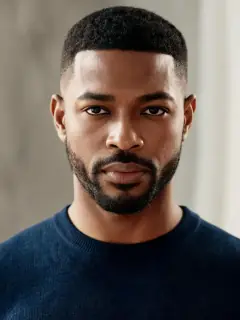
Made with Seedance 2.0 FastNavy sweater close-up: crisp blind stripes across his face and drifting haze.Made with MiniMax H3Black suit at a sunset window: a rim-lit silhouette against white venetian blinds. What we saw when we tested Noir Blinds
The first example is a close portrait of a man in a navy sweater, rendered on Seedance 2.0 Fast: it went fully black and white and kept the room fairly bright, with crisp stripes of light across his face and sweater and curls of haze beside him. The second, on MiniMax H3, is a woman in a black suit photographed from behind at a sunset window: she became a silhouette against a white venetian blind, the haze glowing in the light and her profile rim-lit.
On the same portrait, MiniMax H3 went darker than Seedance 2.0 Fast, with diagonal bands leaving one eye in light and the other in shadow, the classic poster frame.
Both models nailed the black and white; they differ in how dark they push the scene.
How Noir Blinds does on each model
- Seedance 2.0 Fast (510 credits · about 3 min) The portrait example: black and white with a brighter room and crisp stripes.$0.24 vs Adobe Firefly Standard $0.75 · 480p · 5s−68% vs Adobe Firefly Standard
- MiniMax H3 (210 credits · about 60 s) Default. The window example, and a darker, more dramatic take on the same portrait.$0.21 vs Runway $0.50 · 768p · 5s−58% vs Runway
- Seedance 2.0 Mini · 480p (125 credits · about 3 min) High-contrast black and white hides 480p well.$0.13 vs fal $0.36 · 480p · 5s−65% vs fal
The prompt behind Noir Blinds
The image turns to high-contrast black and white as hard slatted light from window blinds slides slowly across the scene through a curl of haze. Deep shadows pool at the edges while the main subject holds still and the camera drifts in.
Tips for a better Noir Blinds result
- A close portrait with strong light and shadow makes the best poster frame.
- Back views at a window turn into elegant silhouettes.
- Keep a straight face; noir is serious.
Noir Blinds: questions and answers
Is Noir Blinds always black and white?
Yes, the image drains to high-contrast black and white within the first second.
Which model is darker?
MiniMax H3 pushed the scene darker in our comparison; Seedance 2.0 Fast kept the room brighter.
Do I need real blinds in my photo?
No, the slatted light is added.
Does the camera creep toward me in the noir shot?
It drifts slowly in while you hold still.
Is it good for a book trailer?
It suits mystery and crime themes; add your title in the editor.
Related effects and tools
- Spotlight · Darkness, then a single beam through rolling smoke.
- Smoke Swirl · Silky smoke curls around you in moody side light.
- 16mm Film · Grain, halation and a gentle handheld drift.
- Over the Shoulder · A glance back at the camera with a half-smile.
- Add a noir title card with free Text Effects

 Your photo

