What the Color Returns effect does
Color Returns starts on a faded black-and-white print and brings it to life: color floods back into the scene as the person begins to move, blinking and turning slightly toward the camera, while the frame holds still with a faint film flicker.
It is a small, satisfying restoration moment, the kind of clip that makes an old photo feel like it just woke up.
How to use Color Returns
- Add a faded single portrait Use Add a photo for one clear black-and-white or faded face, scanned flat in good light. For a modern photo, desaturate it first so the return of color is visible.
- Keep the subtle animation preset Keep MiniMax H3 and leave Add a note empty for the first attempt, then press Make it move. The preset adds color, a blink and a slight turn with a mostly steady camera.
- Check color and small movements Watch the skin, hair and clothes fill with color, then check the blink and slight turn for facial distortion. If the result is unclear, use Change for a sharper scan; generated colors are plausible guesses, so compare them with family references when accuracy matters.
Which photos work best for Color Returns
Works well
- Black-and-white or faded portraits
- One clear face looking roughly toward the camera
- Scanned prints or desaturated modern photos
Avoid
- Photos already in full color, which show no change
- Group photos (one face moves)
- Damaged prints with large tears
Color Returns examples
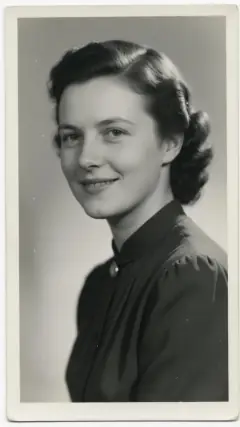
Made with MiniMax H31950s studio print: auburn hair, a teal blouse and pink lips flood in within a second; she smiles.Made with MiniMax H3Black-and-white close-up of a man: warm skin and a navy sweater return; he blinks at 2.5 s. What we saw when we tested Color Returns
The first example is a 1950s-style studio print of a woman: within the first second auburn hair, a teal-blue blouse and pink lips flooded in along with a vertical film scratch and flicker, the white print border dropped away, and she turned slightly and smiled. The second is a modern portrait of a man that we desaturated to black and white ourselves: color seeped back over roughly a second, warm skin, a navy sweater, a beige backdrop, and he blinked around two and a half seconds before settling into a gaze at the lens.
Color comes back faster than the word gradually suggests: within one to two seconds in both runs.
The colors are generated, so they will be plausible rather than historically exact.
How Color Returns does on each model
- MiniMax H3 (210 credits · about 60 s) Both examples. Color floods in within one to two seconds; a blink and slight turn follow.$0.21 vs Runway $0.50 · 768p · 5s−58% vs Runway
- MiniMax H3 · 4s (168 credits · about 60 s) The color arrives just as fast, with less time to settle.$0.21 vs Runway $0.50 · 768p · 5s−58% vs Runway
- Seedance 2.0 Mini · 480p (125 credits · about 3 min) Film flicker and grain look softer at 480p.$0.13 vs fal $0.36 · 480p · 5s−65% vs fal
The prompt behind Color Returns
The image starts as a faded black-and-white print, then color gradually floods back into the scene as the main subject begins to move, blinking and turning slightly toward the camera. The camera holds still with a faint film flicker.
Tips for a better Color Returns result
- Scan old prints flat, in good light.
- One face per photo gives the cleanest result.
- Ask relatives what colors clothes really were; the model guesses.
Color Returns: questions and answers
Are the colors in Color Returns accurate?
They are generated to look natural, not looked up, so they may differ from the real colors.
Does the border stay?
Not always; in one run the white print border disappeared as the color came in.
Does the person move?
Slightly: a blink and a small turn toward the camera.
Color Returns or Live Portrait?
Both colorize and animate. Live Portrait keeps the paper border and ends on a big smile; Color Returns is subtler.
Can I use a modern photo?
Yes, convert it to black and white first; our second example was made that way.
Related effects and tools
- Live Portrait · An old photo blinks, fills with color and smiles.
- 16mm Film · Grain, halation and a gentle handheld drift.
- The Turn · Look away, then turn to the lens with a confident gaze.
- VHS Home Video · Scan lines, tracking noise and a wave from the past.
- Sharpen an old scan first with the AI Image Upscaler

 Your photo

