What the The Turn effect does
The Turn is a clean, confident reveal: within the first second you turn your head and shoulders from looking away toward the camera in one smooth, decisive move, light sliding across your face. By the second second you face the lens and settle into a direct gaze with a hint of a smile while the camera pushes in to a close-up.
It is perfect for profile videos, model portfolios and the first shot of an introduction.
How to use The Turn
- Start from a sideways gaze Use Add a photo for one person looking away in profile or three-quarter view, with the face uncovered. Window light or streetlight gives the turn a visible sweep of light across the face.
- Keep the held gaze Keep MiniMax H3 with Length set to 5s in More options and press Make it move. The turn happens early, leaving the rest of the clip for the close-up and slight smile.
- Check the newly visible face Watch the head and shoulders turn, then inspect the face in the final close-up, especially the side hidden in the original. If the result is mostly a push-in, use Change for a photo looking farther away from the lens.
Which photos work best for The Turn
Works well
- Profile or three-quarter photos looking away
- Soft light that can slide across the face
- Clear, uncovered faces
Avoid
- Photos already looking straight into the lens (nothing to turn)
- Faces hidden by hats or hands
- Group shots
The Turn examples
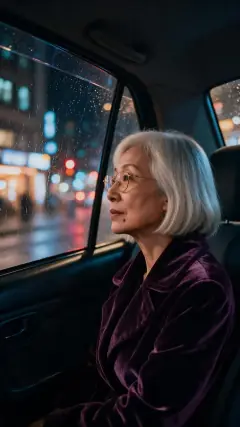
Made with MiniMax H3Purple velvet in a taxi at night: turns from the window as streetlight slides across her face.Made with MiniMax H3Red bob in profile on a street: faces the camera within a second and holds a slight smile. What we saw when we tested The Turn
The first example is an elderly woman with a silver-white bob and thin gold glasses in a deep purple velvet coat in the back of a taxi on a rainy, neon-lit night: she turned from the window within the first second as streetlight slid across her face, faced the lens by two and ended in a close-up with a direct gaze. For a second case we used a profile photo of a woman with a red bob in an olive trench coat on a city street.
Her run was one of the cleanest on the page: within a second she turned from profile to face the camera, the camera pushed in gently to a close-up and she held a slight smile, with hair and trench coat unchanged.
Profile photos are ideal because the turn has the furthest to go; the model fills in the side of the face that was hidden.
How The Turn does on each model
- MiniMax H3 (210 credits · about 60 s) Both examples. The turn is done within one to two seconds, then a steady close-up.$0.21 vs Runway $0.50 · 768p · 5s−58% vs Runway
- MiniMax H3 · 4s (168 credits · about 60 s) The same turn with one second less of the held gaze.$0.21 vs Runway $0.50 · 768p · 5s−58% vs Runway
- Seedance 2.0 Mini · 480p (125 credits · about 3 min) Fine features in the close-up are softer at 480p.$0.13 vs fal $0.36 · 480p · 5s−65% vs fal
The prompt behind The Turn
Within the first second the person turns their head and shoulders from where they were looking around toward the camera in one smooth, decisive move, light sliding across the face as it turns. By the second second they face the lens straight on and settle into a direct, confident gaze with a hint of a smile while the camera pushes in to a close-up. It holds on that direct look to the end, the background melting into blur. The person stays exactly as they appear in the photo.
Tips for a better The Turn result
- Choose a photo where you are looking away, in profile or three-quarter view.
- Night lights or window light slide nicely across the face as you turn.
- Use it as the opening shot of a self-introduction video.
The Turn: questions and answers
Does The Turn work on a front-facing photo?
There is little to turn, so the effect mostly becomes a push-in. Profile or three-quarter photos work best.
Will the hidden side of my face look right?
It is generated from the visible side. In our profile test the result looked natural and recognizable.
Does my whole body turn?
Head and shoulders turn toward the camera; the rest stays in place.
How close does the camera get?
It pushes in to a close-up and holds there to the end.
The Turn or Over the Shoulder?
The Turn brings your head and shoulders round to face the lens; Over the Shoulder is a quick glance back with the shoulders still turned away.
Related effects and tools
- Over the Shoulder · A glance back at the camera with a half-smile.
- Slow Push-In · A cinematic creep toward your eyes as lights melt to bokeh.
- Live Portrait · An old photo blinks, fills with color and smiles.
- Peace & Wink · Peace sign, a playful wink, then a big grin.
- See your photo from another angle with Change Angle

 Your photo

