What the Live Portrait effect does
Live Portrait brings an old photo to life: the person blinks and breathes, color spreads through the picture from the center outward, and they turn to the camera with a smile.
The paper texture and border stay, so it still feels like the original print, now moving.
The idea behind Live Portrait
An old portrait begins to blink and smile as color spreads across the print. The paper texture and border give the animation the feel of a family photo coming to life.
People use it to see a grandparent blink and smile again, which is why it is one of the most emotional effects on the page.
How to use Live Portrait
- Scan one clear face Use Add a photo for a black-and-white or faded portrait with one face at least a quarter of the frame tall. Photograph the print flat and straight, including its border if you want to retain the paper look.
- Keep time for the smile Keep MiniMax H3 at its five-second setting before pressing Make it move. The shorter setting leaves less time for the smile after the color spreads.
- Watch color reach the edges Check the blink, the outward spread of color and the final smile, along with the paper border. If the face barely moves or looks unclear, use Change to add a sharper, closer scan.
Which photos work best for Live Portrait
Works well
- A scanned or photographed print with one clear face
- Faces at least a quarter of the frame tall
- Black-and-white or faded color photos
Avoid
- Photos where the face is tiny or blurred
- Group photos (one face is animated)
Live Portrait examples
Made with MiniMax H3Mid-century studio portrait: a blink at 1 s, red lips at 2 s, full color by 3 s, a broad smile.Made with MiniMax H31940s portrait of a bearded man: warms into color and breaks into a smile. What we saw when we tested Live Portrait
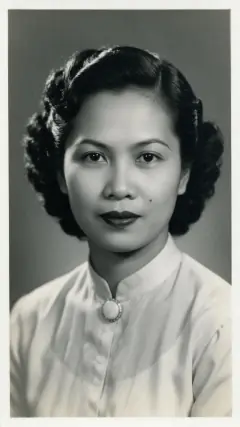
The first example is a mid-century black-and-white studio portrait of a young woman with sculpted vintage waves and a white mandarin-collar blouse: she blinked and drew a breath within the first second, red bloomed on her lips and color spread through the picture by two, it was in full warm color by three, and she ended smiling broadly with the paper border and grain intact. The second is a 1940s-style black-and-white portrait of a bearded man in a jacket and tie, which turned warm and colorful as he broke into a smile.
The color comes in from the center outward, so the moment of transformation is visible, not a cut.
Paper borders and grain survive, which keeps it feeling like the original print rather than a modern photo.
How Live Portrait does on each model
- MiniMax H3 (210 credits · about 60 s) Both examples. A blink in the first second, full color by three or four, a smile at the end.$0.21 vs Runway $0.50 · 768p · 5s−58% vs Runway
- MiniMax H3 · 4s (168 credits · about 60 s) The color comes in faster; the smile is shorter.$0.21 vs Runway $0.50 · 768p · 5s−58% vs Runway
- Seedance 2.0 Mini · 480p (125 credits · about 3 min) Fine photo grain is the first thing 480p loses.$0.13 vs fal $0.36 · 480p · 5s−65% vs fal
The prompt behind Live Portrait
The old photograph comes alive. Within the first second the person in the picture blinks and draws a breath while the grain and paper texture stay. By the second second color starts flooding into the image from the center outward, everything warming into natural tones, until the whole picture is in full color by the fourth second. They turn their eyes to the lens and break into a warm smile, and the final frame is a living full-color portrait still inside its paper border. The face and hairstyle stay the same throughout.
Tips for a better Live Portrait result
- Photograph the print flat and straight, including its white border.
- One clear face, at least a quarter of the frame tall, works best.
- Ask family before sharing an animated photo of someone who has passed away.
Live Portrait: questions and answers
Will it restore scratches and tears?
It colorizes and animates the picture but keeps the paper look. For heavy damage, fix the photo first with the photo tools, then animate it.
Is it respectful to animate photos of people who have died?
Many people use it to see a grandparent smile again. Share it the way you would want the original shared, and only with family who are comfortable with it.
How long until the photo is in color?
In our runs the picture was in full color by the third or fourth second.
Does it keep the white border?
Yes, the paper border and grain stay, as the prompt asks.
Can I use a modern color photo?
It works, but the color reveal is the magic. Black-and-white or faded prints give the best result.
Related effects and tools
- Color Returns · A faded black-and-white photo blinks and fills with color.
- 16mm Film · Grain, halation and a gentle handheld drift.
- The Turn · Look away, then turn to the lens with a confident gaze.
- Burst of Laughter · A calm smile breaks into a real laugh.
- See the person at another age with the Age Filter

 Your photo

