Compare AI models
How to compare AI models side by side with one prompt Compare Models runs the same prompt on up to eight models at once, so you can see which one gets your idea right before you commit. It works for images, video, voiceovers and music, and every round stays in your results.
How it works Choose the media and line up models Pick Image, Video, Voiceover or Music, then add up to eight models, or load a quick lineup: Crowd favorites or Just released. Write one prompt Every model gets the same words. For images and video you can also start from your own photo or a first frame, and each model edits or animates it. Run them all and keep the best The Run button shows the total in credits. Results land side by side; tap the heart on your favorite, then continue on the canvas or open it in the full generator. Good to know A fair test Same prompt, same starting photo, same round, so the differences you see come from the models themselves. Rounds are kept Each round stays under Results. Load an old round to run it again or swap one model for another. Pay for what runs Each model in the lineup is priced on its own, and if one fails, its credits come back. Compare Models FAQ Which models can I compare?+ Any public model on PopNow for the media you picked: image models such as Nano Banana, GPT Image and Seedream, video models such as Kling, Seedance and Wan, plus voice and music models.
How much does a comparison cost?+ The sum of the models you run, so four models cost the same as four separate generations. The total shows before you start.
Can I compare models on my own photo?+ Yes. Add a photo to edit, or a first frame for video, and every model in the lineup starts from it.
What can I do with the winner?+ Keep it in your results, open it in the generator with the same settings, or continue on the canvas to animate it or add sound.
Why do the results look so different from the same prompt?+ Each model was trained differently, so each one interprets words, style and detail in its own way. That is the point of comparing. If all four miss something, try rewording the prompt.
Do I need to compare four models every time?+ No. You can run fewer models if you want to spend less. The total on the Run button only counts the models in your lineup, so you can start small and add more later.
Can I run the same prompt again with a different model?+ Yes. Load an earlier round from Results, swap one model for another and run it again. The prompt stays the same, so the new result is still a fair comparison.
How do I pick a winner if two results look equally good?+ Heart both and compare them against what you need them for. Open each one on the canvas or in the full generator to see which one is easier to improve or animate.
Can I compare voiceover or music models too?+ Yes. Choose Voiceover or Music as the media and line up models the same way. Write one text or prompt, run the round, and listen to each result to pick the one that sounds best.
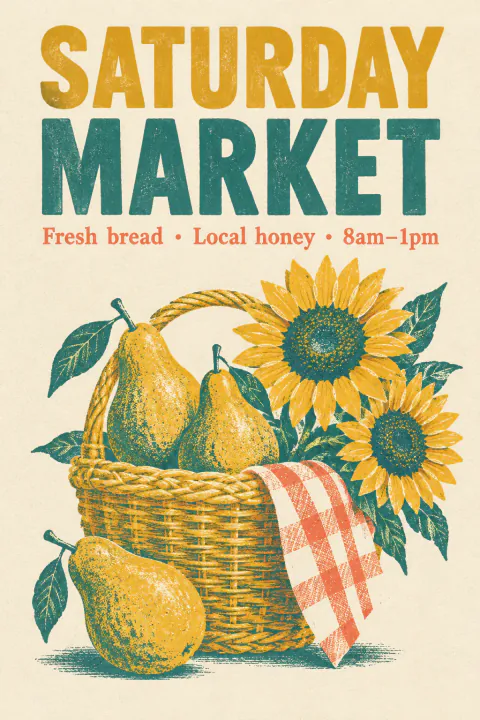
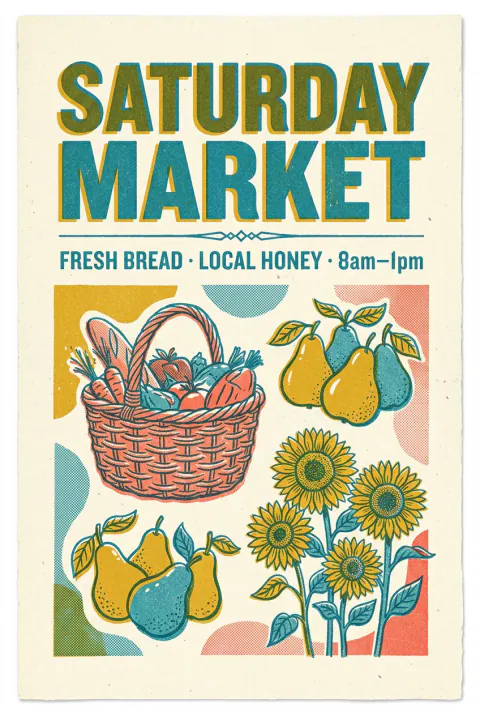
A real comparison “A risograph-style poster for a neighborhood farmers market. Large headline text: "SATURDAY MARKET". Below it, smaller text: "Fresh bread · Local honey · 8am–1pm". Illustrated pears, sunflowers and a wicker basket in mustard, teal and coral ink on cream paper, slight print grain, clean layout with generous margins.”
GPT Image 2 Nano Banana 2 Both spelled “SATURDAY MARKET” and the second line correctly. GPT Image 2 kept “Fresh bread · Local honey · 8am–1pm” in sentence case and drew only pears, sunflowers and a basket. Nano Banana 2 switched that line to capitals, added a deckled paper edge and filled the basket with vegetables we never mentioned.
Generate Go deeper This page has no single before-and-after photo. The change you see is one prompt turned into up to four different results, one from each model in your lineup.
What changes Style, detail, lighting, colors, motion and how closely the result follows your words all vary from model to model. One model may give a polished look, another a more natural one.
What stays the same The prompt, your starting photo or first frame if you added one, and the round. Because those are identical, any difference comes from the model and not from your input.
What to look at when you compare Check the details that matter most for your idea first, such as faces, hands, text in the image, or whether a video moves smoothly. Then judge the overall mood, and heart the one you would actually use. Works well
A prompt with one clear subject, setting and style gives you differences you can actually judge. A sharp, well-lit starting photo lets every model edit or animate the same clear material. The same idea tested in a short, simple prompt first shows how each model reads plain words before you add detail. Avoid
A very long prompt with many unrelated ideas makes it hard to tell which model missed which part. A blurry, dark or tiny starting photo gives every model weak material, so all four results look poor. Mixing a photo with a prompt that contradicts it, such as asking for a night scene from a bright daytime photo, makes the results unpredictable. Choose the media Pick Image, Video, Voiceover or Music at the top. The models you can add depend on this choice, so decide first what you want to make. Build your lineup Add up to four models one by one, or load Crowd favorites or Just released for a quick start. A mix of different model families shows you a wider range of looks than four similar ones. Write the prompt and add a photo if needed Type one prompt that every model will use. For images or video you can also add your own photo or a first frame, and each model will edit or animate it. Check the cost and run Read the total shown on the Run button, which adds up each model in the lineup. Press Run and wait for the results to appear side by side. Review and keep the best Look at each result at full size and compare the details you care about. Tap the heart on your favorite, then continue on the canvas or open it in the full generator. If none fit, load the round under Results and change the prompt or swap one model.
Crowd favorites A ready-made lineup of popular models. It is a good starting point if you are not sure which models to try.
Just released Loads the newest models so you can see whether a recent release handles your idea better than the ones you know.
Nano Banana, GPT Image and Seedream These are image models named on the page. Putting them in one round shows how each one interprets the same prompt or photo.
Kling, Seedance and Wan These are video models named on the page. Compare them with the same first frame to see differences in motion and how well they follow your idea.