What the Over the Shoulder effect does
Over the Shoulder is the signature move of fashion films and profile videos: you look away for a moment, then turn your head to glance back over your shoulder at the camera with a relaxed half-smile and hold the look, hair following the turn as soft light slides across your face.
Unlike The Turn, the shoulders stay facing away and only the head turns, which makes it feel candid and a little playful.
How to use Over the Shoulder
- Keep part of the face visible Use Add a photo for one three-quarter-back portrait with some face visible and no hood covering the head. Window or sunset light suits the glance; a completely hidden face has to be invented.
- Choose the light on the turn In More options, choose MiniMax H3 to match the main examples, or Seedance 2.0 Fast for the warmer light and broader smile seen in our comparison. Press Make it move.
- Compare face and hairstyle Check the over-the-shoulder glance against the visible features and hair in your source. If the result invents a face or changes a bun into loose hair, use Change for a photo showing more of the face and hairstyle.
Which photos work best for Over the Shoulder
Works well
- Back or three-quarter-back photos
- Window light or sunset light
- Loose hair that follows the turn
Avoid
- Expecting the exact face you have if the photo shows only the back of your head
- Front-facing photos
- Hats or hoods
Over the Shoulder examples
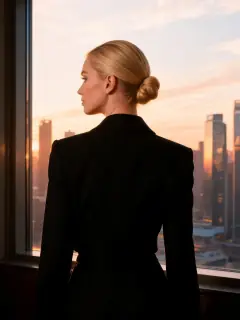
Made with MiniMax H3Black suit at a sunset window, from behind: turns in stages to a smile over the shoulder by 4 s.Made with MiniMax H3Same photo, second run: a full face looks back and the bun becomes loose hair. What we saw when we tested Over the Shoulder
We used the hardest case twice: the same photo of a woman in a black suit with her hair in a bun, photographed completely from behind at a sunset city window. In the first run she turned in stages, from the back of her head to a three-quarter view, and by second four was smiling over her shoulder with the skyline glowing behind her.
In the second run on the same photo the model went further: it invented a full face looking back over the shoulder and let her hair down, turning the neat bun into loose straight hair. Both results were elegant, but they show that when a photo shows no face at all, the face you see is generated.
For a face that really looks like you, start from a three-quarter or profile photo where at least part of the face is visible.
How Over the Shoulder does on each model
- MiniMax H3 (210 credits · about 60 s) Both examples (same photo, two runs): one kept the bun, the other let the hair down.$0.21 vs Runway $0.50 · 768p · 5s−58% vs Runway
- Seedance 2.0 Fast (510 credits · about 3 min) In our comparison on the same back-view photo it gave warmer light on the face and a broader smile.$0.24 vs Adobe Firefly Standard $0.75 · 480p · 5s−68% vs Adobe Firefly Standard
- MiniMax H3 · 4s (168 credits · about 60 s) The glance lands a little sooner.$0.21 vs Runway $0.50 · 768p · 5s−58% vs Runway
- Seedance 2.0 Mini · 480p (125 credits · about 3 min)$0.13 vs fal $0.36 · 480p · 5s−65% vs fal
The prompt behind Over the Shoulder
The main subject looks away for a moment, then turns their head to glance back over the shoulder toward the camera with a relaxed half-smile and holds the look. Hair follows the turn naturally as soft light slides across the face.
Tips for a better Over the Shoulder result
- Use a photo where part of your face is visible if you want to be recognized.
- A back view looks the most cinematic, but expect a generated face.
- Sunset or window light makes the turn glow.
Over the Shoulder: questions and answers
Will the face look like me if the photo shows my back?
Not necessarily. The face is generated when the photo has none; use a three-quarter view if likeness matters.
Why did my hairstyle change?
In one of our runs the model let a bun down while turning the head. Run it again if it changes something you want to keep.
Do my shoulders turn too?
No, only the head. The shoulders stay facing away, which keeps it candid.
Is it good for a fashion profile?
Yes, it is a classic fashion-film beat.
Which model gives the warmest look?
Seedance 2.0 Fast gave warmer light and a broader smile in our comparison; MiniMax H3 is the default.
Related effects and tools
- The Turn · Look away, then turn to the lens with a confident gaze.
- Glam Sweep · A quick arc that eases into slow motion on your best angle.
- Noir Blinds · Black and white, with blind-slat light sliding across.
- Hair in the Wind · A strong gust whips your hair while you hold the stare.
- Preview hairstyles with AI Hairstyle Changer

 Your photo

