What the Cinemagraph effect does
Cinemagraph turns a picture into a living photograph. You stay completely frozen, with no blinking, no breathing and no hair movement, and the camera is locked off. Only the biggest element behind you comes alive with large, clearly visible motion: falling water, waves, clouds or passing lights.
The contrast between the still person and the rushing background is the whole effect, which makes it a calm, hypnotic loop for profiles and travel posts.
How to use Cinemagraph
- Choose one moving background element Use Add a photo for a still person in front of a waterfall, sea, clouds or traffic that fills a clear part of the frame. An obvious existing element gives the model less reason to invent something to animate.
- Keep the freeze instruction focused Keep MiniMax H3 and leave Add a note empty for the first attempt, then press Make it move. The preset already asks for a frozen person, a locked camera and motion only in the largest background element.
- Check stillness and the repeat Watch the person's eyes, hair and shoulders for unwanted motion, then compare the last frame with the first before using it as a loop. If new waterfalls or other scenery appear, use Change for a photo with a more obvious moving background element.
Which photos work best for Cinemagraph
Works well
- Photos with one big moving element behind you: a waterfall, sea, clouds, traffic
- A steady, still pose
- Landscape travel photos
Avoid
- Plain walls with nothing that could move
- Wanting a lively clip; the person does not move at all
- Busy scenes where it is unclear what should move
Cinemagraph examples
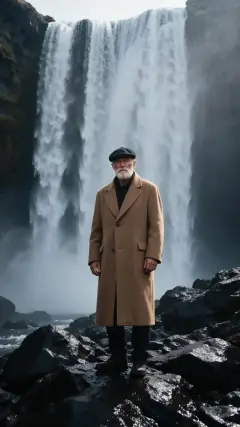
Made with MiniMax H3Flat cap before a waterfall: frozen for five seconds while the falls pour and surf churns.Made with MiniMax H3Sea cliff with a tiny figure in red: the model added waterfalls off the cliff by 2 s. What we saw when we tested Cinemagraph
The first example is a white-bearded man in a flat cap and camel overcoat standing on wet black rocks in front of a huge waterfall: he stayed frozen for the full five seconds while the falls kept pouring, a warm glow slid over the water around second two, and surf churned through the rocks at his feet from about three and a half.
The second example shows the effect's appetite for motion. On a photo of a green sea cliff with a tiny figure in red, the frame stayed locked and the figure perfectly still, but by second two the model had added waterfalls spilling off the cliff face, which were not in the photo, before a big wave crashed white against the rocks.
So the model looks for something big to animate and will invent it if the photo has nothing obvious. Photos with an existing waterfall, sea or sky give the most faithful result.
How Cinemagraph does on each model
- MiniMax H3 (210 credits · about 60 s) Both examples. A true freeze of the person; the background moves for the whole clip.$0.21 vs Runway $0.50 · 768p · 5s−58% vs Runway
- MiniMax H3 · 4s (168 credits · about 60 s) Four-second version of the still-person and moving-background effect. Check the join before repeating it as a loop.$0.21 vs Runway $0.50 · 768p · 5s−58% vs Runway
- Seedance 2.0 Mini · 480p (125 credits · about 3 min) Moving water hides 480p softness well; the frozen face shows it more.$0.13 vs fal $0.36 · 480p · 5s−65% vs fal
The prompt behind Cinemagraph
A living photograph. The person stays completely frozen like a still photo: no blinking, no breathing, no movement of the hair, and the camera is locked off with no drift, zoom or cut. Only the biggest element behind them comes alive, with large, clearly visible motion: falling water, waves, clouds or passing lights pour and roll past in a continuous seamless loop. The frozen person against the rushing background holds for the whole shot. The person stays exactly as they appear in the photo.
Tips for a better Cinemagraph result
- Pick a photo with a waterfall, sea, sky or traffic behind you.
- Hold still in the photo; nothing about you will move.
- If the scene has nothing that could move, the model may add something, like the waterfalls on our cliff.
Cinemagraph: questions and answers
Do I blink or move in a Cinemagraph?
No. The prompt freezes you completely: no blinking, breathing or hair movement.
Why did something new appear in my background?
The model animates the biggest element it can find; on a plain sea cliff it added waterfalls. Photos with an obvious moving element stay closest to reality.
Is the frame really locked off?
The preset asks for a fixed camera throughout the shot, with no drift, zoom or cuts.
Will it loop smoothly?
The preset asks for a seamless loop. Compare the last frame with the first before using the clip as a loop.
Cinemagraph or Still in the Rush?
Cinemagraph animates nature or one big element; Still in the Rush speeds up crowds and traffic around you.
Related effects and tools
- Still in the Rush · Everyone blurs past in fast-forward. You don’t move.
- Fog Roll · A low bank of fog rolls in while you stay sharp.
- Lo-Fi Loop · A cozy hand-painted loop: you, headphones, rain on the window.
- Live Portrait · An old photo blinks, fills with color and smiles.
- Remove distractions from the background first with AI Eraser

 Your photo

