What the Still in the Rush effect does
Still in the Rush speeds up time around you: passers-by, buses and lights streak past in time-lapse blur while you stay completely still, the only sharp point in a frame full of motion.
It is the classic main-character shot for a street-style post or the opener of a busy-day story.
How to use Still in the Rush
- Stand within a busy scene Use Add a photo for one clearly defined person standing in a street, square or station with people or traffic behind them. A full-length pose and few large signs make the frozen subject easier to judge.
- Ask for a steady frame Keep MiniMax H3 and, in More options, use Add a note to reinforce a locked camera and unchanged framing. Press Make it move; one of our tests jumped wider despite the original locked-camera instruction.
- Compare subject and passing crowd Check that the person stays sharp while the surroundings streak past, and watch for sudden framing changes. If signs contain odd letters or the scene feels cluttered, use Change for a street photo with less signage.
Which photos work best for Still in the Rush
Works well
- Busy streets, squares and stations with people around you
- Standing, front-facing poses
- Traffic or a road in the background, which turns into light trails
Avoid
- Empty or indoor scenes with nothing to speed up
- Backgrounds full of shop signs, which can turn into garbled letters
- Group photos where several people should freeze
Still in the Rush examples
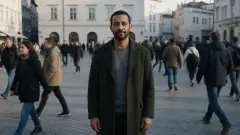
Made with MiniMax H3Stone plaza: he holds still while the crowd, a bus and cars blur past.Made with MiniMax H3London street in a peacoat: frozen subject, but the frame jumps from chest-up to full length at 3 s. What we saw when we tested Still in the Rush
The first example is a man standing still in a European stone plaza: he held his pose for five seconds while the crowd dissolved into blurred streaks and a bus and cars swept through behind him. For a second case we used a London street photo of a red-haired man in a grey beanie and navy peacoat, framed chest up.
The prompt asks for a locked-off camera, but this run did not stay locked: for three seconds the chest-up frame barely moved, then at about second three it jumped to a wide full-length shot, with a red double-decker bus and pedestrians smeared into streaks behind him. The stillness of the subject was convincing; the framing change was not planned.
Shop signs and bus displays tend to stay legible while everything blurs, and the model sometimes fills them with nonsense letters, so cleaner backgrounds are safer.
How Still in the Rush does on each model
- MiniMax H3 (210 credits · about 60 s) Both examples. The subject stays frozen; in one run the framing jumped wider at second three.$0.21 vs Runway $0.50 · 768p · 5s−58% vs Runway
- MiniMax H3 · 4s (168 credits · about 60 s) One second less of rush, so fewer passers-by stream through.$0.21 vs Runway $0.50 · 768p · 5s−58% vs Runway
- Seedance 2.0 Mini · 480p (125 credits · about 3 min) Motion streaks hide 480p softness well; the frozen subject is the part to check.$0.13 vs fal $0.36 · 480p · 5s−65% vs fal
The prompt behind Still in the Rush
The main subject stands completely still while time speeds up around them, passers-by, traffic and light streaking past in rapid time-lapse blur. The camera stays locked off so the subject remains the only sharp, unmoving point in the frame.
Tips for a better Still in the Rush result
- Take the photo where people are moving around you; empty streets give nothing to speed up.
- Pick a full-length photo if you want the frozen pose to read from head to toe.
- Avoid big signs and billboards behind you to keep stray lettering out of the clip.
Still in the Rush: questions and answers
Does the camera stay still in Still in the Rush?
It is meant to. In one of our runs the frame jumped from chest-up to a wide shot halfway through, so check the result if a perfectly locked shot matters.
Do I need people in the background?
Yes, ideally. The effect speeds up what is already in the scene; an empty street just gets some moving light.
Why is there odd text on a shop sign?
Signs often stay sharp while everything blurs, and the model may redraw them with garbled letters. A background with less signage avoids it.
Can I blink or smile?
The prompt keeps you completely still, so expect a frozen expression; that contrast is the point.
Does it work at night?
Yes. Car headlights and street lamps turn into long trails, which looks even more dramatic.
Related effects and tools
- Hyperdrive · The world streaks into light speed while you stay cool.
- Day to Night · Afternoon slides into night as the city lights blink on.
- Rig Cam · You stay locked in frame while the world swings behind.
- Speed Ramp · Normal speed sinks into dreamy slow motion.
- Turn the clip into a 9:16 post with Resize Video

 Your photo

