What the Hyperdrive effect does
Hyperdrive is the classic jump to light speed: you stay perfectly still, staring into the lens, while every light behind you smears into long blue and white lines and a sudden wind throws your hair back. Within a few seconds the streaks fill the whole background.
Because the person is meant to stay frozen, it reads as confidence rather than chaos, which is why it suits profile loops, gaming intros and tech videos.
How to use Hyperdrive
- Find lights behind the face Use Add a photo for one centered portrait with street lamps, signs or a night skyline behind you. A seated vehicle photo with loose hair makes the wind and light-speed rush easy to read.
- Keep the acceleration build In More options, choose MiniMax H3 and keep Length at 5s for the light trails to build into a tunnel. Press Make it move.
- Compare stillness and speed Check that the face stays steady while blue-white streaks accelerate behind it. If you get little more than a soft blur, use Change for a night photo with more distinct background lights.
Which photos work best for Hyperdrive
Works well
- Night photos with street lights, signs or a skyline behind you
- A calm face looking at the camera
- Loose hair, which shows off the wind
- Seated shots in a car or on a bike, where the rush makes sense
Avoid
- Plain daylight walls with no light sources
- Group shots where several people should all stay still
- Very busy backgrounds that crowd the edges of the face
Hyperdrive examples
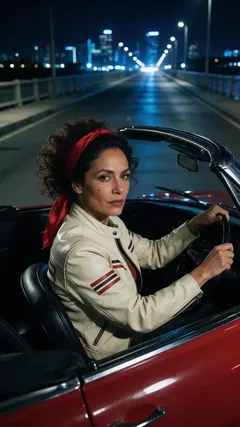
Made with Seedance 2.5Denim jacket on a night sidewalk: the street lights smear into streaks within 1 s and keep accelerating while she stares into the lens.Made with MiniMax H3Leather jacket at the wheel at night: the city behind him becomes a tunnel of blue light.Made with MiniMax H3Red convertible on a night bridge: streaks from second two, headscarf and curls thrown back. What we saw when we tested Hyperdrive
Our two examples were both taken at night. A man in a brown leather jacket behind the wheel of a car kept his pose while the city lights stretched into a tunnel of blue streaks around him. A woman with curly hair and a red headscarf in a cream racing jacket, gripping the wheel of a red convertible on a night bridge, stayed motionless while the road and lights ahead pulled into streaks from about second two, her scarf blowing back.
Light sources are the raw material. In night photos every lamp became a streak; the darker the scene, the stronger the contrast. Faces stayed sharp and recognizable in both runs, and nobody blinked or changed expression, which is exactly what the prompt asks for.
What we saw less of in daytime shots is drama: with few bright points in the background the model has little to stretch, and the effect becomes a gentle blur with wind.
How Hyperdrive does on each model
- MiniMax H3 (210 credits · about 60 s) The second and third examples. Streaks begin within the first one or two seconds and keep accelerating to the end.$0.21 vs Runway $0.50 · 768p · 5s−58% vs Runway
- Seedance 2.5 (1,080 credits · about 5 min) Made the first example at 720p, 4:3. About five times the default price; the streaks fill the whole background.$1.08 vs Higgsfield $3.01 · 720p · 5s−64% vs Higgsfield
- MiniMax H3 · 4s (168 credits · about 60 s) The acceleration is cut a second short, so the full tunnel of light has less time on screen.$0.21 vs Runway $0.50 · 768p · 5s−58% vs Runway
- Seedance 2.0 Mini · 480p (125 credits · about 3 min) 480p softens thin light lines more than faces; expect thicker, blurrier streaks.$0.13 vs fal $0.36 · 480p · 5s−65% vs fal
The prompt behind Hyperdrive
The person stays completely still while the whole world behind them suddenly stretches into light-speed streaks: every light in the background smears into long blue and white lines rushing past, like jumping to hyperspace. Within one second a violent wind blasts their hair backward. The streaks keep accelerating until they fill the whole background, while the person stays sharp and steady, staring into the lens.
Tips for a better Hyperdrive result
- Choose a photo where the background has lots of small lights; bokeh from a night street is ideal.
- Keep the subject centered and facing forward so the stillness against the rush is obvious.
- Seated poses in a vehicle look the most natural, because the brain reads the streaks as speed.
Hyperdrive: questions and answers
Does the person move during Hyperdrive?
Only the hair and loose clothing, pushed by the wind. The face and pose are meant to stay frozen, and in our runs they did.
Why are there hardly any streaks in my clip?
The streaks are built from the lights in your background. A daytime photo against a plain wall gives the model almost nothing to stretch, so pick a night shot with lamps or a skyline.
Do the streaks have to be blue?
The prompt asks for blue and white, and that is what every run gave. Warm city lights in your photo can add a little gold to the mix.
Is it good for a car or bike photo?
It is at its best there. Both of our examples were taken inside a vehicle, and the rush of light reads naturally as speed.
Can I use it as an intro for a gaming or tech video?
Yes. The clip is five seconds with a clear build-up, so it works as a cold open before your title card.
Related effects and tools
- Rig Cam · You stay locked in frame while the world swings behind.
- Light Tunnel · Rings of neon snap on as you walk toward the lens.
- Speed Ramp · Normal speed sinks into dreamy slow motion.
- Still in the Rush · Everyone blurs past in fast-forward. You don’t move.
- Trim it and add a title in the free Video Editor

 Your photo

