What the Pixel Scatter effect does
Pixel Scatter breaks you apart from the edges into glowing square pixels. They peel away from your shoulders, hair and arms and stream sideways in a bright ribbon of light, as if blown by a digital wind, and within four seconds the whole figure has flown out of frame.
The empty background left behind gives the clip a clean ending, which is why it is popular as a log-off moment or the end of a gaming edit.
How to use Pixel Scatter
- Make the silhouette clear Use “Add a photo” for one clearly outlined person against a plain wall or corridor, with space to the sides. Bright clothing gives the departing pixel ribbon a stronger color.
- Keep the empty ending In “More options”, keep MiniMax H3 at the default five-second Length to leave a short view of the empty background after the dissolve. The four-second option leaves almost no hold once the pixels depart.
- Follow the pixels out Press “Make it move” and check that the figure dissolves into a sideways stream rather than remaining partly visible. If the cleared background looks tangled, use a simpler setting with no other people.
Which photos work best for Pixel Scatter
Works well
- A clear silhouette against a simple background
- Bright or saturated clothing, which turns into colored pixels
- Corridors, server rooms or plain walls that look right when empty
Avoid
- Busy scenes where an empty background looks odd
- Groups, which dissolve into one tangled ribbon
- Clips where the person must stay to the end
Pixel Scatter examples
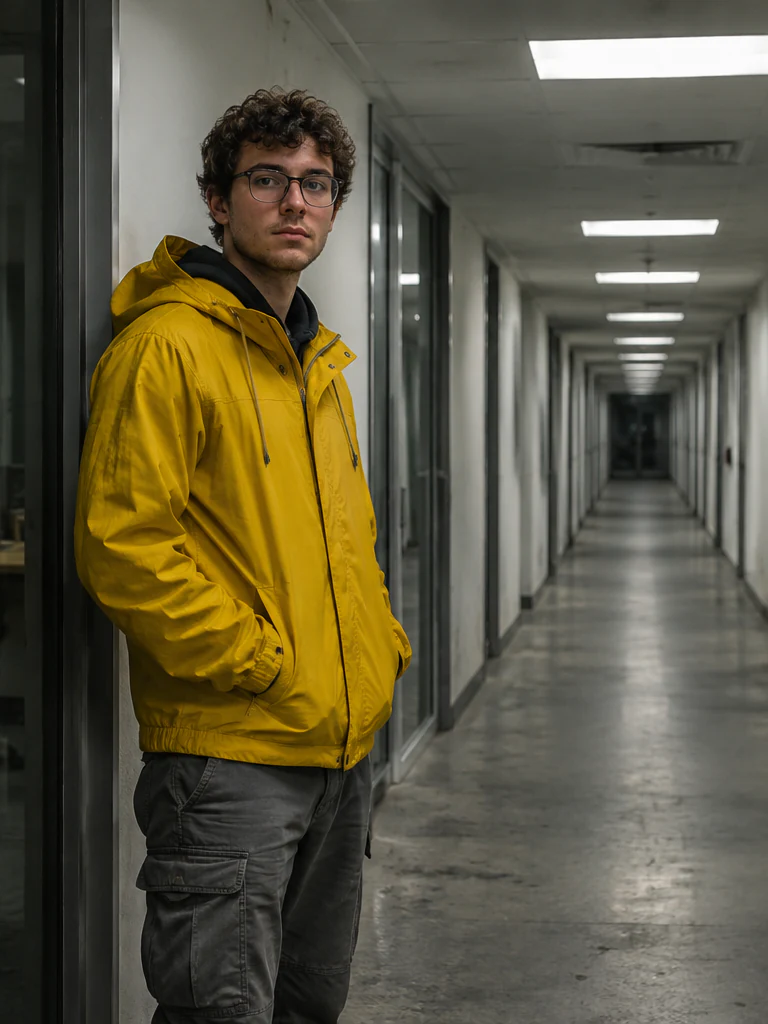
Made with Seedance 2.0 FastMustard rain jacket in a light-strip corridor: yellow pixel ribbon at 4 s, corridor left empty.Made with MiniMax H3Neon pink bomber in a server room: a pink and blue pixel stream flies out of frame. What we saw when we tested Pixel Scatter
The first example is a man with glasses in a mustard rain jacket in a white light-strip corridor: he began breaking into pixels at the shoulders around second two, turned side-on as his whole figure pixelated, streamed away in a ribbon of yellow at second four and left the corridor empty. The second is a woman with a high ponytail in a neon pink bomber in a blue-lit server room, who went the same way in pink and blue.
The color of the outfit decides the color of the ribbon, which makes bright clothing worth it here.
The background behind the person is filled in once they leave. On plain corridors this looked believable; complicated scenes give the model more to guess.
How Pixel Scatter does on each model
- MiniMax H3 (210 credits · about 60 s) Both examples. Pixels start around second two and the figure is gone by four.$0.21 vs Runway $0.50 · 768p · 5s−58% vs Runway
- MiniMax H3 · 4s (168 credits · about 60 s) The dissolve is timed to finish by second four, so it still completes, with almost no empty hold after.$0.21 vs Runway $0.50 · 768p · 5s−58% vs Runway
- Seedance 2.0 Mini · 480p (125 credits · about 3 min) Small square pixels are exactly the detail 480p blurs, so the ribbon looks softer.$0.13 vs fal $0.36 · 480p · 5s−65% vs fal
The prompt behind Pixel Scatter
The person begins to break apart from the edges into glowing square pixels. The pixels peel away from their shoulders, hair and arms and stream sideways in a bright ribbon of light, as if blown by a digital wind. Within four seconds the whole figure has dissolved into a flowing stream of pixels that flies out of frame, leaving the background empty.
Tips for a better Pixel Scatter result
- Wear a bold color; the stream of pixels takes it on.
- A plain corridor or wall makes the empty ending look natural.
- End your video on it: there is nothing of you left after second four.
Pixel Scatter: questions and answers
Do I disappear completely in Pixel Scatter?
Yes. By the fourth second the figure has streamed away and only the background remains.
What decides the color of the pixels?
Your clothes and the light in the photo. A mustard jacket gave a yellow ribbon, a pink bomber a pink and blue one.
What fills the space where I was standing?
It stays, and the part that was hidden behind you is filled in once you leave.
Is there a version where I come back?
Not here. For a glitch that keeps you on screen, try Digital Glitch or Hologram.
Does it work on a pet?
Yes, any clearly outlined subject can pixelate and stream away.
Related effects and tools
- Glitch · Red-and-cyan glitches tear through, then snap back clean.
- Turn to Dust · Crumble into glowing dust that drifts away.
- Hologram · Scan lines sweep in and you flicker into a blue hologram.
- Into Smoke · Dissolve from the feet up into swirling black smoke.
- Add a pixel-style title with free Text Effects

 Your photo

