What the Turn to Dust effect does
Turn to Dust holds you still while your fingertips and one shoulder begin to crumble into fine glowing ash. Over several seconds, flakes peel away from shoulders, hair and face and stream sideways in a long river of dust, until only the last of the face remains, still looking into the lens.
It is the cinematic disintegration everyone recognizes, used for dramatic endings and fan-style edits.
How to use Turn to Dust
- Expose the shoulders and hair In “Add a photo”, upload one portrait with clear shoulder and hair edges against a dark or stormy backdrop. Keep enough of the arms in view for the crumbling fingertips to read.
- Keep the dust grains readable Open “More options” and choose MiniMax H3 for the detailed disintegration shown in the examples. The Seedance 2.0 Mini tier uses 480p, where fine dust can look more like mist.
- Watch the edges crumble Press “Make it move” and check for flakes peeling from the shoulders into a sideways stream, with the face lasting longest. If the dust is hard to see, use “Change” for a darker, less busy background; clothing and light can also affect its color.
Which photos work best for Turn to Dust
Works well
- Dark or stormy backgrounds where glowing dust shows
- Clear edges at the shoulders and hair
- A calm, steady expression
Avoid
- Bright, busy backgrounds that hide the grains
- Clips where you must stay on screen
- Group photos, which crumble into one cloud
Turn to Dust examples
Made with Seedance 2.5Leather jacket on an empty desert highway: ash starts at the shoulder at 1 s, a river of dust streams sideways and only drifting grains are left at 5 s.Made with MiniMax H3Black turtleneck on black: glowing ash from 2 s, cracks across the face by 3 s.Made with MiniMax H3Red coat under storm clouds: the coat and body stream away as sand from 2 s to 4 s, half a face left at 5 s. What we saw when we tested Turn to Dust
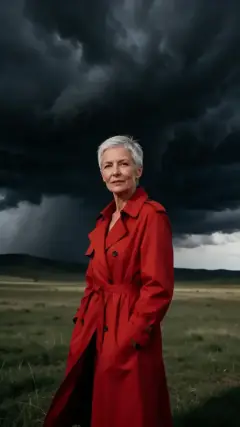
The first example is a man with a buzz cut and greying beard in a black turtleneck against black: his shoulder and hair began crumbling into glowing ash by second two, cracks spread across his face by three, and by the end only a faint trace of the face looked out of a drifting cloud. For a second case we used an older woman with white hair in a red coat in a field under storm clouds.
Her run showed the process clearly: at one second her shoulder began to flake, from two to four the red coat and body turned layer by layer into sandy dust streaming to the right, and at five only a cloud of dust and half her face remained. The storm sky behind her never changed.
Color influences the dust: the red coat produced beige sand rather than glowing embers, while the dark studio portrait gave brighter, glowing ash.
How Turn to Dust does on each model
- MiniMax H3 (210 credits · about 60 s) The second and third examples. Crumbling starts within one or two seconds; the face is the last thing left.$0.21 vs Runway $0.50 · 768p · 5s−58% vs Runway
- Seedance 2.5 (1,080 credits · about 5 min) Made the first example at 720p, 4:3. About five times the default price; the dust river is longer and finer.$1.08 vs Higgsfield $3.01 · 720p · 5s−64% vs Higgsfield
- MiniMax H3 · 4s (168 credits · about 60 s) The face disappears closer to the end, so there is little drifting dust afterwards.$0.21 vs Runway $0.50 · 768p · 5s−58% vs Runway
- Seedance 2.0 Mini · 480p (125 credits · about 3 min) Fine grains are tiny detail; at 480p the stream looks more like mist.$0.13 vs fal $0.36 · 480p · 5s−65% vs fal
The prompt behind Turn to Dust
The person holds still. Within the first second their fingertips and the edge of one shoulder begin to crumble into fine glowing ash. The disintegration is clearly visible over several seconds: flakes and grains peel away from the shoulders, hair and face and stream sideways in a long glowing river of dust that catches the light. By the fourth second only the last of the face remains, still looking into the lens, and the final frame is a drifting cloud of glowing dust where they stood.
Tips for a better Turn to Dust result
- A dark or dramatic sky makes the dust glow; bright scenes hide it.
- Keep a steady, serious face in the photo: it is the last thing to go.
- Put it at the end of an edit, since you are gone by the final frame.
Turn to Dust: questions and answers
Is anything left of me at the end of Turn to Dust?
A faint trace of the face inside a drifting cloud of dust; otherwise you are gone.
Why is my dust beige instead of glowing?
It takes color from your clothing and light. A red coat in daylight gave sandy dust; a dark studio portrait gave glowing ash.
How long does the disintegration take?
About three to four seconds from the first flakes to the last of the face.
Is it violent?
No. There is no injury or blood, only ash drifting away.
Turn to Dust or Pixel Scatter?
Turn to Dust crumbles into organic ash; Pixel Scatter breaks into glowing square pixels.
Related effects and tools
- Into Smoke · Dissolve from the feet up into swirling black smoke.
- Pixel Scatter · Break into glowing pixels that blow away on a digital wind.
- Petal Dissolve · Break apart into a swirl of rose petals.
- Shatterpoint · Turn to glass, crack, and burst into flying shards.
- Fade the clip to black in the free Video Editor

 Your photo

