What the Clone Split effect does
Clone Split is the copy-yourself trick: you step forward and split into four identical versions that walk away in different directions, then all turn back at once and stand in a row facing the camera.
No green screen or multiple takes: it all comes from one photo.
How to use Clone Split
- Frame one person widely Use “Add a photo” for a full-length solo portrait with open floor and space on both sides. A bold outfit helps you follow the copies as they separate.
- Leave time to line up In “More options”, select MiniMax H3 and keep the default five-second Length so the copies can walk apart and turn back. The four-second option gives them less walking time.
- Watch through the final row Press “Make it move” and check the ending for the four-copy line-up rather than counting figures in an early frame. If the copies are hard to distinguish, use a photo without bystanders and with more open floor.
Which photos work best for Clone Split
Works well
- A full-body photo with space on both sides
- Open places such as a street, a hall or a park
- A distinctive outfit, which makes the copies easy to follow
Avoid
- Tight frames with walls close by
- Group photos
Clone Split examples
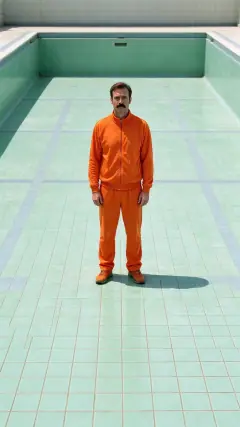
Made with MiniMax H3Orange jumpsuit in a drained pool: four copies walk off and line up facing the camera.Made with MiniMax H3Orange coverall in a car park: four of him walk away and line up from 4 s. What we saw when we tested Clone Split
The first example is a man in an orange jumpsuit in a drained, tiled swimming pool: he stepped forward and split into four copies that walked off and then lined up side by side facing the camera. The second is a young man with curly red hair in an orange coverall on an empty sunny car park: he split from second one, four of him walked off in different directions, then all turned back at once and stood in a row from second four.
Open floor was the key in both runs: empty pools and car parks gave the copies room to walk without bumping into walls.
The cover frame of the car park run catches the moment when only two copies are visible; the full line of four forms near the end.
How Clone Split does on each model
- MiniMax H3 (210 credits · about 60 s) Both examples. Split at second one, line-up by second four.$0.21 vs Runway $0.50 · 768p · 5s−58% vs Runway
- MiniMax H3 · 4s (168 credits · about 60 s) The copies have less time to walk out before turning back.$0.21 vs Runway $0.50 · 768p · 5s−58% vs Runway
- Seedance 2.0 Mini · 480p (125 credits · about 3 min) Four small figures are demanding at 480p; faces of the copies lose detail.$0.13 vs fal $0.36 · 480p · 5s−65% vs fal
The prompt behind Clone Split
The person takes one step forward and splits into four identical copies of themselves. The four walk away in four different directions, then all turn back at the same moment and stand in a row looking at the lens. The person stays exactly as they appear in the photo.
Tips for a better Clone Split result
- Use a full-length photo in an open space with nothing close behind you.
- A bold, single-color outfit makes the four copies easy to follow.
- Look straight at the camera in the photo; all four copies end up doing the same.
Clone Split: questions and answers
Are all four copies identical?
Yes, the prompt asks for four identical copies of you in the same clothes.
Can I make more than four?
This effect makes four. For other numbers, describe it in the video generator.
How long until the four copies line up?
In our runs the row formed around the fourth second.
Why do I only see two copies in some frames?
The copies walk in different directions and can overlap or leave the frame for a moment before turning back.
Does it need an empty background?
Open floor helps a lot. Busy streets make it harder to tell the copies from passers-by.
Related effects and tools
- Mirror Twin · Your reflection lags a beat behind, then turns and winks at the camera.
- Dance Duo · You and a friend bust out the same dance routine, side by side.
- Slow-Mo Entrance · A hero walk-in in slow motion with dust and sparks hanging in the air.
- Put the same face in different scenes with Characters

 Your photo

