What the Aurora effect does
Aurora spreads ribbons of green and violet northern lights across the sky above you, rippling and folding slowly like curtains, their glow washing over the scene. You stay in the same place and pose while the camera tilts up toward the sky in one continuous shot.
The scene turns from day to night as the lights build, which makes it feel earned rather than pasted on.
How to use Aurora
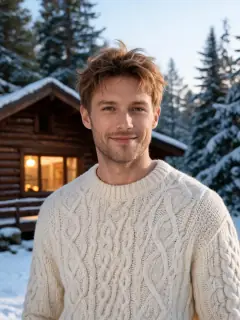
- Leave open sky above you In Add a photo, use one outdoor portrait with generous headroom and an unobstructed sky. Snow or water can catch the green glow as the scene darkens.
- Choose how much sky to reveal Open More options and choose MiniMax H3 at 5s for the longer upward tilt. The 4s tier shows a little more of the person and less sky at the end.
- Check the curtains overhead Press Make it move and watch the green and violet ribbons grow while the person moves lower in the frame. If buildings or a tight crop leave little room for the lights, retry with a more open skyline.
Which photos work best for Aurora
Works well
- Outdoor photos with sky above: snow, beaches, mountains, fields
- Standing poses with space above the head
- Daytime or dusk photos, which show the change to night
Avoid
- Indoor photos
- Tight close-ups with no sky
- City centers where tall buildings block the sky
Aurora examples
Made with MiniMax H3By a snowy log cabin: day fades to night and aurora unfurls above the pines.Made with MiniMax H3Knit dress on a beach dune: aurora curtains glow bright enough to tint the sea teal. What we saw when we tested Aurora
The first example is a man standing by a snowy log cabin: he kept the same relaxed smile while daylight faded to night, green and violet ribbons unfurled above the pines from about one second, and as the camera tilted up he ended lower in the frame with the sky doing most of the work. The second is a woman in a long knit dress on a beach dune: she tilted her face upward as the dusk sky darkened, and broad aurora curtains glowed brightly enough to tint the sea teal.
Snow and sea both reflected the aurora light, which made the scenes feel lit by it.
Because the camera tilts up, the person moves down the frame; leave room above your head in the photo.
How Aurora does on each model
- MiniMax H3 (210 credits · about 60 s) Both examples. Ribbons from about one second, the camera tilting up throughout.$0.21 vs Runway $0.50 · 768p · 5s−58% vs Runway
- MiniMax H3 · 4s (168 credits · about 60 s) A shorter tilt, so the final frame shows a bit more of you and less sky.$0.21 vs Runway $0.50 · 768p · 5s−58% vs Runway
- Seedance 2.0 Mini · 480p (125 credits · about 3 min) Soft aurora glow holds up at 480p; fine curtain folds simplify.$0.13 vs fal $0.36 · 480p · 5s−65% vs fal
The prompt behind Aurora
Ribbons of green and violet aurora spread across the sky above the main subject, rippling and folding slowly like curtains of light, and their glow washes softly over the scene. The main subject stays in the same place and pose, still facing the same way, while the camera tilts up slowly toward the sky in one continuous shot.
Tips for a better Aurora result
- Use a photo with open sky above you.
- Snow, water or sand reflect the green light nicely.
- Leave headroom: the camera tilts up and you drift toward the bottom.
Aurora: questions and answers
Does Aurora work on a daytime photo?
Yes. It turns day to night as the lights build; both of our examples started in daylight or dusk.
What colors are the lights?
Green and violet ribbons, as in real northern lights.
Will I still be in the frame?
Yes, though lower, because the camera tilts up toward the sky.
Does the aurora light up my scene?
Yes, its glow washes over snow, sand or water around you.
Aurora or Starfall?
Aurora is slow curtains of colored light; Starfall is a fast meteor shower with fireballs.
Related effects and tools
- Starfall · A meteor shower lights up the sky behind you.
- Fireflies · Dusk turns blue and hundreds of fireflies rise around you.
- Day to Night · Afternoon slides into night as the city lights blink on.
- Snow Globe · Snow starts to fall, then the camera pulls back: you are inside a snow globe.
- Add sky above you with the AI Image Extender

 Your photo

