What the Jellyfish Drift effect does
Jellyfish Drift turns your entire scene into an underwater world: glowing translucent jellyfish and a few small silver fish drift slowly through the air around you, soft blue light ripples across everything, and the camera floats gently sideways.
The full transformation, not stickers on a photo, is what makes it dreamy, which suits calm loops and aquarium-like profile clips.
How to use Jellyfish Drift
- Give the jellyfish depth Use “Add a photo” for one calm portrait with a window, city view or other depth behind you. A back view also works when you want the glowing creatures to take the focus.
- Allow the creatures to drift In “More options”, keep MiniMax H3 at the default five-second Length so more jellyfish can pass through the scene. The four-second option leaves less time for them to drift by.
- Review the underwater scene Press “Make it move” and check for translucent jellyfish, small fish and blue rippling light around the subject. If the creatures are hard to distinguish, try a setting with more depth and less clutter; expect the whole scene to turn blue.
Which photos work best for Jellyfish Drift
Works well
- City or window photos with depth behind you
- Calm poses, front or back
- Dark clothing that the blue light glows on
Avoid
- Wanting your background unchanged; it all turns blue
- Busy group photos
- Bright white rooms
Jellyfish Drift examples
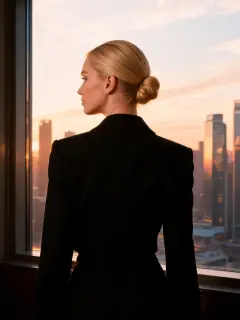
Made with MiniMax H3Black suit at a sunset window, seen from behind: the skyline becomes a sea of glowing jellyfish.Made with MiniMax H3Dark coat on a blue-hour rooftop: deep blue within a second, jellyfish and silver fish drifting past. What we saw when we tested Jellyfish Drift
The first example is a woman in a black suit seen from behind at a sunset city window: the skyline turned into an underwater world full of glowing jellyfish, small silver fish swam across her back, and she turned her head slightly into profile; her suit and hair stayed intact. The second is a man in a dark coat on a blue-hour rooftop, whose scene sank into deep blue within the first second, with jellyfish and fish drifting around him and rippling light over his coat.
Faces and clothing stayed consistent in both runs. The whole background changes color, so the original setting reads more as a hint than a location.
Back views worked particularly well; the jellyfish become the subject.
How Jellyfish Drift does on each model
- MiniMax H3 (210 credits · about 60 s) Both examples. The scene sinks underwater within the first second.$0.21 vs Runway $0.50 · 768p · 5s−58% vs Runway
- MiniMax H3 · 4s (168 credits · about 60 s) Fewer jellyfish pass by before the end.$0.21 vs Runway $0.50 · 768p · 5s−58% vs Runway
- Seedance 2.0 Mini · 480p (125 credits · about 3 min) Translucent jellyfish edges blur a little at 480p, which suits the dreamy look.$0.13 vs fal $0.36 · 480p · 5s−65% vs fal
The prompt behind Jellyfish Drift
Glowing translucent jellyfish and a few small silver fish drift slowly through the air around the main subject, as if the whole scene had sunk underwater. Soft blue light ripples across everything while the camera floats gently sideways.
Tips for a better Jellyfish Drift result
- Photos with a city or window behind you give the jellyfish depth to float in.
- A back view turns it into a calm, wistful loop.
- Dark outfits glow under the blue light.
Jellyfish Drift: questions and answers
Does Jellyfish Drift change my background?
Yes, the whole scene turns into an underwater world bathed in blue.
Are there other sea creatures?
A few small silver fish swim through along with the jellyfish.
Does my face stay the same?
Yes, in both runs faces and clothes stayed consistent.
Can I use a photo from behind?
Yes, it looks especially good; one of our examples is a back view.
Jellyfish Drift or Underwater?
Jellyfish Drift adds glowing creatures; Underwater adds rippling sea light and bubbles only.
Related effects and tools
- Underwater · Rippling sea light and rising bubbles, like a shot below the surface.
- Bubbles · Rainbow soap bubbles drift around you.
- Aurora · Green and violet ribbons unfurl as day turns to night.
- Lo-Fi Loop · A cozy hand-painted loop: you, headphones, rain on the window.
- Resize the loop for your profile with Resize Video

 Your photo

