What the Tiny Planet effect does
The tiny planet effect bends your surroundings into a small sphere: the camera shoots up, the ground curls around, and you end up standing on top of your own little world, waving at the lens.
It works best on outdoor photos with a horizon, where the curl has plenty to wrap.
The idea behind Tiny Planet
Turning familiar surroundings into a small sphere gives an ordinary travel photo a new sense of scale. The effect creates the camera move and curling landscape from one image, without a 360-degree camera or manual editing.
Its pull is the ending. A curled horizon turns any street, park or rooftop into a single round object, so the last frame works as a thumbnail and as the final beat of a montage.
How to use Tiny Planet
- Include the ground and horizon Under Add a photo, use one outdoor full-body picture with your feet visible and buildings or trees around you. Keep yourself near the middle so the little planet has a clear top.
- Choose the planet animation Open More options and choose MiniMax H3 to match the rooftop-curl example, then press Make it move. Its 4s option also completed the globe and wave in our tests.
- Check what wraps around Watch for your surroundings curling into a sphere beneath your feet. If you get a generic Earth instead of your street, use Change to add a photo with more recognizable scenery.
Which photos work best for Tiny Planet
Works well
- Outdoor photos with a visible horizon
- Full-body shots with your feet in the frame
- Wide backgrounds such as parks, beaches or streets
Avoid
- Indoor close-ups
- Photos cropped at the knees
Tiny Planet examples
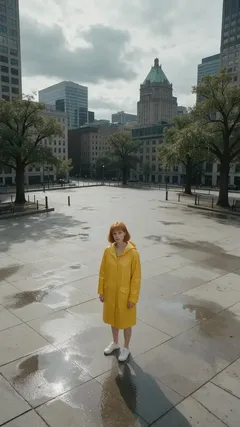
Made with MiniMax H3Waterfront, bubble wand in hand: the city curls into a planet made of real rooftops.Made with MiniMax H3Skate park, full length: the model swapped the park for a planet seen from space.Made with MiniMax H3Wet plaza in a yellow raincoat: globe complete by about 2.5 s, waving against the stars. What we saw when we tested Tiny Planet
We ran it on three very different photos. A woman in a pale green tracksuit holding a bubble wand on a city waterfront ended on a planet built from the rooftops around her. A young man in an olive hoodie at a concrete skate park ended standing on top of a whole Earth floating in space, which shows how the model sometimes swaps the local scenery for a planet seen from orbit. A red-haired woman in a yellow raincoat on a wet plaza watched the ground curl by about two and a half seconds and finished on a small globe against a starry sky, waving as the prompt asks.
The pattern across runs: full-length photos with the feet visible always gave the planet somewhere to stand, and the person stayed recognizable even when small. When the photo had little scenery around the subject, the model filled the sphere with a generic Earth rather than the real place.
Indoor shots and waist-up crops are where it struggles: there is no ground to bend, so the curl looks arbitrary and the person can slide toward the edge of the sphere.
How Tiny Planet does on each model
- MiniMax H3 (210 credits · about 60 s) Every example on this page. The curl starts around second two and the wave lands in the last second.$0.21 vs Runway $0.50 · 768p · 5s−58% vs Runway
- MiniMax H3 · 4s (168 credits · about 60 s) We tested this exact prompt at four seconds: the whole planet and the wave still fit, about 40 seconds to render.$0.21 vs Runway $0.50 · 768p · 5s−58% vs Runway
- Seedance 2.0 Mini · 480p (125 credits · about 3 min) In the same side-by-side test the 480p version also built a complete planet with the person waving on top; it is softer and takes about two minutes.$0.13 vs fal $0.36 · 480p · 5s−65% vs fal
The prompt behind Tiny Planet
The camera shoots straight up into the sky while the ground beneath the person curls into a tiny round planet: the scene around them wraps into a small sphere with the person standing on top of it. By the end the whole little planet floats in the frame with the person on its top, waving at the lens. The person stays exactly as they appear in the photo.
Tips for a better Tiny Planet result
- Stand the subject near the middle of the photo; people framed at the edge end up on the side of the planet instead of the top.
- Rooftops, a row of houses or trees make a more convincing planet than an empty square, because there is something recognizable wrapping around.
- Want a wave at the end? It only happens with a person in the shot. A car or a landmark works, but it simply sits on top.
Tiny Planet: questions and answers
How is this different from a 360 tiny planet photo?
This is a generated video rather than a stitched 360-degree photo. Upload one ordinary photo, and the effect builds a little globe and animates the curl.
Can I use a photo with no person?
Yes, a landmark or a car on top of the planet works, but the wave at the end needs a person.
Why did my planet turn into the Earth instead of my street?
When the photo has little scenery around you, the model fills the sphere with the most familiar planet it knows. A photo with buildings or trees around you keeps more of your real place on the globe.
Does it work with a selfie?
Not well. A selfie has no ground in it, so nothing curls. Use a photo taken from a few meters away with your feet in the frame.
Can I make the planet snowy or at night?
Not on this page, which sends the same fixed prompt for everyone. Pick a photo that is already snowy or taken at dusk; the planet keeps that light.
Which cheaper option still gets the whole planet?
Both cheaper options did in our tests: H3 at four seconds and Seedance 2.0 Mini at 480p each finished the full globe with the wave.
Related effects and tools
- Cosmic Zoom · Keep rising past the clouds until the whole planet glows.
- Snow Globe · Snow starts to fall, then the camera pulls back: you are inside a snow globe.
- Drone Rise · Lift off into a sweeping aerial opening shot.
- Big Reveal · The camera flies back until you’re a dot in an epic landscape.
- Extend a tight photo with the AI Image Extender before you curl it
- Resize the finished clip to 9:16 or 1:1

 Your photo

