What the Big Reveal effect does
Big Reveal holds on your photo for half a second, then snaps backward and up into the sky in one continuous move. By the third second you are a tiny lone figure in the middle of a landscape that runs to the horizon, and the shot holds there while wind moves through it.
The whole effect is the change of scale, which makes it a strong opener or a closing shot for a travel or lone-traveler story.
How to use Big Reveal
- Start on open ground Under “Add a photo”, upload one full-length portrait on a beach, field or other open ground. A strong clothing color helps you remain visible when the camera pulls far away.
- Keep the landscape hold Select MiniMax H3 in “More options” and keep the default five-second Length for the fast pull-back and wide ending. The four-second option shortens the hold after the reveal.
- Check the change of scale Press “Make it move” and check that the ending reads as a tiny lone figure in an expansive landscape. If you disappear into the scenery, use a brighter outfit against simpler ground; the generated wide view will not reproduce the real location.
Which photos work best for Big Reveal
Works well
- Full-length photos with open ground around you
- Plain, open settings such as salt flats, fields, beaches or dunes
- Bold, solid-colored clothing that stays visible when you are tiny
Avoid
- Indoor rooms and narrow streets, where a giant landscape makes no sense
- Tight portraits with no body or ground in frame
- Busy crowds that blur together from above
Big Reveal examples
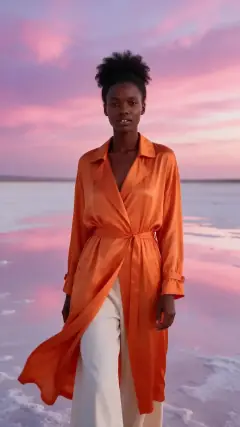
Made with MiniMax H3Orange wrap coat on a pink salt lake: a speck on a white plain by second three.Made with MiniMax H3Red poncho on cracked salt: the camera rises until he is one red dot. What we saw when we tested Big Reveal
Our examples were all shot on wide, empty ground. A woman in an orange wrap coat on a pink-lit salt lake held for a beat, then the camera snapped back until she was a speck on a white plain stretching to the horizon. A grey-bearded man in a red poncho on a salt flat cracked into hexagons went through the same move and by second three was a single red dot in the middle of the plain.
Color carried the ending: the orange coat and the red poncho stayed readable even at a few pixels tall, which is why bold clothing works so well here.
The wide landscape is invented. It continues your setting convincingly, but it will not match the real place behind you, and a cluttered starting background makes the pull-back less believable.
How Big Reveal does on each model
- MiniMax H3 (210 credits · about 60 s) Both examples. The snap back starts at about half a second and the extreme wide shot is reached by second three.$0.21 vs Runway $0.50 · 768p · 5s−58% vs Runway
- MiniMax H3 · 4s (168 credits · about 60 s) The wide shot still arrives on time, it just holds for one second less at the end.$0.21 vs Runway $0.50 · 768p · 5s−58% vs Runway
- Seedance 2.0 Mini · 480p (125 credits · about 3 min) A tiny figure is the hardest detail to keep at 480p; bold clothing helps it stay visible.$0.13 vs fal $0.36 · 480p · 5s−65% vs fal
The prompt behind Big Reveal
Hold for half a second, then the camera snaps backward in one fast continuous pull-back while rising into the sky, revealing the person as a tiny lone figure in the middle of a vast landscape that stretches to the horizon. By the third second it is an extreme wide aerial shot, and it holds there as the wind moves through the scene. The person stays exactly as they appear in the photo.
Tips for a better Big Reveal result
- Leave space around yourself in the photo so the camera has room to pull back through.
- Wear one strong color; it is the only thing that will identify you in the last frame.
- Cut it right after a close-up for the biggest change of scale.
Big Reveal: questions and answers
Will the landscape at the end look like where I took the photo?
It continues the look of your setting, but the wide view is generated, so mountains, roads or coastlines will not match the real place.
Am I still recognizable at the end?
Not by your face; you are a few pixels tall. Your clothing color and pose are what remain, so a bright outfit helps.
Does it work in a city?
On an open square or a rooftop it does. Narrow streets and indoor shots look odd, because the camera pulls back into a landscape that cannot exist there.
How is it different from Cosmic Zoom?
Big Reveal stops at an aerial view of the landscape. Cosmic Zoom keeps going past the clouds until you see the curve of the planet.
Can I add a slow, gentle version?
Not on this page; the move is fast by design. Drone Rise is the calmer alternative that lifts slowly into an aerial view.
Related effects and tools
- Cosmic Zoom · Keep rising past the clouds until the whole planet glows.
- Drone Rise · Lift off into a sweeping aerial opening shot.
- Tiny Planet · Your world curls into a little planet, with you on top.
- FPV Dive · Racing-drone dive, low skim, then a hover right in front of you.
- Widen a cropped photo with the AI Image Extender

 Your photo

