What the Smoke Swirl effect does
Smoke Swirl gives any photo the look of a studio smoke shoot: the background dims, silky curls of smoke drift and swirl around the subject in a single warm side light, and the camera drifts slowly in while the subject stays clear.
It is a staple for fragrance and spirits ads, album art, author portraits and moody fashion shots.
How to use Smoke Swirl
- Give the smoke breathing room Use Add a photo for one close portrait or a centered product with space around its edges. A plain background lets the smoke form distinct ribbons as the scene darkens.
- Choose the sample smoke model In More options, select Wan 3.0 for the layered smoke shown in the examples, or keep MiniMax H3 for a draft. Press Make it move after choosing; the samples and default use different models here.
- Check the subject through the smoke Watch for warm side light and curls of smoke around a clear face or product outline. If the smoke becomes clutter, use Change for a simpler background with more empty space around the subject.
Which photos work best for Smoke Swirl
Works well
- Close portraits and single products
- Plain backgrounds that can fall into shadow
- Dark clothing or glass bottles, which catch the side light
Avoid
- Wanting a bright result; the whole photo gets darker
- Busy scenes where smoke turns into clutter
- Groups
Smoke Swirl examples
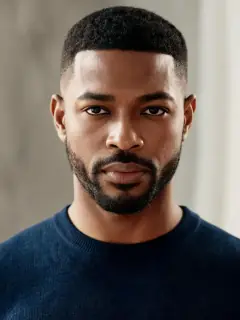
Made with Wan 3.0Navy sweater close-up: smoke billows behind and drifts over his shoulders, face sharp.Made with Wan 3.0Amber perfume on travertine: a bright set turns into a dark stage with smoke ribbons. What we saw when we tested Smoke Swirl
Both examples were rendered on Wan 3.0, which draws smoke as soft, layered volume rather than flat haze. A close-up of a man in a navy sweater gained billowing smoke behind and around him that drifted across his shoulders while his face stayed sharp. An amber perfume bottle on a travertine plinth went from a bright beige set to a dark stage within two seconds, with ribbons of smoke curling around the glass.
The effect relights the photo: bright backgrounds fall into shadow, so expect a darker, more dramatic result than the original.
The default here is MiniMax H3, which is far cheaper and quicker than Wan 3.0; pick Wan 3.0 from the list if you want the layered smoke you see in the samples.
How Smoke Swirl does on each model
- Wan 3.0 (425 credits · about 3 min) Both examples. Soft, layered smoke and strong relighting. See the model list for the current credit price and estimated wait.
- MiniMax H3 (210 credits · about 60 s) Default. Same dimmed scene and warm side light for a fraction of the credits.$0.21 vs Runway $0.50 · 768p · 5s−58% vs Runway
- Seedance 2.0 Mini · 480p (125 credits · about 3 min) The cheapest option; wispy smoke loses some of its layered depth at 480p.$0.13 vs fal $0.36 · 480p · 5s−65% vs fal
The prompt behind Smoke Swirl
The background dims and silky smoke curls drift and swirl around the main subject, glowing in a single warm side light, while the subject stays clear and the camera drifts in slowly.
Tips for a better Smoke Swirl result
- Use a photo with a plain background; it turns into a dark stage.
- For products, center the item with a little space around it for the smoke.
- Choose Wan 3.0 for a hero shot, MiniMax H3 for quick drafts.
Smoke Swirl: questions and answers
Why is my Smoke Swirl clip darker than my photo?
The effect dims the background and lights you from one side, so bright photos become moody and dark by design.
Why do the smoke samples look softer than the default model's?
Wan 3.0. MiniMax H3 is the default because it costs far less; switch to Wan 3.0 in the model list for the same look.
Does the smoke cover the face?
No, it curls around the subject and the face stays clear.
Is it good for a perfume or drink ad?
That is its classic use. Our bottle sample turned a plain set into a dark, smoky stage.
Smoke Swirl or Fog Roll?
Smoke Swirl is studio smoke and a dark relight; Fog Roll is natural fog drifting through an outdoor scene.
Related effects and tools
- Fog Roll · A low bank of fog rolls in while you stay sharp.
- Ingredients Burst · Fruit and droplets explode around your product in slow motion.
- Spotlight · Darkness, then a single beam through rolling smoke.
- Noir Blinds · Black and white, with blind-slat light sliding across.
- Prepare a clean bottle shot with AI Product Photography

 Your photo

