What the Spotlight effect does
Spotlight drops everything around you into total darkness, then snaps on a single hard beam from directly above, catching you in a cone of white light as smoke rolls through it. The camera rises from your feet to your face, and you lift your chin into the light and look into the lens.
It is a clean stage reveal, made for performers, speakers and anyone announcing something.
How to use Spotlight
- Show the feet-to-face path Use “Add a photo” for one full-length standing portrait against a dark or plain background. A face angled slightly upward is better placed to catch the overhead beam.
- Keep the full upward reveal In “More options”, select MiniMax H3 with the default five-second Length for the blackout, spotlight and rising camera. The four-second option makes the rise quicker and the final close-up shorter.
- Check the face under the beam Press “Make it move” and review the silhouette, smoke and final face reveal. If the face stays too shadowed, try a photo with the chin already lifted slightly toward the light.
Which photos work best for Spotlight
Works well
- Full-length standing photos, since the camera rises from the feet
- Dark or plain backgrounds
- Formal or all-black outfits that read as a silhouette
Avoid
- Bright outdoor scenes, which lose the darkness
- Waist-up crops with no feet for the camera to start at
- Groups, since one beam lights one person
Spotlight examples
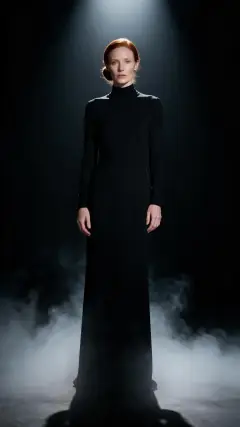
Made with MiniMax H3Black gown on a smoky stage: blackout at 1 s, beam at 2 s, a rising close-up into the light.Made with MiniMax H3Black suit and white hair: caught in the beam, face mostly in shadow under the hard top light. What we saw when we tested Spotlight
The first example is a red-haired woman with a low bun in a black high-neck gown on a smoky stage: she sank into silhouette as the light died at second one, was caught in a single hard beam by two, and ended in a rising close-up lifting her chin into the light. The second is a white-haired older man in a black double-breasted suit and turtleneck on the same kind of smoky stage, who fell into silhouette at second one and was caught in the white beam by two.
In the older man's run the beam was so hard from above that his face stayed mostly in shadow for a good part of the clip; the reveal is in the shape of the figure as much as in the face.
Both runs kept the outfits crisp against the black, which is why dark clothing on a dark stage looks so striking.
How Spotlight does on each model
- MiniMax H3 (210 credits · about 60 s) Both examples. Blackout at second one, the beam by two, the rise to the face after that.$0.21 vs Runway $0.50 · 768p · 5s−58% vs Runway
- MiniMax H3 · 4s (168 credits · about 60 s) The rise from feet to face is quicker and the final close-up shorter.$0.21 vs Runway $0.50 · 768p · 5s−58% vs Runway
- Seedance 2.0 Mini · 480p (125 credits · about 3 min) Rolling smoke in the beam keeps its shape at 480p; the face in the dark loses detail.$0.13 vs fal $0.36 · 480p · 5s−65% vs fal
The prompt behind Spotlight
Everything around the person sinks into total darkness. A single hard spotlight snaps on from directly above, catching them in a cone of white light as smoke rolls through the beam. The camera rises from their feet up to their face, and they lift their chin into the light and look into the lens. The person stays exactly as they appear in the photo.
Tips for a better Spotlight result
- Use a full-length photo so the camera has feet to start from.
- Dark outfits against a dark stage give the boldest silhouette.
- If you want the face clearly lit, choose a photo where you already face slightly upward.
Spotlight: questions and answers
Does the Spotlight effect work outdoors?
It plunges the scene into darkness wherever you are, but stages and dark rooms look the most believable.
Why is my face in shadow?
The beam comes straight down, which can leave the face shaded until you lift your chin. Photos where you already look slightly up get more light.
Which way does the camera travel under the spotlight?
Upward: it rises from your feet to your face during the clip.
Is there smoke?
Yes, smoke rolls through the beam, which is what makes the light visible.
Is it good for a talk or concert announcement?
Yes, it reads as walking onto a stage; add your event name in the editor.
Related effects and tools
- Light Tunnel · Rings of neon snap on as you walk toward the lens.
- Smoke Swirl · Silky smoke curls around you in moody side light.
- Noir Blinds · Black and white, with blind-slat light sliding across.
- Red Carpet · Camera flashes and confetti as you own the carpet.
- Add your event title in the free Video Editor

 Your photo

