What the Ingredients Burst effect does
Ingredients Burst keeps your product at the center while its key ingredients explode outward around it in slow motion: fruit, leaves, drops and splashes hang suspended in the air and spin in the light as the camera orbits slowly.
The product itself never moves, so every frame reads as a hero shot for drinks, cosmetics and food ads.
How to use Ingredients Burst
- Center one clean product Use Add a photo for one bottle, jar or package on a plain surface with space all around. Avoid strong glass glare and fine label text that may warp as the camera moves.
- Keep droplets and pieces clear In More options, choose MiniMax H3 for the tier used in both product examples. Its 5s setting leaves time for the burst to hang around the product as the camera slowly orbits.
- Review the ingredients before using Press Make it move and check the product shape, label and every flying ingredient. If the model adds unsuitable citrus or changes label text, open Edit in Video to revise the prompt before making a new result.
Which photos work best for Ingredients Burst
Works well
- One product centered on a plain surface
- Bottles, jars and packaging with clean shapes
- Warm or bright studio light
Avoid
- Several products in one photo
- Strong glare on glass
- Busy kitchen backgrounds
Ingredients Burst examples
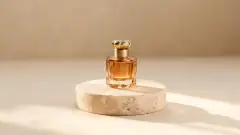
Made with MiniMax H3Amber perfume on travertine: citrus, apple, leaves and spice flecks suspended in warm light.Made with MiniMax H3Unlabeled juice bottle: orange, grapefruit and lime slices spin around it like a drinks ad. What we saw when we tested Ingredients Burst
The first example is an amber perfume bottle on a travertine plinth: it stayed centered and crisp while citrus slices, a red apple, green leaves and spice flecks burst outward and hung suspended in warm light as the camera orbited slightly. The second is an unlabeled juice bottle: orange, grapefruit and lime slices, green leaves and berry-like droplets exploded around it and spun gently as the camera drifted, like a polished beverage ad.
The model chooses the ingredients itself, and it reached for citrus both times, even for the perfume. If your product is not citrus-flavored, check that the fruit makes sense.
The product kept its shape perfectly in both runs, which matters most for an ad.
How Ingredients Burst does on each model
- MiniMax H3 (210 credits · about 60 s) Both examples. The burst starts quickly and hangs in slow motion while the camera orbits.$0.21 vs Runway $0.50 · 768p · 5s−58% vs Runway
- MiniMax H3 · 4s (168 credits · about 60 s) A shorter orbit around the suspended pieces.$0.21 vs Runway $0.50 · 768p · 5s−58% vs Runway
- Seedance 2.0 Mini · 480p (125 credits · about 3 min) Small droplets and spice flecks blur at 480p; the fruit still reads.$0.13 vs fal $0.36 · 480p · 5s−65% vs fal
The prompt behind Ingredients Burst
The product sits at the center as its key ingredients burst outward around it in slow motion, fruit, leaves, drops and splashes hanging suspended in the air. The camera orbits slowly around the product while the pieces spin in the light.
Tips for a better Ingredients Burst result
- Use a clean product shot on a plain surface.
- Check the fruit: the model tends to pick citrus.
- Remove labels you do not want in the ad before you start; text can warp.
Ingredients Burst: questions and answers
Can I choose which ingredients fly out in Ingredients Burst?
The model picked the ingredients and leaned toward citrus in our examples. To suggest your own, use Add a note under More options, or open Edit in Video to change the prompt.
Does the product move?
No, it stays centered and still while the ingredients burst around it.
Does it work with a label on the bottle?
Yes, but small text can warp when the camera moves. Plain or simply labeled products look cleanest.
Is it good for a shop listing?
It makes an eye-catching ad clip; use a plain product photo for the listing itself.
Ingredients Burst or Liquid Splash?
Ingredients Burst throws fruit and leaves around the product; Liquid Splash wraps it in a wave of liquid.
Related effects and tools
- Liquid Splash · A glossy wave swirls around your product, then a crisp push-in.
- 360 Turntable · Your product or pet spins a full circle on the spot.
- Smoke Swirl · Silky smoke curls around you in moody side light.
- Glitch · Red-and-cyan glitches tear through, then snap back clean.
- Make a clean product photo with AI Product Photography
- Turn it into a full ad set with Ad Maker

 Your photo

