What the 360 Turntable effect does
360 Turntable turns one product shot into a smooth full spin on the spot, like an item on a display turntable, with the camera and background held perfectly still.
It is a quick way to make shop and ad clips without a turntable or a video shoot. Pets work too.
How to use 360 Turntable
- Isolate one product Use Add a photo for a single centered product on a plain surface, ideally viewed from the side in even light. Leave space around its outline so it can rotate without reaching the frame edges.
- Choose the tested rotation In Pick a model, choose Seedance 2.0 Fast for the tier used in both full-turn examples. Simple, symmetrical items give the model less hidden geometry to invent.
- Inspect every side Press Make it move and watch the whole rotation, checking that the backdrop stays still and the item returns to its starting angle. If the hidden side changes shape or lettering, retry with a simpler product photo and check the new result before using it in a listing.
Which photos work best for 360 Turntable
Works well
- One product on a plain surface
- The product centered with space around it
- Soft, even studio light
Avoid
- Several items in one photo
- Strong reflections or glare
360 Turntable examples
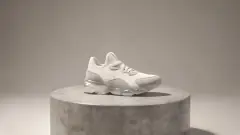
Made with Seedance 2.0 FastKnit sneaker on a concrete plinth: a full rotation, the sole catching light.Made with Seedance 2.0 FastTabby cat on a stool: side, back, side, front, and the same stare. What we saw when we tested 360 Turntable
Both examples were rendered on Seedance 2.0 Fast. An unbranded knit sneaker on a concrete plinth rotated cleanly from its side profile to the toe, around the heel and back, its translucent sole catching the light at every angle. A tabby cat sitting on a walnut stool made a full turn too: side, back, other side and front again, ending with the same green-eyed stare it started with.
The model only sees one side of the subject, so it imagines the rest. Simple shapes and plain backgrounds came out most convincing; logos or lettering on the hidden side would be invented.
The camera and backdrop stayed perfectly still in both runs, exactly like a display turntable.
How 360 Turntable does on each model
- Seedance 2.0 Fast (510 credits · about 3 min) Both examples: a clean full rotation for a shoe and a cat.$0.24 vs Adobe Firefly Standard $0.75 · 480p · 5s−68% vs Adobe Firefly Standard
- MiniMax H3 (210 credits · about 60 s) Default here: lower cost and a shorter typical wait.$0.21 vs Runway $0.50 · 768p · 5s−58% vs Runway
- Seedance 2.0 Mini · 480p (125 credits · about 3 min) The cheapest option; product texture is less sharp at 480p.$0.13 vs fal $0.36 · 480p · 5s−65% vs fal
The prompt behind 360 Turntable
The main subject turns slowly on the spot through one full rotation, like an item on a display turntable, while the camera and the background stay perfectly still under soft, even studio light.
Tips for a better 360 Turntable result
- Shoot the product from the side on a plain surface with even light.
- Symmetrical products come out most accurate on the hidden side.
- Pets work too, if they are sitting still and centered.
360 Turntable: questions and answers
Is the back of the product accurate?
The model has to imagine the sides you didn't photograph, so check the result before using it in a listing. Simple, symmetrical items come out most accurate.
Can I make a longer spin?
This effect makes one full rotation in a five-second clip.
Does a pet really turn all the way around?
In our test a tabby cat made a full turn on its stool and ended facing the camera again.
Which model made the samples?
Seedance 2.0 Fast, which gave the cleanest rotations. MiniMax H3 is the default because it costs less.
Will text on the back of my product be right?
No guarantee: the hidden side is generated, so lettering and logos there may not match.
Related effects and tools
- Ingredients Burst · Fruit and droplets explode around your product in slow motion.
- Liquid Splash · A glossy wave swirls around your product, then a crisp push-in.
- Outfit Check · A full turn to show the look, then a hand-on-hip finish.
- Glitch · Red-and-cyan glitches tear through, then snap back clean.
- Prepare a clean product shot with AI Product Photography
- Put the product on a plain background with Remove Background

 Your photo

