What the Drone Rise effect does
Drone Rise turns a ground-level photo into an establishing shot. The camera lifts straight up, tilts down as it climbs, and the scene opens into a high, wide aerial view while wind and light move across the landscape.
Because the first frame is your own photo, the clip starts on a real view before it takes off, which is why it suits travel reels, road trips and property listings.
How to use Drone Rise
- Choose scenery with depth Use “Add a photo” for an outdoor coastline, road or valley with ground visible into the distance. If a person must remain in the shot, place them near the center.
- Choose what stays visible In “More options”, keep MiniMax H3 for the default aerial climb, or select Seedance 2.0 Fast if retaining a small person matters. In the cliff comparison, Fast kept the figure visible while H3 let her leave the frame.
- Review the aerial surroundings Press “Make it move” and follow the climb into the final wide view. If a person leaves the frame, try the centered input with Seedance 2.0 Fast, and check generated buildings or terrain before presenting the scene as a location.
Which photos work best for Drone Rise
Works well
- Landscapes, coastlines and roads with a sense of place
- Vehicles parked in open settings
- Photos taken outdoors in natural light
Avoid
- Tight portraits with no ground to reveal
- Indoor shots
- Night photos where the landscape below would be invisible
Drone Rise examples
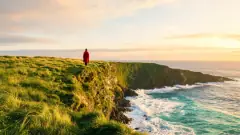
Made with MiniMax H3Sea cliff with a figure in red: rises into a sweeping view of cove and surf (the figure leaves the frame).Made with MiniMax H3Convertible on a desert highway: lifts into a near top-down view of the road and red rocks. What we saw when we tested Drone Rise
Both examples were rendered on MiniMax H3. A grassy sea cliff with a small figure in a red coat lifted into a sweeping view of the cove and surf. A cream convertible parked on a desert highway rose into an almost top-down view of the road running into red-rock country.
One honest catch from the cliff run: the small figure in red dropped out of frame as the camera climbed. In the same comparison, Seedance 2.0 Fast given the same photo kept her in view all the way up. If the person matters, that tier is the safer pick.
Everything beyond the edges of your photo is generated. It follows the light and geography convincingly, but it is not a map of the real place.
How Drone Rise does on each model
- MiniMax H3 (210 credits · about 60 s) Both examples. Smooth climb and a wide final view; a small person can drift out of frame.$0.21 vs Runway $0.50 · 768p · 5s−58% vs Runway
- Seedance 2.0 Fast (510 credits · about 3 min) With the same cliff photo it kept the person in view to the end.$0.24 vs Adobe Firefly Standard $0.75 · 480p · 5s−68% vs Adobe Firefly Standard
- MiniMax H3 · 4s (168 credits · about 60 s) A slightly lower final altitude, since the climb has one second less.$0.21 vs Runway $0.50 · 768p · 5s−58% vs Runway
- Seedance 2.0 Mini · 480p (125 credits · about 3 min)$0.13 vs fal $0.36 · 480p · 5s−65% vs fal
The prompt behind Drone Rise
The camera lifts off and rises smoothly into the sky like a drone, tilting down as it climbs so the scene opens up into a high, wide aerial view. The landscape spreads out below while wind and light move gently across it.
Tips for a better Drone Rise result
- Use a photo with depth: a road, a shoreline or a valley gives the camera something to reveal.
- If a person must stay visible, place them near the center and consider Seedance 2.0 Fast.
- For portraits, Big Reveal is the better choice; Drone Rise needs scenery.
Drone Rise: questions and answers
Does Drone Rise keep the person in the shot?
Not always. On MiniMax H3 a small figure dropped out of frame as the camera climbed; Seedance 2.0 Fast kept her in view with the same photo.
Will the aerial view show my real location?
No. Everything outside your photo is generated to match its look, so it will feel like the place without matching a map.
Can I use it for a property or hotel listing?
Yes, a street-level shot of a building or a beach rises into a convincing establishing view. Check the generated surroundings before using it commercially.
Does it work on city photos?
Rooftops and open streets rise well. Narrow alleys give the camera less room to climb.
How is it different from Big Reveal?
Drone Rise is a slow climb over scenery. Big Reveal snaps backward from a person until they are a dot in the landscape.
Related effects and tools
- Big Reveal · The camera flies back until you’re a dot in an epic landscape.
- FPV Dive · Racing-drone dive, low skim, then a hover right in front of you.
- Cosmic Zoom · Keep rising past the clouds until the whole planet glows.
- Day to Night · Afternoon slides into night as the city lights blink on.
- Crop the clip to 9:16 or 16:9 with Resize Video

 Your photo

