What the Flash Snapshot effect does
Flash Snapshot recreates a point-and-shoot camera at night: a harsh flash fires about once a second, each pop blowing out the highlights and throwing a hard shadow behind you before dropping back to dim, cool, grainy light, while the handheld frame jostles in close and you break into a laugh.
It is less a camera move than a lighting effect, built to make a calm photo feel like a candid caught mid-laugh at a party.
How to use Flash Snapshot
- Start with an evening portrait Use “Add a photo” for one night-out or evening portrait facing the camera. Bright clothing catches the flash clearly, while an evening setting better matches the dim light between pops.
- Keep the sequence of flashes Open “More options” and choose MiniMax H3 with “Length” at “5s” to leave room for the light pulses and laugh. Choose the four-second model option for a shorter clip.
- Check bright and dim moments Press “Make it move” and look for hard white flashes alternating with dim, grainy light as the person laughs. If a daytime scene changes more than you want, use “Change” for an evening photo closer to the intended night-flash look.
Which photos work best for Flash Snapshot
Works well
- Night-out, party or evening photos
- Faces turned toward the camera
- Bright clothing that catches the flash
Avoid
- Wanting your original daylight look; it may switch to night
- Very wide shots where the flash cannot reach
- Formal portraits
Flash Snapshot examples
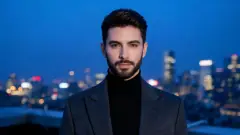
Made with MiniMax H3Rooftop at night: hard white pops at 2 s and 3 s as he bursts out laughing.Made with MiniMax H3Rust jacket in a field: daylight turns dim, the jacket flashes orange each second, he laughs and ducks. What we saw when we tested Flash Snapshot
The first example is a man on a rooftop at night: the image pulsed dark and bright, with clear hard-white pops around two and three seconds that flattened his face and jacket as he broke into a big laugh. For a second case we used a full-length daylight photo of a young blond man in a rust jacket in a field.
His run turned the daylight into a dim evening: the frame was pushed to half-length, a flash fired about every second so the jacket lit up bright orange on each pop and fell back into shadow between them, and he went from standing still to laughing, ducking his head and looking up again.
So daylight photos get converted into a night-flash look; evening photos keep more of their original scene.
How Flash Snapshot does on each model
- MiniMax H3 (210 credits · about 60 s) Both examples. Flash pops roughly every second, a laugh by the middle of the clip.$0.21 vs Runway $0.50 · 768p · 5s−58% vs Runway
- MiniMax H3 · 4s (168 credits · about 60 s) One flash fewer before the end.$0.21 vs Runway $0.50 · 768p · 5s−58% vs Runway
- Seedance 2.0 Mini · 480p (125 credits · about 3 min) Grain and hard shadows survive 480p well; the look is rough on purpose.$0.13 vs fal $0.36 · 480p · 5s−65% vs fal
The prompt behind Flash Snapshot
The scene plays like a late-night point-and-shoot snapshot in the same place: every second a harsh on-camera flash fires, each pop hitting the main subject with a burst of hard white light that blows out the highlights and throws a sharp shadow right behind them, then drops back to the dim ambient light, with a cool, grainy cast. The main subject breaks into a spontaneous laugh as the handheld camera jostles close.
Tips for a better Flash Snapshot result
- Evening or party photos keep their setting best.
- Bright clothes light up dramatically on each flash.
- Expect a closer, half-length framing even from a full-length photo.
Flash Snapshot: questions and answers
Why did my daytime photo turn dark in Flash Snapshot?
The effect imitates a night flash photo, so daylight scenes are often switched to dim evening light between flashes.
How often does the flash fire?
About once a second.
Do I laugh in the clip?
Yes, the prompt has you break into a spontaneous laugh.
Why does the snapshot frame jostle?
It jostles in close like a handheld snapshot camera.
Flash Snapshot or Cover Shot?
Flash Snapshot is a messy party flash; Cover Shot is a polished studio shoot that ends in black and white.
Related effects and tools
- Cover Shot · Studio flashes, three sharp poses, one magazine cover.
- VHS Home Video · Scan lines, tracking noise and a wave from the past.
- Party Freestyle · You break into a high-energy freestyle while the house party cheers.
- Make a party recap in the free Video Editor

 Your photo

