What the Cover Shot effect does
Cover Shot is a quick photo shoot: studio flashes fire in a steady rhythm, and with each flash you snap into a new pose, hand on hip, chin up, then a look over the shoulder. On the final flash the image freezes into a high-contrast black-and-white editorial photograph with no text.
It is a fashion moment for portfolios, outfit posts and personal brands.
How to use Cover Shot
- Show a standing editorial pose Use Add a photo for a full-length standing portrait against a plain wall or studio backdrop. Structured clothes and clear space beside the arms help the hand-on-hip and shoulder poses read.
- Keep time for the final freeze Keep MiniMax H3 with Length set to 5s in More options and press Make it move. The shorter setting leaves little time to see the black-and-white editorial frame after the poses.
- Review poses in the lit frames Check the pose changes with each flash and the final black-and-white freeze, watching hands and shoulders in the bright moments. If movement is cramped or confusing, use Change for a wider standing portrait against a simpler backdrop.
Which photos work best for Cover Shot
Works well
- Full-length photos in a studio or against a plain wall
- Strong outfits: suits, coats, statement pieces
- Standing poses with room to move
Avoid
- Busy outdoor backgrounds
- Seated photos
- Wanting color at the end; it freezes in black and white
Cover Shot examples
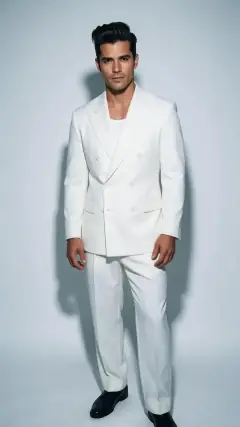
Made with MiniMax H3White double-breasted suit: three poses with the flashes, frozen in black and white at 4 s.Made with MiniMax H3Houndstooth coat and red lipstick: hands on hips, a side pose, then a black-and-white freeze. What we saw when we tested Cover Shot
The first example is a man with a slicked-back quiff in a white double-breasted suit in a grey-blue studio: he snapped into a new pose with each flash, chin up, hands on hips, a look over the shoulder, and at second four froze into a black-and-white editorial photo. The second is an older woman with a white bob, black glasses, red lipstick and a houndstooth coat in a pink studio, who struck a hands-on-hips pose by one and a half seconds, turned side-on by three and froze into a high-contrast portrait around four.
The flash frames are very dark between pops, which is why the cover image for the second example was taken from a lit moment of the clip.
Plain studio backgrounds kept the poses crisp; the black-and-white freeze makes any outfit look editorial.
How Cover Shot does on each model
- MiniMax H3 (210 credits · about 60 s) Both examples. Three poses with the flashes, the freeze around second four.$0.21 vs Runway $0.50 · 768p · 5s−58% vs Runway
- MiniMax H3 · 4s (168 credits · about 60 s) The freeze comes almost at the end, with less time on the final photo.$0.21 vs Runway $0.50 · 768p · 5s−58% vs Runway
- Seedance 2.0 Mini · 480p (125 credits · about 3 min) The black-and-white freeze survives 480p well; fast pose changes blur more.$0.13 vs fal $0.36 · 480p · 5s−65% vs fal
The prompt behind Cover Shot
Studio flashes fire in a steady rhythm. With each flash the person snaps into a new pose, hand on hip, chin up, then a look over the shoulder, three sharp poses in a row. On the final flash the image freezes and turns into a high-contrast black-and-white editorial photograph with no text. The person stays exactly as they appear in the photo.
Tips for a better Cover Shot result
- A plain wall or studio backdrop gives the cleanest flashes.
- Wear something with structure; it looks great in high-contrast black and white.
- Use the frozen final frame as a profile picture.
Cover Shot: questions and answers
How many poses does Cover Shot make?
Three: hand on hip, chin up and a look over the shoulder, one per flash.
Does it add a magazine title?
No. The final frame is a black-and-white editorial photo with no text.
Why are some frames dark?
Between flashes the studio is dim. The pops of light are part of the effect.
Can I get a color ending?
Not with this effect; it always freezes in black and white.
Cover Shot or Red Carpet?
Cover Shot is a studio shoot that freezes in black and white; Red Carpet is press flashes, confetti and a camera sweep.
Related effects and tools
- Red Carpet · Camera flashes and confetti as you own the carpet.
- Runway Walk · Strobes, a runway stride and a hard final pose.
- Outfit Check · A full turn to show the look, then a hand-on-hip finish.
- Flash Snapshot · On-camera flash pops while you break into a laugh.
- Make a polished portrait with the AI Headshot Generator

 Your photo

