


by TripoImageNew
Tripo 3D Tools
Rig, animate, retexture and convert a finished 3D model to GLB, FBX or STL
From 72 credits per run≈ $0.072· 3D Converter
What is Tripo 3D Tools?
Tripo 3D Tools is Tripo's set of four finishing steps for an existing 3D model: automatic rigging, preset animation, retexturing and file conversion. It reads GLB, binary FBX, OBJ or STL files up to 90 MB. Its rigger is the broadest we have on PopNow, with nine body plans from birds and snakes to eight-legged creatures, and a humanoid skeleton that includes individual fingers.
Best on PopNow for: Giving a generated character a full skeleton, a handful of game-ready clips and the right file for a printer or an engine, without opening a rigging program.
Good for
- A character made from a photo that has to idle, walk and jump in a browser game
- Hand and grip work that needs finger bones: the humanoid skeleton we tested had 78 joints
- One finished figure turned into a print file, an engine file and a new colourway
What Tripo 3D Tools does well
A skeleton down to the fingertips
In our tests on PopNow (November 2026), the explorer figure that Meshy T2.5 built from a photo came back from Rig with 78 joints, a separate chain for every finger, after 133 seconds. Its 30,289 faces and the original 2048-pixel colour map were left alone, so the rigged figure looks exactly like the one you uploaded until you pose it. The example turntable draws that mesh see-through with the bones in orange; we recorded it by spinning the returned GLB in a three.js viewer.
Five clips in one file
Animate rigs and moves in the same order. We asked for idle, walk, run, jump and turn on a plain grey mannequin made with Tripo H3.1, and 36 seconds later had one 1.9 MB GLB holding five named clips. The idle lasts about 15 seconds while the run cycle is just over one, so short cycles loop cleanly and the idle covers waiting time between actions.
New paint and new formats, same mesh
Retexture rebuilds the surface and keeps every face: our diving helmet from Meshy T2 stayed at 14,311 faces and gained normal and metal-roughness maps beside its new colour. Convert writes a model out again as GLB, FBX or STL. Our explorer became a 1.5 MB binary STL with all 30,289 faces in 105 seconds, ready for a slicer.
Real results from Tripo 3D Tools
Bring your own 3D model
No prompt, just the settings
Bring your own 3D model
No prompt, just the settings
Bring your own 3D model
No prompt, just the settings
Bring your own 3D model
No prompt, just the settings
Bring your own 3D model
Bring your own 3D model
No prompt, just the settings
Bring your own 3D model
No prompt, just the settings
Bring your own 3D model
Prompts that worked on Tripo 3D Tools

Glossy matte-black ceramic glaze with fine gold kintsugi seams running across the dome and around each porthole, the porthole glass left clear
Every word goes on the surface and none on the object, because the mesh already is a helmet. It sets one base glaze, then says exactly where the gold seams travel, across the dome and around each porthole, which gives the texture a route to follow instead of random cracks. The closing clause tells it what to leave alone, which matters on any object that has glass in it.
Recreate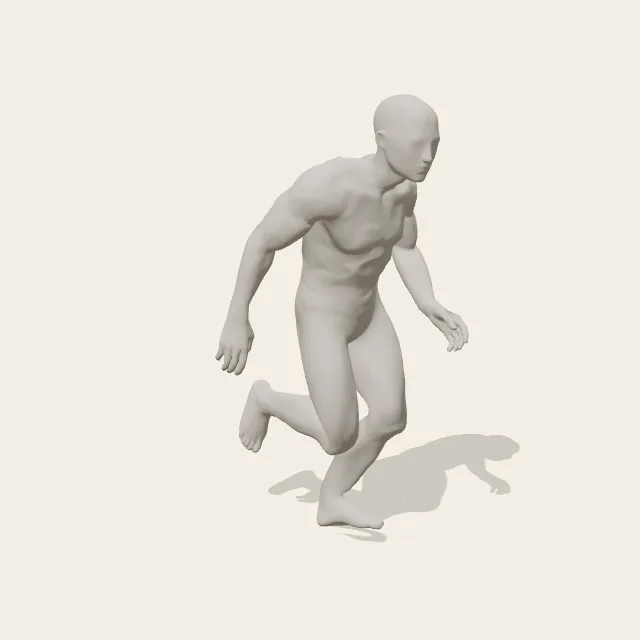
Animate has nothing to write; the order is the motion list plus one switch. All five presets went in together, so they share one skeleton and one file, and In place was on, which keeps the run cycling on the spot instead of travelling across the floor. That is what lets the clip loop in a viewer, and what a game wants when code, not the animation, moves the body.
RecreateWhat Tripo 3D Tools can do
 3D RiggingAdd a skeleton to a 3D model so it can be posed and animated.From 360 creditsper run3D AnimationApply preset motions like walking, running or dancing to a 3D character.From 504 creditsper run3D ConverterConvert a 3D model to GLB, FBX, OBJ or STL, cut its face count or switch to quads.From 72 creditsper run3D RetextureGive a 3D model new textures from a prompt or a reference image.From 120 creditsper run
Best ways to use Tripo 3D Tools on PopNow
Animate a figure made from a photo
Build the character in Image to 3D, download the GLB and bring it here for bones and clips. Ask the generator for a standing A-pose so the rigger has space between arms, legs and torso.
OpenShow a product in new finishes
Retexture one product model into a few materials, then upload each GLB to 3D Product Page so visitors can turn the variants on the launch page.
OpenPrint the pose
Convert the figure to STL with the flat-bottom option and send it to your slicer. The file holds shape only, so colour has to come from paint or a multi-material printer.
How to prompt Tripo 3D Tools
- Feed it a figure standing in an A-pose, legs apart and arms clear of the body. Our explorer was generated that way and rigged with no clean-up.
- Put every motion the character needs into one Animate order. The base fee already covers the first clip, so five clips together cost a little over twice a single one instead of five times.
- For Retexture, spend the words on materials and where they sit. Say what must stay untouched, such as glass, a label or a face.
Settings worth knowing
Formatglb · fbx- File type of the result.
How it compares
Meshy 3D Tools also rigs and animates, rigs faster in our tests (33 seconds against 133) and costs less per rig. Pick Tripo for finger bones, creature skeletons, engine bone names, FBX files, retexturing and format conversion. Pick Meshy when you need a deep motion library on a plain humanoid or four-legged body.
Where Tripo 3D Tools falls short
The motion list is short: 16 presets in total, of which 11 suit a two-legged character. There are no dances, waves or other gestures.
- Only 16 motions exist, and 11 of them are for two-legged bodies. Dances, waves and other gestures are not on the list, and you cannot describe a custom move.
- Animate takes at most five clips per order; a bigger move set needs several orders.
- Rig was the slowest step in our tests at 133 seconds, and retexturing the helmet took 155, so plan on a wait of two to three minutes.
- STL carries geometry only. Colour, bones and motion are dropped when you convert to it.
How to use Tripo 3D Tools in three steps
- Open Tripo 3D Tools, choose Rig, Animate, Retexture or Convert, and upload a GLB, FBX, OBJ or STL of up to 90 MB.
- Pick the body type and motions, describe the new surface, or choose the target format and any clean-up options.
- Download the file and turn it in a viewer: check elbows and knees on a rig, seams on a new texture, and size and facing on an export.
Questions about Tripo 3D Tools
How much does Tripo 3D Tools cost?
On PopNow, Tripo 3D Tools starts at 72 credits ($0.072) per run.
Can Tripo 3D Tools make a 3D model from a picture?
No. It starts from a model you already have. Make one first in Image to 3D or with a model such as Meshy T2.5 or Tripo H3.1, then rig, animate, repaint or convert it here.
How many bones does the Tripo rig add?
On our standing explorer figure, 78, with separate bones for each finger. Animals and other body plans get their own layouts.
Which motions can Tripo animate?
Idle, walk, run, dive, climb, jump, slash, shoot, hurt, fall and turn for humanoids, plus one walking or marching cycle each for four-legged, six-legged, eight-legged, snake-like and swimming bodies. Up to five per order.
How much do the four tools cost?
Rig is 360 credits. Animate starts at 504 credits with the first motion included, and each extra motion adds a fixed amount. Retexture starts at 120 credits, and a plain STL conversion is 72 credits.
Do I have to rig a model before animating it?
No. Animate adds the skeleton itself. Use Rig alone when you want bones for posing or for your own keyframes.
Can I 3D print what comes out?
Yes. Convert to STL, and turn on the flat-bottom and pivot-to-base options if the figure has to stand on a print bed. The STL has no colour.
Tripo 3D Tools or Meshy 3D Tools?
Tripo for finger bones, creature skeletons, bone names your engine already knows, FBX files, retexturing and conversion. Meshy, whose rig is 240 credits, for its far larger motion library and up to ten clips in one file.
Make something with Tripo 3D Tools
Bring the model you already like, and let Tripo 3D Tools give it bones, a few moves and the file your next tool expects.