


by MeshyImageNew
Meshy 7
Repaint a 3D model from a prompt or an image, with PBR maps up to 8K
From 480 credits per run≈ $0.48· 2K
What is Meshy 7?
Meshy 7 is Meshy's retexturing model, released in August 2026. It keeps the geometry of an existing GLB, FBX, OBJ or STL and paints a new surface from a written description or a style picture. It can add full PBR maps, metallic, roughness and normal, at 2K, 4K or 8K.
Best on PopNow for: Trying several material directions on one finished mesh for a product render, a game prop or an AR preview, when the surface has to respond to light.
Good for
- Material variants of one product model: lacquer, leather, oxidised metal, woven cane
- Game props that have to react to light in an engine, using the PBR maps at no extra cost
- Close-up renders that need 8K texture detail
What Meshy 7 does well
Write the finish, keep the form
In our tests on PopNow (November 2026), two meshes went through Meshy 7 at 2K with PBR on. The diving helmet from Meshy T2 kept all 14,311 faces, and the armchair from Meshy T2.5 went from 31,244 to 31,236, eight fewer and invisible to the eye; only the surface changed. Both jobs were done in about a minute, 56 and 62 seconds.
Light-aware maps included
With PBR on, each file carried a 2048-pixel colour map plus a metal-roughness map and a normal map. In a real-time viewer the copper and the cane can then catch light differently, instead of every material sharing one painted-on sheen. The example clips are turntables we recorded by spinning each returned GLB in a three.js viewer, with textures shown as delivered.
Three resolutions, one decision
2K and 4K cost the same, 480 credits, so 4K is the sensible pick for anything seen up close. 8K costs 720 credits and earns its place on hero renders and large stills where the camera gets very near the surface.
Real results from Meshy 7
Bring your own 3D model
Bring your own 3D model
Prompts that worked on Meshy 7
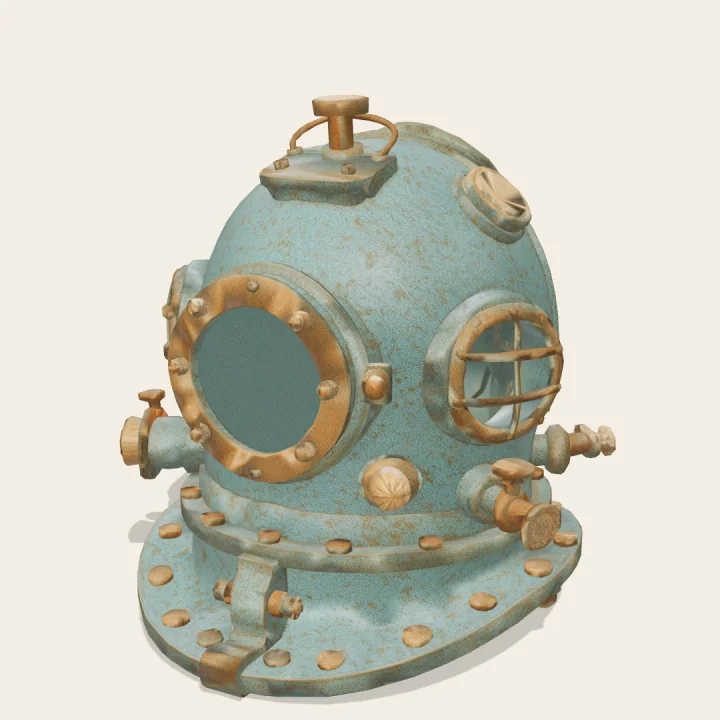
Sea-worn oxidised copper with blue-green verdigris, clusters of small white barnacles and a few orange coral growths around the collar, salt crust in the crevices
It moves from the whole surface to the details: first the overall oxidised copper, then growths placed at one spot, the collar, then salt in the crevices. Giving the decay a location makes it read like years at sea rather than a uniform tint. The colours are named outright, so the palette is decided by the writer, not guessed by the model.
Recreate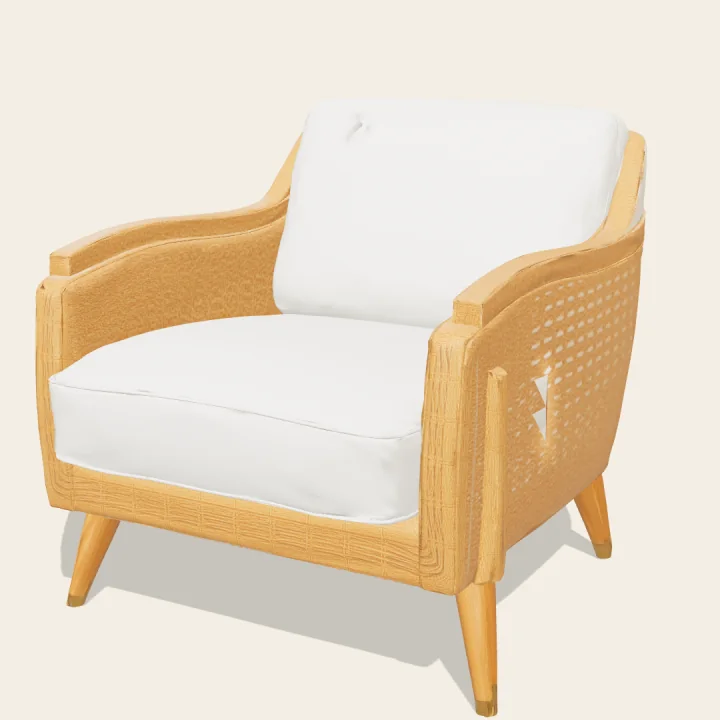
Woven natural rattan frame with visible cane weave, a cream boucle seat and back cushion, honey-coloured wooden legs with brass caps
The brief follows the parts the chair already has, frame, cushion, legs and caps, and gives each one a material. The source mesh was modelled with distinct arms, seat and tapered legs, so every phrase had somewhere to land. Keeping the brass caps from the original design is a small choice that makes the new version feel like the same chair in a new fabric.
RecreateWhat Meshy 7 can do
Best ways to use Meshy 7 on PopNow
Show a product in several materials
Repaint one product mesh in three or four finishes, then upload each GLB to 3D Product Page so visitors can compare them on the launch page.
OpenDress a set before a shoot
Drop a retextured GLB into 3D Set Builder as a prop, then frame it with the set's cameras and lights before rendering keyframes.
OpenStart from a photo or a sentence
No mesh yet? Make one in Image to 3D, and come to Meshy 7 when the first texture is not the finish you had in mind.
OpenHow to prompt Meshy 7
- Name the material of each part, frame, cushion, legs, in the order the eye travels over the object. The mesh already tells Meshy 7 what the object is.
- Switch PBR on. It starts off and costs nothing extra.
- Use either words or a picture. If both are sent, the words win and the picture is ignored.
How it compares
Meshy N1 also repaints a mesh, but it takes pictures only, works best when they show the object itself, and returns a single colour map. Choose Meshy 7 to invent a finish in words, or whenever you need PBR maps or 8K textures.
Where Meshy 7 falls short
With PBR on, both of our test files more than doubled in size, landing near 10 MB each.
- PBR is off by default. Forget the switch and you get a colour map only.
- Words and a picture are alternatives: the picture is used only when there is no text prompt, and the prompt stops at 600 characters.
- Retexturing changes paint, not shape. A missing handle or a soft edge in the mesh stays exactly as it was.
- 8K costs more and makes heavier files; our 2K results with PBR were already around 10 MB.
How to use Meshy 7 in three steps
- Open Meshy 7 and upload the GLB, FBX, OBJ or STL you want to repaint, up to 90 MB.
- Describe the new finish part by part, or upload one style image instead; switch on PBR and choose 2K, 4K or 8K.
- Turn the result under a moving light: check the metal, the seams at the back and any part your description skipped.
Questions about Meshy 7
Does Meshy 7 change the shape of my model?
No. The helmet kept every one of its 14,311 faces and the armchair lost 8 of 31,244, too few to see. Only the textures are replaced.
Can I use a picture instead of words?
Yes, one style image. If you also write a prompt, the prompt is used and the picture is ignored.
Do PBR maps cost extra?
No. They are off by default; switch them on at the same price.
How much does Meshy 7 cost?
480 credits with 2K or 4K maps, and 720 credits with 8K maps.
Should I keep the original UVs?
Usually, yes. It is the default and keeps any texture layout you already rely on. Turn it off when a generated mesh has messy UVs and you would rather let Meshy 7 unwrap it again.
Meshy 7 or Meshy N1?
Meshy 7 when you are inventing a finish in words or need PBR and 8K. Meshy N1, at 480 credits, when you have photos of the real object and want its look back, or one picture whose colours you want to borrow.
What file do I get back?
A GLB with the maps built in. Our 2K results with PBR were 9.8 and 10.2 MB.
Make something with Meshy 7
Keep the model you built, and describe the surface you actually want on it.