


by MeshyImageNew
Meshy 3D Tools
Auto-rig a character and bake up to ten library motions into one GLB
From 240 credits per run≈ $0.24· 3D Rigging
What is Meshy 3D Tools?
Meshy 3D Tools is Meshy's rigging and animation service for models you already have. Rig adds a humanoid or four-legged skeleton and scales the model to a height you choose. Animate takes motions from Meshy's library of 804 clips by number and bakes up to ten of them into a single GLB, rigging the model along the way.
Best on PopNow for: Handing a character or an animal a long list of moves at once, from idle loops and walks to combos and dances, in one file a web viewer or game engine can play.
Good for
- Characters that need a wide move set: dances, fight combos, waves, parkour and everyday actions
- Animals: the library has 127 four-legged motions for dogs, horses, cats, wolves, deer and more
- A lean humanoid skeleton without finger bones, close to what game engines expect
What Meshy 3D Tools does well
A compact skeleton, sized in metres
Rigging the explorer figure from Meshy T2.5 took 33 seconds in our tests on PopNow (November 2026). It came back with 24 joints and no finger bones, scaled to the 1.7 metres we entered, with its colour texture untouched. That joint count is in the range engines commonly use for humanoids, so mapping the skeleton onto other animation is straightforward.
A library instead of a preset list
Animate draws on 804 motions: 677 for people, sorted into walking and running, daily actions, body movements, fighting and dancing, plus 127 for animals. Each has a number; 0 is a plain idle and 92 a double combo attack. Every motion lands in the GLB under its library name, so the clips are easy to tell apart in any viewer.
Animals get their own moves
The four-legged section covers leopards, horses, wolves, dogs, rabbits, fawns, cats, cattle, foxes, deer and turtles. Our grey dog model received a walk, a run and a tail wag in one order, 47 seconds from start to finish, on a 46-joint four-legged skeleton. The dog clips on this page were recorded by playing the returned GLB in a three.js viewer with a plain clay material.
Real results from Meshy 3D Tools
No prompt, just the settings
Bring your own 3D model
No prompt, just the settings
Bring your own 3D model
No prompt, just the settings
Bring your own 3D model
No prompt, just the settings
Bring your own 3D model
Prompts that worked on Meshy 3D Tools
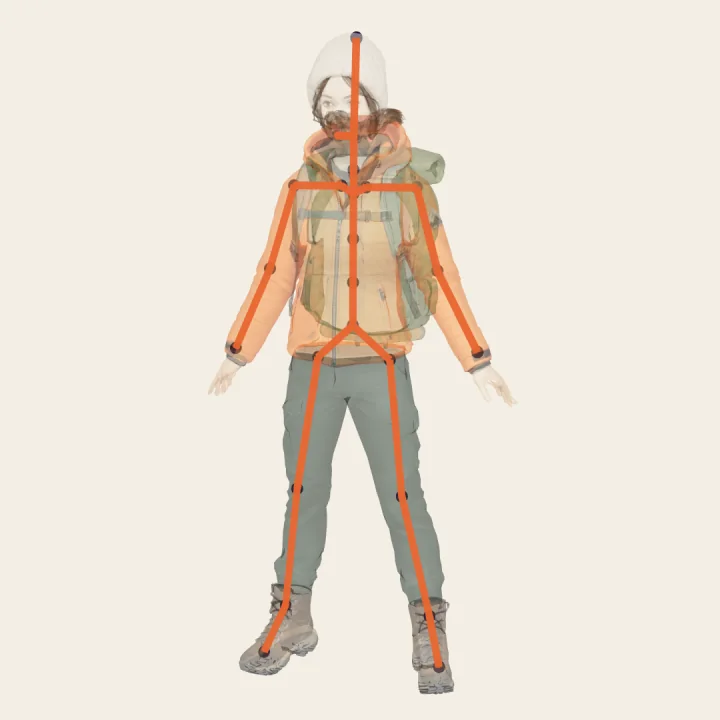
There is no text to write for a rig, so the source model does the work. The figure was generated in a clean A-pose, legs apart and arms held away from the jacket, which gives every limb room for its own bones. The height was set to 1.7 metres, a believable adult, which is why the rigged figure drops into a scene at the right size without rescaling.
Recreate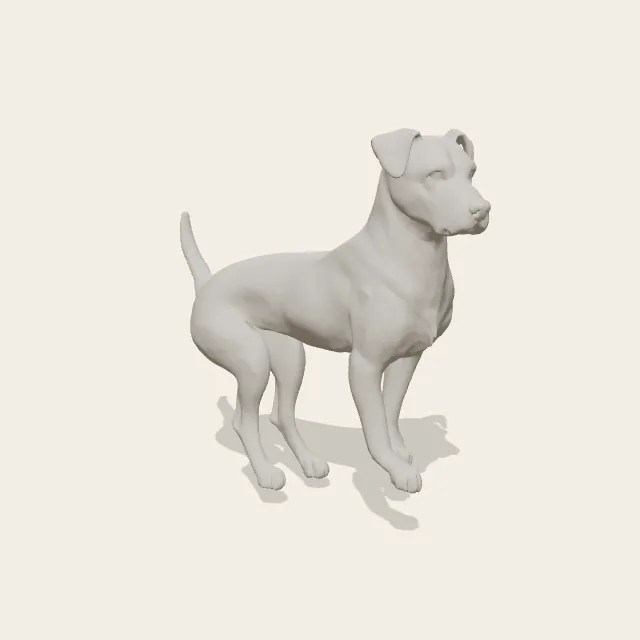
The order combined three numbers from the dog section of the library, a walk, a run and a tail wag, with the four-legged skeleton selected. Choosing moves made for that same animal matches the motion to the body, and batching three in one order means one rig and one file. The run shown here is a very short cycle, under half a second, so it is played on loop.
RecreateWhat Meshy 3D Tools can do

Best ways to use Meshy 3D Tools on PopNow
Turn a photo figure into a playable character
Make the mesh in Image to 3D in a standing A-pose, then pick an idle, a walk and an attack or two from the library. Ten clips fit in one order, enough for a small game prototype.
OpenGive a mascot a reaction pack
A big wave, a heart gesture, a short dance and a cheer: humanoid gestures and dances make a set of reactions for a brand mascot on a website or in a live overlay.
How to prompt Meshy 3D Tools
- Look at the legs before you order a long list. On our untextured mannequin, whose legs were thin and close together, the automatic skin joined them and they moved as one piece.
- Enter the character's real height in metres. The skeleton and the model are scaled to it, which keeps several characters in proportion when they share a scene.
- Pick motions made for the body you rigged: humanoid numbers for a person, the animal's own section for a four-legged model.
How it compares
Tripo 3D Tools builds a denser 78-joint skeleton with fingers, covers nine body plans, renames bones for engines and writes FBX, but offers 16 preset motions, five at a time. Meshy has 804 motions, takes ten per order, rigged our figure about four times faster and sticks to humanoids and four-legged animals.
Where Meshy 3D Tools falls short
Results are GLB only. If a desktop tool needs FBX, convert the file afterwards, for example with Tripo 3D Tools.
- On our untextured grey mannequin, whose legs were thin and close together, the automatic skin joined both legs and they moved as a single piece while walking, so we did not use it as an example. Separate the legs in the source model, or check the skin with one motion before ordering ten.
- Only two body plans are available, humanoid and four-legged. Birds, snakes, insects and fish need a different rigger.
- The humanoid skeleton has no finger bones, so hands move only as part of the whole motion.
- Files come back as GLB only, and motions are picked by number from the library, at most ten per order.
How to use Meshy 3D Tools in three steps
- Open Meshy 3D Tools, choose Rig or Animate, and upload a GLB, GLTF, FBX, OBJ or STL character of up to 90 MB.
- Set humanoid or four-legged, adjust the height if needed, and for Animate add up to ten motions from the library.
- Download the GLB, play each clip and watch knees, elbows and tails for stretched or stuck-together surfaces.
Questions about Meshy 3D Tools
How much does Meshy 3D Tools cost?
On PopNow, Meshy 3D Tools starts at 240 credits ($0.24) per run.
How many joints does the Meshy rig have?
Our humanoid came back with 24 joints and no fingers. A four-legged dog got 46.
How do I choose Meshy motions?
Every library motion has a number. Browse by group (walking and running, daily actions, body movements, fighting, dancing, animals) and add the ones you want. Each clip keeps its library name inside the GLB.
How many motions can I add, and what does it cost?
Up to ten per order. Animate starts at 384 credits with the first motion included, and every extra motion adds a fixed fee. Rig on its own is 240 credits.
Can Meshy animate animals?
Four-legged ones, yes. The library has 127 animal motions across 11 species, from leopards and horses to rabbits and turtles.
Why are my character's legs stuck together?
The automatic skin can bind two limbs that sit very close. It happened on our thin-legged mannequin. Widen the stance in the source model and rig again.
Do I need to rig before animating?
No. Animate rigs the model itself. Rig alone is for posing or your own keyframes, and its file includes one short default clip.
Meshy 3D Tools or Tripo 3D Tools?
Meshy for a big motion library, ten clips per order and quick turnaround. Tripo, whose rig is 360 credits, for finger bones, creature skeletons, FBX output, retexturing and format conversion.
Make something with Meshy 3D Tools
Rig once, choose up to ten moves from the library, and watch the whole set play from a single file.