


by PopNowVideo
Talking Avatar Flash
A portrait speaks your recording at 480p or 720p, up to 2 minutes
- Up to 720p
From 162 credits per second of video≈ $0.16· 480p
What is Talking Avatar Flash?
Talking Avatar Flash is the higher tier of PopNow's own talking-photo tools. It takes a JPEG, PNG or WebP portrait plus up to two minutes of recorded speech and returns a 480p or 720p clip in which the face follows the voice while the prompt shapes the performance. Where the basic Talking Avatar only nudges mood at a small size, Flash takes stage direction such as look up, nod or lean in, and acts it out.
Best on PopNow for: Presenter openers, character monologues and vertical social clips where the way someone moves matters as much as what they say, and where 720p is sharp enough for a phone screen.
What Talking Avatar Flash does well
Direction, not just lip shapes
Write what the head and eyes should do while the line plays: a glance at something off camera, a slow nod, a smile on one word. In our glacier test the requested look at the sky arrived as a full upward tilt of the head, a clearly acted beat rather than a flicker of the eyes.
Two output heights, one price ratio
480p runs at 162 credits per second and 720p, the default, at 324 credits, exactly double. Work out the direction at 480p, then switch up only for the take you intend to publish.
Two minutes in one go
A single recording can run to 120 seconds, twice the basic tool's ceiling. That covers most course welcomes, onboarding messages and product walk-throughs without splicing separate renders, so the head never jumps back to its starting pose mid-speech.
Real results from Talking Avatar Flash
 Input
Bring your own image
Prompts that worked on Talking Avatar Flash
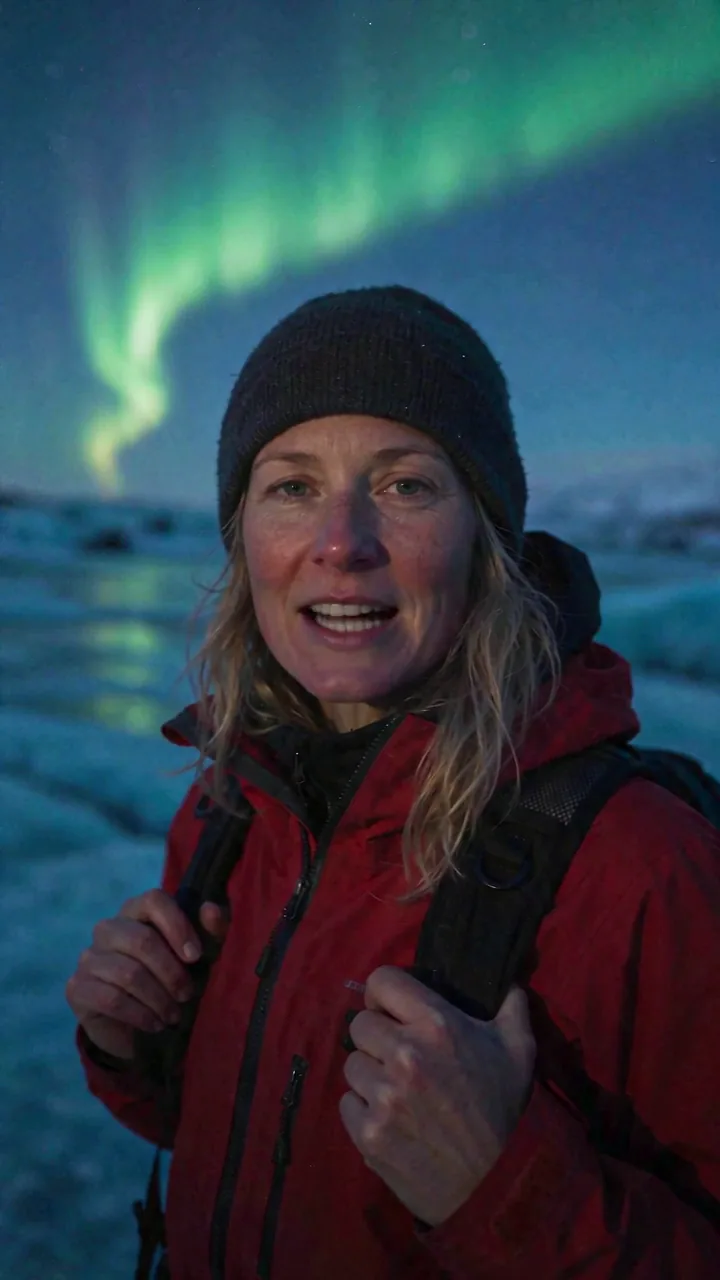
She speaks warmly and quietly to the camera like she is sharing a secret, glancing up at the sky once, the wind moving loose strands of her hair.
This run received the full performance sentence: speaking warmly and quietly like sharing a secret, glancing up at the sky once, wind moving loose strands of hair. Flash gave a bigger, more acted read than the basic Talking Avatar or InfiniteTalk produced from the same portrait and 6.5-second line, and the upward glance was large and deliberate. The 720×1280 result ran 6.7 seconds, about 0.2 seconds past the audio, so the end needed a small trim. At 720p it was also one of the most expensive takes in our whole talking-photo round.
RecreateWhat Talking Avatar Flash can do

Best ways to use Talking Avatar Flash on PopNow
A presenter clip with stage direction
In the talking avatar app, choose Flash, add the portrait and the recording, and write one or two movement cues that the audio already suggests, such as a look up on a question or a nod on a yes.
OpenA speaking close-up inside a short film
When a character needs to deliver a line on camera, render the close-up from their still with Flash and cut it into the sequence you are building in the Movie app.
OpenCharacters that react
Generated characters with a clear face respond to cues like a raised eyebrow or a turn toward the viewer, which helps a mascot or story character feel present rather than recited.
OpenSettings worth knowing
Resolution480p · 720p- Choose an available output size.
Image- The picture to start from.
Audio- The voice or music track to use.
Similar models


Where Talking Avatar Flash falls short
- It is among the priciest talking-photo options on PopNow at 720p, and billing counts every started second with a four-second minimum. Our 6.5-second line was billed as seven seconds (2,268 credits), and a two-second line is still charged as four.
- Output stops at 720p, and there is neither a mask nor a seed field. A group photo cannot be told who speaks, so crop to one face first, and two prompt variations cannot be compared from the same random start.
- Direction is interpreted generously: ask for one glance and you may get a full head tilt. For a calm script, write smaller cues such as eyes lift briefly. The returned file can also run a fraction of a second past the audio, so check the ending.
How to use Talking Avatar Flash in three steps
- Pick a well-lit portrait showing one face. Crop group pictures down to the speaker, because Flash has no way to mark who talks.
- Upload the final recording, up to 120 seconds, and write a short performance note: the expression, plus one or two head or eye movements tied to moments in the line.
- Render at 480p to judge the direction, then switch to 720p for the take you keep; the button shows the price at each height.
Questions about Talking Avatar Flash
How much does Talking Avatar Flash cost?
It is billed per started second of audio with a four-second minimum: 162 credits per second at 480p and 324 credits at 720p. There is no free tier, and the total appears on the button before you generate.
Talking Avatar Flash vs Talking Avatar: what is the difference?
Flash outputs 480p or 720p, accepts two minutes of audio and acts out movement cues. The basic Talking Avatar outputs about 352×640 for a vertical photo, caps at 60 seconds, only adjusts mood, but adds a speaker mask and a seed and costs 18 credits per second.
How long can a Talking Avatar Flash video be?
Up to 120 seconds of speech in a single clip. The video follows the recording's length; ours came back about 0.2 seconds longer than the audio.
Does Talking Avatar Flash support 1080p?
No, the choices are 480p and 720p. For 1080p talking photos, look at OmniHuman 1.5 or HeyGen Avatar 6 in the model list; they are priced and behave differently, so test one line first.
Can the prompt change the words she says?
No. Words, pauses and timing all come from the recording. The prompt only directs how the face and head behave, so fix wording by re-recording the audio.
Can I animate a group photo with Flash?
Not with a chosen speaker, because there is no mask input. Crop to the person who talks, or use Talking Avatar or InfiniteTalk, which both accept a white-on-black speaker mask.
Make something with Talking Avatar Flash
When a still has to perform rather than just mouth the words, name the one movement that matters and let Flash act it out. Decide at 480p, publish at 720p.