


by IdeogramImageNew
Ideogram 4.6
Native 4K poster lettering, transparent cutouts and precision edits
- Up to 4K
- Up to 3 reference images
- 7 aspect ratios
From 10 credits per image≈ $0.01· Create Image · 1K
What is Ideogram 4.6?
Ideogram 4.6 is Ideogram's image model for designs that carry words, released on 20 November 2026. It generates at 1K, 2K or native 4K in seven ratios with four quality levels and can output a transparent background. Its edit mode works on an uploaded design with an optional mask, up to three references and a high-precision setting that keeps geometry in place.
Best on PopNow for: Gig posters, menus, product labels and wordmarks where the copy must be letter-perfect, plus quick text corrections on a design you already like.
Good for
- Event posters and flyers where every line of copy has to be spelled exactly
- Wordmarks and labels on a transparent background, ready to drop onto packaging
- Updating a date, a price or a tagline on a finished design without redrawing it
What Ideogram 4.6 does well
Four lines of copy, first time
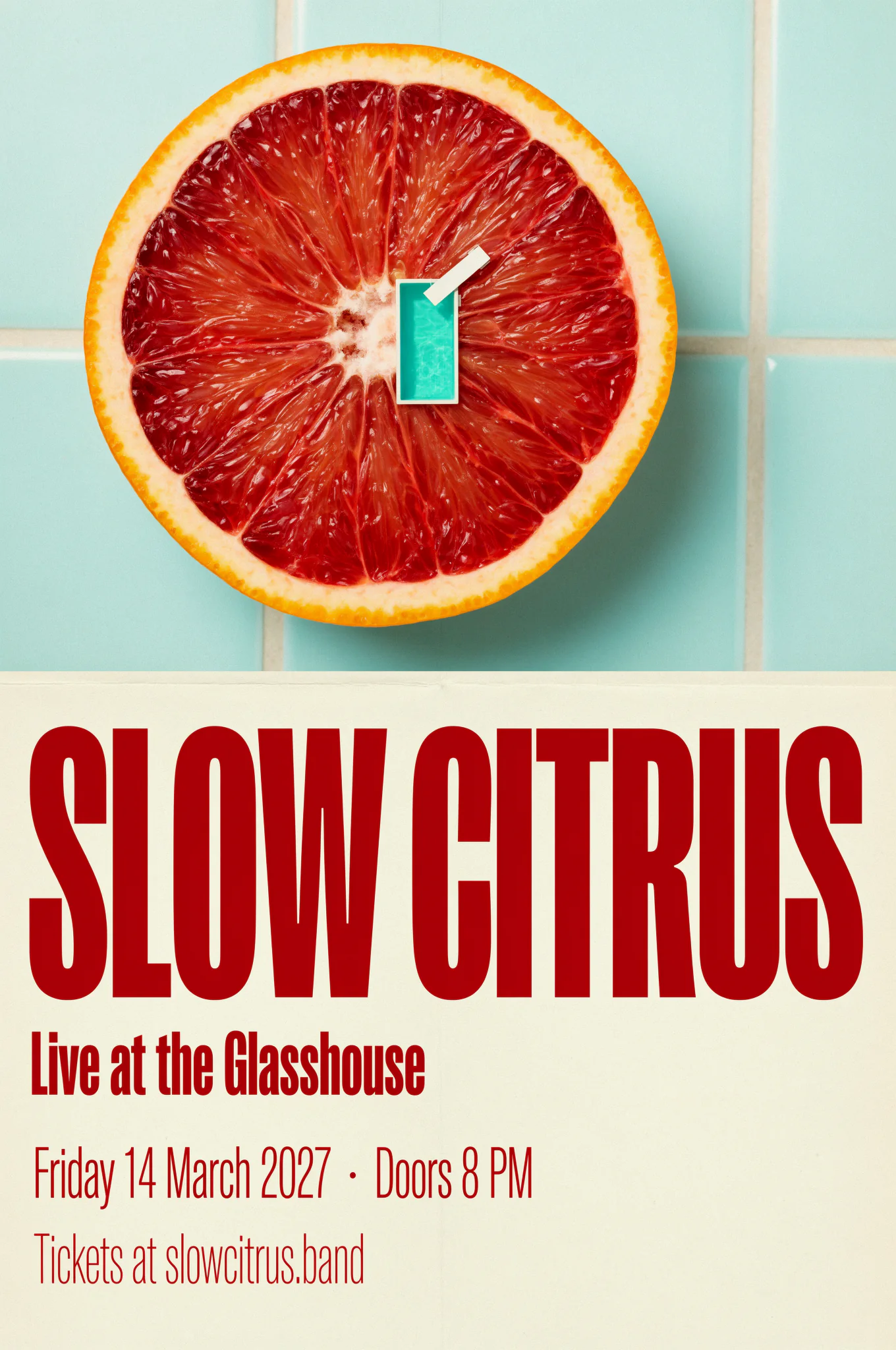
In our tests on PopNow (November 2026), a Swiss-style concert poster at medium quality and 4K came back at 2720 × 4096 in 33 seconds with all four requested lines correct, including a middle dot in the date and a web address. Type sizes stepped down in a clear hierarchy on a left-aligned grid, and the photograph in the upper half never bled into the type below.
Real transparency
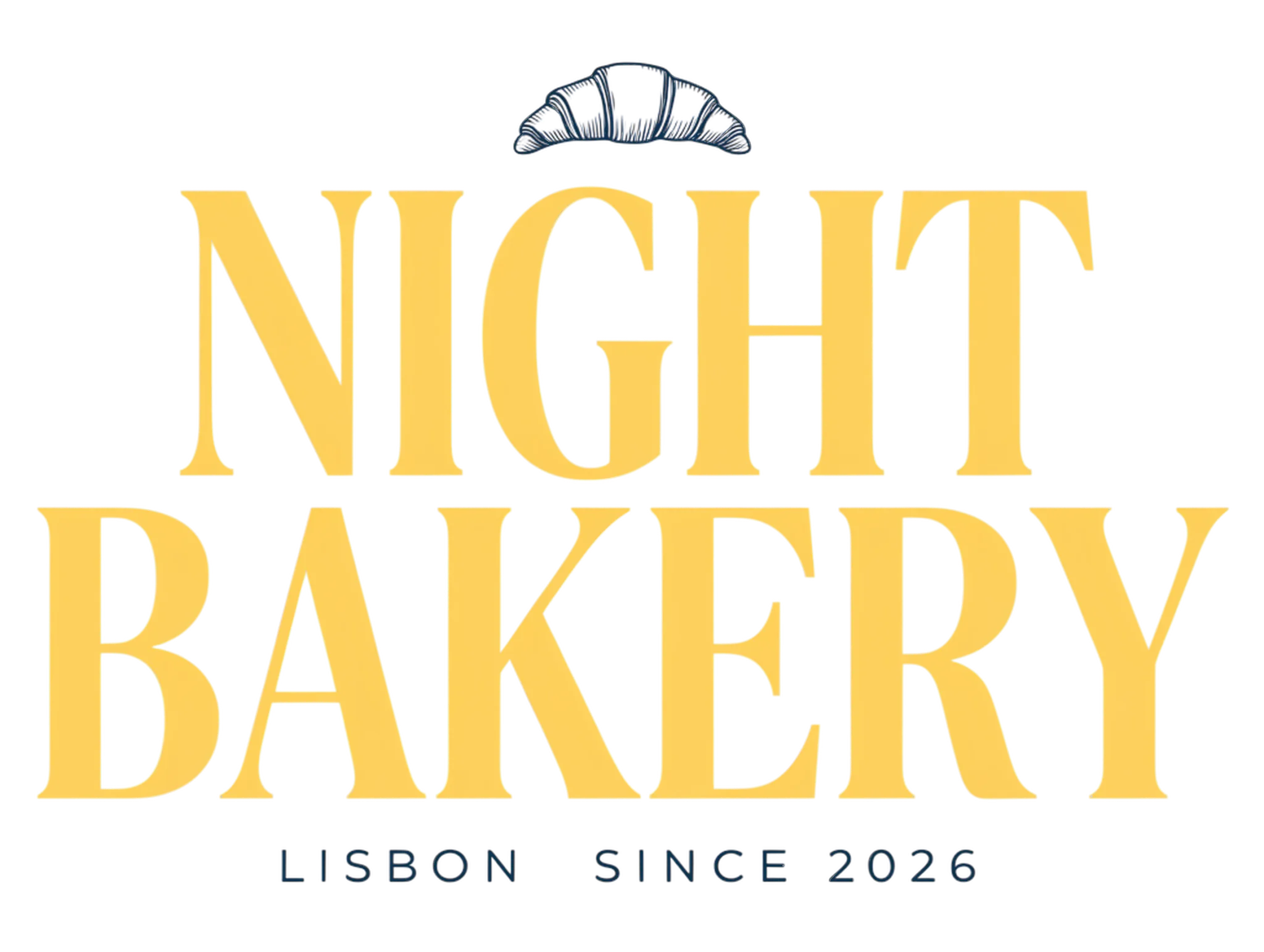
With the background set to transparent, a bakery wordmark arrived as a genuine RGBA file with a full range of alpha values, so the engraved croissant and tall serif letters can be placed on any colour straight away. That removes a background-removal pass from logo, sticker and packaging work.
Fix the copy, keep the poster
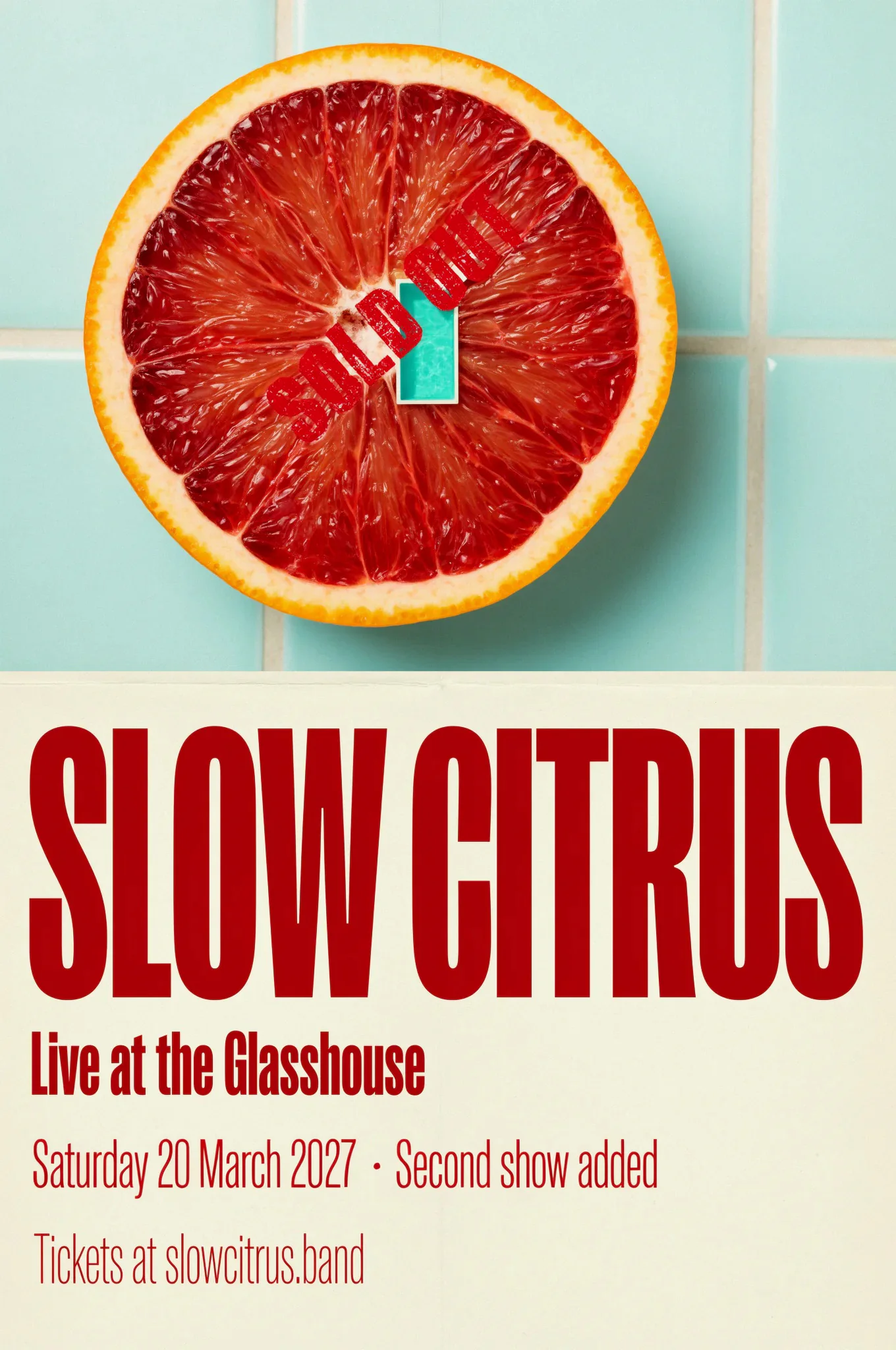
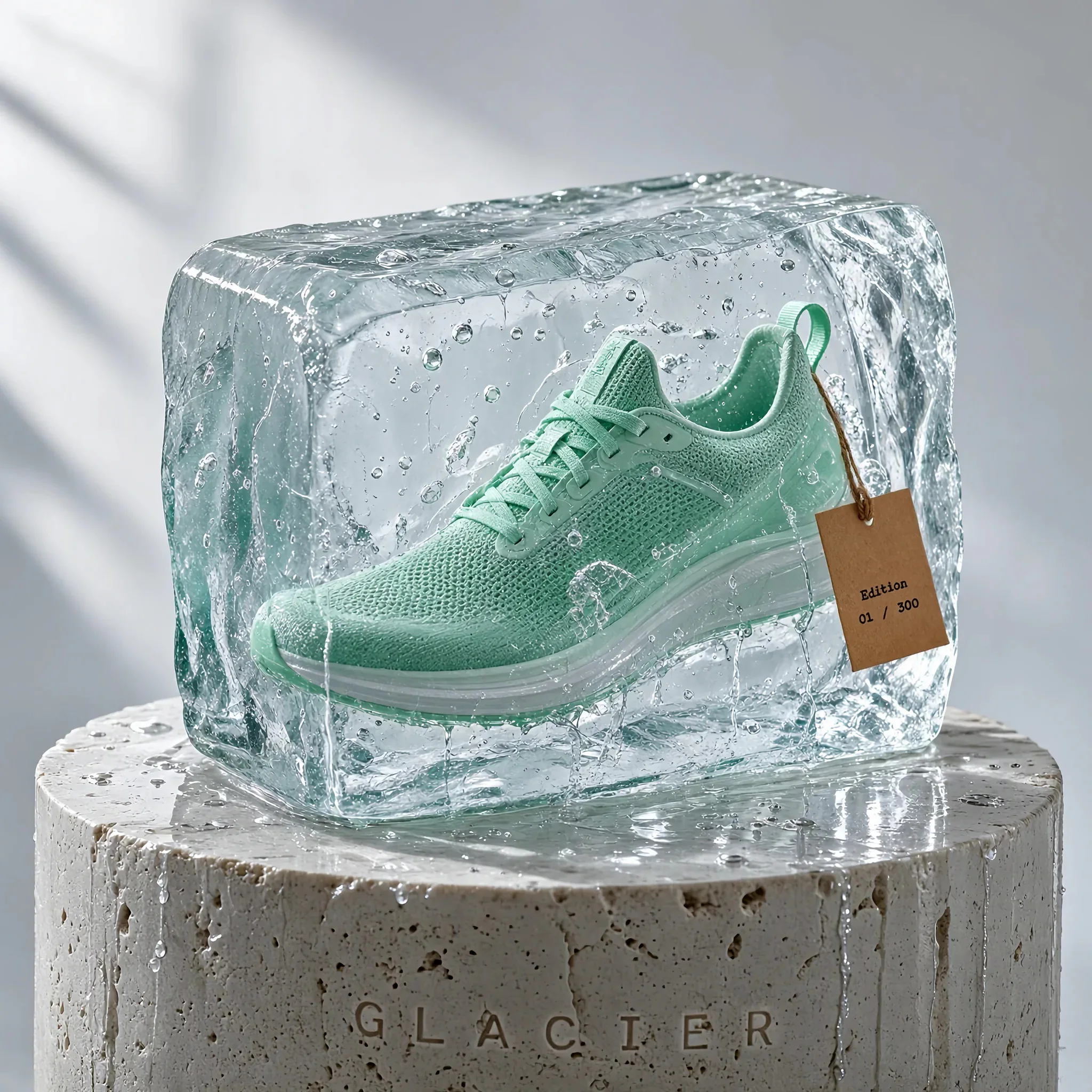
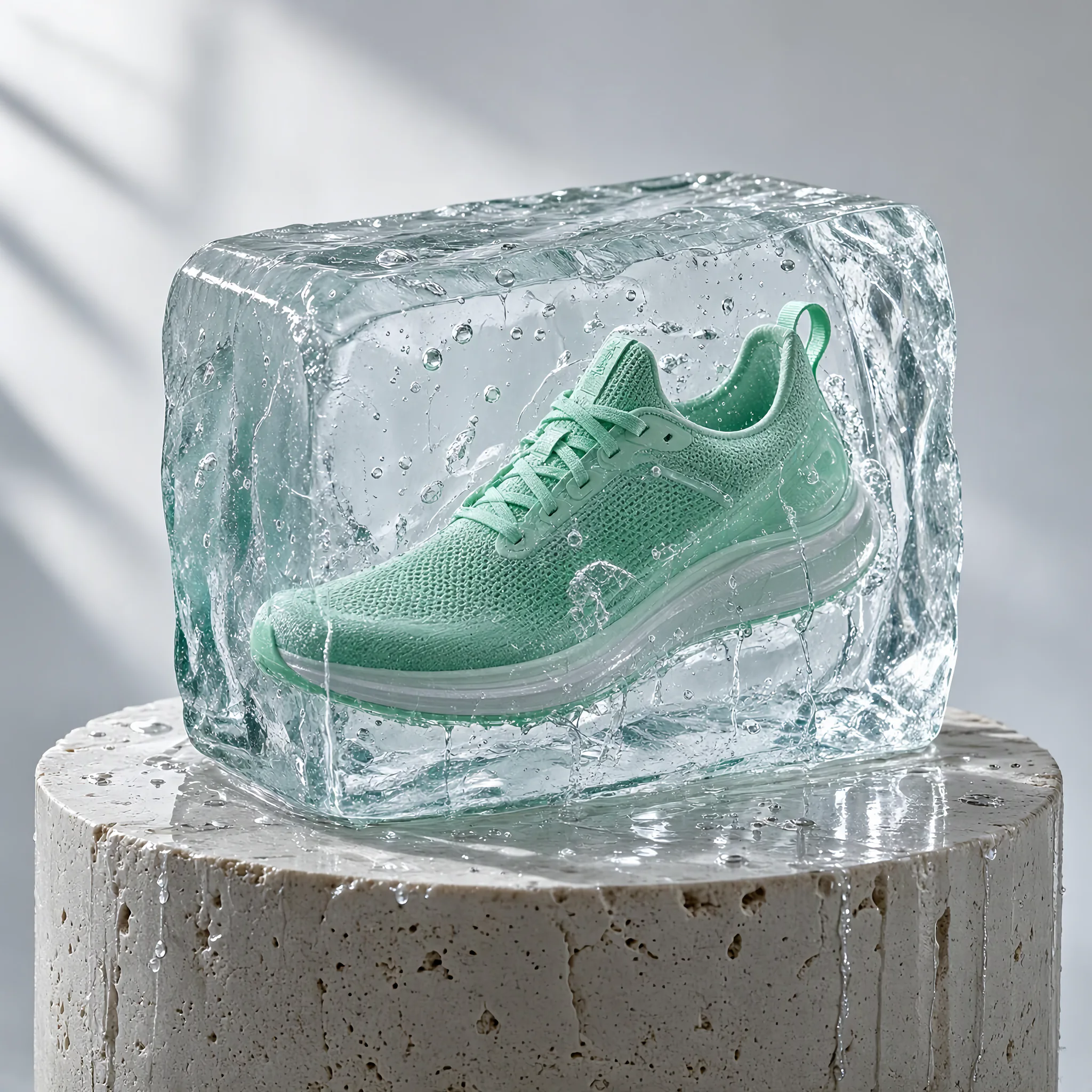
High edit precision changed only the date line of the finished poster, in the same red typeface and position, word for word. On a product photo it engraved GLACIER into a stone plinth so the letters followed the pores of the travertine, and hung a kraft tag reading Edition 01 / 300, both spelled right.
Real results from Ideogram 4.6
 Input
Bring your own image
 Input
Bring your own image
Prompts that worked on Ideogram 4.6
Swiss-style concert poster. Upper half: a photograph of a halved blood orange lying on pale blue tiles, with a tiny turquoise swimming pool and a miniature diving board set into its flesh. Lower half on cream paper, bold condensed sans-serif lettering in deep red: the headline "SLOW CITRUS", below it "Live at the Glasshouse", then "Friday 14 March 2027 · Doors 8 PM", and a small line at the bottom "Tickets at slowcitrus.band". Strict grid, generous margins, subtle paper grain and risograph texture.
The prompt divides the sheet before filling it: photograph in the upper half, lettering in the lower half. Each line of copy is quoted and listed in the order it should be read, with typeface style and colour stated once for the whole block. Ending on grid, margins and paper texture supplies the layout rules a designer would set instead of leaving composition to chance.
RecreateKeep the whole poster design exactly as it is. Change only the date line to "Saturday 20 March 2027 · Second show added" in the same red typeface, and stamp the words "SOLD OUT" diagonally across the orange in red rubber-stamp ink.
It starts by freezing the whole design, then names one line to replace and repeats the typeface condition so the new date matches the old one exactly. The stamp request gave no size, only a direction across the orange, which is why it landed small over the pool. Placement words are read literally, so add dimensions for anything that must dominate.
RecreateWhat Ideogram 4.6 can do


Best ways to use Ideogram 4.6 on PopNow
Posters with real copy
For event posters, start from the poster app's layouts, or pick Ideogram 4.6 in the image workspace when you want to write every line yourself.
OpenLogos and stickers with alpha
When you need a whole set of cutouts rather than one mark, the transparent PNG generator is built for sticker packs, clipart and icon sets with alpha.
OpenType on product photos
Make the product shot in a photographic model, then open it in Ideogram 4.6 edit mode to engrave a name or add a tag, as we did with the frozen shoe from MAI-Image-2.7 Flash.
OpenHow to prompt Ideogram 4.6
- Put every piece of copy in quotation marks and list the lines in reading order, from the headline down to the small print.
- Keep lettering on straight lines. A circular badge test spelled NIGHT as NIGHHT, while the same words set straight came out right.
- When an edit adds something new, give it a size and a position, such as a large stamp across the top third. Without that it tends to come out small.
Settings worth knowing
Resolution1K · 2K · 4K- Choose an available output size.
Aspect ratio1:1 · 4:3 · 3:4 · 3:2 +3- The shape of the frame: wide, square or tall.
Qualityvery_low · low · medium · high- Choose one of this model’s quality settings.
Reference images≤ 3- Pictures of the people, outfits or places the result should keep.
Image- The picture to start from.
Mask- Paint over the area that should change.
Prompt boost- Lets the model add detail to a short prompt.
Backgroundopaque · transparent- Keep, remove or replace the background.
How it compares
Ideogram 4.5 tops out at 2K and has no transparent background option. Ideogram 4.6 adds native 4K and RGBA output, so choose it for print posters and logo cutouts. Ideogram 4.5 still covers 1K and 2K work, and its edits accept one more reference image.


Where Ideogram 4.6 falls short
Small punctuation can slip: our bakery wordmark dropped the middle dot from LISBON · SINCE 2026. Proofread separators and symbols before a file goes to print.
- Text set along a curve is unreliable: a circular badge misspelled NIGHT as NIGHHT.
- Punctuation can go missing, such as the middle dot in a wordmark tagline.
- Elements added in an edit come out small unless you give a size and position, and a high-precision edit can still push the framing in slightly, as our shoe photo showed.
How to use Ideogram 4.6 in three steps
- Choose Ideogram 4.6 under Image and set quality, resolution and, for logos, a transparent background.
- Describe the layout first, then write each line of copy in quotes in reading order.
- Proofread the result, then fix any single line in edit mode with high precision instead of regenerating the design.
Questions about Ideogram 4.6
How much does Ideogram 4.6 cost?
On PopNow, Ideogram 4.6 starts at 10 credits ($0.01) per image. Larger sizes cost more: 1K 10 · 2K 10 · 4K 72.
What sizes can Ideogram 4.6 make?
Ideogram 4.6 renders up to 4K in 7 aspect ratios, and edits with up to 3 reference images.
Can Ideogram 4.6 make a PNG with a transparent background?
Yes. Set the background to transparent when creating an image. Our wordmark came back as a true RGBA file, ready to place on packaging mockups.
Does Ideogram 4.6 really render in 4K?
Yes, natively. Our medium-quality 4K poster at 2:3 measured 2720 × 4096 and took 33 seconds.
Which quality level should I pick?
Medium handled every test on this page, the 4K poster included. At 1K or 2K it costs 72 credits, and 4K at the same quality is 144 credits. Keep the lower levels for rough layout sketches.
How do I change one line on a finished design?
Upload it in edit mode, ask to keep the whole design exactly as it is, name the line with its new wording in quotes, and set edit precision to high.
Can I edit only part of an image?
Yes. A mask limits changes to one area, and up to three reference images can steer colour, subject or layout.
Why did my added stamp come out so small?
Placement words are read literally. Describe size and position, for example a large diagonal stamp across the top third, whenever an element has to dominate.
Should I switch on prompt expansion?
It is off by default, and every test on this page ran without it. Your own exact wording is the safest input when the picture carries copy.
Ideogram 4.6 or Ideogram 4.5?
Ideogram 4.5 tops out at 2K and has no transparent background option. Ideogram 4.6 adds native 4K and RGBA output, so choose it for print posters and logo cutouts. Ideogram 4.5 still covers 1K and 2K work, and its edits accept one more reference image.
Make something with Ideogram 4.6
Quote every line, keep it straight, and proof it before print.