


by MeshyImageNew
Meshy T2.5
Cleaner meshes up to 30,000 faces from a photo or a sentence, with optional rigging
From 240 credits per run≈ $0.24
What is Meshy T2.5?
Meshy T2.5 is the higher-detail tier of Meshy's photo and text to 3D models, released in October 2026. It accepts the same inputs and options as T2 but lets the triangle target climb to 30,000. That extra budget goes into faces, fingers, folds and trims, which makes it the better pick for characters.
Best on PopNow for: Rig-ready characters from a single front view, and furniture or products whose curves and small trims must hold up at close range.
Good for
- Characters and figurines you plan to rig and animate
- Furniture and hero products whose curves and trims must survive
- A detailed base mesh to repaint in several finishes
What Meshy T2.5 does well
Front view in, both sides out
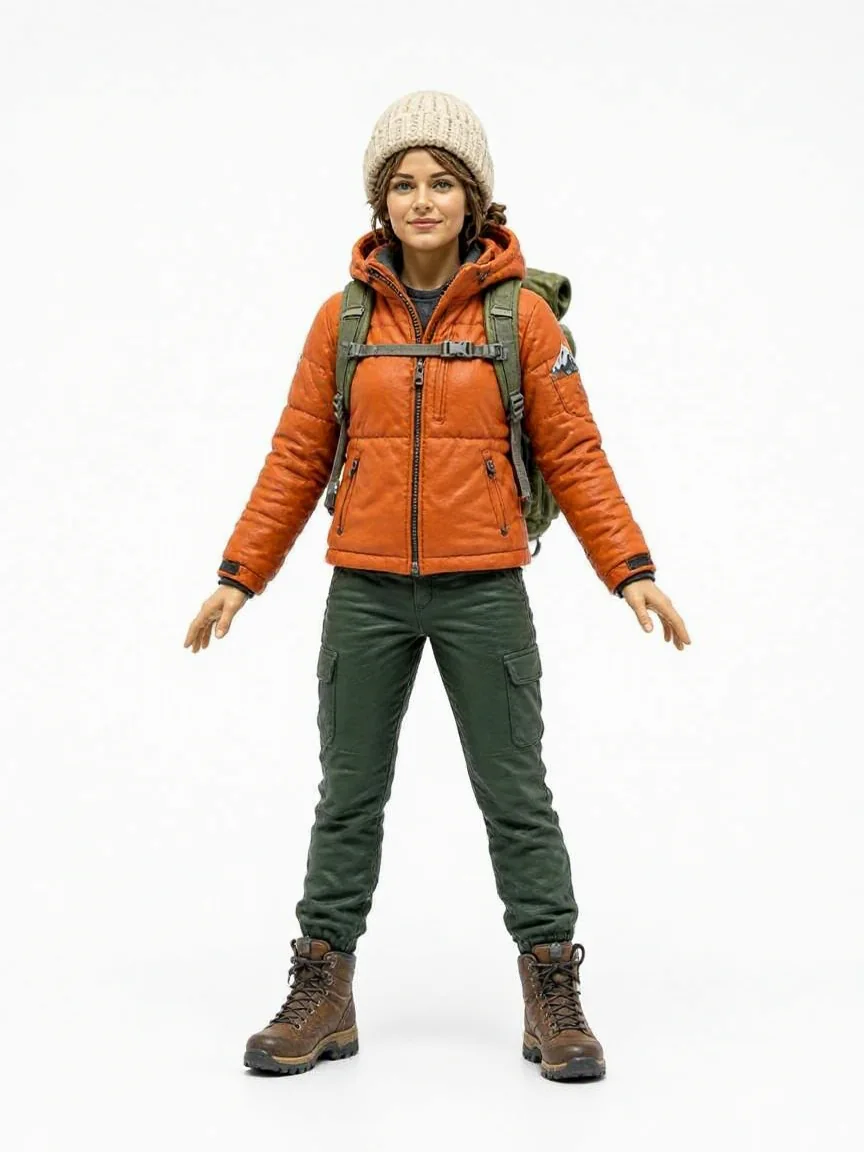
In our tests on PopNow (November 2026) a photo of an explorer figurine in an orange puffer jacket, standing in an A-pose, came back in 72 seconds as a 4.9 MB GLB with 30,292 triangles. The front matched the photo. The back, which the photo never showed, gained a backpack whose shoulder straps lined up with the ones visible on the front.
Ready for a skeleton
With pose set to A-pose the explorer came out with legs apart and arms clear of the body. We rigged that exact mesh with two different auto-riggers and no cleanup: one produced 78 bones including every finger, the other 24 joints scaled to a 1.7 meter height.
Trims survive in text mode
A one-sentence brief for a mid-century lounge chair returned 31,244 triangles in 82 seconds, with the curved walnut armrests, tapered legs and brass caps on the feet all present. The same chair later took two different repaints, rattan with a boucle cushion and a blue and white stripe, without its shape changing.
Real results from Meshy T2.5
 Input
No prompt, just the settings
Bring your own image
Prompts that worked on Meshy T2.5
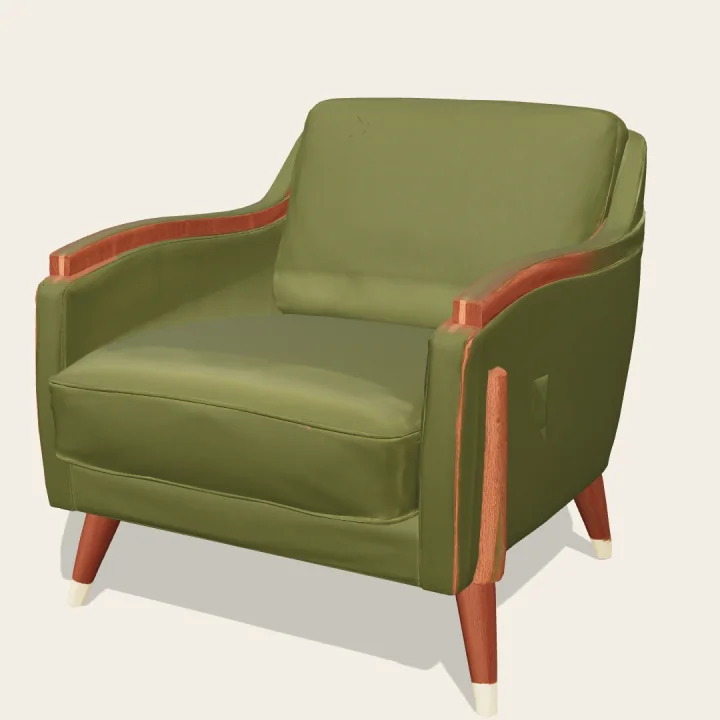
A mid-century lounge armchair upholstered in moss-green velvet, curved walnut armrests and tapered walnut legs with brass caps
The brief names the object type and era first, which settles the silhouette, then each structural part with its material: velvet upholstery, walnut armrests, walnut legs, brass caps. Because every part carries a material, the texture knew where each colour belonged. It has no lighting or scene words, which a 3D model has no use for.
Recreate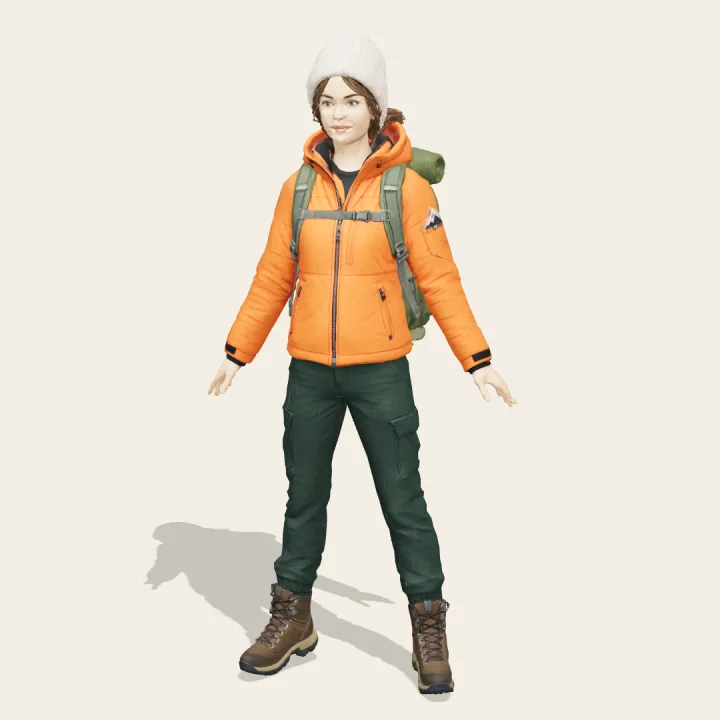
No prompt, just a carefully made input: one figurine, full body, facing the camera, arms out in an A-pose on a white background, plus pose_mode set to a-pose. The clear gaps between arms, legs and torso are what made the mesh rig-ready, and the plain backdrop kept stray shapes out of the model.
RecreateWhat Meshy T2.5 can do

Best ways to use Meshy T2.5 on PopNow
Design the figurine first
Figurine Maker turns a picture into a collectible-style figure photo, a good starting point for a full-body front view to model from.
OpenGenerate a clean front view
Describe the character in the image workspace standing in an A-pose on a plain background, then bring that picture here. Our explorer input was made that way.
OpenRig with more bones later
Keep the base mesh if you need finger bones or a specific skeleton naming scheme, and send it to a dedicated rigging tool instead of the built-in humanoid rig.
How to prompt Meshy T2.5
- For a character, use a full-body front view in an A-pose with arms away from the body and legs apart, and set the pose option to A-pose too. That stance rigs cleanly later.
- In text prompts, describe the structure first (frame, arms, legs, feet) and give each part its material. Our armchair brief named every part and all of them appeared.
- Turn the model around before you use it. One side of our armchair carried a small patch of red speckles that the front view hid.
Settings worth knowing
Image- The picture to start from.
Negative prompt- Things you don't want to see.
Seed0–2147483647- Use the same seed and settings for more controlled comparisons.
How it compares
Meshy T2 has the same controls and price but stops at 15,000 triangles, which suits light props. Choose T2.5 when the model will be seen up close, has to bend at joints, or has many small parts.

Where Meshy T2.5 falls short
At around 30,000 triangles these meshes are heavier than most mobile game props; lower the target if file size matters.
- Texture blemishes can appear on sides the input never showed: our armchair had a small patch of red speckles on one side.
- The triangle target is overshot a little: 30,292 and 31,244 against a 30,000 target.
- Files are heavier than T2. A 30,000 triangle character suits desktop and web viewers but may need a lower target for mobile games.
- The built-in rig is humanoid only. Animals and props need a dedicated rigging tool.
How to use Meshy T2.5 in three steps
- Upload one full-body or object photo on a plain background, or describe the object part by part.
- Set pose to A-pose for characters, pick the triangle target, texture resolution and PBR, and add rigging if you want it.
- Spin the GLB to check the back and the texture, then rig, repaint or export it.
Questions about Meshy T2.5
How much does Meshy T2.5 cost?
On PopNow, Meshy T2.5 starts at 240 credits ($0.24) per run.
How is Meshy T2.5 different from T2?
Its triangle target goes to 30,000 instead of 15,000, so faces, hands and trims keep more detail. Inputs, options and price are the same.
What does a Meshy T2.5 run cost?
720 credits with the default 2K texture, 240 credits for the shape alone, and 1,104 credits with a rig and one animation included.
Which pose should I pick for a character?
A-pose, with the input photo in the same stance. Our A-pose explorer went through two different auto-riggers straight away.
How long does it take?
72 seconds for our explorer from a photo and 82 seconds for the armchair from a sentence, queue included.
Does it invent the back of the model?
Yes. The back is the model's guess. Our explorer's backpack was invented and matched the front straps, but check it before you rely on it.
Can I change the texture later without regenerating?
Yes. We repainted the T2.5 armchair twice with separate retexture models and its shape stayed the same.
Meshy T2.5 or Meshy T2?
Meshy T2 has the same controls and price but stops at 15,000 triangles, which suits light props. Choose T2.5 when the model will be seen up close, has to bend at joints, or has many small parts.
Make something with Meshy T2.5
Give T2.5 a clean front view or a part-by-part brief, and it returns a model detailed enough to rig, repaint and show up close.