


by MeshyImageNew
Meshy T2
Light game-ready meshes up to 15,000 faces from a photo or a sentence
From 240 credits per run≈ $0.24
What is Meshy T2?
Meshy T2 is Meshy's lighter 3D generation model, released in July 2026. It turns a single object photo, or a description of up to 600 characters, into a textured triangle mesh with a face target you can set anywhere from 100 to 15,000. A humanoid rig and a preset animation can be added in the same run.
Best on PopNow for: Props for games, AR and product viewers where a small file and a modest triangle count matter more than the finest surface detail.
Good for
- Game props and set dressing that must fit a tight polygon budget
- Turning a clean product photo into a model you can spin, repaint or print
- Quick blockouts from a one-line description before anyone opens a 3D app
What Meshy T2 does well
Photo in, textured prop out
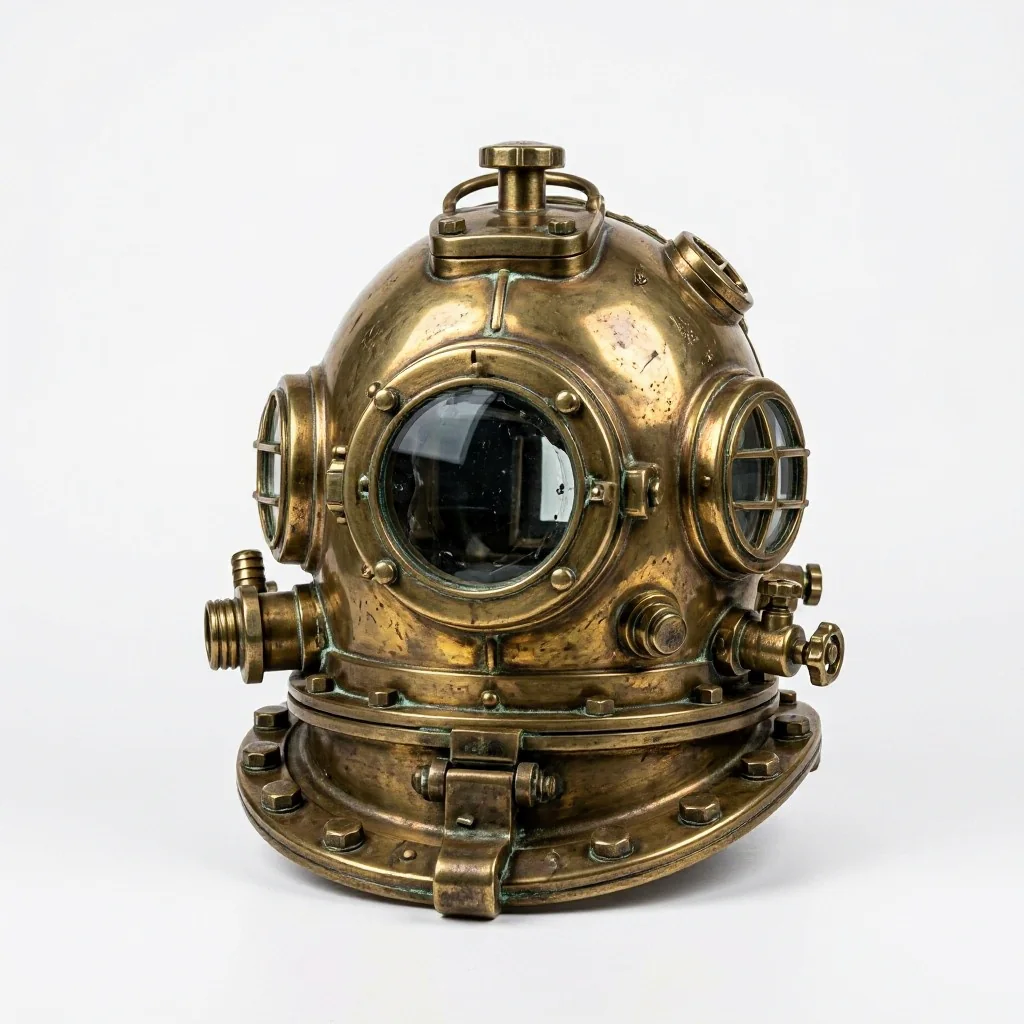
In our tests on PopNow (November 2026) a studio photo of a brass diving helmet came back as a 4.2 MB GLB with 14,311 triangles and one colour texture at the default 2K. All three portholes, the rows of rivets and the side valve were there. The back of the helmet, which the photo never showed, was filled in by the model.
A budget you choose
The triangle target runs from 100 to 15,000 and starts at the top. Drop it for mobile or background props and keep it high for hero pieces. Treat it as an aim, not a ceiling: our rowboat from text landed at 15,148, just over the line, so check the count before an engine with hard limits imports it.
A clean base for repainting
A light, tidy mesh is a good starting shape for retexturing tools. We sent the same helmet through two of them, one turning it into black ceramic with gold seams and one into sea-worn copper, and the triangle count stayed at 14,311 both times.
Real results from Meshy T2
 Input
No prompt, just the settings
Bring your own image
Prompts that worked on Meshy T2
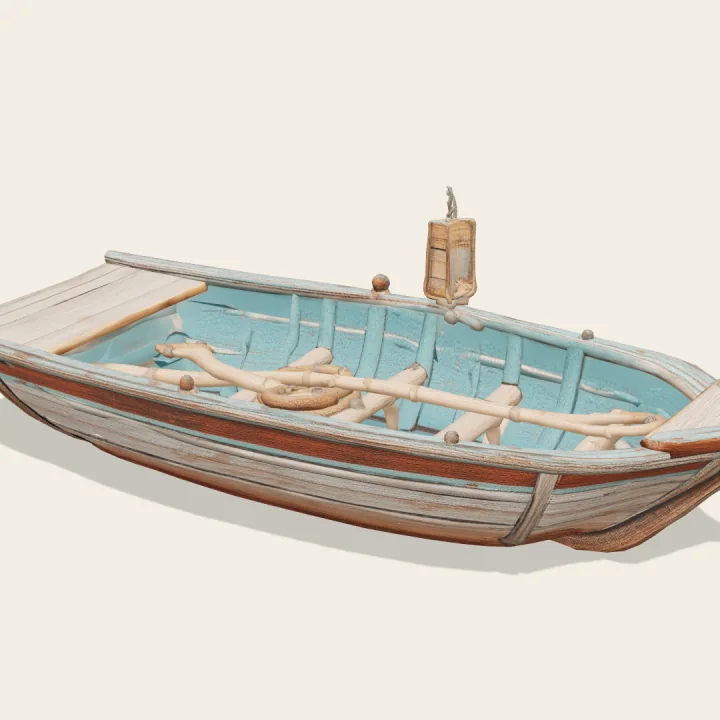
A weathered wooden rowing boat painted teal with chipped paint, a brass lantern hanging from a short mast, coiled rope and two oars resting inside, game-ready prop
The sentence names one object and the parts that make its outline: hull, mast, lantern, rope and oars. Surface words such as weathered, chipped teal paint and brass feed the texture rather than the shape. Ending with game-ready prop pushes toward a usable mesh. The mast and lantern still collapsed into a small block, which shows how much detail survives at this budget.
Recreate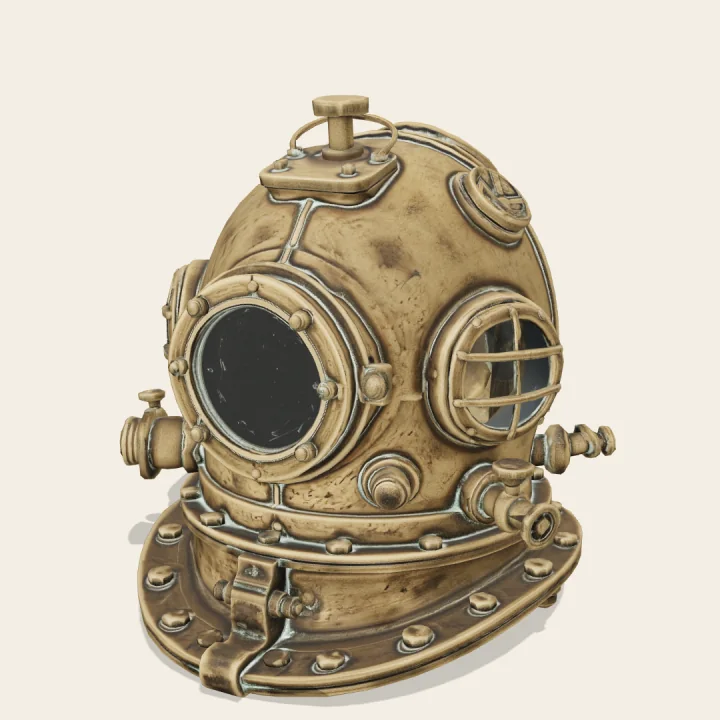
No prompt here: the photo did the work. One object, shot head-on and slightly from above on a plain white backdrop with soft light, so the outline, portholes and valves were easy to read. Defaults were kept, meaning a 2K texture and the full 15,000 target.
RecreateWhat Meshy T2 can do

Best ways to use Meshy T2 on PopNow
Make the source photo first
No photo yet? Generate a single object on a plain backdrop in the image workspace, then bring it here. Our helmet input started that way.
OpenClean product shots
Product Photo puts an item on a simple studio background, the kind of input that gives Meshy T2 the clearest outline to work from.
OpenRepaint without remodelling
Keep the GLB as the base and change its finish later with a retexture model; the shape and triangle count stay as they are.
How to prompt Meshy T2
- Show the object alone on a plain backdrop with every part you care about in view. The hidden side is guessed, so face the camera toward the side that matters.
- In a text prompt, name the main parts and how they connect, and end with the use, such as game-ready prop. Keep tiny attachments to a minimum; at this budget they merge into simple shapes.
- Turn texturing off for a cheaper shape check, then run again with texture once the silhouette is right.
Settings worth knowing
Image- The picture to start from.
Negative prompt- Things you don't want to see.
Seed0–2147483647- Use the same seed and settings for more controlled comparisons.
How it compares
Meshy T2.5 takes the same inputs and options but goes up to 30,000 triangles and keeps finer detail, which helps characters and objects with many small parts. T2 is the lighter mesh for props where triangle count matters more than tiny detail. Both cost the same per run.

Where Meshy T2 falls short
The triangle target is a goal rather than a hard cap: our rowboat came back at 15,148.
- Small attachments get swallowed. The rowboat's short mast and hanging lantern came out as a single small block.
- The triangle target can be overshot slightly: 15,148 against 15,000 in one of our runs.
- Hidden sides are guessed. The helmet's back looked plausible, but nothing in the photo described it.
- The default result carries one colour texture. Turn on PBR if your renderer needs metallic, roughness and normal maps.
How to use Meshy T2 in three steps
- Upload one object photo, or switch to text and describe the object and its main parts.
- Set the triangle target for where the model will live, then choose texture resolution and PBR.
- Download the GLB, check the count and the small parts, and run again with a simpler brief if pieces merged.
Questions about Meshy T2
How much does Meshy T2 cost?
On PopNow, Meshy T2 starts at 240 credits ($0.24) per run.
How many triangles does Meshy T2 make?
You set a target from 100 to 15,000. Our two tests landed at 14,311 and 15,148, so expect results close to the number you choose.
What does a Meshy T2 model cost?
720 credits with the default 2K texture, 240 credits for an untextured mesh, and 960 credits with an 8K texture.
Can it rig and animate the model?
Yes, for humanoid characters. With texture on, adding the rig brings a run to 960 credits; adding animation, which includes the rig, brings it to 1,104 credits.
What file do I get?
A GLB. With rigging or animation on you also get the rigged model and, if asked for, the animated one as separate files.
Meshy T2 or Meshy T2.5?
T2 for light props within 15,000 triangles. T2.5 for up to 30,000 and finer detail, especially characters. The price is the same.
Why is my model missing small parts?
At this budget thin, small pieces merge into simple shapes. Describe fewer attachments, show them larger in the photo, or move to T2.5.
Make something with Meshy T2
Keep the object simple, the photo clean and the triangle target realistic, and T2 hands back a prop ready to drop into a scene.