


by AppleImageNew
Depth Pro 2
A sharp depth map from one photo, with an optional 32-bit metric EXR
From 12 credits per run≈ $0.012
What is Depth Pro 2?
Depth Pro 2 is Apple's model for estimating depth from a single still image. It needs no prompt and no camera details: upload a photo and it returns a map at the photo's own resolution, drawn in one of three palettes. An optional second file stores the distance of every pixel in meters.
Best on PopNow for: Making a clean grayscale depth pass for depth-guided generation, and checking the front-to-back layering of a scene before you composite or animate it.
Good for
- A grayscale depth pass to guide a depth-conditioned image or video model
- Checking how a generated scene is layered from front to back
- Real distances for compositing fog, lens blur or relighting
What Depth Pro 2 does well
Fine structure stays separate
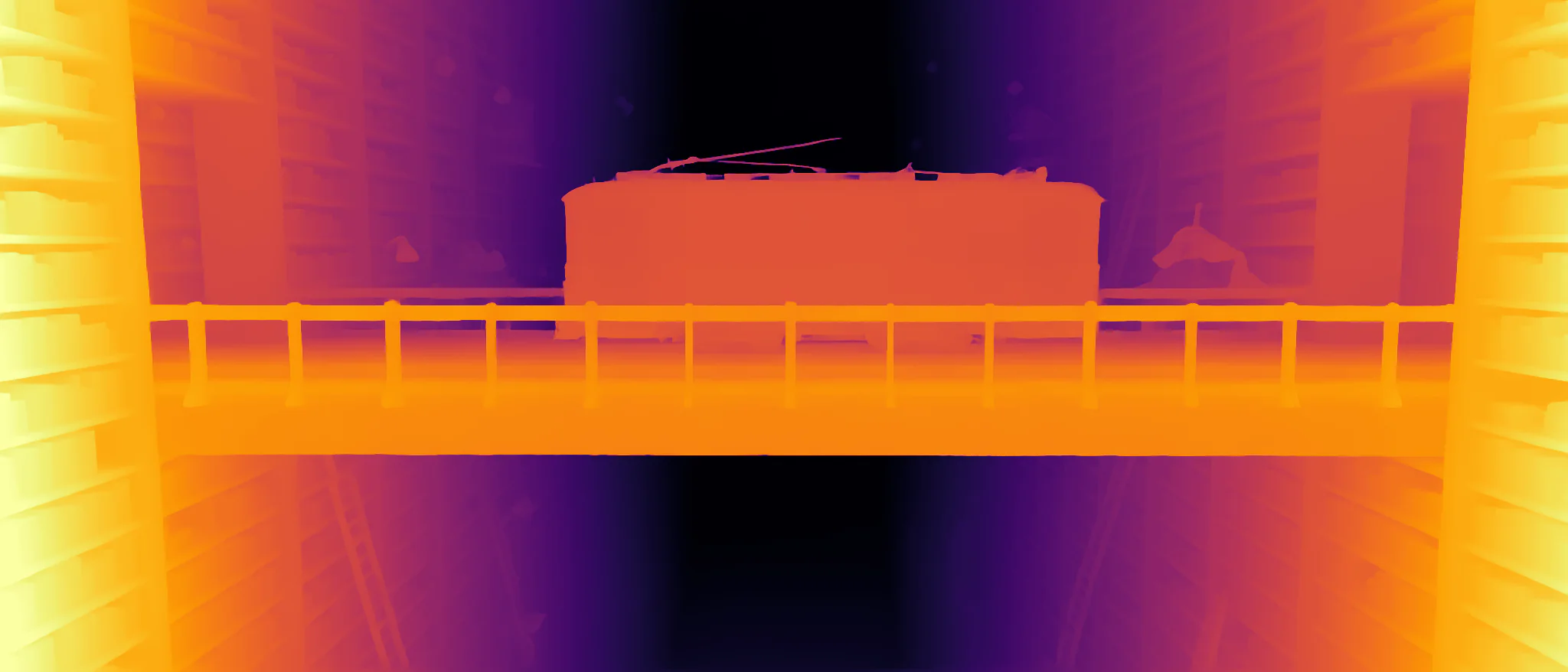
In our tests on PopNow (November 2026) we ran a 2048 by 878 picture of a red tram crossing an iron bridge between two cliffs of bookshelves. The inferno map came back at the same size in 22 seconds. Each railing post stood apart from the next, the nearest shelves glowed yellow, the far end of the canyon fell to black and the tram read as one flat block sitting on the bridge.
Pick the palette by who reads it
Grayscale maps near to white and far to black, the convention depth-conditioned generators expect. Inferno runs from black through purple and orange to pale yellow, and turbo spreads distance across a rainbow; both make small steps in distance easier for people to see. The palette changes only the rendered picture, not the estimate behind it.
Distances you can measure
Metric depth adds a single-channel 32-bit float OpenEXR at the input resolution, one value in meters per pixel, with sky stored as infinity. In a compositing app that drives fog that thickens with distance, lens blur focused at a chosen depth, or 3D elements placed at the right scale. It costs the same as the map alone.
Real results from Depth Pro 2
 Input
No prompt, just the settings
Bring your own image
 Input
No prompt, just the settings
Bring your own image
 Input
No prompt, just the settings
Bring your own image
Prompts that worked on Depth Pro 2
There is no prompt here, so the choice that mattered was the input. A symmetrical canyon with a bridge across the middle gives the map an obvious near, middle and far, and the thin railing posts are a hard test of edge detail. Inferno was picked because this map was meant to be looked at, not fed to another model.
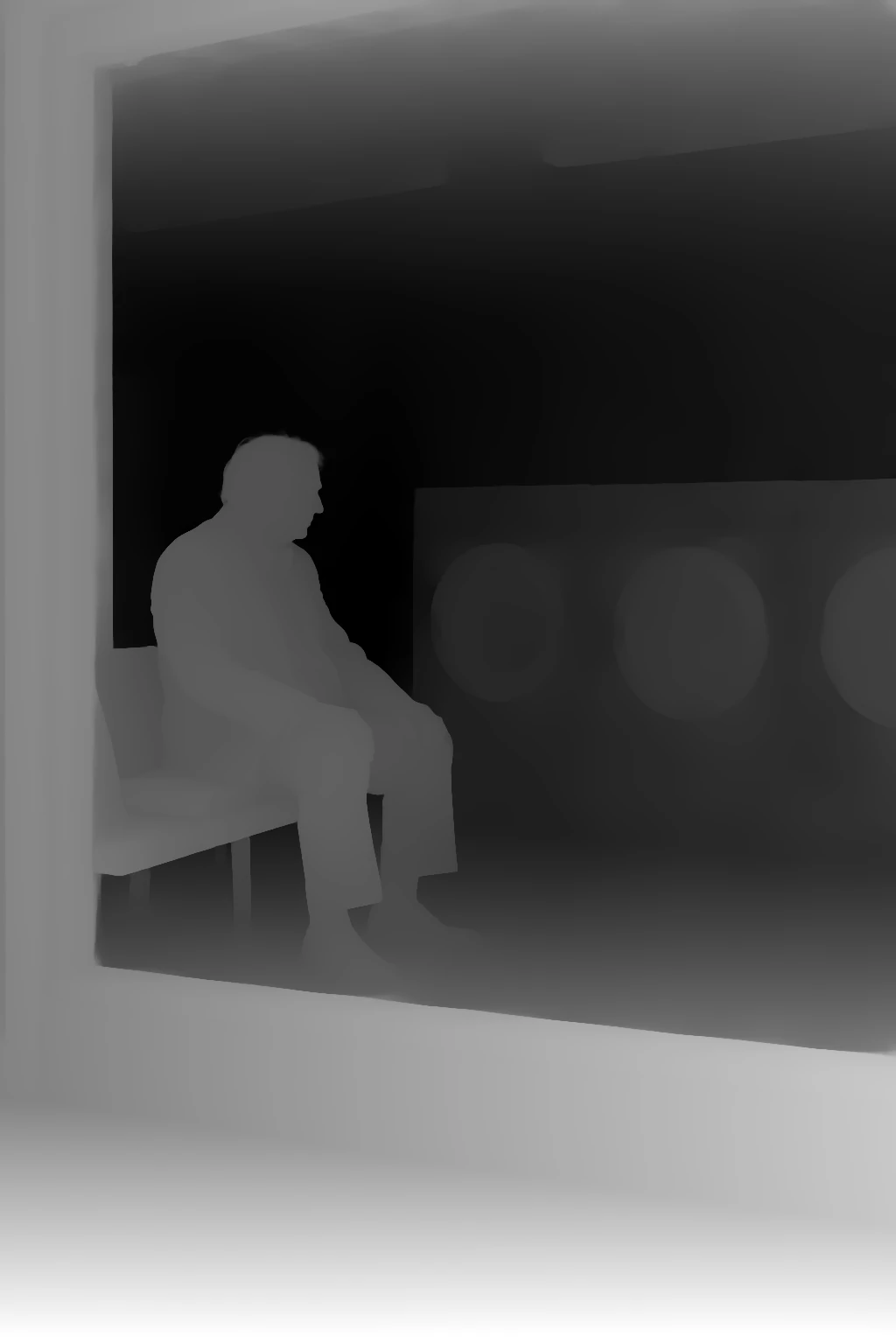
RecreateA photo taken from the pavement through a shop window has strong layers: kerb, window frame, a man on a bench, the machines and the tiled back wall. The grayscale map ranks them in that order, from pale to near black. Grayscale was the right call because this kind of map usually goes on to steer another generator.
RecreateWhat Depth Pro 2 can do

Best ways to use Depth Pro 2 on PopNow
Depth Map in the image tools
Open Depth Map from the image workspace, upload a still and pick a palette. Download the PNG, plus the EXR if metric depth is on.
OpenA quick parallax move from a photo
3D Photo Effect builds a parallax animation from a photo's depth right in your browser. Use Depth Pro 2 when you need the full-resolution map as a file or real distances in meters.
OpenDepth for a whole clip
For moving footage, Depth Pro 2 Video applies the same estimation frame by frame and keeps the original audio, so you are not stitching stills together yourself.
How to prompt Depth Pro 2
- Grayscale is white near and black far. Use it when another tool will read the map; use inferno or turbo when a person will look at it.
- Keep PNG, the default, if the map will be processed further. JPEG and WebP are fine for quick previews.
- Turn on metric depth when you need numbers rather than a picture. The EXR adds nothing to the price, and sky is stored as infinity, so clamp it before averaging.
Settings worth knowing
Image- The picture to start from.
Formatpng · jpeg · webp- File type of the result.
How it compares
Depth Pro 2 Video runs the same estimation over a clip of 1 to 120 seconds, keeps the original sound and is billed per second. Use the still version for photos, single frames and keyframes.
Where Depth Pro 2 falls short
The map measures surfaces, not materials: in our laundromat test the shop window glass did not register and the map read straight through to the room.
- Glass is seen through. In the laundromat test the shop window did not appear in the map, which jumped straight to the room behind it.
- Small recesses inside a larger surface flatten out: the round washing machine doors barely separate from the machine fronts.
- The grayscale and colour maps show relative depth. Only the EXR from metric depth carries distances you can measure.
- Sky has no finite distance and is stored as infinity in the EXR. Clamp or mask it before averaging or normalising.
How to use Depth Pro 2 in three steps
- Upload a sharp photo with a clear foreground and background.
- Choose grayscale for another model to read, or inferno or turbo for people, and turn on metric depth if you need meters.
- Download the map, check the edges around thin objects and glass, then take it into your next tool.
Questions about Depth Pro 2
How much does Depth Pro 2 cost?
On PopNow, Depth Pro 2 starts at 12 credits ($0.012) per run.
How much does a Depth Pro 2 map cost?
12 credits per image, with or without the metric EXR.
Do I need to write a prompt?
No. The photo is the only required input; palette, file format and metric depth are optional.
What resolution is the depth map?
The same as the photo you upload. Our 2048 by 878 canyon picture came back at 2048 by 878.
Which palette should I use for ControlNet?
Grayscale. It is white for near and black for far, which is what depth-conditioned generators usually expect.
What is inside the EXR file?
One 32-bit float channel at the input resolution, holding the distance from the camera in meters for every pixel. Sky pixels are infinity.
How long does it take?
Our canyon map took 22 seconds from submitting to the finished file, queue included.
Depth Pro 2 or Depth Pro 2 Video?
Depth Pro 2 Video runs the same estimation over a clip of 1 to 120 seconds, keeps the original sound and is billed per second. Use the still version for photos, single frames and keyframes.
Make something with Depth Pro 2
Feed it a clear photo, choose the palette for whoever reads the map, and keep the EXR when real distances matter.