What the Snowfall effect does
Snowfall starts with the first flakes drifting through the light, then thickens fast: by the third second it is a heavy, dense snowstorm with big flakes swirling past the lens. Snow piles up on your hair and shoulders, flakes catch on your lashes, and you look up into it and then back to the camera with a smile.
It is the easiest way to make a winter or holiday clip from a photo taken any time of year.
How to use Snowfall
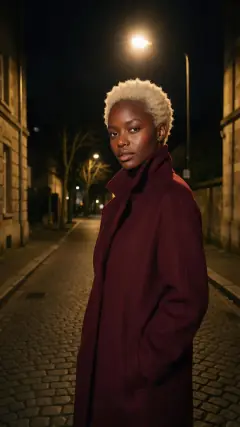
- Give flakes light to catch Use “Add a photo” for one evening portrait on a lamp-lit street, with hair and coat shoulders visible. Avoid a tight face crop that leaves little room for the growing flurry.
- Let the snow build Open “More options” and select MiniMax H3 with “Length” at “5s” to give the snowfall time to build. Choose the four-second model option for a shorter clip.
- Inspect snow on the shoulders Press “Make it move” and look for flakes settling on hair and clothing as the person looks up. If the snow feels out of place or hides the face, use “Change” for a wider evening portrait with visible street lighting.
Which photos work best for Snowfall
Works well
- Evening street photos with lamps, which make flakes glow
- Coats and hair that snow can settle on
- Faces turned to the camera
Avoid
- Bright summer beach photos
- Indoor photos with a ceiling
- Tight close-ups where flakes hide the face
Snowfall examples
Made with MiniMax H3Burgundy coat on a lamp-lit street: a dense snowstorm by 3 s, snow piling on her curls.Made with MiniMax H3Black coat and grey scarf at dusk: she tips her face up into heavy snow. What we saw when we tested Snowfall
The first example is a woman with short bleached curls in a burgundy wool coat on a lamp-lit cobblestone street at night: the first flakes fell within a second, by three it was a dense swirling snowstorm piling on her hair and shoulders, and she ended smiling back at the lens. The second is a dark-haired woman in a black coat and grey scarf on a shopping street at dusk, who tipped her face up into heavy snow from about second three.
Street lamps made a big difference: flakes caught the light and glowed. Both runs showed snow visibly settling on hair and coats, which sells the cold.
The second photo had no snow at all to begin with, and the cobblestones read as winter by the end anyway.
How Snowfall does on each model
- MiniMax H3 (210 credits · about 60 s) Both examples. First flakes within a second or two, a heavy storm by three.$0.21 vs Runway $0.50 · 768p · 5s−58% vs Runway
- MiniMax H3 · 4s (168 credits · about 60 s) The storm is a little lighter by the final frame.$0.21 vs Runway $0.50 · 768p · 5s−58% vs Runway
- Seedance 2.0 Mini · 480p (125 credits · about 3 min) Small flakes merge into a softer flurry at 480p.$0.13 vs fal $0.36 · 480p · 5s−65% vs fal
The prompt behind Snowfall
Within the first second the first flakes start falling through the light. The snowfall thickens fast: by the third second it is a heavy, dense snowstorm, big flakes swirling past the lens and glowing where they catch the light. Snow visibly piles up on the hair and shoulders. The final frames hold on the person in a thick white flurry, flakes on their lashes, looking up into the snow and then back into the lens with a smile. The person stays exactly as they appear in the photo.
Tips for a better Snowfall result
- Evening photos with street lights make the flakes glow.
- Wool coats and loose hair show the snow piling up.
- Pair it with Snow Globe or Frost Over for a winter series.
Snowfall: questions and answers
Does snow settle on me in Snowfall?
Yes, it piles up on hair and shoulders and catches on the lashes.
Will snow look odd on a sunny photo?
It works best on cool, evening scenes; a sunny beach under snow looks odd.
How heavy does the snow get?
A dense snowstorm by around the third second.
Do I move?
You look up into the snow and back to the camera with a smile.
Is it good for a Christmas card?
Yes, though for a full holiday scene the AI Christmas Photo app goes further.
Related effects and tools
- Snow Globe · Snow starts to fall, then the camera pulls back: you are inside a snow globe.
- Frost Over · Ice creeps in from the edges until everything glitters.
- Rain Falls · Cinematic rain with silver streaks and glossy streets.
- Petal Storm · Backlit pink petals build into a glowing blizzard.
- Make a full holiday scene with AI Christmas Photo

 Your photo

