



What an anamorphic lens actually does
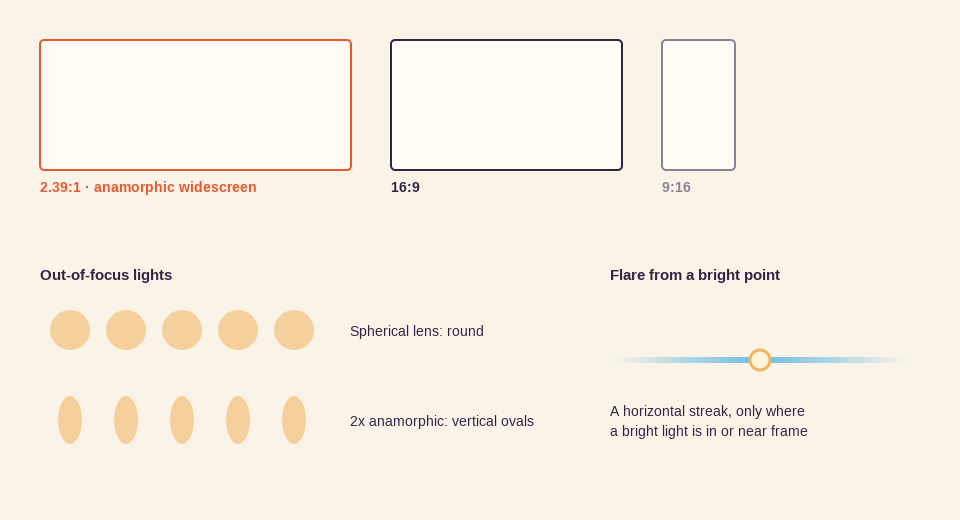
A 2x anamorphic lens squeezes a wide field of view horizontally onto the sensor or film, and the picture is stretched back out for viewing. On a standard frame that gives the familiar wide cinema shape of about 2.39:1. The squeeze also changes how out-of-focus light looks: points of light behind the subject become tall ovals instead of circles.
The cylindrical glass at the front is also what produces the famous flare. A bright point source, such as a headlight, a lamp or the sun at the edge of the frame, can throw a thin horizontal streak across the image. Without a bright point there is no streak.
Getting it right in AI images
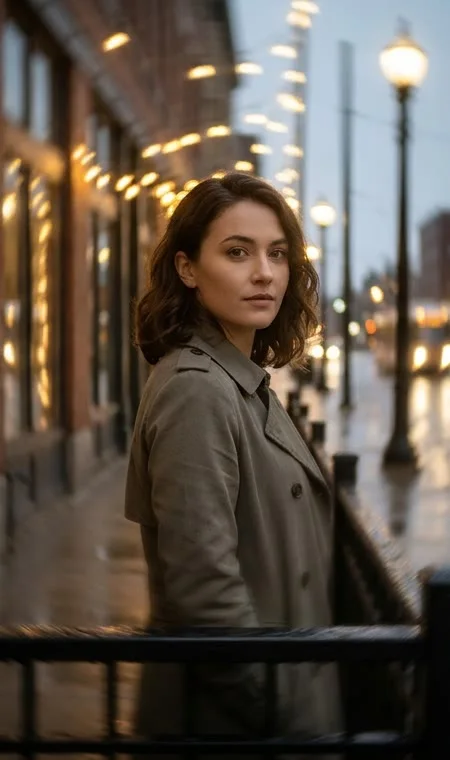
Image models know the look but often apply it loosely: blue streaks across a face with no light to cause them, round bokeh, or a vertical frame. Three choices help. Open Shot settings and set Shape to 21:9 (or toggle 2.39:1 frame lines on the monitor) so the composition is actually wide. Put a few small, bright lights in the background so streaks and oval bokeh have something to come from. Keep the subject's eyes away from the brightest point so a flare doesn't cut across them.
Set Depth to Soft background (f/1.4) in the Lens dial if you want shallow focus, because at Everything sharp (f/8) the background stays sharp. Night exteriors, wet streets, car interiors and backlit golden hour scenes are the natural home of this look.
Glass and body options in the studio
Open the Lens dial to pair physical reshoot optics (Focal length 24 / 50 / 85mm and Depth f/8 or f/1.4) with instant optical textures. The Glass wheel gives you five real-time styles—Clean sharp, Anamorphic (horizontal highlight streaks), Warm vintage, Halation and Soft bloom—and the Body wheel adds five film textures from Clean digital through 35mm, 16mm, 8mm and Camcorder.
Because Glass and Body run live in your browser, you can test Anamorphic streaks or Warm vintage glass on any take or uploaded clip instantly with no credits, and bake them right into Export.
Choosing with a 3× bracket
If you want to compare framing or looks side by side, toggle 3× on the desk bar. In the Lens dial, 3× brackets 24mm, 50mm and 85mm on the same scene; in the Look dial, 3× previews three color looks side by side live in the monitor with no extra credits on your own footage.
For paid brackets, the button shows the maximum total price before you start, and any arm that fails is refunded automatically.