


by PopNowVideo
Motion Control Flash
Copy the moves, camera and timing of a clip onto your character, up to 30 seconds
- Up to 720p
- Sound included
- Up to 10 reference images
From 162 credits per second of video≈ $0.16· 480p
What is Motion Control Flash?
Motion Control Flash is PopNow's own motion transfer tool. A driving clip of up to 30 seconds supplies the moves, the camera and the background, and the performer comes from up to ten pictures or, if you have none, from a written description. Wan 2.2 Animate, in its default animate mode, places the character in the setting of its own image; Flash keeps the driving clip's room instead, and unlike Kling 2.6's Motion Control it can work from text alone and generate a fresh soundtrack.
Best on PopNow for: Putting one recorded performance, such as a dance, a demo gesture or a walk, onto a character you designed, while keeping the original camera move and set.
What Motion Control Flash does well
Up to ten pictures for one performer
The first image is the person who performs. The rest can add angles or details, such as the back of a jacket or the shoes, which helps when the routine turns the body away from the lens and a single front photo has nothing to say about it.
No photo? Describe the performer
Without any picture, the prompt becomes the character: a profession, the clothing, the hair. The driving clip is still required, because the words only decide who moves, never how they move.
Keep the track or replace it
Sound is on by default and gives the result new audio. Switch it off and the output keeps the audio of the driving clip, which is what you want when the routine was filmed to a particular song.
Real results from Motion Control Flash
Bring your own clip
Prompts that worked on Motion Control Flash
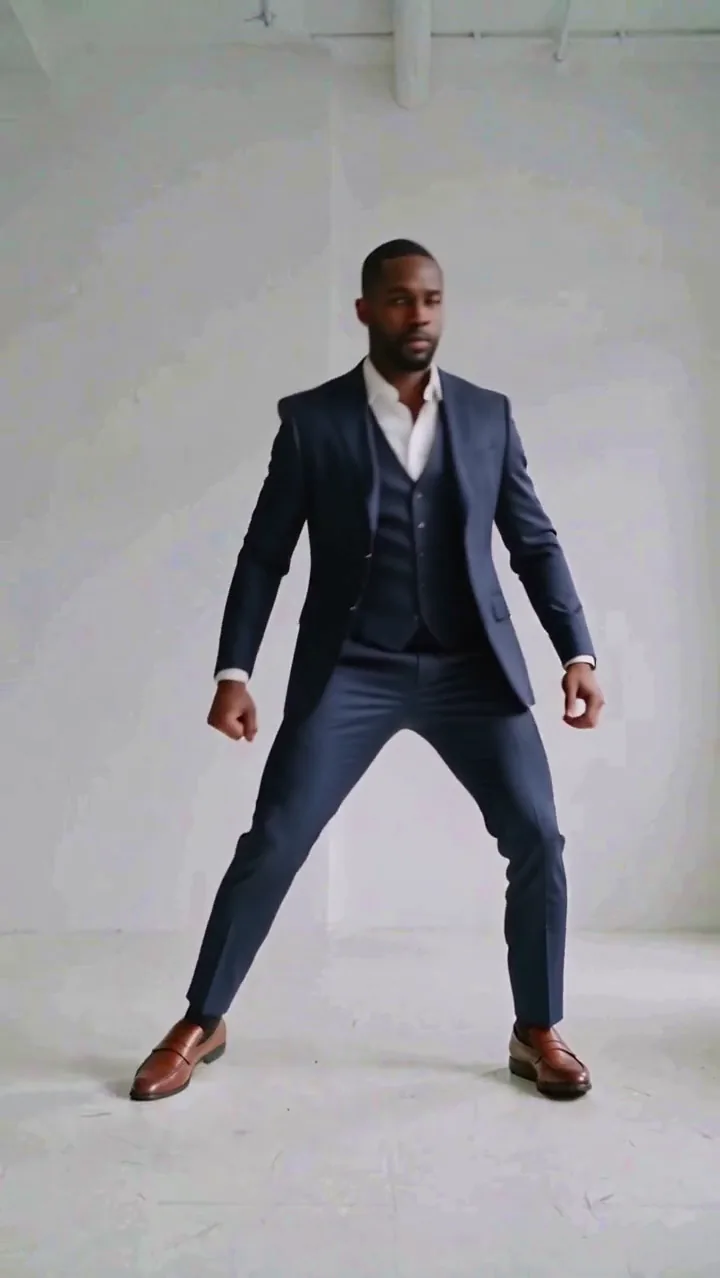
The man in the navy three-piece suit performs the dance exactly as in the motion clip, bare hands with natural skin tone, in the same bright white studio.
This is the same suit-and-dancer pair used for Kling 2.6's Motion Control example, so the two pages can be compared shot for shot. The first Flash run followed the choreography closely, footwork and arm swings included, but in the final second both hands smeared into red patches and the take was unusable. The rerun added one sentence, the man in the navy three-piece suit performs the dance exactly as in the motion clip, bare hands with natural skin tone, in the same bright white studio, and the hands held their shape. When a routine has quick hand work, describe the hands; otherwise the model has very few pixels to invent them from.
RecreateWhat Motion Control Flash can do

Best ways to use Motion Control Flash on PopNow
Dance videos from a character photo
Pick a routine, add your character, and keep the original framing so the result looks as if it was filmed in one take.
OpenDesign the performer first
Create a fictional character with a full-body view and a neutral pose, then use that image as the first reference so the outfit survives every turn.
OpenTest a move at 480p
Run a short excerpt of the driving clip at 480p to check timing and hands before paying the 720p rate on the full routine.
OpenSettings worth knowing
Resolution480p · 720p- Choose an available output size.
Sound- Adds sound made to match the picture: voices, ambience and effects.
Reference images≤ 10- Pictures of the people, outfits or places the result should keep.
Video- The clip to work on.
Similar models


Where Motion Control Flash falls short
- Quick hand movements can smear. Our first run lost both hands to red blotches in its last second; describing the hands in the prompt fixed it on the rerun.
- The background and camera always come from the driving clip. A prompt asking for another room will not move the scene, so choose a motion clip shot somewhere that already fits.
- It costs more per second than Kling 2.6's Motion Control at 720p and stops at 720p, where Kling 2.6 also renders 1080p.
How to use Motion Control Flash in three steps
- Trim the driving clip to the routine you need, up to 30 seconds, framed the way you want the result framed.
- Add the performer as the first image, plus extra angles if the routine turns, or describe the character in the prompt.
- Choose 480p or 720p and whether to keep the clip's own sound, check the quoted price and generate.
Questions about Motion Control Flash
How long can a Motion Control Flash video be?
As long as the driving clip, up to 30 seconds, although the file can run a little short: our 5-second dance came back at 4.7 seconds. Check the real length before you sync the result to music.
Do I need a photo of the character?
No. With no picture the prompt has to describe the performer, for example a chef in a white jacket and checked trousers. A photo gives far more control over the face and outfit, and up to ten are accepted.
Motion Control Flash vs Kling 2.6 Motion Control: which should I use?
Kling 2.6 costs less per second at 720p and also renders 1080p, but it needs exactly one character photo. Flash takes up to ten reference pictures or none, offers 480p for cheap tests and can generate new sound. The suit-and-dancer example appears on both pages if you want to compare them.
What makes a good driving clip?
One performer with the full body in frame, steady light and a plain backdrop. Our white-studio dance worked well because nothing else in the frame competed with the dancer.
How much does Motion Control Flash cost?
It is charged per second of the driving clip, with a 4-second minimum, and 720p costs twice the 480p rate. The generate button shows the exact price for your clip before you run it.
Is Motion Control Flash free?
No, every run is paid per second of the driving clip. A 4-second test at 480p is the cheapest way to see whether a routine transfers cleanly.
Whose footage and photos can I use?
Clips you filmed or have permission to use, and characters you created or people who have agreed to appear. The performer in the driving clip should have agreed too.
Make something with Motion Control Flash
Choose a clean, full-body routine, put your character first in the picture list, and say what the hands look like.