


by MiniMaxVideo

MiniMax Hailuo 2.3
Silent 6 or 10-second clips from a still at 768p, or 6 seconds at 1080p
- Up to 1080p
- 6–10s clips
From 163 credits per run≈ $0.16· Fast
What is MiniMax Hailuo 2.3?
MiniMax Hailuo 2.3 is MiniMax's image-to-video model, released in October 2025 as the successor to Hailuo 02, with the lighter Hailuo 2.3 Fast available through the same request. You give it an opening frame and describe what happens next, and it returns a silent clip of 6 or 10 seconds at 768p, or 6 seconds at 1080p. Unlike the newer MiniMax H3 line it has no sound, no text-only mode and no references, but its body motion and physical detail are convincing.
Best on PopNow for: Bringing a finished still to life with believable movement, fabric, splashes and particles, when music or voice will be added in a later step.
What MiniMax Hailuo 2.3 does well
Your still, untouched
In our beach test, the rider's black coat, the white horse, the wet sand and the morning mist in the opening frame matched the uploaded image exactly, and the look held as the shot moved on. Hailuo keeps the framing of the still, so the output follows its proportions.
Motion with weight
The horse's gallop had a natural rhythm, and every stride kicked up sand and spray. Small timed effects worked too: each fresh hoofprint lit up amber the instant it landed, and the glowing trail stretched back behind the horse.
Standard or Fast, same request
The mode switch picks the full Hailuo 2.3 or Hailuo 2.3 Fast with the same image, prompt, resolution and length. Fast renders sooner and costs less, so draft there and rerun the chosen prompt in standard.
Real results from MiniMax Hailuo 2.3
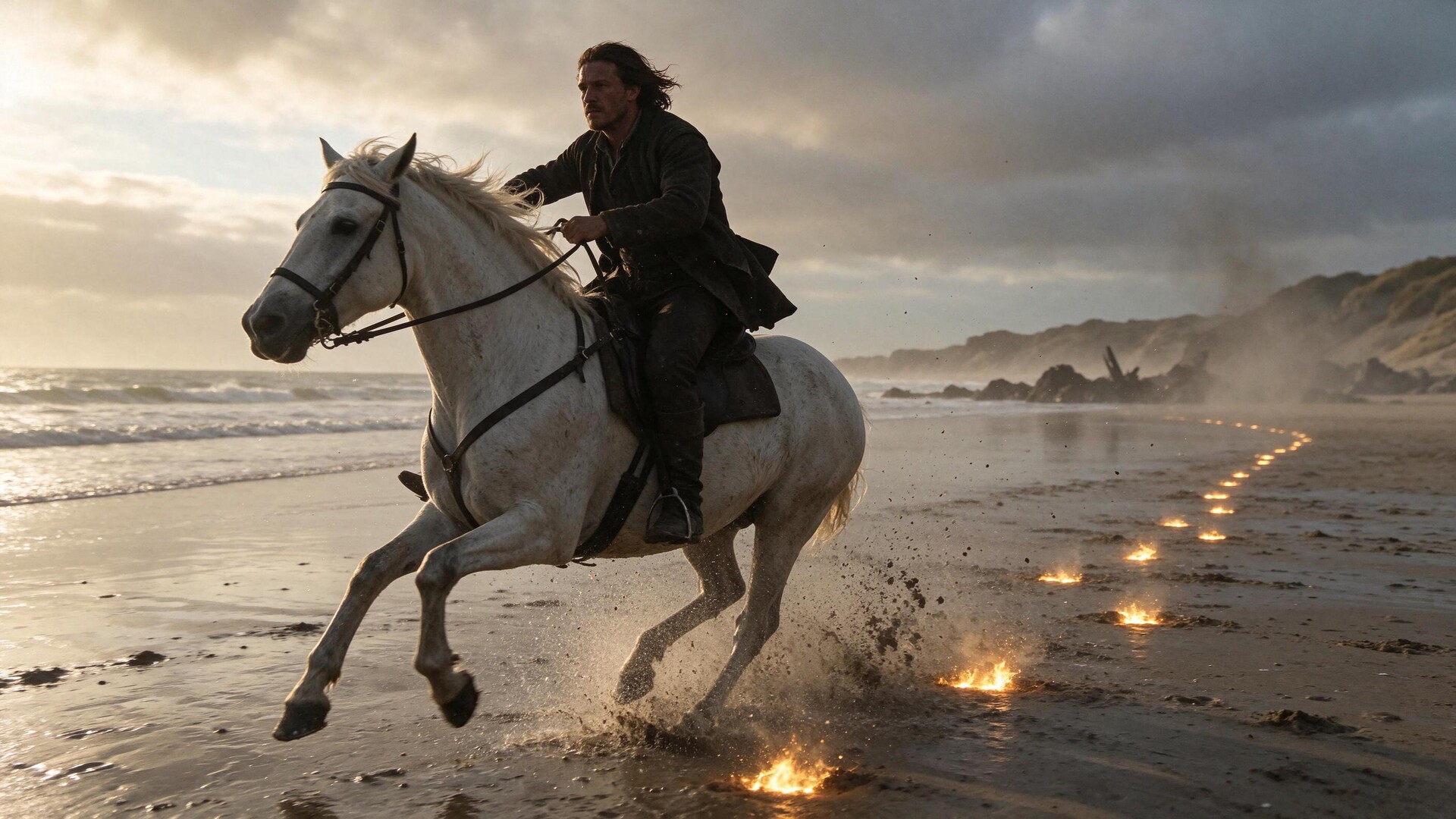 Input
Bring your own image
Prompts that worked on MiniMax Hailuo 2.3
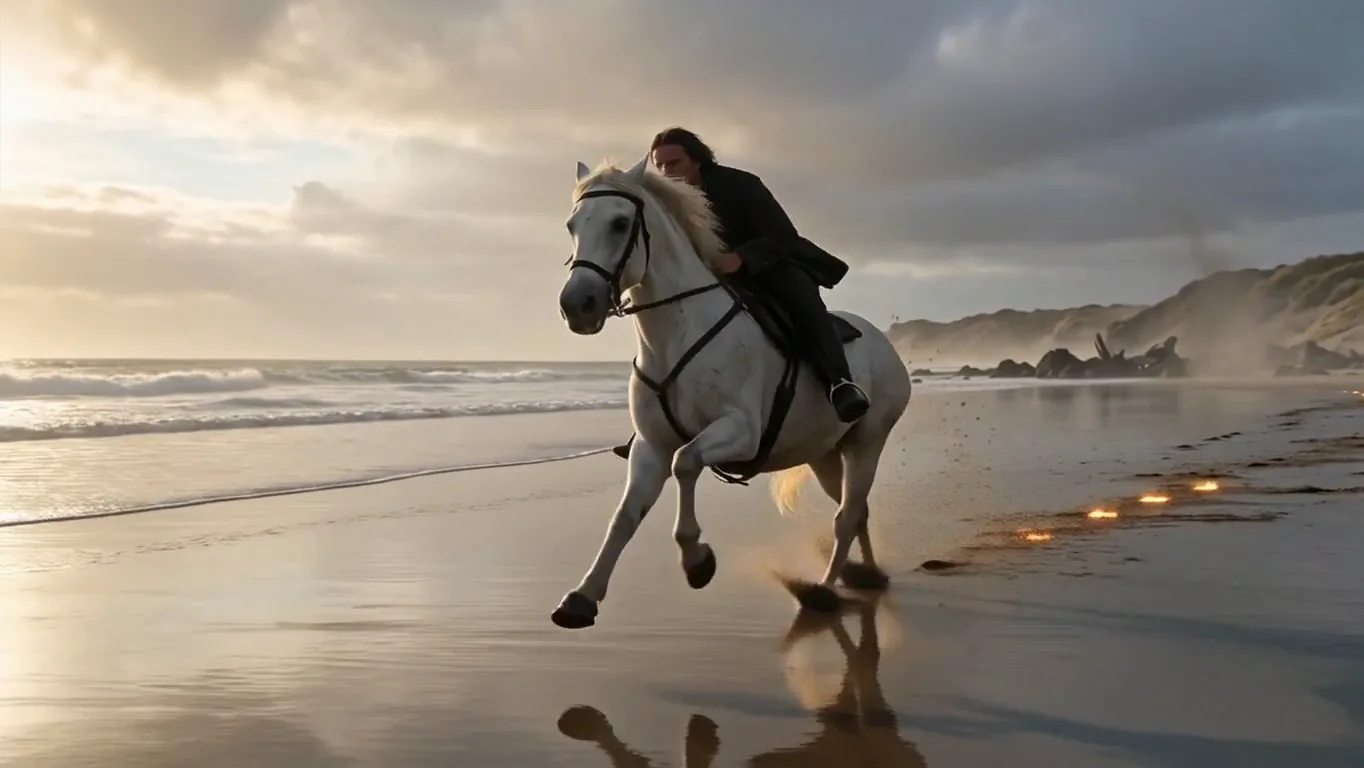
The white horse gallops toward the camera along the wet beach, hooves throwing up sand and sea spray, the rider leaning forward over its neck. Each new hoofprint flares with warm amber light the moment it lands, and the trail of glowing prints stretches back into the mist. The camera tracks backward at the horse's speed with a slight handheld shake.
The prompt only describes what happens after the first frame: the gallop, what the hooves throw up, the glowing prints and the camera. Hailuo got the physics and the light trail right and kept the camera with the rider. What it ignored was direction: instead of charging toward the lens, the horse ran across the middle of the frame from side to side. We used standard mode, 768p and 6 seconds; the file is 1364x768, 5.88 seconds long, with no audio track. The opening still was generated with Seedream 5.5.
RecreateWhat MiniMax Hailuo 2.3 can do

Best ways to use MiniMax Hailuo 2.3 on PopNow
Design the first frame
Hailuo is only as good as the still you give it. Make or refine the opening image in the image workspace, lit the way the clip should start.
OpenGive the clip a soundtrack
Every Hailuo 2.3 clip is silent. Add an original score written for the finished shot in Add Music to Video.
OpenLarger 10-second shots
10-second clips are only available at 768p. When a long take needs to be bigger, upscale it afterwards instead of settling for a 6-second 1080p version.
OpenSettings worth knowing
Resolution768p · 1080p- Choose an available output size.
Duration6s · 10s- Length of the generated clip.
Image- The picture to start from.
Similar models


Where MiniMax Hailuo 2.3 falls short
- No sound of any kind. Plan a separate music, voice or effects pass.
- Image to video is the only mode: no text-only generation, no closing frame, no reference images and no aspect ratio setting.
- Directions in the prompt are not always followed: our horse was told to gallop toward the camera and ran across the frame instead. 10-second clips are 768p only; 1080p is limited to 6 seconds.
How to use MiniMax Hailuo 2.3 in three steps
- Open the video workspace, choose MiniMax Hailuo 2.3 and upload the still the shot should start on.
- Describe the one action that follows, the camera move and the mood; do not restate what the image already shows.
- Choose standard or Fast, 768p or 1080p and 6 or 10 seconds, check the price on the button and generate.
Questions about MiniMax Hailuo 2.3
How long and how sharp are MiniMax Hailuo 2.3 videos?
Clips run 6–10s at up to 1080p.
Does Hailuo 2.3 make videos with sound?
No. Every clip is silent. If you need audio in the same pass, the MiniMax H3 models generate it with the picture; otherwise add music or narration after Hailuo finishes.
What is the difference between Hailuo 2.3 and Hailuo 2.3 Fast?
They take the same inputs and produce the same sizes and lengths. Fast renders sooner and costs less: at 768p and 6 seconds it is 163 credits against 256 credits for standard.
How long can Hailuo 2.3 videos be?
6 or 10 seconds at 768p, and 6 seconds at 1080p. There is no option in between.
How much does MiniMax Hailuo 2.3 cost?
It is priced per clip. In standard mode a 6-second 768p clip is 256 credits, a 10-second one is 512 credits and a 6-second 1080p clip is 448 credits. Fast mode is cheaper at each size.
Hailuo 2.3 vs MiniMax H3?
Hailuo 2.3 is an older, image-only model that makes silent clips of fixed lengths. MiniMax H3 accepts text, frames and references, adds sound and runs to longer durations. Choose Hailuo for a silent shot from a strong still, H3 when the clip needs audio or a cast built from photos.
What kind of image should I upload?
A JPEG, PNG or WebP up to 10 MB, framed exactly as you want the shot to begin, since the output keeps its proportions; a 16:9 still came back at 1364x768 and 24 frames per second. A frame that already suggests motion, such as a stride or a gust of wind, gives the clip a head start.
Make something with MiniMax Hailuo 2.3
Bring Hailuo 2.3 a still you love and one clear action. Add the sound afterwards, and let the motion carry the shot.