


by LightricksVideo
LTX 2.5 Pro
6 to 10-second clips at 720p or 1080p with sound and crisper faces
- Up to 1080p
- 6–10s clips
- 5 aspect ratios
From 576 credits for a 6-second clip≈ $0.58· Create Video · 720p
What is LTX 2.5 Pro?
LTX 2.5 Pro is Lightricks' detail-focused video model released in August 2026 for 6, 8, and 10-second shots with synchronized native audio at 720p or 1080p. Unlike the standard LTX 2.5 tier that reaches 4K and 20-second takes, Pro concentrates its budget on sharper facial skin, beard and hair fidelity, glowing material gradients, and five aspect ratios including 3:2 and 2:3.
Best on PopNow for: Close-up character performances, tactile craft or product shots, and 24–50 fps scenes where lifelike skin, warm lighting falloff, and matched ambient sound matter more than 4K width.
What LTX 2.5 Pro does well
Facial detail and warm light falloff
In our Murano glass workshop test, the grey-bearded artisan's profile, skin pores, and furnace reflections held steady as the camera tracked away to follow the floating glass jellyfish. Even at 720p, bright molten highlights kept soft amber gradients instead of clipping into flat white blocks.
Five aspect ratios plus 48 and 50 fps
Text-to-video supports 16:9, 9:16, 1:1, 3:2, and 2:3 frames, and both text and image endpoints let you pick 24, 25, 48, or 50 frames per second at no extra charge. Picking 48 or 50 fps smooths fast camera sweeps or gives you clean half-speed slow motion in an editor.
Joined picture and room tone
Every clip includes a synchronized AAC audio track generated alongside the motion, without a separate sound toggle. Describing the room's acoustic texture—furnace crackle, soft glass chimes, footsteps, or quiet breath—gives Pro concrete sonic cues that sit gently behind the visuals.
Real results from LTX 2.5 Pro
Prompts that worked on LTX 2.5 Pro
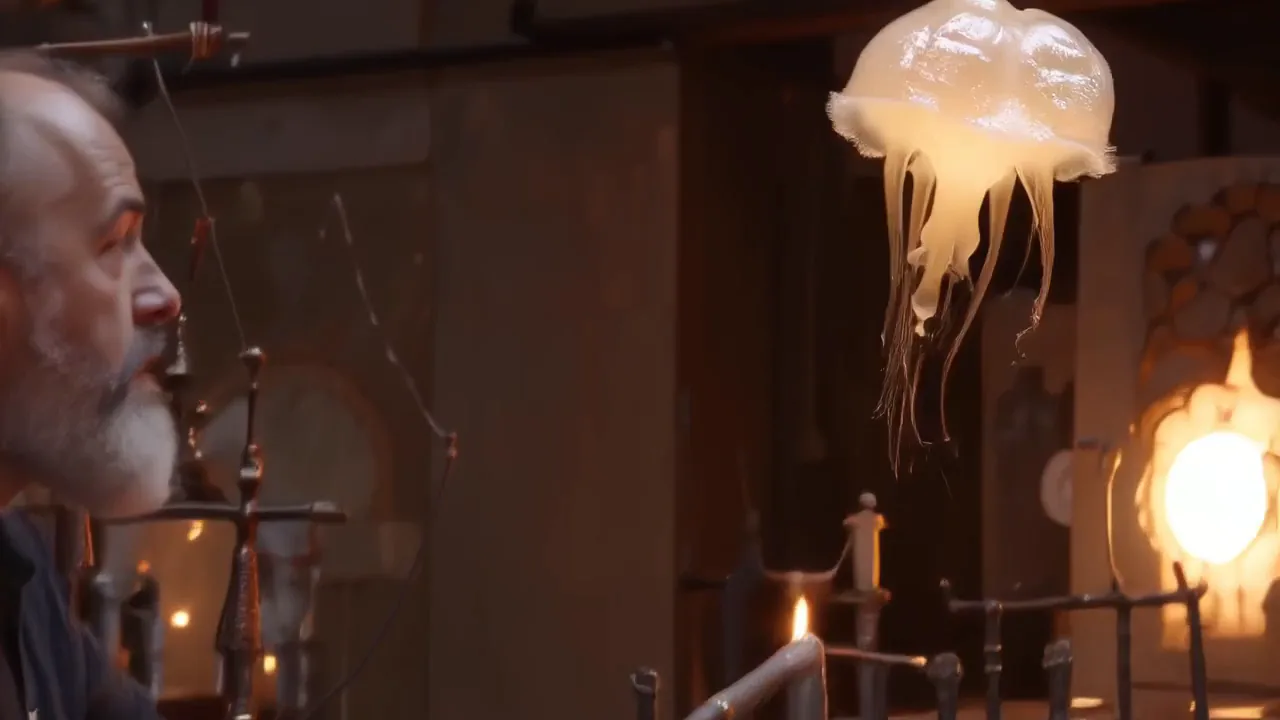
In a dim Murano glass workshop, a master glassblower with a grey beard turns a glowing molten orange orb at the end of an iron blowpipe. As he exhales gently, the molten glass stretches into a luminous translucent jellyfish that lifts free and floats slowly across the warm dark workshop, its trailing glass tentacles shedding tiny amber sparks. Smooth close-up pulling back to a medium wide shot, warm furnace key light, crisp full-bleed widescreen digital cinema with ambient furnace crackle and soft chime.
We tested this Murano glassblower scene twice at 720p, 6 seconds, 24 fps. The first run ended with 'real film grain', which caused LTX 2.5 Pro to add rounded vintage pillarbox borders on both sides of a 16:9 frame. Replacing that phrase with 'crisp full-bleed widescreen digital cinema' filled all 1280x720 pixels cleanly: the artisan's bearded profile stayed lifelike, the glowing glass bell lifted smoothly off the iron pipe with drifting tendrils and tiny amber sparks, and the audio track carried subtle furnace crackle around -35 dB peak.
RecreateWhat LTX 2.5 Pro can do


Best ways to use LTX 2.5 Pro on PopNow
Build a clean opening still first
When a character's face or wardrobe must stay locked from frame one, generate the key photograph in the image workspace and hand it to LTX 2.5 Pro image-to-video.
OpenScale 1080p shots up to 4K
LTX 2.5 Pro stops at 1080p. When a 6 or 10-second character take needs 4K delivery without switching away from Pro's facial rendering, run the finished MP4 through Video Upscaler.
OpenDraft scenes inside the video studio
Open the video workspace to test 6-second 720p drafts first, lock your seed and framing, and step up to 1080p once the motion and lighting match your shot list.
OpenSettings worth knowing
Resolution720p · 1080p- Choose an available output size.
Aspect ratio16:9 · 9:16 · 1:1 · 3:2 · 2:3- The shape of the frame: wide, square or tall.
Duration6s · 8s · 10s- Length of the generated clip.
Image- The picture to start from.
Seed0–2147483647- Use the same seed and settings for more controlled comparisons.
Similar models


Where LTX 2.5 Pro falls short
- No 4K output and no takes beyond 10 seconds: duration is fixed to 6, 8, or 10 seconds and resolution stops at 720p or 1080p.
- Vintage film phrases like 'real film grain' can trigger rounded black pillarbox borders inside a 16:9 canvas; specify modern full-bleed framing when you need edge-to-edge widescreen.
- Only supports text-to-video and first-frame image-to-video—there is no closing-frame keyframe, multi-image reference casting, or video-to-video editing mode.
How to use LTX 2.5 Pro in three steps
- Open the video workspace, pick LTX 2.5 Pro, and stay in Create Video or upload a first-frame still in Image to Video.
- Write one flowing present-tense shot note naming subject, action, lighting, camera move, and ambient sound—avoid vintage film-stock phrases if you want edge-to-edge 16:9.
- Start at 720p and 6 seconds (576 credits), choose 24–50 fps, verify the motion, then switch to 1080p or 10 seconds for the final take.
Questions about LTX 2.5 Pro
How much does LTX 2.5 Pro cost?
On PopNow, LTX 2.5 Pro starts at 576 credits ($0.58) for a 6-second clip. Larger sizes cost more: 720p 576 · 1080p 816.
How long and how sharp are LTX 2.5 Pro videos?
Clips run 6–10s at up to 1080p.
How does LTX 2.5 Pro differ from standard LTX 2.5?
Standard LTX 2.5 stretches up to 20 seconds and native 4K in 16:9 or 9:16. LTX 2.5 Pro caps at 10 seconds and 1080p, but adds 1:1, 3:2, and 2:3 aspect ratios, 48/50 fps options, and tighter facial, skin, and warm-light fidelity.
How much does LTX 2.5 Pro cost on PopNow?
Both text-to-video and image-to-video bill per second by resolution: 96 credits at 720p (576 credits for 6 seconds) and 136 credits at 1080p (816 credits for 6 seconds, 1,360 credits for 10 seconds).
Does raising frame rate to 48 or 50 fps cost extra?
No. Frame rate options (24, 25, 48, and 50 fps) do not change the per-second credit rate; only resolution (720p vs 1080p) and duration (6, 8, or 10 seconds) affect the price.
Why did my LTX 2.5 Pro clip come back with black side borders?
In our testing, prompts mentioning 'real film grain' or archival film looks occasionally prompted the model to render a rounded vintage gate inside the 16:9 frame. Switching to modern digital cinema phrasing eliminated the borders completely.
Does LTX 2.5 Pro include native audio?
Yes. Every render outputs synchronized AAC audio baked into the MP4, whether you prompt from text or animate a still. Ambient cues like furnace crackle, rain, or quiet room tone come through subtly without drowning out the scene.
Can I control the output aspect ratio in Image to Video?
Image to Video inherits the proportions of your uploaded opening image (JPG, PNG, or WEBP up to 10 MB), so crop your still to the exact aspect ratio you want before uploading. Text to Video lets you pick 16:9, 9:16, 1:1, 3:2, or 2:3 directly.
Make something with LTX 2.5 Pro
Use LTX 2.5 Pro when skin, warm light, and 24–50 fps motion matter more than 4K pixels—draft at 6 seconds and 720p, keep film-gate wording out of the prompt, and step up to 1080p for the keeper.