


by ByteDanceVideo

Seedance 2.0
Cinematic clips up to 4K with native audio
- Up to 4K
- 4–15s clips
- Sound included
- Start and end frames
- Up to 9 reference images
- 6 aspect ratios
From 33 credits for a 5-second clip≈ $0.33· Reference to Video
What is Seedance 2.0?
Seedance 2.0 is ByteDance's video model for text to video, image to video, reference scenes and clip extension. It renders 4 to 15 second clips from 480p up to 4K with sound made in the same pass, and its reference mode keeps a product or cast the same across a set of cuts.
Best on PopNow for: Campaign cuts with the same product and model in every shot, one shot delivered in 16:9, 9:16 and 1:1, and bar or street scenes that carry their own ambience.
Good for
- Campaign cuts with the same product and model in every shot
- One shot in 16:9, 9:16 and 1:1 for site, feed and tile
- Bar and street scenes that carry their own ambience
What Seedance 2.0 does well
Room sound in the same file
Ice in a shaker, a laugh, low chatter and the acoustics of the room come back with the picture, so nightlife and street scenes feel complete without a sound edit.
Up to 4K for delivery
Draft at 480p and render the final at 1080p or 4K. It is the Seedance model to pick when the file has to be big.
Copy a camera's behaviour
Reference mode can borrow the camera language of a clip, such as low, drifting right and never cutting, and stage it in a new place.
Real results from Seedance 2.0
Every image and clip here was generated with Seedance 2.0. Hit Recreate to open it in the studio with the same prompt and settings.
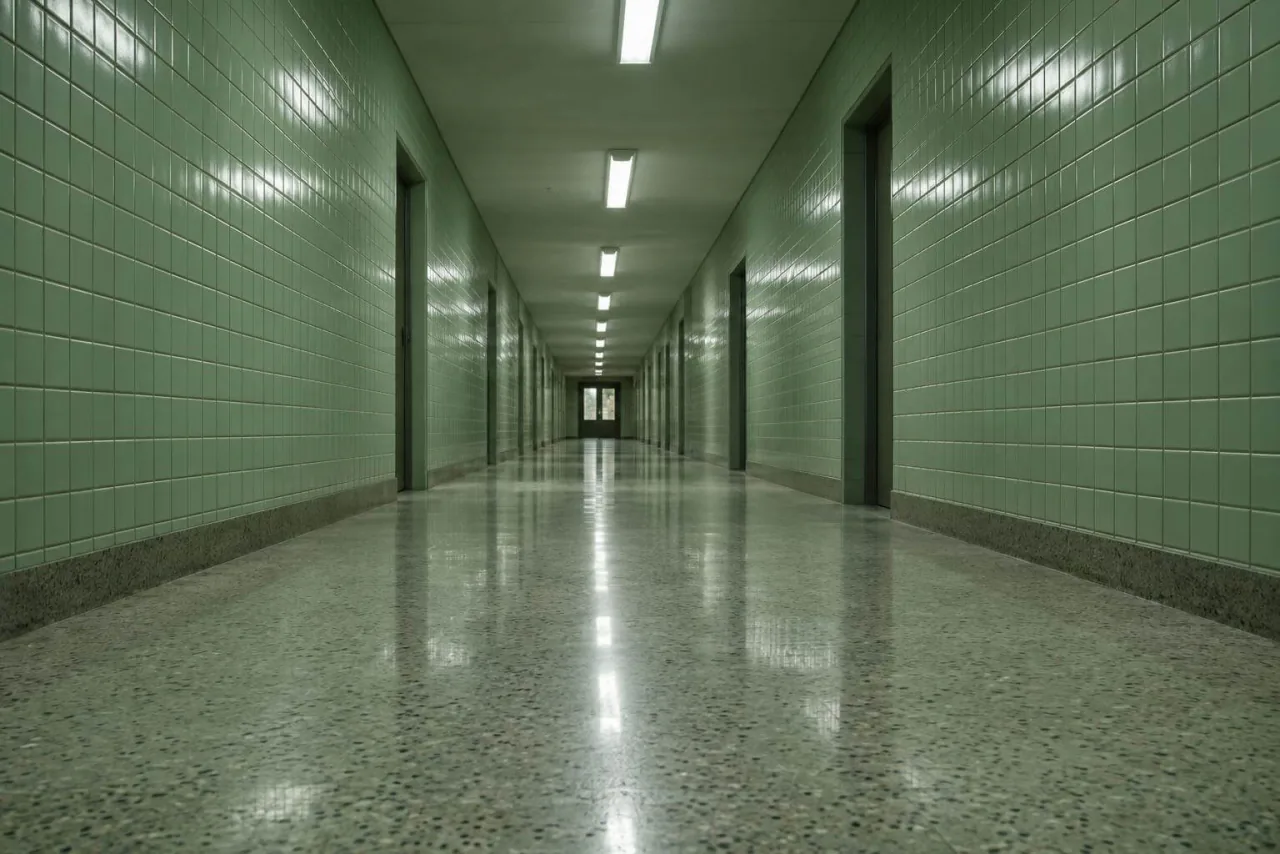 Input
InputBring your own image
Prompts that worked on Seedance 2.0
Real outputs with the exact prompt we used, and why it worked. Hit Recreate to try the same settings.
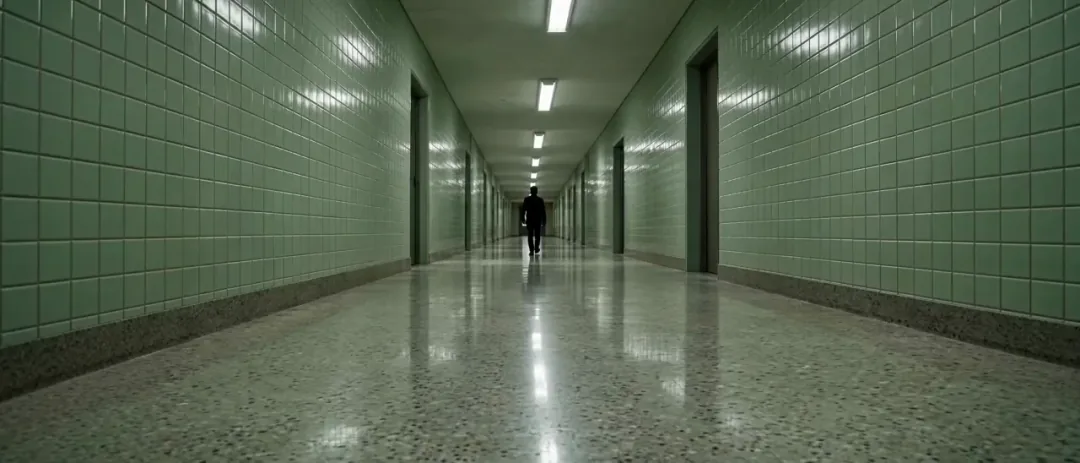
Copy the camera language of the reference clip — low, drifting right, never cutting — but stage it in the tiled corridor from reference image 1. One figure walking away from us, footsteps timed to the pulse in the reference track.
It names the camera traits to copy (low, drifting right, never cutting) and then the new location. Listing the traits works better than just saying "copy the reference".
RecreateWhat Seedance 2.0 can do
Each mode opens in the studio with Seedance 2.0 already picked. The price shows before you generate.
 Create VideoGenerate a video clip from a text prompt.From 53 creditsfor a 5-second clip480p 53 · 720p 114 · 1080p 281 · 4K 584
 Image to VideoBring a still image to life with motion and sound.From 53 creditsfor a 5-second clip480p 53 · 720p 114 · 1080p 281 · 4K 584
 Reference to VideoKeep characters, outfits and places consistent from your references.From 33 creditsfor a 5-second clip480p 33 · 720p 70 · 1080p 172 · 4K 584
 Extend VideoContinue a clip from where it ends for a longer shot.From 53 creditsfor a 5-second clip480p 53 · 720p 114 · 1080p 281 · 4K 584
Best ways to use Seedance 2.0 on PopNow
Where this model already does the work for you, from one-tap apps to the full studio.
How to prompt Seedance 2.0
- Write the shot as a shot list: subject, action, camera, light, sound, one idea per sentence.
- For reference scenes, three angles of the same subject carry more than nine unrelated photos, and the prompt should say which reference does what.
- Draft at 480p and change one setting at a time; there's no seed, so judge a change over a couple of runs.
Settings worth knowing
Everything else has a sensible default, so you can type a prompt and go.
resolution480p · 720p · 1080p · 4K- Output size. Bigger sizes look sharper and cost more.
aspect_ratio21:9 · 16:9 · 4:3 · 1:1 · 3:4 · 9:16- The shape of the frame: wide, square or tall.
duration_seconds4–15s- How long the clip runs. You pay per second.
generate_audio- Adds sound made to match the picture: voices, ambience and effects.
reference_image_urls≤ 9- Pictures of the people, outfits or places the result should keep.
image_url- The picture to start from.
last_image_url- Optional final frame, so the clip ends exactly where you want.
reference_video_urls≤ 3- Clips whose motion, camera or style the result should follow.
reference_audio_urls≤ 3- Audio to match: a voice, music or a rhythm.
How it compares
Same kind of job, different strengths and prices.
Seedance 2.5 runs single takes up to 30 seconds; Seedance 2.0 goes up to 4K but stops at 15 seconds.
- Seedance 2.0 vs Seedance 2.5
- Seedance 2.0 Fast vs Seedance 2.0
- HappyHorse 1.1 vs Seedance 2.0
- Seedance 2.0 vs Kling 3.0


Where Seedance 2.0 falls short
- Clips stop at 15 seconds; Seedance 2.5 goes to 30.
- 4K is several times the 1080p price per second, so keep it for finals.
- Results vary from run to run, so judge a settings change over a couple of tries.
How to use Seedance 2.0 in three steps
- Choose Seedance 2.0 in the video studio and pick a mode.
- Write a shot list: subject, action, camera, light, sound. For references, say which photo does what.
- Draft at 480p, then render at 1080p or 4K.
Questions about Seedance 2.0
How much does Seedance 2.0 cost?
On PopNow, the cheapest run of Seedance 2.0 costs 33 credits ($0.33) for a 5-second clip. Larger sizes cost more: 480p 33 · 720p 70 · 1080p 172 · 4K 584. You pay with credits (1 credit = $0.01), the exact cost shows on the Generate button before you start, and failed generations are refunded automatically.
How long and how sharp are Seedance 2.0 videos?
Clips run 4–15s at up to 4k, with sound generated along with the picture.
How long can a Seedance 2.0 clip be?
4 to 15 seconds per clip.
Does Seedance 2.0 support 4K?
Yes, alongside 480p, 720p and 1080p. It is the only current Seedance model on PopNow with 4K.
How many references does Seedance 2.0 accept?
Up to nine images plus three clips and three audio tracks.
Does Seedance 2.0 make sound?
Yes, audio is generated with the picture by default.
Seedance 2.0 or Seedance 2.0 Fast?
Fast renders quicker with the same settings; full Seedance 2.0 is the one with 1080p and 4K.
Is Seedance 2.0 free?
Not on its own. New accounts get 30 credits, and the shortest Seedance 2.0 text or image to video run, 4 seconds at 480p, costs 42. Those 30 credits do cover a 5-second Seedance 2.0 Mini clip, a cheap way to test a prompt before paying for the full model. There is no subscription, and failed runs refund their credits.
Seedance 2.0 or Seedance 2.5?
Seedance 2.5 runs single takes up to 30 seconds; Seedance 2.0 goes up to 4K but stops at 15 seconds.
Make something with Seedance 2.0
Draft cheap at 480p, then deliver the same shot at 4K.