


by KuaishouVideo

Kling O3
Kling’s unified model: create, animate, reference and edit up to 4K
- Up to 4K
- 3–15s clips
- Sound included
- Start and end frames
- Up to 7 reference images
- 3 aspect ratios
From 51 credits for a 5-second clip≈ $0.51· Create Video
What is Kling O3?
Kling O3, also called Kling 3.0 Omni, is Kuaishou's most flexible video model. One model handles four jobs: writing a scene from text, animating your first frame, building a shot from up to seven reference photos, and editing a clip you already have. It can add sound and cut between several shots on its own.
Best on PopNow for: Changing something in a video you already have (the season, an outfit, the backdrop), casting people and objects from separate photos into one shot, and multi-angle scenes from one prompt.
Good for
- A wide shot, a close-up and a low angle from a single request
- Putting the same character into settings you never filmed
- Changing the season, outfit or backdrop of an existing clip
What Kling O3 does well
Edit a real clip with words
Upload a 3 to 10 second video and describe only what should change. Snow on the street, a different jacket, night instead of day: framing, motion and dialogue carry over from the original.
Seven photos, one scene
Give a person, a prop and a location their own photo and assign each a job in the prompt. O3 combines them into a shot none of the source photos contain.
Several angles from one request
Write the shots in order, switch to multi-shot and it cuts between a wide, a close-up and a low angle by itself, keeping people and setting consistent.
Real results from Kling O3
Every image and clip here was generated with Kling O3. Hit Recreate to open it in the studio with the same prompt and settings.
Bring your own clip
Bring your own clip
Prompts that worked on Kling O3
Real outputs with the exact prompt we used, and why it worked. Hit Recreate to try the same settings.
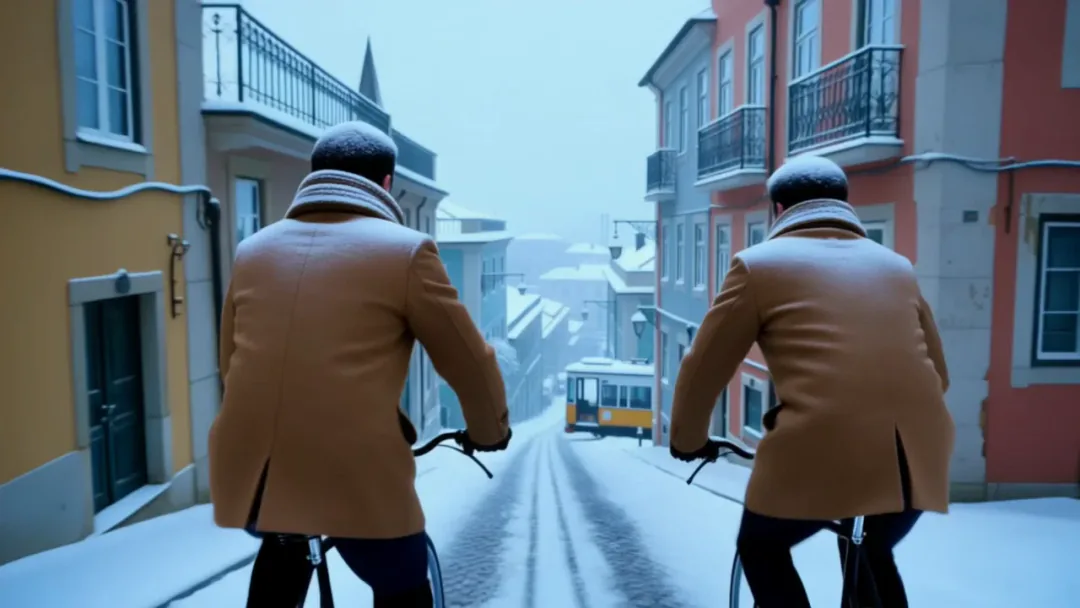
Turn the season to deep winter: fresh snow on the cobblestones, the balconies, the rooftops and the yellow tram, snowflakes drifting through the air and cold blue morning light. Dress both riders in wool coats and knitted scarves. Keep the street, the bicycles, the riders' movement and the camera move exactly as they are.
The edit names the change and nothing else: deep winter, snow on the cobbles, balconies and tram. Because the prompt never mentions the riders or the camera, O3 leaves them alone.
Recreate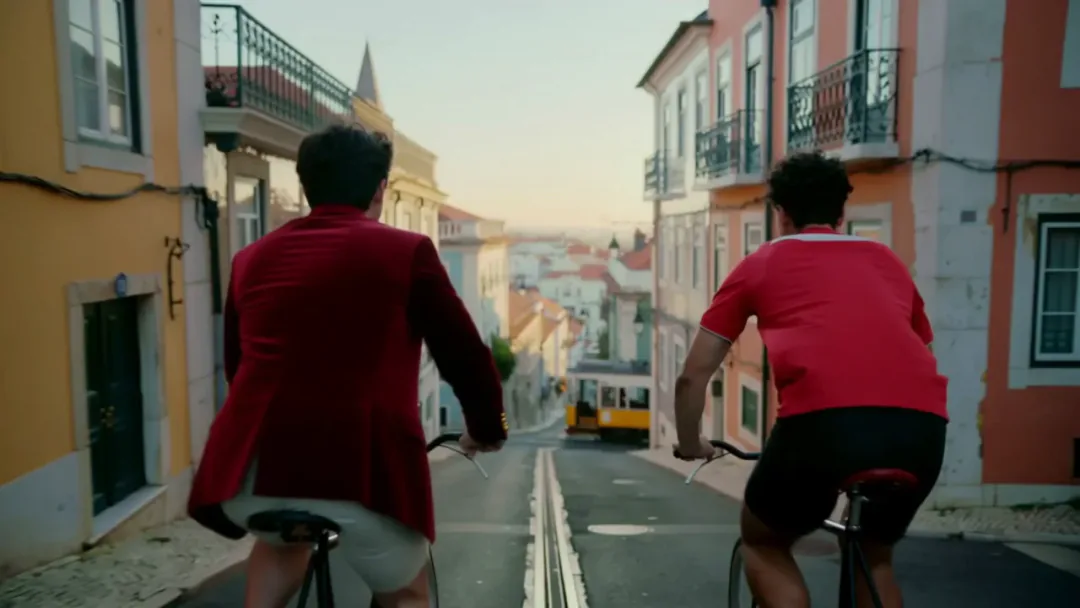
Dress the rider on the left, in the blue shirt, in the wine-red velvet jacket from <<<image_1>>>. Keep the rider in the red shirt, the street, the bicycles, the yellow tram, the riders' movement and the camera move exactly as they are.
It points at one person precisely (the rider on the left, in the blue shirt) and at the reference image for the jacket. Being that specific stops the change spilling onto the other rider.
RecreateWhat Kling O3 can do
Each mode opens in the studio with Kling O3 already picked. The price shows before you generate.
 Create VideoGenerate a video clip from a text prompt.From 51 creditsfor a 5-second clip720p 51 · 1080p 68 · 4K 252
 Image to VideoBring a still image to life with motion and sound.From 51 creditsfor a 5-second clip720p 51 · 1080p 68 · 4K 252
 Reference to VideoKeep characters, outfits and places consistent from your references.From 51 creditsfor a 5-second clip720p 51 · 1080p 68 · 4K 315
 Edit VideoChange the subject, style or setting of a clip with a prompt.From 18.78 creditsper second of video720p 18.78 · 1080p 25.2
Best ways to use Kling O3 on PopNow
Where this model already does the work for you, from one-tap apps to the full studio.
Edit a video you already made
Open the video studio's edit mode, upload your clip and describe the change.
OpenCompare with Kling 3.0
See which Kling model suits a single polished shot and which suits editing and references.
OpenSwap a character in footage
For replacing one person throughout a clip, the Video Face Swap app is the simpler route.
OpenHow to prompt Kling O3
- For several angles, write each shot in the prompt and choose multi-shot; the model cuts between them for you.
- When editing a clip, describe only what should change. Framing, motion and dialogue carry over from the original.
- Need one unbroken take? Add "one continuous shot, no cuts" to the prompt.
Settings worth knowing
Everything else has a sensible default, so you can type a prompt and go.
resolution720p · 1080p · 4K- Output size. Bigger sizes look sharper and cost more.
aspect_ratio16:9 · 9:16 · 1:1- The shape of the frame: wide, square or tall.
duration_seconds3–15s- How long the clip runs. You pay per second.
generate_audio- Adds sound made to match the picture: voices, ambience and effects.
reference_image_urls≤ 7- Pictures of the people, outfits or places the result should keep.
image_url- The picture to start from.
last_image_url- Optional final frame, so the clip ends exactly where you want.
reference_video_urls≤ 1- Clips whose motion, camera or style the result should follow.
video_url- The clip to work on.
How it compares
Same kind of job, different strengths and prices.
Kling 3.0 is the pick for a single polished shot with first and last frames or Motion Control. O3 wins when you need reference photos, video editing or several modes in one place.


Where Kling O3 falls short
- Edits work on source clips of 3 to 10 seconds; trim longer footage first.
- Single-shot mode is not a strict guarantee of one take. Add "one continuous shot, no cuts" when it matters.
- Each extra reference photo helps only if the prompt gives it a clear job; three or four focused references beat seven vague ones.
How to use Kling O3 in three steps
- Choose Kling O3 in the video studio and pick create, animate, reference or edit.
- For edits, upload the clip and describe only the change. For references, number each photo and give it a role.
- Draft at 720p, then rerun the keeper at 1080p or 4K.
Questions about Kling O3
How much does Kling O3 cost?
On PopNow, the cheapest run of Kling O3 costs 51 credits ($0.51) for a 5-second clip. Larger sizes cost more: 720p 51 · 1080p 68 · 4K 252. You pay with credits (1 credit = $0.01), the exact cost shows on the Generate button before you start, and failed generations are refunded automatically.
How long and how sharp are Kling O3 videos?
Clips run 3–15s at up to 4k, with sound generated along with the picture.
Is Kling O3 the same as Kling 3.0 Omni?
Yes. Kling O3 is the shorter name for Kling 3.0 Omni, the unified model that creates, animates, references and edits.
Can Kling O3 edit a video I already have?
Yes. Upload a 3 to 10 second clip and write what should change. Everything you do not mention stays as it was.
How many reference photos can Kling O3 use?
Up to seven in one shot. Give each a role in the prompt, such as the person, the room and the object they hold.
Kling O3 or Kling 3.0?
Kling 3.0 is better for a single polished shot with first and last frames or Motion Control. Kling O3 is better for references, multi-shot scenes and editing existing footage.
Does Kling O3 make sound?
Yes, when you turn audio on. Dialogue in quotes, room tone and effects are generated with the picture.
Make something with Kling O3
Have a clip that is almost right? Upload it and tell Kling O3 the one thing to change.