


Katana alternative
A Katana alternative that runs in your browser
Recast turns finished edits into templates you star in — outfit lineups, photo dumps, magazine covers, clone dances — or rebuilds your own clip shot by shot. The cuts land on the beat, the text stays sharp, and there is nothing to install or connect.
Presets start at 20 credits. New accounts get 30 free credits.
What Higgsfield Katana does
Higgsfield Katana recreates a reference edit with your own characters. According to Higgsfield’s own description, it reads the shots, rhythm and soundtrack of the reference clip, places your photos into the matching shots, and fills in the shots it needs with Higgsfield’s models.
The recreation itself runs inside Claude: you connect the Higgsfield MCP server to a Claude account, pick or upload a reference on the Katana page, and start the job from Claude. That works well if you already live in Claude. If you just want the video, it is two accounts and a setup step before the first result.
Recast does the same core job — your face in a stylish edit, with the timing intact — on a normal web page.
Recast and Katana side by side
| PopNow Recast | Higgsfield Katana | |
|---|---|---|
| Where you use it | On popnow.ai, in any modern browser | Inside Claude, through the Higgsfield MCP connector |
| What you need | A free PopNow account (30 credits to start) | A Claude account and a Higgsfield account |
| Presets | 21 original edits in three groups: personalized edits, style transfer and motion transfer | Community presets in the same three groups |
| Reference clip | A preset, a clip from your library, or your own 3–30 second upload | A preset or your own upload (no social links), 3–30 seconds |
| Your photos | Up to 5 — people, outfits or products — and @ mentions in the instructions | Up to 5 photos of people, products or outfits |
| What stays the same | Shot order, cuts on the beat, on-screen text, stickers and transitions | Shot order, timing and beats |
| Price before you start | Yes — the total is on the button; each shot is billed on its own and refunded if it fails | Yes — Claude reports the credits before generating |
| Versions and fixes | Up to 3 versions side by side; redo any single shot on the page | Several versions per setup; re-run only the shots that need it |
| Your own presets | Save a reference edit as a private preset (community sharing opens after a safety review) | Publish presets to the community |
Katana details are taken from Higgsfield’s public description as of October 2026 and may change.
How Recast keeps an edit intact
A single prompt can’t reproduce an edit — the timing and the graphics are the whole point. So Recast treats every preset as a structured template and never asks an AI model to paint the text.
1. A preset is a shot list
Each preset stores its shots (length in beats, framing, action, camera), its overlays (titles, counters, stickers, frames, transitions), its music track and what it needs from you — one photo, two people, a product or outfits.
2. Every shot is made with your photo
Photo shots put you into the scene from your picture; moving shots then animate that frame; motion-transfer shots copy the moves of a reference clip onto you. Each shot is its own job, priced and refunded on its own.
3. The edit is put back by code
Your shots are laid onto the template in your browser: the cuts land on the beats of the track, and the big text, stickers and frames are drawn on top, so they look exactly like the preset every time.
4. Your own clip works too
Upload a clip you made: Recast finds every cut to about 1/48 of a second, swaps you into each shot with that shot’s own motion, and joins them at the original cuts.
One template, two different people
The same “Which One?” preset made from two different sample photos. Same six looks, same cuts, same title — only the star changes.
A real result, frame by frame
A six-second, three-shot clip recast from one photo, on the Fast setting. Left: the original. Right: the recast. Same frame time in each pair.
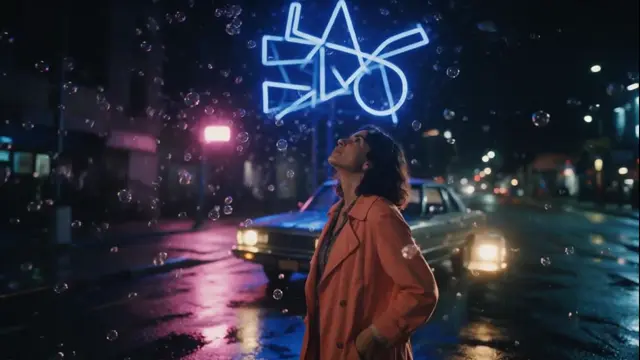 Original
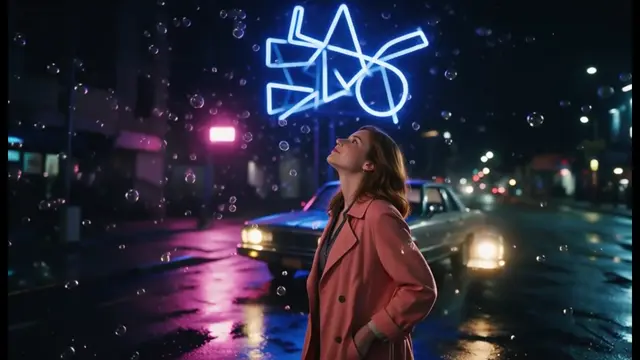 Recast
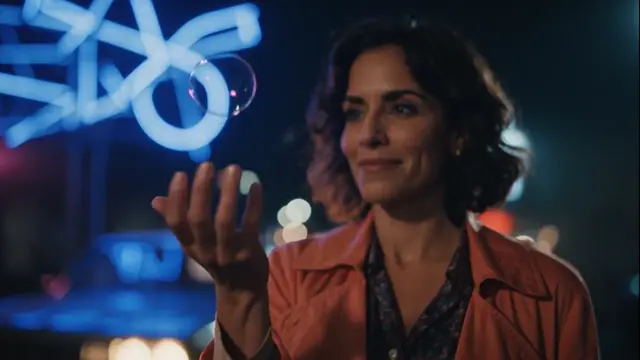 Original
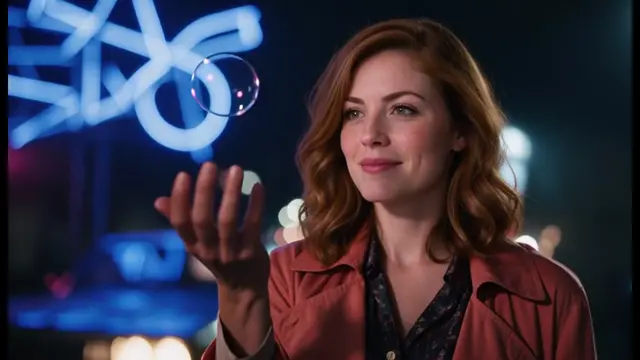 Recast
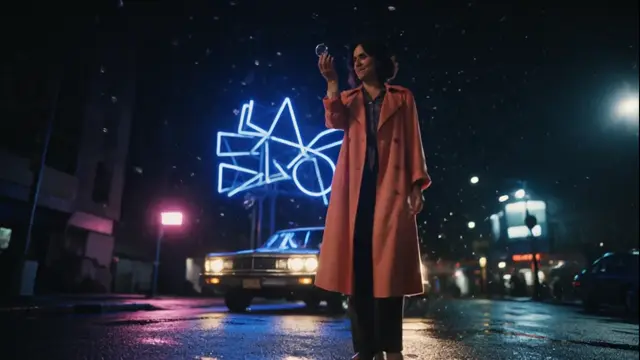 Original
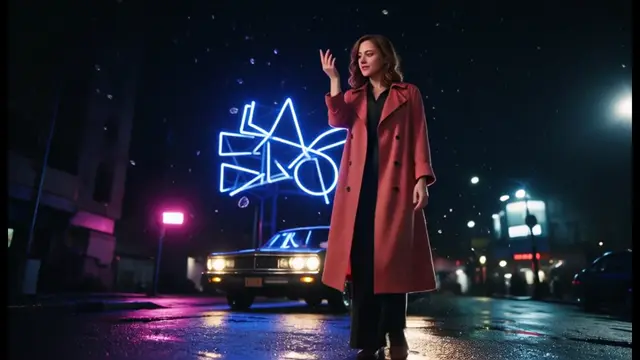 Recast
What it costs
Every preset, priced the same way the Recreate button does it before you start.
| Preset | Type | Shots | Fast | HD |
|---|---|---|---|---|
| Photo Booth9:16 · 11.1s | Personalized edits | 5 | 20 | 24 |
| Comic Strip4:3 · 11.5s | Style transfer | 5 | 20 | 24 |
| Which One?9:16 · 12.1s | Personalized edits | 7 | 30 | 36 |
| Photo Dump9:16 · 14.2s | Personalized edits | 7 | 30 | 36 |
| Player Card1:1 · 11.5s | Personalized edits | 5 | 43 | 47 |
| Product Drop9:16 · 11.6s | Personalized edits | 5 | 43 | 47 |
| Clay World1:1 · 11.5s | Style transfer | 4 | 43 | 47 |
| Gallery Portrait4:3 · 11.8s | Style transfer | 4 | 43 | 47 |
| Clone Squad16:9 · 11.0s | Motion transfer | 2 | 45 | 89 |
| Frame Dance9:16 · 11.0s | Motion transfer | 2 | 45 | 89 |
| Bullet-Time Kickflip9:16 · 12.5s | Motion transfer | 3 | 45 | 89 |
| Rooftop Spin9:16 · 12.6s | Motion transfer | 3 | 46 | 90 |
| Cover Story9:16 · 11.5s | Personalized edits | 6 | 48 | 53 |
| Passport Stamps16:9 · 11.6s | Personalized edits | 6 | 48 | 53 |
| Chrome Noir16:9 · 14.5s | Style transfer | 5 | 48 | 53 |
| Anime Opening16:9 · 13.5s | Style transfer | 6 | 48 | 53 |
| 90s Camcorder4:3 · 11.5s | Style transfer | 5 | 48 | 53 |
| A Day in My Life9:16 · 12.9s | Personalized edits | 6 | 53 | 59 |
| Blue Hour16:9 · 11.5s | Motion transfer | 4 | 58 | 112 |
| Neon Night16:9 · 11.0s | Motion transfer | 5 | 67 | 125 |
| Dance Montage9:16 · 11.0s | Motion transfer | 4 | 75 | 144 |
Each shot is a separate job: if one fails it is refunded, and you can redo a single shot without paying for the rest again.
Comic Strip and Photo Booth cost 20 credits on Fast, so the 30 free credits from sign-up cover a full try.
Where it falls short
- In your own clips one person is replaced per shot; in a group shot the main person becomes you and the others stay as they are.
- Preset text is the same for everyone. To change a title or the music, send the finished edit to the video editor.
- Very fast whip pans and shots where the person is barely visible are the hardest; redo those shots if they look off.
- The finished edit is rendered in your browser in real time, so keep the tab open for the length of the video.
Questions people ask
Is there a free alternative to Higgsfield Katana?
Recast is pay-as-you-go with no subscription. New PopNow accounts get 30 free credits, and the Comic Strip preset costs 20 on Fast, so you can try a full recast without paying.
Do I need Claude or an MCP connection?
No. Recast runs on the PopNow website. Pick a preset, add a photo and press Recreate.
Can I paste a TikTok or Instagram link?
No. Upload the video file itself (3 to 30 seconds), and only use clips you made or have permission to use.
Will the result look like me?
Every shot is made from your photo, so the face, hair and build follow your picture. A clear, front-facing photo gives the closest match.
Is PopNow connected to Higgsfield?
No. PopNow is not affiliated with Higgsfield. Katana is mentioned on this page only to compare how the two tools work.
Put yourself in an edit
Pick one of 21 presets or upload your own clip. You will see the full price before anything is charged.
Open RecastHiggsfield and Katana are trademarks of their respective owners. PopNow is not affiliated with or endorsed by them.