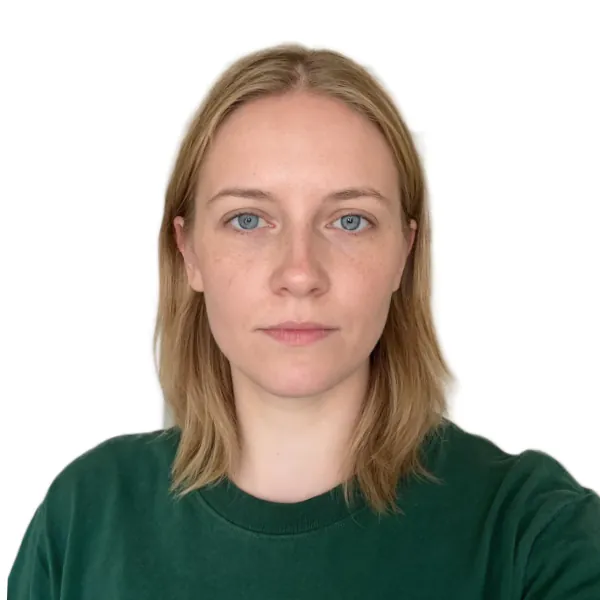
Passport photo maker
A passport photo has to meet rules that most phone photos miss: an exact print size, a head that fills a set share of the frame, eyes at the right height and a plain background in an approved color. This passport photo maker does the measuring for you. Upload a photo taken against any wall, choose the document from 17 country and visa sizes (or type your own), and it cuts you out of the background, straightens your head using your eyes, scales it to the required head height and puts it on white, light grey or another accepted color. You get a digital photo at 300 DPI for online forms and a print sheet for 4×6 in, 5×7 in, A4 or Letter paper with cut lines. Your face is not retouched or redrawn. Everything runs in your browser, there is no sign-up and no watermark. Rules change and offices differ, so check the official requirements before you submit: we can't guarantee that an office will accept the photo.
Questions
How do I make a passport photo at home?
Take a well-lit, front-facing photo against any plain wall, upload it here and choose your country. The tool removes the background, sizes your head to the rules and centers it. Download the digital file for an online form, or print the 4×6 in sheet at a photo kiosk or at home.
What size is a passport photo?
It depends on the country. The US and India use 2×2 inches (51×51 mm); the UK, Schengen countries, Canada visas, Australia, Japan, Korea and many others use 35×45 mm; China uses 33×48 mm; Spain uses 26×32 mm. Pick the document and the tool applies its size and head height.
Will the photo be accepted?
We follow the official size, head height and background rules we checked on 2026-10-17, but the final decision is always made by the office that reviews it, and rules change. Read the official page linked under the document, and make sure your expression, lighting and glasses follow its rules too.
Does it change my face?
No. It only removes the background, straightens the tilt, crops and resizes. Your skin, features and expression stay exactly as photographed, because most passport offices reject retouched photos. For a styled, AI-made ID portrait, use the ID Photo effect instead.
Is my photo uploaded?
No. The background removal and face finder run in your browser. The first time, the page downloads the two models (about 13 MB) and then keeps them cached. Only Send to uploads a copy, and only if you use it.
Can I print passport photos at Walgreens, CVS or a photo kiosk?
Yes. Download the 4×6 in sheet as a JPG and order it as a standard 4×6 print. The photos are laid out at 300 DPI with cut lines, so each one comes out at the exact size when printed without cropping.
Can I take a passport photo with my phone?
Yes, most offices accept a home photo as long as it meets their rules. Ask someone to hold the phone about 1.5 m away at eye level, stand facing a window, and let this tool handle the background, size and print layout.
Why is my head the wrong size on the printed photo?
Usually the printer scaled the page. Choose Actual size or 100% in the print dialog, turn off Fit to page and borderless enlargement, then measure one photo with a ruler: a US photo must be exactly 51 mm square.
Which background color should I choose?
Use the default for your document. The US, India, China, Korea and Japan ask for white; the UK asks for cream or light grey; France does not accept white. Blue and red are only for forms that ask for them.
Can I wear glasses in my passport photo?
It depends on the country. The US has not allowed glasses since 2016, and the UK and Australia ask you to avoid them. Elsewhere clear glasses are usually fine if there is no glare and the frames do not cover your eyes.
How is this different from the AI ID photo effect?
The ID photo effect asks an AI model to repaint you in a blazer on light blue, which is fine for a profile but not for official use. This passport photo maker never changes your face; it only crops, straightens and replaces the background.
What if my photo is rejected?
Check the reason given by the office, retake the photo with better light or more space around you, and run it again here. Make sure you picked the exact document, because a visa and a passport from the same country can use different sizes.
Go deeper
Before and after: what changes
You start with an ordinary phone picture in a hallway or living room and end with a print-ready ID photo: the wall, door frames and clutter are replaced by a flat approved color, the head is straightened and scaled to the exact millimeters your document asks for, and the frame is cropped to that country's format.
- What changes
- The background becomes white, off-white, light grey, light blue or the color you pick. The photo is rotated by the angle between your eyes, cropped and scaled so the chin-to-crown height lands in the middle of the allowed range, for example 30 mm on a US 2×2 inch photo or 34 mm on a 35×45 mm Schengen photo.
- What stays the same
- Your face, skin, freckles, glasses, hairstyle and clothes. Nothing is smoothed, slimmed or redrawn, because passport offices reject retouched pictures. Fine hair edges keep the soft transition from the original photo.
- What to look at when you compare
- Turn on Guides: the top of your hair should sit inside the orange band and your chin on the orange line; on US photos your eyes should also fall in the blue band. Then zoom in on the hair outline to check that no bits of the old wall are left.
Photos that make clean passport pictures, and ones that cause trouble
Works well
- Taken from about 1.5 m away at eye level, with the head and the top of the shoulders in frame and some space above the hair.
- Even daylight from a window in front of you, a neutral expression, mouth closed and both ears or face edges visible.
- A plain or lightly patterned wall that contrasts with your hair, so the cutout follows the outline cleanly.
Avoid
- Selfies at arm's length or tightly cropped at the chin: there is not enough shoulder to fill the frame, and the check turns yellow.
- Strong side light, a shadow behind you, a hat, sunglasses or hair covering the eyebrows: these break the rules no matter how well it is cropped.
- Very busy backgrounds such as shelves, plants or a lamp right next to the head, which can leave a faint halo around the hair.
Step by step
- Add your photoPress Upload photo, drop a file, paste with Ctrl or Cmd + V, or choose From my library. The first time, the background remover and face finder download once and then work offline from the cache.
- Pick the documentTap a common choice such as US 2×2 in, Schengen visa or UK, or open the list of 17 countries and sizes. Custom size takes any width, height and head height in millimeters.
- Check the guidesRead the Checks list. If the head size, eye height or crop is marked yellow, use Head size, Up or down, Left or right or Straighten; Reset puts everything back to the automatic fit.
- Set the backgroundThe default color follows the document, for example light grey for the UK and France. Pick another swatch or a custom color only if your office allows it.
- Download or printSave the digital photo as JPG or PNG at 300 DPI, or switch to Print sheet, choose 4×6 in, 5×7 in, A4 or Letter and download a sheet with several copies and grey cut lines.
How the sizing and cutout work
- Head height from your eyes and chin
- A face detector finds your eyes and mouth; the chin is placed from the eye-to-mouth distance, calibrated on test portraits of different ages and skin tones, and the top of the head comes from the cutout, with very full hair capped so the face is not shrunk.
- On-device portrait matting
- MODNet, an open portrait matting model, produces a soft transparency mask on your device. Edge cleanup tightens that mask if the old background shows around the hair.
- Print-exact sheets
- Every photo is drawn at 300 DPI and the files carry that resolution, so a 4×6 in print or an A4 printed at 100% gives each photo its true size. Cut lines run along the photo edges, never across a face.
- Official sizes with sources
- Each document lists its size, head range, accepted backgrounds and a link to the official rules checked in October 2026. Rules change, so read that page before you submit.
Where to go next