How Dunes Move, made with GPT Image 2.5 Sunburst
Example made with GPT Image 2.5 Sunburst

Text to imageInfographics & diagrams

GPT Image 2.5 Sunburst cutaway diagram promptHow Dunes Move

The exact text-to-image prompt behind this picture, made with GPT Image 2.5 Sunburst.

Prompt

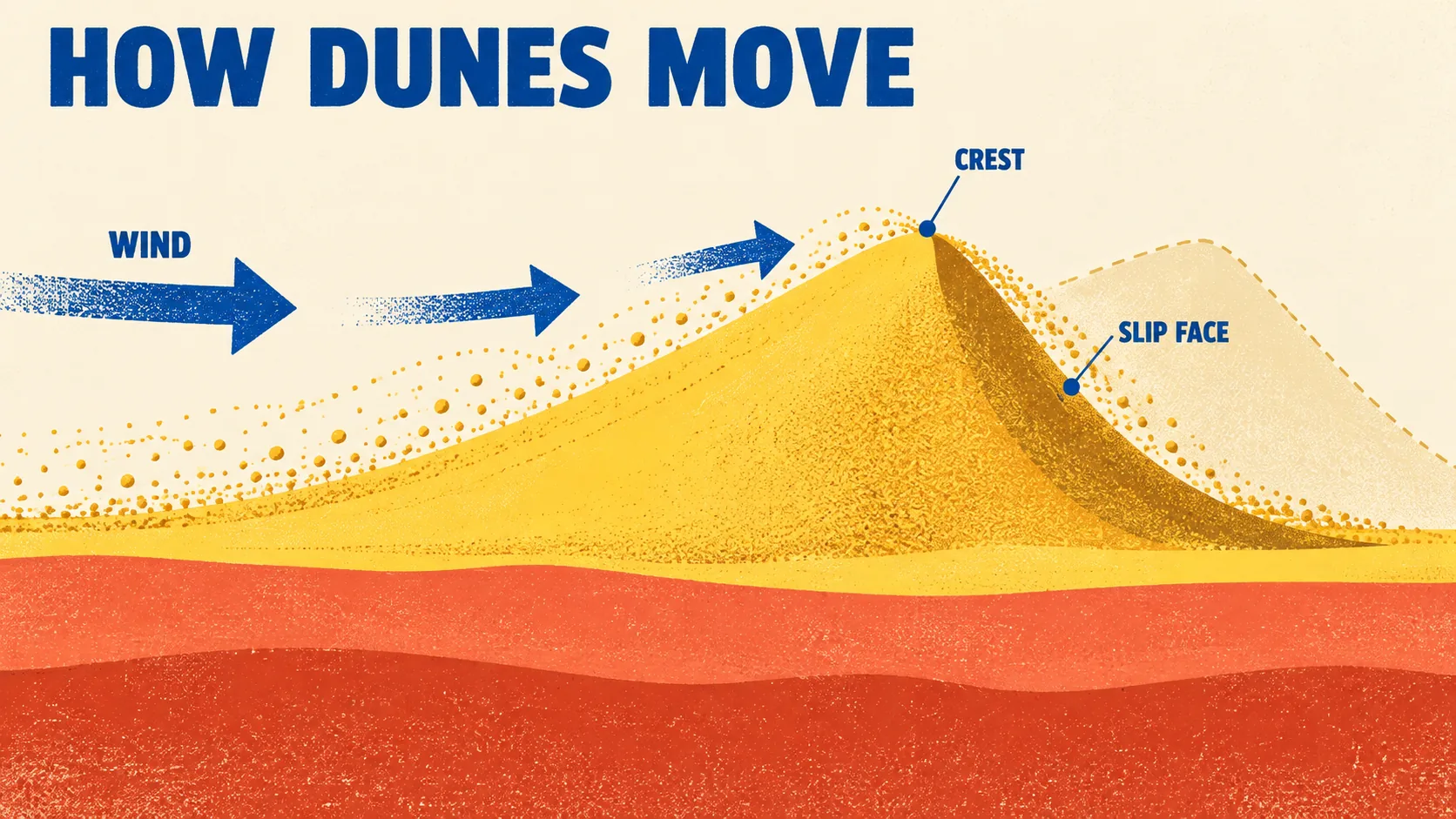
Wide 16:9 landscape frame. One sweeping dune cross-section explains wind carrying sand up a gentle slope and depositing it beyond a sharp crest, with a faint outline showing the dune's next position. Flat coral and butter yellow layers sit below a cream sky, cobalt arrows remain large and sparse. Textured educational screenprint with crisp illustrated noon shadows, title reading "HOW DUNES MOVE", labels "WIND", "CREST" and "SLIP FACE", no other text.

Prompts are kept in their original English to help reproduce the example. Copy one as it is, or adapt it for your project.

Opens GPT Image 2.5 Sunburst with this prompt and the settings below filled in.

135 tested GPT Image prompts →

Settings

Mode
Text to image
Aspect ratio
16:9
Quality
high
Price
From 2 credits

The exact price shows before you generate.

Make your own version

  1. The words in quotes, "HOW DUNES MOVE", are printed in the picture. Keep them short and change them to your own.
  2. For a different mood, rewrite only the light: Textured educational screenprint with crisp illustrated noon shadows.

Style prompt guide

Style traits to keep

A stylized educational infographic illustrates desert geomorphology through a clean screenprinted dune cross-section. GPT Image 2.5 Sunburst renders the limited mid-century palette and legible labels cleanly without cluttering the diagram. The bold compositional contrast between flat earth tones, cream negative space, and cobalt process arrows makes a complex geological motion immediately easy to grasp.

The visual appeal comes from treating an Earth science lesson like a collectible mid-century classroom chart. Four stylistic choices ensure the result stays stylized rather than turning into a photorealistic desert.

Palette
Muted coral, warm butter yellow, and cream sky mimic vintage offset ink swatches, punctuated only by functional cobalt blue.
Texture
Screenprint grain softens the digital shapes, giving flat vector strata the organic feel of ink soaking into uncoated heavy paper.
Composition
A wide cutaway view places geological layers in clear profile, using vast cream negative space to keep annotations uncluttered.
Light
Crisp noon sun creates short, graphic drop shadows that delineate the crest sharply without casting dark washes across text.

What defines this look

  1. Horizontal layout framingWide 16:9 landscape frame.

    Establishes an expansive horizontal canvas that lets the windward slope, crest, and slip face unfold naturally from left to right. Changing to a square ratio compresses the cutaway and clips the explanatory flow.

  2. Core diagram conceptOne sweeping dune cross-section explains wind carrying sand up a gentle slope and depositing it beyond a sharp crest, with a faint outline showing the dune's next position.

    Defines the exact physical mechanism and adds the ghost outline to convey movement across time. Omitting the secondary outline reduces the graphic to a static desert scene rather than an active scientific process.

  3. Controlled color systemFlat coral and butter yellow layers sit below a cream sky, cobalt arrows remain large and sparse.

    Restricts the visual spectrum to warm vintage paper tones while making the cobalt indicators pop immediately. Removing these color restrictions often results in muddy gradients and competing, oversaturated indicators.

  4. Print medium styleTextured educational screenprint with crisp illustrated noon shadows,

    Instructs the generator to emulate ink grain and tactile paper stock instead of glossy digital vector art or 3D CGI. Noon shadows ground the dunes without casting dark, messy shapes over the instructional text.

  5. Text and label constrainttitle reading "HOW DUNES MOVE", labels "WIND", "CREST" and "SLIP FACE", no other text.

    Places exact scientific typography in key anatomical positions while suppressing auto-generated gibberish. Dropping the negative constraint invites unreadable pseudo-text across the sky and terrain.

Same style, new subjects

Bioswale street cutaway

Applies the screenprint diagram aesthetic to civil engineering and urban hydrology.

Prompt

Wide 16:9 landscape frame. One sweeping city street cross-section explains stormwater runoff flowing through bioswales and permeable pavers into groundwater, with a faint outline showing water table absorption. Flat terracotta and sage green layers sit below a cream sky, cobalt arrows remain large and sparse. Textured educational screenprint with crisp illustrated noon shadows, title reading "HOW BIOSWALES WORK", labels "RUNOFF", "SOIL BED" and "AQUIFER", no other text.

Lung respiration diagram

Uses the same vintage instructional look to illustrate human anatomy and breathing mechanics.

Prompt

Wide 16:9 landscape frame. One sweeping human chest cross-section explains diaphragm motion expanding the rib cage and pulling air into bronchial branches, with a faint outline showing relaxed exhalation posture. Flat coral and butter yellow layers sit below a cream sky, cobalt arrows remain large and sparse. Textured educational screenprint with crisp illustrated noon shadows, title reading "HOW LUNGS BREATHE", labels "INHALATION", "BRONCHI" and "DIAPHRAGM", no other text.

Coffee extraction cutaway

Translates the instructional print format into a culinary kitchen science infographic.

Prompt

Wide 16:9 landscape frame. One sweeping pour-over dripper cross-section explains hot water saturating ground coffee beans and filtering down into a glass carafe, with a faint outline showing rising liquid levels. Flat terracotta and butter yellow layers sit below a cream sky, cobalt arrows remain large and sparse. Textured educational screenprint with crisp illustrated noon shadows, title reading "HOW EXTRACTION WORKS", labels "BLOOM", "BED" and "CARAFE", no other text.

Model and settings

Use the high quality setting to render crisp typography and clean paper grain without smudging the small text characters. Keep the 16:9 aspect ratio whenever a process moves horizontally through time or physical space. If you want to isolate a single upright cross-section or make a museum poster for social feeds, switch the ratio to 4:5 or 9:16 while keeping quality set to high.

  • Nano Banana ProPick Nano Banana Pro when you want to pack in secondary callout boxes or denser multi-stage diagrams, as its layout planning excels at complex schematic organization.
  • FLUX.2 ProChoose FLUX.2 Pro if your publication requires strict adherence to corporate hex codes or editorial branding for the coral, butter, and cobalt ink values.

When the style drifts

The model fills empty areas with nonsensical placeholder words and fake diagram labels.
Reinforce the final phrase by keeping the exact label list short and leaving no other text explicitly stated at the end.
The sand layers blend into smooth photorealistic gradients rather than distinct print strata.
Add the phrase bold flat papercut strata directly before coral and butter yellow layers to strip out photographic shading.
Arrows multiply into a confusing swarm of tiny lines across the entire dune face.
Replace cobalt arrows remain large and sparse with exactly two large cobalt directional arrows to strictly limit indicator count.

Questions about this style prompt

Why did the AI misspell one of the diagram labels?

Even on top-tier models, complex labels can occasionally blur or drop letters. Keep requested words short, capitalize each label in quotation marks, and limit the total count to three or four key terms to maximize legibility.

How can I make the screenprint texture look more worn or vintage?

Insert subtle ink bleed and weathered matte paper stock into the style description right after screenprint. Avoid adding heavy distress words like grunge or dirty, which will muddy the flat strata.

Can I change the cobalt arrow color without breaking the graphic style?

Yes, replace cobalt with another high-contrast accent such as forest green or charcoal black. Make sure the replacement hue stands out strongly against both the cream sky and the warm terrain layers.