Museum Catalog Breakdown, made with GPT Image 2.5 Sunburst
Example made with GPT Image 2.5 Sunburst

Text to imageInfographics & diagrams

GPT Image 2.5 Sunburst infographic promptMuseum Catalog Breakdown

The exact text-to-image prompt behind this picture, made with GPT Image 2.5 Sunburst.

Fill in the blanks

Change any box and the prompt below updates. Copy it, or make one with your version.

Prompt

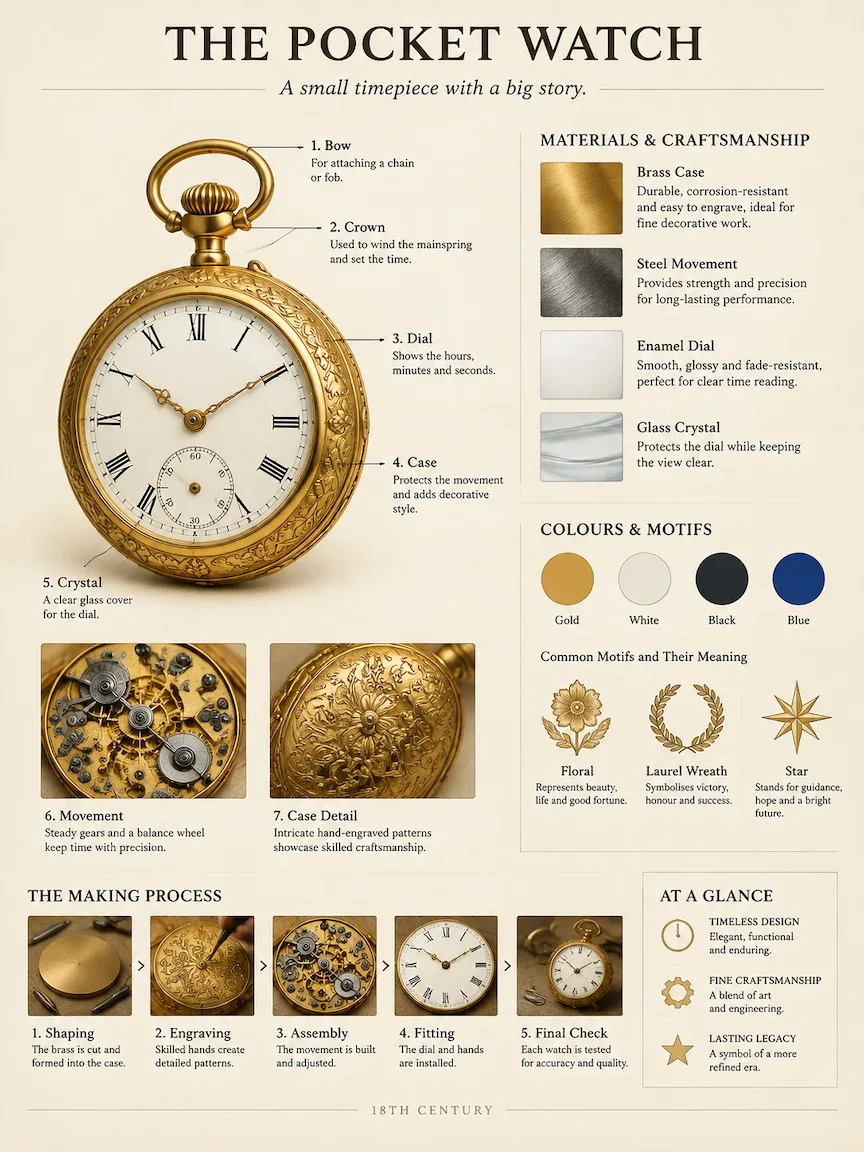
A museum catalog-style breakdown poster of an 18th-century brass pocket watch. Work out the right structure, materials and history yourself. Fixed layout on warm ivory paper: top, the title "THE POCKET WATCH" with a one-line subtitle; left, the object large and photoreal with numbered leader-line callouts to its key parts and two close-up insets; upper right, material and craft samples with short notes; middle right, colour swatches and what its motifs mean; bottom, a small making-process strip and a three-point summary. Calm, professional exhibition-panel design, crisp readable English text, no clutter.

Prompts stay in English, the language these models follow best. Copy it as it is, or change a few words.

Opens GPT Image 2.5 Sunburst with this prompt and the settings below filled in.

67 tested GPT Image prompts →

Settings

Mode
Text to image
Aspect ratio
3:4
Resolution
1k
Quality
high
Price
From 2 credits

The exact price shows before you generate.

Make your own version

  1. Work out the right structure, materials and history yourself makes the model work out the details first, so you only type the topic.
  2. The layout is spelled out piece by piece: Fixed layout on warm ivory paper. Keep that structure and change only the content, or the model loses track of the page.
  3. This is a fill-in template: swap the parts in braces, like {subject}, in the boxes above and keep the rest word for word.

Where this template comes from

Adapted from a prompt by @MrLarus, collected in freestylefly/awesome-gpt-image-2 under MIT. PopNow rewrote it as a fill-in template and made the example above.

Style prompt guide

Style traits to keep

A museum catalog-style poster of an 18th-century brass pocket watch, laid out on warm ivory paper like an exhibition panel. GPT Image 2.5 Sunburst fills the page with a large photoreal watch, numbered callouts, two close-up insets, material samples, colour swatches and a three-point summary, and it works because the fixed layout gives the model a clear structure to follow while the photoreal object keeps the content believable.

The style comes from a museum exhibition panel: calm, ordered and precise. These four traits make the result recognisable as a catalogue page rather than a decorative poster.

Palette
Warm ivory paper forms the base, and the brass watch and colour swatches are the only strong accents. This keeps the panel quiet, which is why the prompt asks for warm ivory paper first.
Line
Numbered leader-line callouts run from labels to the watch parts as thin, precise lines. They make the poster read like a catalogue plate and help the viewer follow the breakdown.
Composition
The fixed layout puts the title at the top, the object on the left, panels on the right and strips at the bottom. The grid lets a viewer scan the page in order, which is what makes it feel like an exhibition panel.
Era
The 18th-century period shapes the brass case, engraved motifs and movement parts so they look like older craft rather than modern hardware. Changing the date would change the whole look of the object.

What defines this look

  1. Subject and open briefA museum catalog-style breakdown poster of an 18th-century brass pocket watch. Work out the right structure, materials and history yourself.

    Names the object, the poster format and the period. The sentence after it lets the model invent the structure and history, so removing it gives you a tighter but more predictable panel.

  2. Layout and title lockFixed layout on warm ivory paper: top, the title "THE POCKET WATCH" with a one-line subtitle;

    Locks the page into top, left and right zones and sets the exact title text. If you remove the zone order, the model may scatter the callouts and insets, and the poster loses its exhibition-panel grid.

  3. Object and callout systemleft, the object large and photoreal with numbered leader-line callouts to its key parts and two close-up insets;

    Asks for a photoreal object with numbered leader lines and two insets, which is what makes the page read as a breakdown. Changing photoreal to illustrated would lose the realistic brass finish that makes the watch look like a real museum object.

  4. Right-side panel contentupper right, material and craft samples with short notes; middle right, colour swatches and what its motifs mean;

    Gives the right-hand panels their jobs: craft samples with notes in the upper right, and swatches with motif meanings in the middle right. Removing the swatch phrase would leave the middle panel without colour information, so the page looks emptier.

  5. Bottom strip and finishbottom, a small making-process strip and a three-point summary. Calm, professional exhibition-panel design, crisp readable English text, no clutter.

    Adds a making-process strip and a three-point summary at the bottom, then sets the calm finish. Dropping no clutter or crisp readable English text gives the model room to crowd the page or blur the labels.

Same style, new subjects

Grey tabby cat

Swaps the watch for a grey tabby cat, so the same panel structure presents a pet's coat, markings and grooming steps for a pet-themed exhibition panel.

Prompt

A museum catalog-style breakdown poster of a grey tabby cat. Work out the right structure, materials and history yourself. Fixed layout on warm ivory paper: top, the title "THE HOUSE CAT" with a one-line subtitle; left, the cat large and photoreal with numbered leader-line callouts and two close-up insets; upper right, coat and whisker samples with short notes; middle right, colour swatches and what its markings mean; bottom, a grooming-process strip and a three-point summary. Calm, professional exhibition-panel design, crisp readable English text, no clutter.

Rainy market street

Moves the same panel to a rainy market street, with stone and iron samples and a timeline strip, for a local history or city-walk display.

Prompt

A museum catalog-style breakdown poster of a rainy cobblestone market street. Work out the right structure, materials and history yourself. Fixed layout on warm ivory paper: top, the title "OLD MARKET STREET" with a one-line subtitle; left, the street large and photoreal with numbered leader-line callouts and two close-up insets; upper right, stone and iron samples with short notes; middle right, colour swatches and what its signs mean; bottom, a timeline strip and a three-point summary. Calm, professional exhibition-panel design, crisp readable English text, no clutter.

Pewter teapot still life

Turns the object into a pewter teapot and pears still life, keeping the calm layout for a food, craft or home-goods showcase.

Prompt

A museum catalog-style breakdown poster of a pewter teapot and three pears. Work out the right structure, materials and history yourself. Fixed layout on warm ivory paper: top, the title "STILL LIFE STUDY" with a one-line subtitle; left, the teapot large and photoreal with numbered leader-line callouts and two close-up insets; upper right, metal and glaze samples with short notes; middle right, colour swatches and what its motifs mean; bottom, a making-process strip and a three-point summary. Calm, professional exhibition-panel design, crisp readable English text, no clutter.

Model and settings

This example uses a 3:4 ratio at 1k resolution and high quality, in text-to-image mode with no input pictures. Keep the 3:4 portrait ratio, because the title, large object and bottom strips stack down the page. Keep high quality so the small callout numbers and swatch notes stay sharp. For a wider exhibition banner, change to a landscape ratio, and expect the left object and right panels to need re-spacing.

  • Nano Banana ProPick this when the layout is the hard part, since its tagline says it plans the layout first with dense text and diagrams, which suits the callouts, swatches and bottom strips in this poster.
  • FLUX.2 ProPick this when the watch must look most photoreal, since its tagline promises photoreal images with readable text and hex colour control, useful for matching the brass and ivory swatch colours exactly.

When the style drifts

The watch swallows the page and the right-hand panels shrink to thin strips.
Change "left, the object large" to "left, the object at medium size" and add "the right side carries most of the text".
Callout labels and swatch notes come out garbled or misspelt.
Shorten the notes to one or two words each and keep "crisp readable English text" in the prompt, since long notes are harder to render cleanly.
The colours turn muddy brown and the ivory paper looks grey.
Name the swatch colours in the prompt, for example "brass gold, oxblood red and muted green", and keep "warm ivory paper" as the first colour mentioned.
The poster looks like a modern infographic or a cartoon instead of an 18th-century catalogue.
Keep "photoreal" and "18th-century", and add "archival museum catalogue plate" right after "museum catalog-style" to anchor the medium.

Questions about this style prompt

How do I get the leader-line callouts to point at the right parts of the watch?

The prompt asks for numbered leader-line callouts to its key parts but does not name the parts, so GPT Image 2.5 Sunburst chooses them itself. If a callout points at the wrong place, add the part name, such as the balance wheel or the mainspring barrel, directly after "to its key parts".

Can I use this layout for a different object without rewriting the whole prompt?

Yes. Swap only the object in the first sentence and the title in quotes, then keep the layout sentence, the callout wording and the closing style line. The fixed layout is what makes the page look like a museum panel, so changing it would change the style.

Why does the prompt ask the model to work out the history itself, and is that history accurate?

The phrase "Work out the right structure, materials and history yourself" lets the model invent the content, so the panel looks plausible but its dates and makers are not checked. Verify any written history against a museum source before you publish it, and add exact facts to the prompt if they matter.