Botanical Growth Poster, made with GPT Image 2.5 Sunburst
Example made with GPT Image 2.5 Sunburst

Text to imageInfographics & diagrams

GPT Image 2.5 Sunburst infographic promptBotanical Growth Poster

The exact text-to-image prompt behind this picture, made with GPT Image 2.5 Sunburst.

Fill in the blanks

Change any box and the prompt below updates. Copy it, or make one with your version.

Prompt

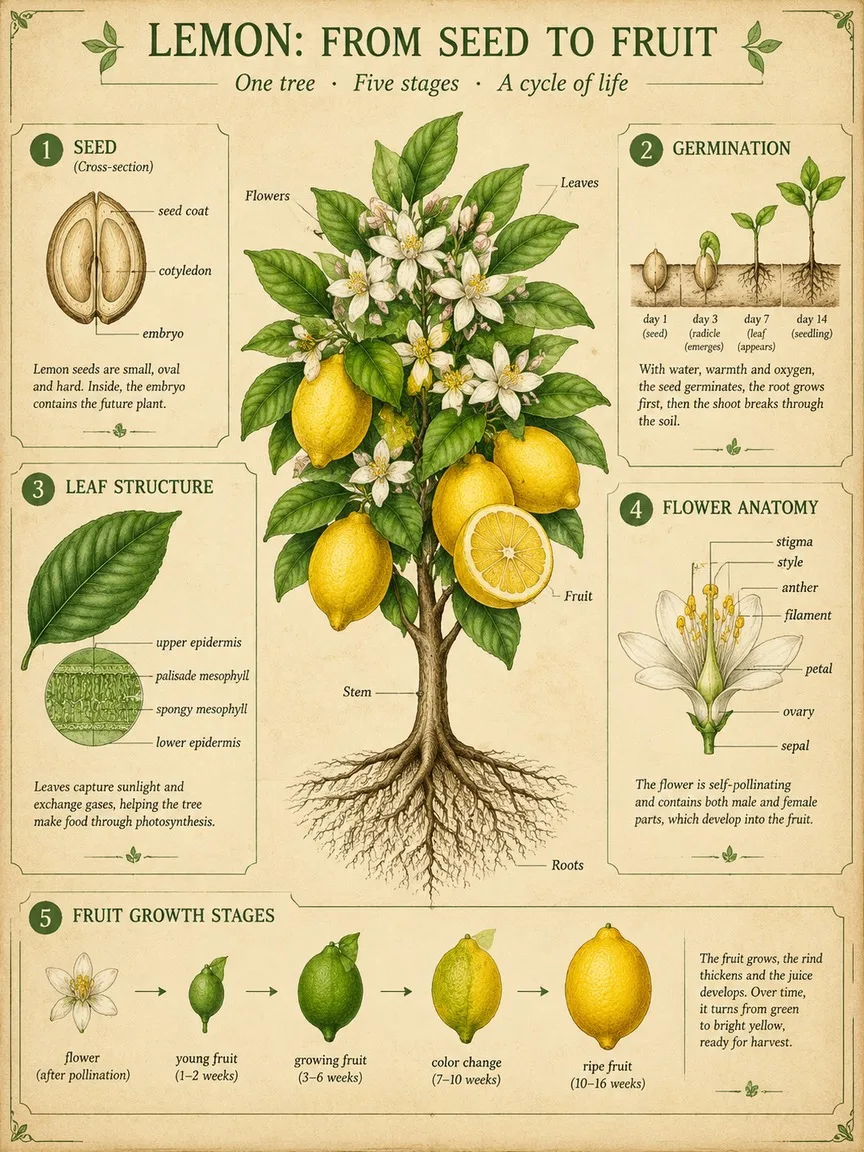
A scientific botanical infographic poster of the lemon tree: vintage botanical illustration mixed with clean modern infographic design on parchment. Centrepiece: the whole plant with roots, stem, leaves, flowers and fruit, one fruit cut in half. Around it, five numbered panels: 1 seed cross-section, 2 germination, 3 leaf structure, 4 flower anatomy with labelled parts, 5 fruit growth stages. Title at the top: "LEMON: FROM SEED TO FRUIT". Palette: leaf greens, lemon yellow and soft ink brown. Fine linework, readable labels.

Prompts stay in English, the language these models follow best. Copy it as it is, or change a few words.

Opens GPT Image 2.5 Sunburst with this prompt and the settings below filled in.

67 tested GPT Image prompts →

Settings

Mode
Text to image
Aspect ratio
3:4
Resolution
1k
Quality
high
Price
From 2 credits

The exact price shows before you generate.

Make your own version

  1. The layout is spelled out piece by piece: five numbered panels: 1 seed cross-section, 2 germination, 3 leaf structure, 4 flower anatomy with labelled parts, 5 fruit growth stages. Keep that structure and change only the content, or the model loses track of the page.
  2. This is a fill-in template: swap the parts in braces, like {plant}, in the boxes above and keep the rest word for word.
  3. vintage botanical illustration mixed with clean modern infographic design on parchment sets the whole feel of the shot. Swap it for another camera style to change the vibe.

Where this template comes from

Adapted from a prompt by @hx831126, collected in freestylefly/awesome-gpt-image-2 under MIT. PopNow rewrote it as a fill-in template and made the example above.

Style prompt guide

Style traits to keep

A vintage botanical infographic poster detailing the lemon tree life cycle comes alive through GPT Image 2.5 Sunburst. The model blends classical ink-and-wash herbalist drawings with structured modern educational layouts, rendering crisp linework, organized sub-panels, and legible typography on aged parchment.

This visual style relies on classic 18th-century naturalist printmaking combined with modern graphic layout techniques.

Texture
Warm, fibrous parchment paper gives the background an archival, aged museum feel rather than a sterile white poster look.
Line
Fine ink contour hatching and delicate etching define cellular structures, cross-sections, and botanical veins with scientific precision.
Palette
Muted organic tones—soft ink brown, botanical greens, and pale yellow—prevent visual noise and keep the educational diagram cohesive.
Composition
A strong central hero illustration surrounded by orderly, numbered breakout panels mimics historical encyclopaedia plates.

What defines this look

  1. style and theme foundationA scientific botanical infographic poster of the lemon tree: vintage botanical illustration mixed with clean modern infographic design on parchment.

    This establishes the dual aesthetic of historic field guide illustration and contemporary textbook layout. Removing the parchment background or infographic mention turns it into a simple standalone plant drawing.

  2. central subject compositionCentrepiece: the whole plant with roots, stem, leaves, flowers and fruit, one fruit cut in half.

    It anchors the visual hierarchy with a complete anatomical view of the mature plant. Without this direction, the generator might scatter random citrus branches without a clear focal subject.

  3. panel layout and contentAround it, five numbered panels: 1 seed cross-section, 2 germination, 3 leaf structure, 4 flower anatomy with labelled parts, 5 fruit growth stages.

    Specifying five numbered steps forces the model to structure peripheral information into clear, educational callout sections instead of cluttering the background with decorative foliage.

  4. header typography instructionTitle at the top: "LEMON: FROM SEED TO FRUIT".

    This directs GPT Image 2.5 Sunburst to place a clean typographic banner at the top, completing the scientific chart look.

  5. color and rendering detailPalette: leaf greens, lemon yellow and soft ink brown. Fine linework, readable labels.

    It controls the colour harmony and enforces sharp drafting lines. Omitting this can cause overly saturated digital colours and blurry, illegible micro-details.

Same style, new subjects

Fungi Growth Chart

Applies the same archival educational plate style to mycology and mushroom life cycles.

Prompt

A scientific botanical infographic poster of the chanterelle mushroom: vintage botanical illustration mixed with clean modern infographic design on parchment. Centrepiece: a cluster of mature mushrooms with underground mycelium network. Around it, four numbered panels: 1 spore release, 2 hyphae germination, 3 button stage, 4 gill anatomy. Title at the top: "CHANTERELLE: MYCELIUM TO SPORE". Palette: earth ochre, forest moss green and soft ink brown. Fine linework, readable labels.

Coffee Plant Anatomy

Uses the diagrammatic botanical layout for agricultural and culinary plant studies.

Prompt

A scientific botanical infographic poster of the arabica coffee tree: vintage botanical illustration mixed with clean modern infographic design on parchment. Centrepiece: flowering coffee branch with green and ripe red cherries. Around it, four numbered panels: 1 coffee bean cross-section, 2 seedling sprout, 3 white blossom anatomy, 4 roasting colour shift. Title at the top: "ARABICA: BEAN TO BLOSSOM". Palette: cherry crimson, roasted umber, deep leaf green and soft ink brown. Fine linework, readable labels.

Oak Tree Study

Adapts the vintage infographic format for grand forestry and tree anatomy studies.

Prompt

A scientific botanical infographic poster of the English oak tree: vintage botanical illustration mixed with clean modern infographic design on parchment. Centrepiece: full silhouette of the mature tree alongside root system and branch detail. Around it, four numbered panels: 1 acorn cross-section, 2 sapling stage, 3 lobed leaf and gall structure, 4 catkin flowers. Title at the top: "OAK: ACORN TO CANOPY". Palette: deep forest green, warm bark brown and soft ink brown. Fine linework, readable labels.

Model and settings

Keep the aspect ratio at 3:4 or switch to vertical formats like 9:16 to give the five sub-panels and top title sufficient vertical room without crowding the central plant. Set resolution to 1k or 4k to maintain sharpness in the fine linework and diagrammatic labels. Always maintain high quality mode in text-to-image to ensure crisp rendering of text and intricate botanical cross-sections.

  • Nano Banana ProSwitch to Nano Banana Pro when you want strict, pre-planned multi-panel layouts and ultra-dense diagram text rendered with 4K clarity.
  • FLUX.2 ProChoose FLUX.2 Pro if you want tighter hex colour matching on the plant pigments while keeping callout labels crisp.

When the style drifts

Overly modern graphic design washing out the vintage herbalist feel
Reinforce archival textures by adding 'copperplate engraving texture' and making sure 'on parchment' remains in the prompt.
Text labels becoming garbled or overlapping the drawings
Reduce the number of numbered callouts from five to three, or switch to Nano Banana Pro for denser diagram planning.
The central lemon tree overpowering the side panels and filling the entire canvas
Ensure the prompt explicitly states 'Centrepiece:' and 'Around it, numbered panels' to enforce layout division.

Questions about this style prompt

How do I ensure the labels remain readable on smaller screens?

Limit the number of sub-panels to three or four and keep text prompts short. Generating at high quality or 4K resolution also prevents delicate typography from blurring together.

Can I swap parchment for a clean white background?

Yes, replace 'on parchment' with 'on crisp white archival paper background' in the prompt. This yields a sleeker, contemporary Scandinavian botanical poster style.

Why are some panel numbers missing or merged?

Complex multi-panel requests can occasionally blend together in text-to-image models. Numbering each item explicitly in your prompt text helps the model preserve individual box divisions.