Zoom Scale Infographic, made with GPT Image 2.5 Sunburst
Example made with GPT Image 2.5 Sunburst

Text to imageInfographics & diagrams

GPT Image 2.5 Sunburst infographic promptZoom Scale Infographic

The exact text-to-image prompt behind this picture, made with GPT Image 2.5 Sunburst.

Fill in the blanks

Change any box and the prompt below updates. Copy it, or make one with your version.

Prompt

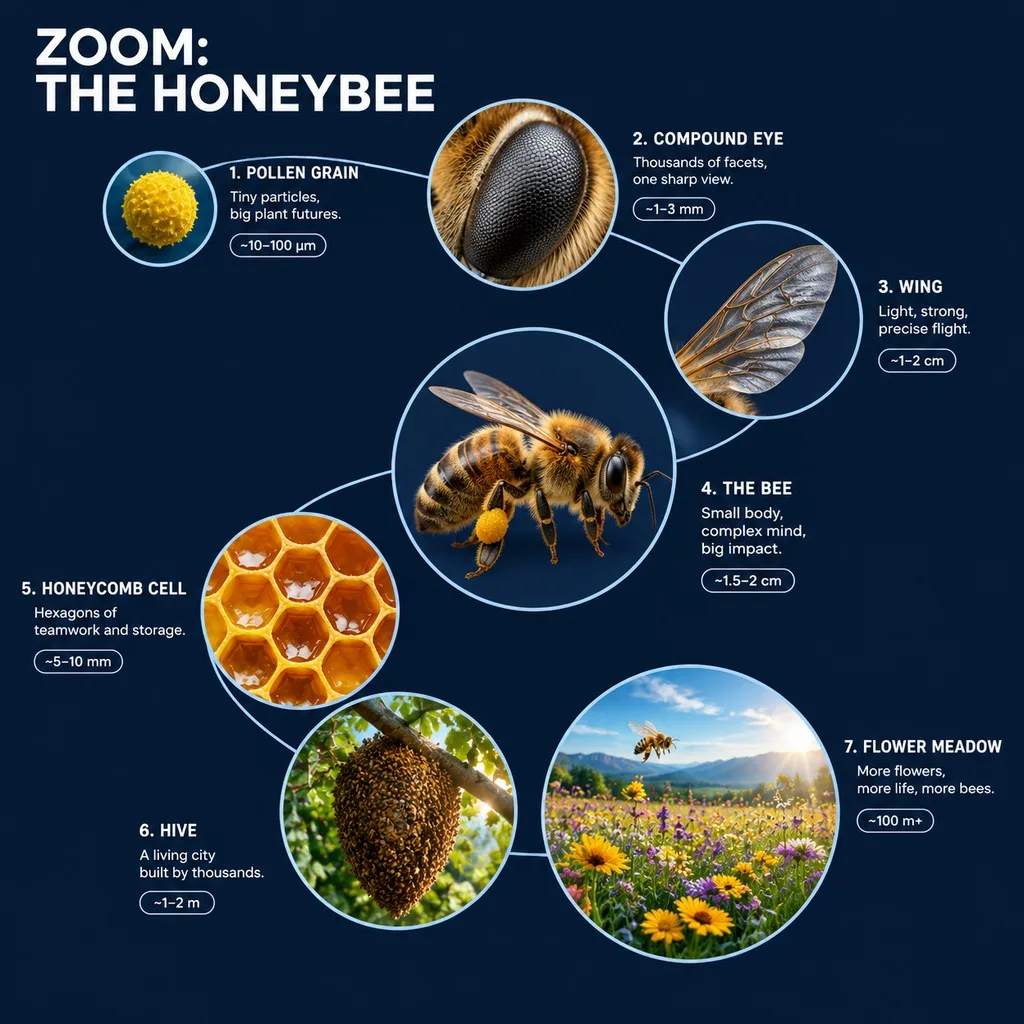
A 3D zoom-sequence science infographic about a honeybee, titled "ZOOM: THE HONEYBEE". Seven circular frames arranged in an expanding spiral, from the smallest detail to the full subject in its world: a pollen grain, the compound eye, a wing, the whole bee, a honeycomb cell, the hive and the flower meadow. Each frame holds a detailed render at that scale, the scale name, a four-word insight and a size tag. Frames are joined by thin zoom-path lines; no two frames show the same scale, and each frame grows with its scale. Clean dark navy background, crisp white labels, no generic magnifying-glass icons.

Prompts stay in English, the language these models follow best. Copy it as it is, or change a few words.

Opens GPT Image 2.5 Sunburst with this prompt and the settings below filled in.

67 tested GPT Image prompts →

Settings

Mode
Text to image
Aspect ratio
1:1
Resolution
1k
Quality
high
Price
From 2 credits

The exact price shows before you generate.

Make your own version

  1. The layout is spelled out piece by piece: Seven circular frames arranged in an expanding spiral, from the smallest detail to the full subject in its world. Keep that structure and change only the content, or the model loses track of the page.
  2. This is a fill-in template: swap the parts in braces, like {levels}, in the boxes above and keep the rest word for word.
  3. The prompt ends with no generic magnifying-glass icons. Leave that in, or the model may add random lettering.

Where this template comes from

Adapted from a prompt by @Gdgtify, collected in freestylefly/awesome-gpt-image-2 under MIT. PopNow rewrote it as a fill-in template and made the example above.

Style prompt guide

Style traits to keep

A seven-frame 3D zoom infographic about a honeybee, titled "ZOOM: THE HONEYBEE", is what this prompt makes with GPT Image 2.5 Sunburst. It works because the spiral, the scale list and the label rules are stated plainly, so the model places each frame at a clear size and fills it with a readable name, insight and size tag on a dark navy ground.

This style reads as a clean 3D science explainer, not a photo. Four traits from the wording make it recognisable on sight.

Palette
Dark navy ground with crisp white labels, so the text is the brightest thing in each frame and the poster reads like a textbook plate.
Line
Thin zoom-path lines link the frames into one route from the pollen grain to the meadow, which shows order without heavy graphics.
Composition
Seven circular frames in an expanding spiral, with each circle growing with its scale, so the page reads as a zoom rather than a grid of pictures.
Render
A detailed 3D render sits inside every frame at its own scale, so the change between circles is in the detail, not in the style.

What defines this look

  1. subject and titleA 3D zoom-sequence science infographic about a honeybee, titled "ZOOM: THE HONEYBEE". Seven circular frames

    Naming the medium, the 3D look and the subject up front tells the model this is a labelled explainer, not a photo. Without the title in quotes, the headline text is likely to come out vague or get reworded.

  2. layout and scale orderarranged in an expanding spiral, from the smallest detail to the full subject in its world: a pollen grain, the compound eye

    This sets the layout: circles in a spiral that expands with each step, so the reader follows the zoom from small to large. If you change it to a grid or a row, the zoom idea and the order are lost.

  3. scales and frame contenta wing, the whole bee, a honeycomb cell, the hive and the flower meadow. Each frame holds a detailed render at that scale

    These last five scales finish the ladder, from the wing up to the meadow. Each frame holds a detailed render at that scale, which sets the rule that every circle is drawn at its own size, so removing it lets the frames blur together.

  4. label and connector rulesthe scale name, a four-word insight and a size tag. Frames are joined by thin zoom-path lines; no two frames show the same scale

    The scale name, the four-word insight and the size tag are what make this read as science, not decoration. Without them the thin zoom-path lines have nothing to connect, and the frames become pretty pictures.

  5. size rule and lookand each frame grows with its scale. Clean dark navy background, crisp white labels, no generic magnifying-glass icons

    The size rule makes the jump between frames visible at a glance, and the dark navy with white labels keeps the text readable. The no-icon clause stops the model from falling back on a stock zoom symbol.

Same style, new subjects

Violinist and concert hall

Swaps the subject and title to a violinist, keeping the style wording unchanged, for a music or craft explainer.

Prompt

A 3D zoom-sequence science infographic about a violinist, titled "ZOOM: THE VIOLINIST". Seven circular frames arranged in an expanding spiral, from the smallest detail to the full subject in its world: a bow hair, the varnish grain, a fingertip, a violin body, the whole violinist, the concert hall and the city block. Each frame holds a detailed render at that scale, the scale name, a four-word insight and a size tag. Clean dark navy background, crisp white labels, no generic magnifying-glass icons.

Golden retriever at home

Turns the subject into a golden retriever so the zoom runs from fur to the home, for a pet-care guide.

Prompt

A 3D zoom-sequence science infographic about a golden retriever, titled "ZOOM: THE RETRIEVER". Seven circular frames arranged in an expanding spiral, from the smallest detail to the full subject in its world: a fur strand, the nose pad, a paw, the whole dog, a doghouse, the kitchen and the backyard. Each frame holds a detailed render at that scale, the scale name, a four-word insight and a size tag. Clean dark navy background, crisp white labels, no generic magnifying-glass icons.

Teapot still life

Moves the subject to a still-life teapot on a breakfast table, for a product or home-craft explainer.

Prompt

A 3D zoom-sequence science infographic about a ceramic teapot, titled "ZOOM: THE TEAPOT". Seven circular frames arranged in an expanding spiral, from the smallest detail to the full subject in its world: a glaze speck, a tea leaf, a handle joint, the whole teapot, the tea tray, the breakfast table and the kitchen window. Each frame holds a detailed render at that scale, the scale name, a four-word insight and a size tag. Clean dark navy background, crisp white labels, no generic magnifying-glass icons.

Model and settings

Keep the 1:1 ratio, since a square canvas suits a spiral of circular frames. Keep 1k resolution at high quality for this example so the small white labels stay sharp. For a wide slide, change the ratio and check that the outer frames are not cut off. Stay in text-to-image mode, because no input picture is used.

  • Nano Banana ProPick this when the spiral layout matters most, since its tagline says it plans the layout first, which suits seven frames that each need a label, insight and size tag.
  • Nano Banana 2.1Pick this if the white labels must stay sharp at a larger size, since its tagline promises sharp text and 4K output for a version you plan to print or project.

When the style drifts

The 3D look fades into a flat, generic infographic style.
Keep the opening words "3D zoom-sequence science infographic" unchanged and do not add words like flat or cartoon.
Colours turn muddy as the palette grows.
Keep "Clean dark navy background, crisp white labels" and remove any extra colour words from the prompt.
The bee takes over, so the frames become a close-up portrait of the insect.
Shorten the honeybee description in the first sentence and keep the full scale list so the hive and the meadow get their own frames.
A stock zoom magnifier appears inside the circles.
Keep "no generic magnifying-glass icons" at the end of the prompt, because deleting it lets the default icon return.

Questions about this style prompt

How do I keep the seven frames in a spiral instead of a grid?

Keep the phrase arranged in an expanding spiral word for word, since it tells the model the layout directly. If the frames still come out as a grid, check that no other layout word has been added to the prompt.

How many frames can I add to a zoom infographic before it gets crowded?

This prompt uses seven frames, and each one already holds a render, a scale name, a four-word insight and a size tag. Adding more circles makes those labels tight, so add detail to the existing frames instead.

Can I reuse this honeybee prompt for a different insect?

Yes. Replace the honeybee in the title and first sentence, then rewrite the scale list so each step grows from small to large. Keep the style wording, and the dark navy background and white labels will carry the layout.