GPT Image 2.5 Sunburst cutaway diagram promptHalf-Transparent Toy Cutaway
The exact text-to-image prompt behind this picture, made with GPT Image 2.5 Sunburst.
Fill in the blanks
Change any box and the prompt below updates. Copy it, or make one with your version.
Prompt
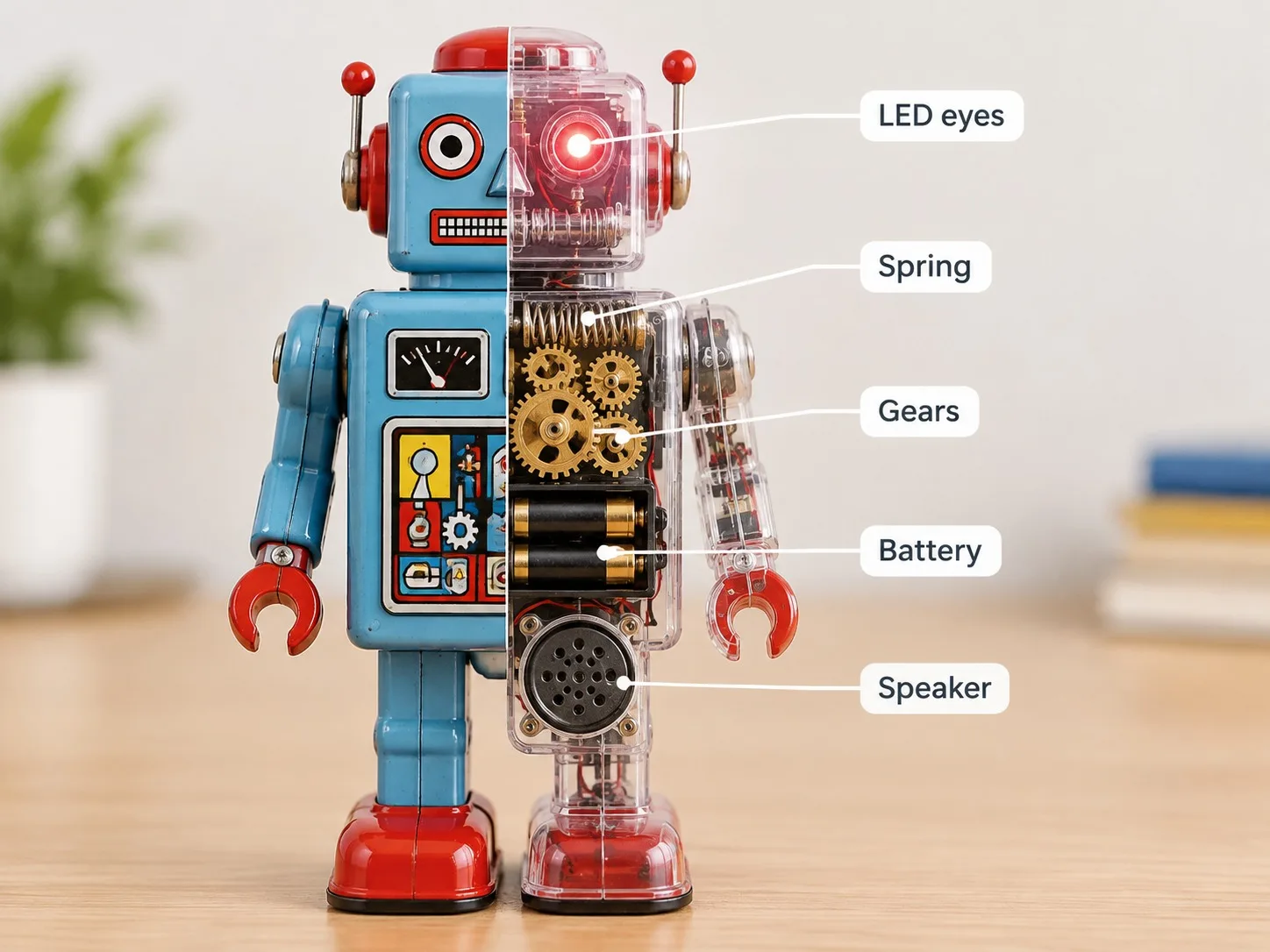
One retro tin robot toy stands on a desk, displayed split down the middle. The left half is the normal painted toy; the right half is a clear transparent shell that reveals the inner mechanism: a wind-up spring, brass gears, a battery box, a tiny speaker and LED eyes. Thin white leader lines point from each part to short labels on the right side of the picture: "Spring", "Gears", "Battery", "Speaker", "LED eyes". Bright clean background, softly blurred tabletop, product photography lighting, crisp readable labels.
Prompts stay in English, the language these models follow best. Copy it as it is, or change a few words.
Say where the split is, The left half is the normal painted toy; the right half is a clear transparent shell that reveals the inner mechanism, then describe each side on its own.
Naming every label up front, "Spring", "Gears", "Battery", "Speaker", "LED eyes", is what keeps the words spelled right. Keep labels short and concrete.
This is a fill-in template: swap the parts in braces, like {toy}, in the boxes above and keep the rest word for word.
A retro tin robot toy standing on a desk, split down the middle: a normal painted half on the left and a clear, see-through half on the right that reveals the spring, brass gears, battery box, speaker and LED eyes inside. GPT Image 2.5 Sunburst works well here because its clean text rendering keeps the five leader-line labels crisp, while its product-photo lighting keeps the toy looking like a real object.
The look rests on a few traits that all come straight from the prompt wording. Remove any one of them and the image stops reading as a clean, labeled cutaway.
Composition
The split down the middle puts a painted half and a see-through half side by side, so the viewer compares them in one glance. The toy stays the same object on both sides, which makes the reveal easy to read.
Line
Thin white leader lines turn the parts into a diagram instead of a photo with loose labels. They need to stay thin so they do not hide the gears and spring.
Light
Product photography lighting gives even, bright highlights on the tin and the clear shell, so the transparent part reads as glass. Flat light would make the see-through half look dull and grey.
Era
Retro tin robot wording signals an older toy, so the painted tin and brass parts feel vintage rather than new. Dropping it would likely give a glossy modern robot.
What defines this look
Subject and split layoutOne retro tin robot toy stands on a desk, displayed split down the middle.
Sets the subject and the split-screen layout that the whole image depends on. If you drop the split instruction, the model is likely to show only one whole toy, and the cutaway idea disappears.
Painted vs. clear halfThe left half is the normal painted toy; the right half is a clear transparent shell that reveals the inner mechanism
This sentence splits the toy into two states, one painted and one see-through, which is the core visual idea. If you cut the transparent wording, the right half turns into a second painted toy and the inner gears never show.
Internal parts lista wind-up spring, brass gears, a battery box, a tiny speaker and LED eyes
Names the five mechanical and electronic parts the viewer should see inside the clear shell. Swap these for other parts and the labels in the next line will no longer match what the image shows, so keep the list and labels aligned.
Leader lines and labelsThin white leader lines point from each part to short labels on the right side of the picture: "Spring", "Gears", "Battery", "Speaker", "LED eyes"
Tells the model to draw a thin white line from each part to a label, and puts the exact label words in quotes. Changing 'LED eyes' to 'Eyes' changes the printed text, and dropping the quotes risks the words being reworded.
Sets the studio-style backdrop and lighting, so the toy looks like a clean product shot rather than a scene. Removing 'crisp readable labels' would make the small label text softer, and dropping the lighting phrase would give a darker, moodier photo.
Same style, new subjects
Pocket Watch Cutaway
Swaps the tin robot for a still-life object while keeping the split, clear shell and labels, so use it for product or hobby pieces.
Prompt
One vintage pocket watch lies on a wooden table, displayed split down the middle. The left half is the normal polished case; the right half is a clear transparent shell that reveals the inner mechanism: a balance wheel, a mainspring, a jewel bearing and a small crown gear. Thin white leader lines point from each part to short labels on the right side of the picture: "Balance", "Mainspring", "Jewel", "Crown gear". Bright clean background, softly blurred tabletop, product photography lighting, crisp readable labels.
Tabby Cat Cutaway
Moves the cutaway style onto a living pet with friendly anatomy labels, which suits a playful pet-education poster.
Prompt
One tabby cat sits on a small wooden table, displayed split down the middle. The left half is the normal striped fur and face; the right half is a clear transparent shell that reveals the inner anatomy: a skeleton, a heart, two lungs and a stomach. Thin white leader lines point from each part to short labels on the right side of the picture: "Skeleton", "Heart", "Lungs", "Stomach". Bright clean background, softly blurred tabletop, product photography lighting, crisp readable labels.
Vintage Tram Cutaway
Applies the same cutaway idea to a vehicle in a street scene, useful for transport or city-themed graphics.
Prompt
One vintage tram stands on a quiet city street, displayed split down the middle. The left half is the normal painted tram; the right half is a clear transparent shell that reveals the inner mechanism: a motor, a pantograph, brass gears and a small bell. Thin white leader lines point from each part to short labels on the right side of the picture: "Motor", "Pantograph", "Gears", "Bell". Bright clean background, softly blurred street, product photography lighting, crisp readable labels.
Model and settings
Keep the 4:3 ratio, which gives both halves of the toy and the labels on the right enough width. Keep quality on high so the thin leader lines and small label text stay sharp. Resolution 1k matches the example; raise it for a larger print, because the small labels are the first thing to soften. Stay in text-to-image mode, since this prompt has no input picture to edit. For a tall phone wallpaper, change only the ratio and keep the rest.
Nano Banana ProIts layout-first planning suits this prompt if the five labels and leader lines come out crowded or misplaced in GPT Image 2.5 Sunburst. Choose it when you want a denser, more diagram-like layout with more text.
FLUX.2 ProIts photoreal focus and hex color control suit this prompt if you need the painted tin to match an exact shade, such as a specific red. Choose it when a realistic product look matters more than the label layout.
When the style drifts
The clear half turns into a second painted toy, so the gears never show.
Keep the phrase 'a clear transparent shell that reveals the inner mechanism' exactly as written, and add 'glass-like' before 'shell' if the right half still looks opaque.
The labels come out misspelled or replaced with other words.
Keep the five labels in quotes exactly as written, and do not add extra wording such as 'with descriptions' that competes with them.
The style washes out into a plain studio photo with no retro feel.
Keep 'retro tin robot toy' at the start of the prompt and add 'painted tin finish' to the left half so the era still shows.
The leader lines cross over the parts or the image gets too busy.
Add 'lines that do not cross each other' right after 'Thin white leader lines', and keep the desk plain by not adding props such as books or plants.
Questions about this style prompt
Can I change the five labels to other words in this prompt?
Yes. The labels are the quoted words in the prompt, so you can swap them for other part names such as 'Mainspring' or 'Eyes' and GPT Image 2.5 Sunburst will print them as written. Keep the same number of labels and parts, since each leader line needs one matching part.
Why does GPT Image 2.5 Sunburst keep both halves of the toy looking like the same robot?
The prompt describes one toy in two states, so the model usually treats it as a single object shown split in half. If the halves drift apart, add 'same robot on both sides' to the first sentence to hold the design together.
How do I use this half-transparent toy look on a different toy, like a teddy bear?
Keep the split layout, the clear shell sentence and the labels, then change only the toy description. A teddy bear with a clear shell would need inner parts that fit a plush toy, so rewrite the parts list and the labels to match what that new toy would contain inside.
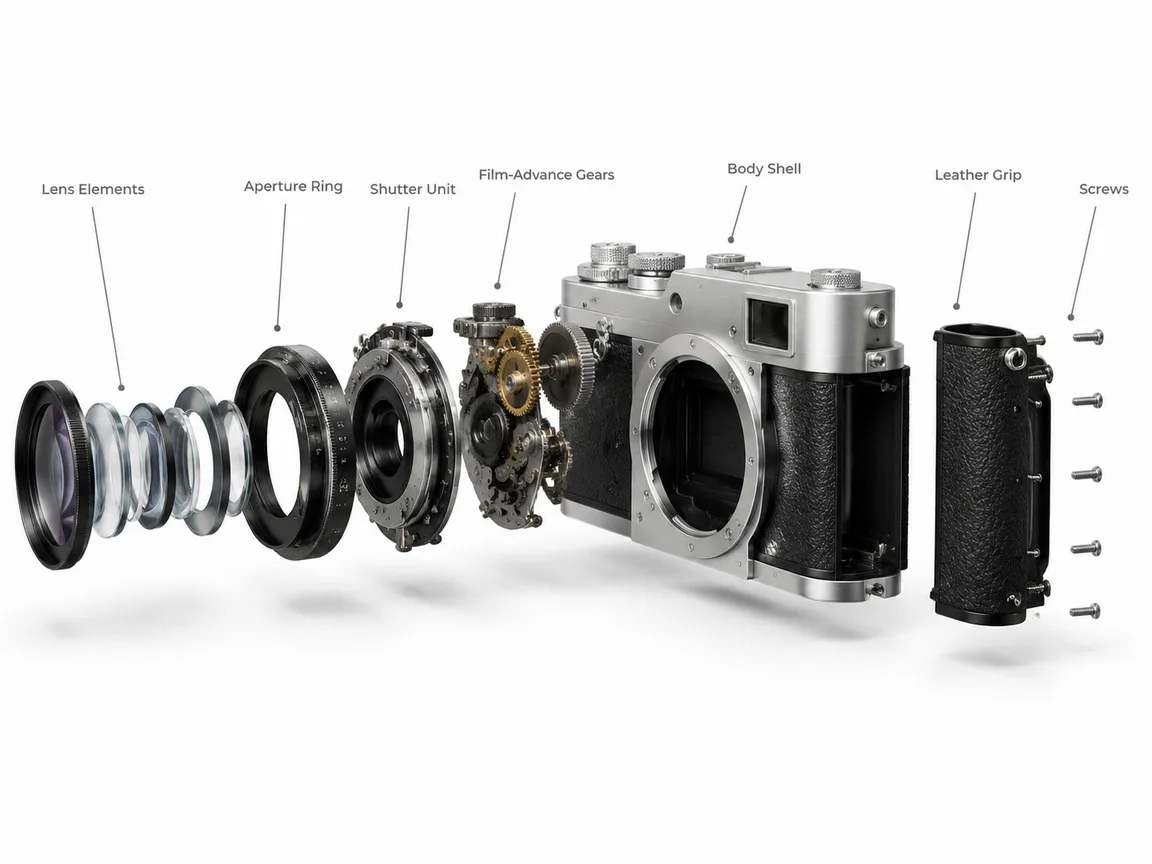
A clean 3D exploded assembly view of a vintage film camera, every part floating apart along one straight axis in the order it is assembled: lens elements, aperture ring, shutter unit, film-advance gears, body shell, leather grip and screws. Keep the real proportions and the brushed silver and black finish, on a plain unbranded body with no logos or model names. Thin grey leader lines link each part to a short label in a neat sans-serif. White studio background, soft shadows under each floating part, technical product-render look.
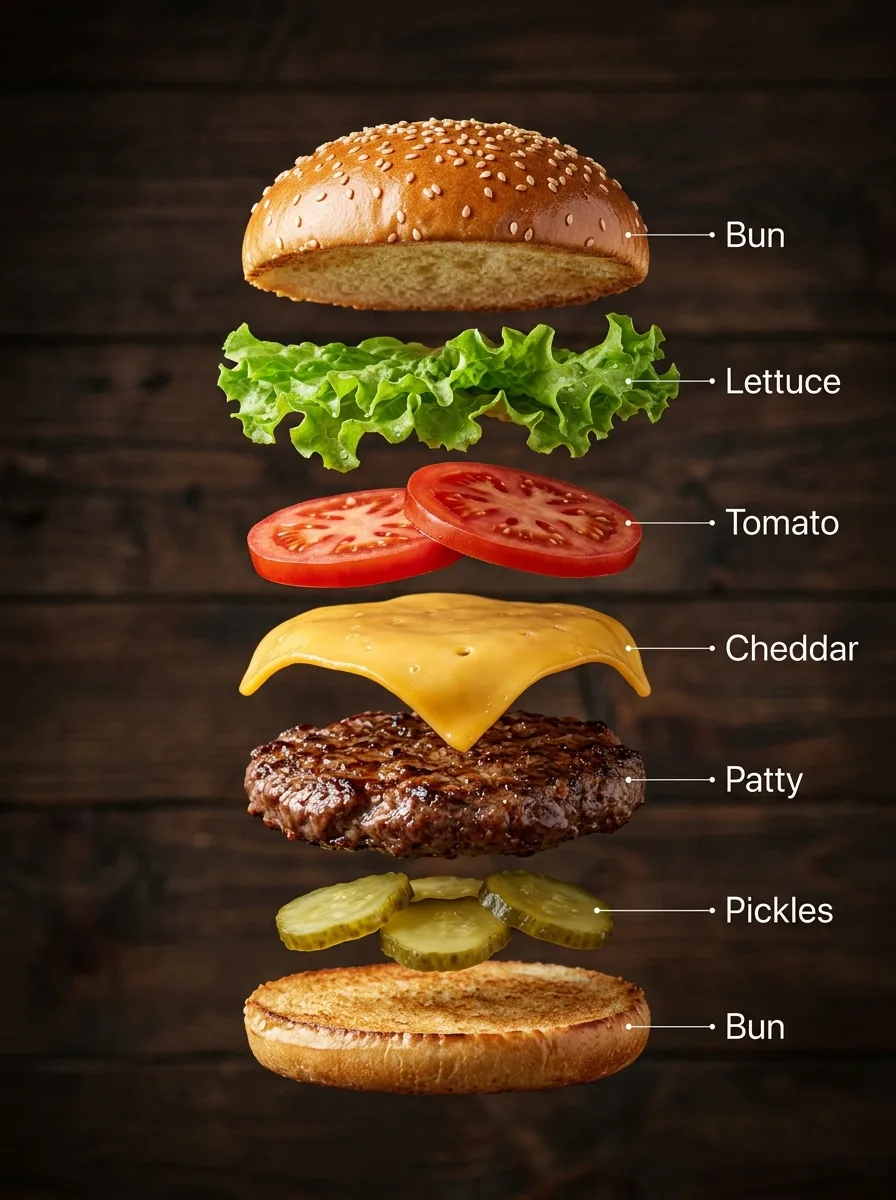
A hyper-real exploded vertical infographic of a classic cheeseburger: every layer floats in a perfectly aligned stack, top to bottom: sesame bun top, lettuce, tomato slices, melted cheddar, grilled beef patty, pickles, bun bottom. Realistic shadows under each layer, rustic wooden background, soft studio light. Clean labels with thin pointer lines using these exact words: "Bun", "Lettuce", "Tomato", "Cheddar", "Patty", "Pickles". Ultra-detailed food textures, premium commercial look.
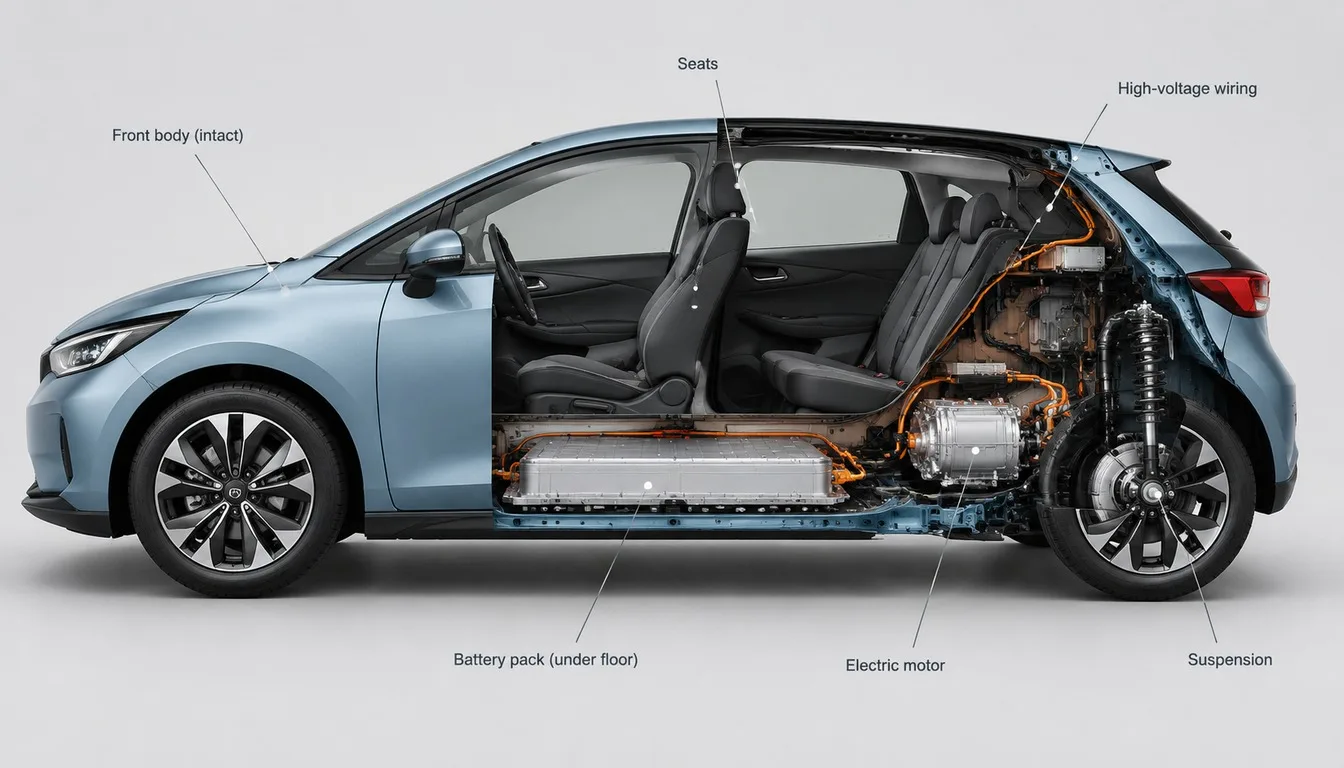
A cutaway visualisation of a compact electric hatchback in side view: the front half shows the intact painted body, the back half is cut open to expose the battery pack under the floor, the electric motor, the seats, the wiring and the suspension. Accurate proportions, realistic materials, thin callout lines with short labels, clean light-grey studio background, technical illustration meets product render.
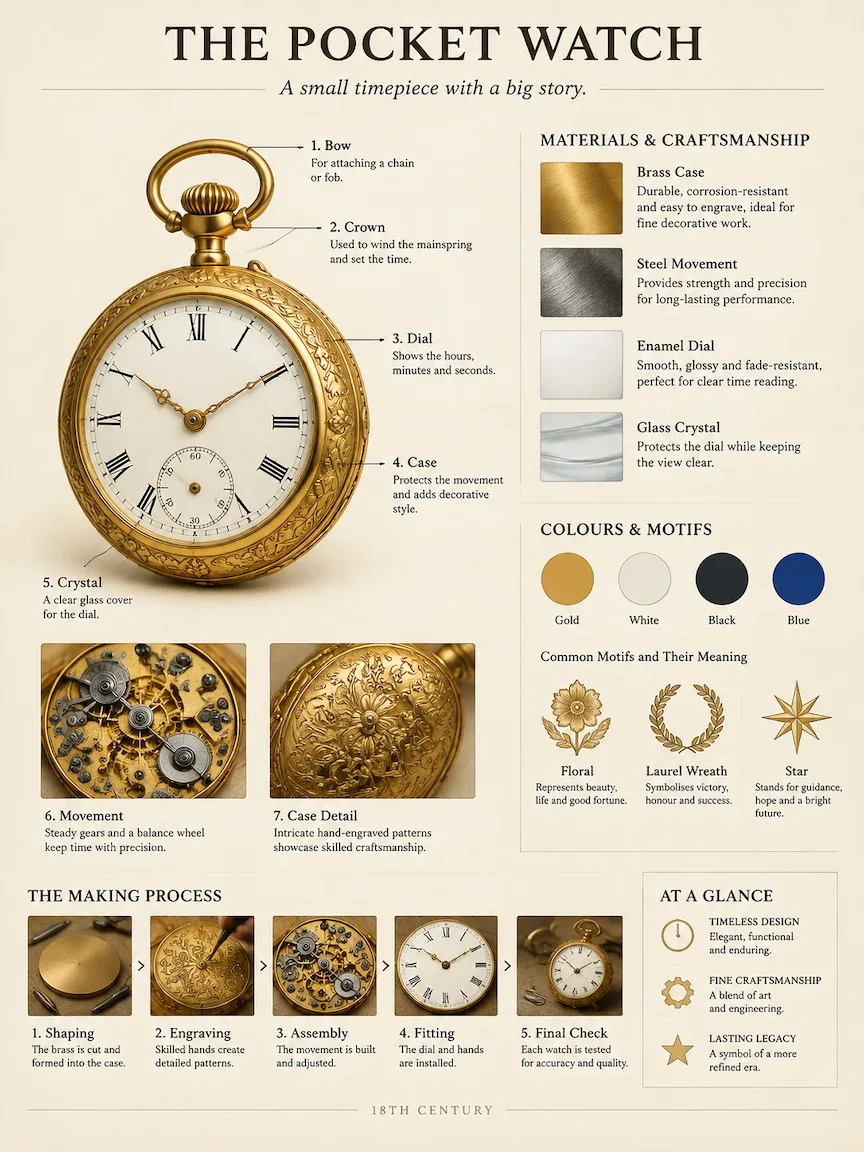
A museum catalog-style breakdown poster of an 18th-century brass pocket watch. Work out the right structure, materials and history yourself. Fixed layout on warm ivory paper: top, the title "THE POCKET WATCH" with a one-line subtitle; left, the object large and photoreal with numbered leader-line callouts to its key parts and two close-up insets; upper right, material and craft samples with short notes; middle right, colour swatches and what its motifs mean; bottom, a small making-process strip and a three-point summary. Calm, professional exhibition-panel design, crisp readable English text, no clutter.
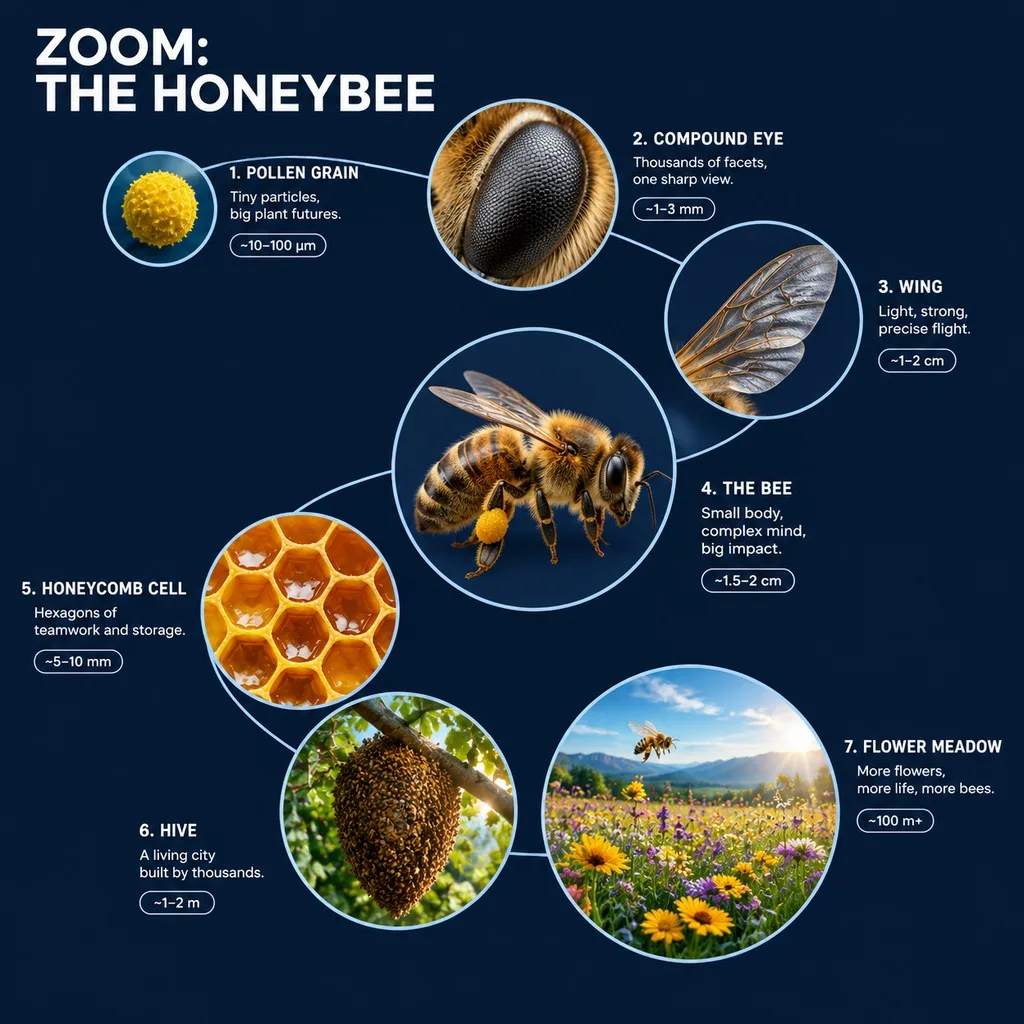
A 3D zoom-sequence science infographic about a honeybee, titled "ZOOM: THE HONEYBEE". Seven circular frames arranged in an expanding spiral, from the smallest detail to the full subject in its world: a pollen grain, the compound eye, a wing, the whole bee, a honeycomb cell, the hive and the flower meadow. Each frame holds a detailed render at that scale, the scale name, a four-word insight and a size tag. Frames are joined by thin zoom-path lines; no two frames show the same scale, and each frame grows with its scale. Clean dark navy background, crisp white labels, no generic magnifying-glass icons.
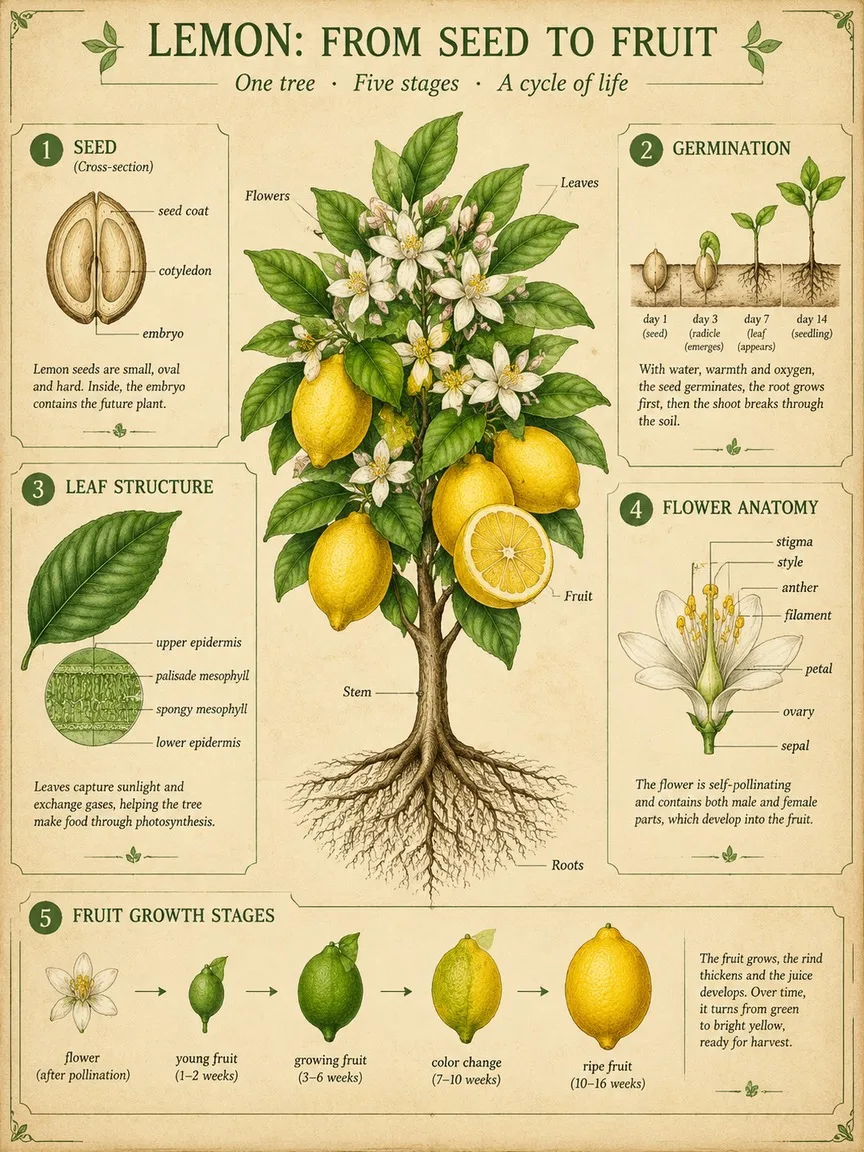
A scientific botanical infographic poster of the lemon tree: vintage botanical illustration mixed with clean modern infographic design on parchment. Centrepiece: the whole plant with roots, stem, leaves, flowers and fruit, one fruit cut in half. Around it, five numbered panels: 1 seed cross-section, 2 germination, 3 leaf structure, 4 flower anatomy with labelled parts, 5 fruit growth stages. Title at the top: "LEMON: FROM SEED TO FRUIT". Palette: leaf greens, lemon yellow and soft ink brown. Fine linework, readable labels.
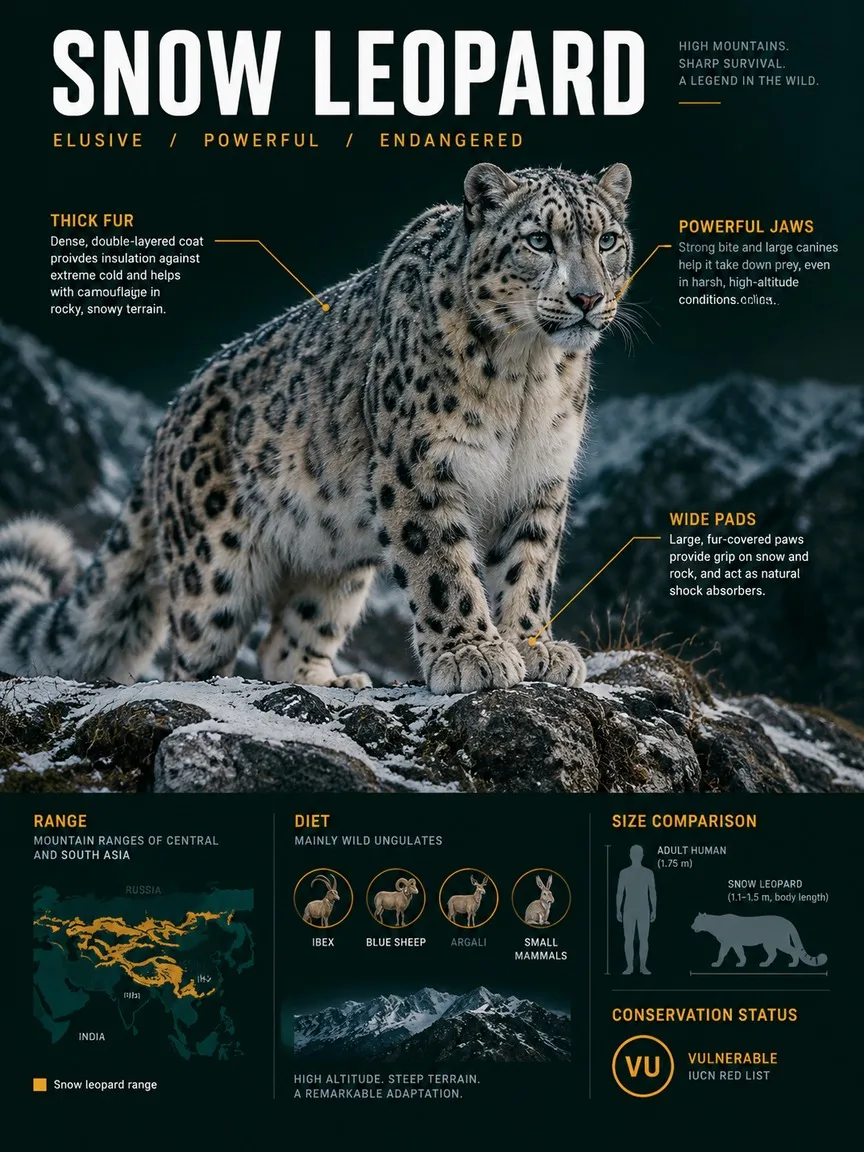
A premium wildlife infographic poster about the snow leopard, styled like a sleek field dossier rather than a school chart. The animal dominates the page in photoreal detail in its habitat, a windswept rocky ridge with light snow. Around it, layered callouts: three anatomy notes with thin lines, a range map, a size comparison with an adult human silhouette, a diet icon row and a conservation-status badge. Title "SNOW LEOPARD" at the top in bold condensed type. Dark green-black background, crisp white and amber text.
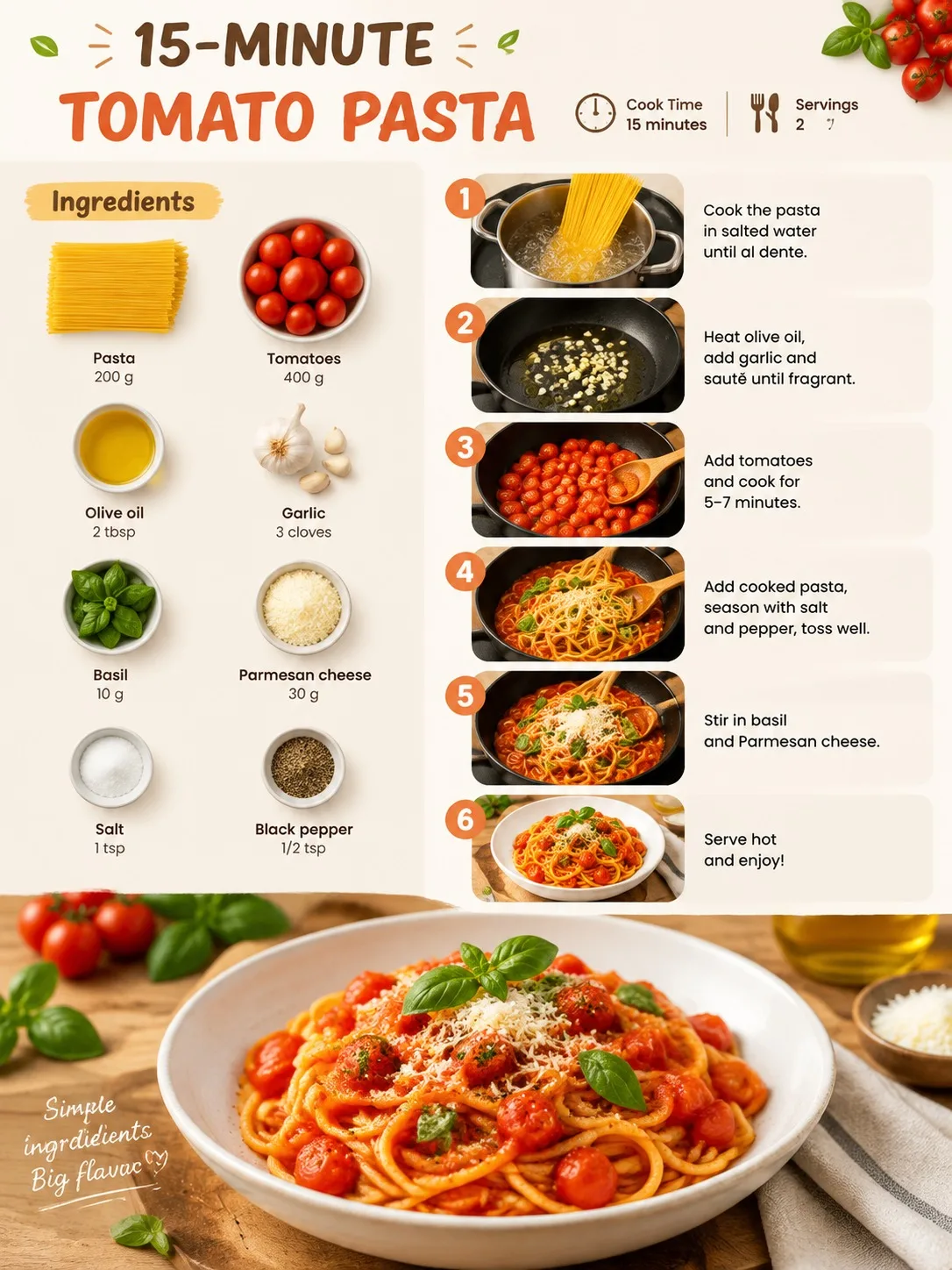
A clean, appetising recipe infographic for a quick tomato pasta, vertical layout. Top: the title "15-MINUTE TOMATO PASTA" with small icons for cook time and servings. Left column: an ingredients flat-lay with each item labelled with its amount. Right column: six numbered step panels, each with a small photo-style illustration and one short line of instruction. Bottom: the finished dish as a hero shot. Warm kitchen colours, crisp readable text, plenty of white space.