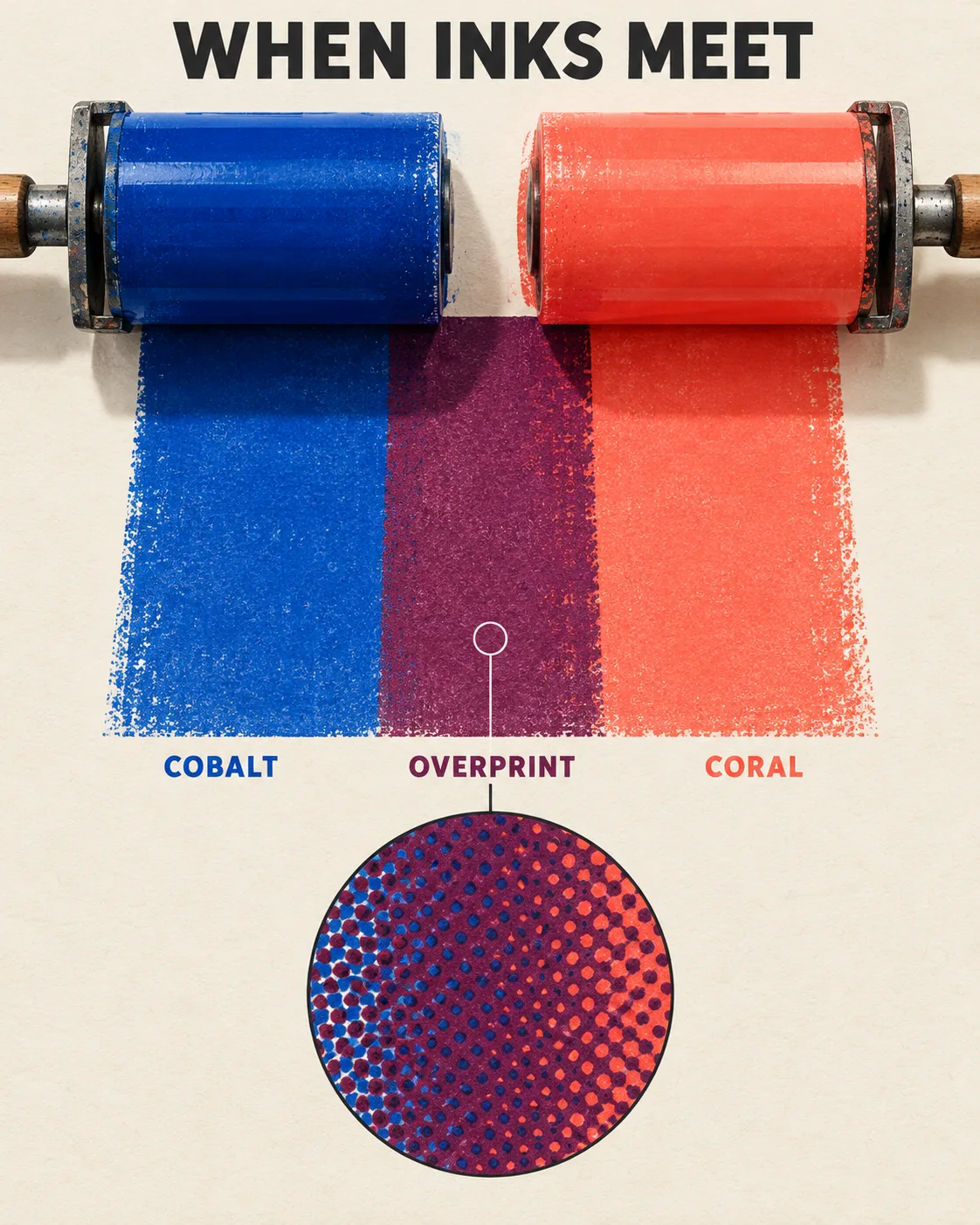
When Inks Meet, made with GPT Image 2.5 Sunburst
Example made with GPT Image 2.5 Sunburst

Text to imageInfographics & diagrams

GPT Image 2.5 Sunburst infographic promptWhen Inks Meet

The exact text-to-image prompt behind this picture, made with GPT Image 2.5 Sunburst.

Prompt

Vertical 4:5 portrait frame. A printmaking infographic shows two large translucent ink rollers laying cobalt and coral bands across cream paper, their single central overlap producing a rich plum rectangle. Below, one simple magnified patch reveals halftone dots without additional panels. Flat editorial vector shapes with subtle paper grain and crisp implied studio shadows, title reading "WHEN INKS MEET", labels reading "COBALT", "CORAL" and "OVERPRINT", no logos, no other text.

Prompts are kept in their original English to help reproduce the example. Copy one as it is, or adapt it for your project.

Opens GPT Image 2.5 Sunburst with this prompt and the settings below filled in.

135 tested GPT Image prompts →

Settings

Mode
Text to image
Aspect ratio
4:5
Quality
high
Price
From 2 credits

The exact price shows before you generate.

Make your own version

  1. The words in quotes, "WHEN INKS MEET", are printed in the picture. Keep them short and change them to your own.

Style prompt guide

Style traits to keep

A screen-print infographic illustrates overprint color mixing by contrasting translucent ink bands against an unbleached cream surface. GPT Image 2.5 Sunburst renders the clean geometric shapes and places exact typographic titles without visual artifacting. The composition balances flat vector clarity with tactile texture, turning a printmaking concept into an elegant educational poster.

This style combines modernist informational vector drafting with the tactile, imperfect charm of manual screenprinting.

Palette
Restricting pigments to cobalt, coral, and their blended plum over a cream base keeps the visual field organized and mimics real transparent printing inks.
Texture
Fine paper grain softens sharp digital edges, lending the piece the authentic weight of heavy cotton printmaking stock.
Composition
Stacking the main dynamic roller demonstration above a single circular loupe creates clear instructional hierarchy without messy sub-panels.
Light
Crisp implied studio shadows create subtle layer separation between paper, inks, and rollers while maintaining flat editorial surfaces.

What defines this look

  1. Layout and subject stagingVertical 4:5 portrait frame. A printmaking infographic shows two large translucent ink rollers laying cobalt and coral bands across cream paper,

    This establishes the vertical poster format and introduces the printing apparatus. Removing it leaves the AI to guess the subject, often resulting in a messy art studio photo instead of a clean diagram.

  2. Color interaction ruletheir single central overlap producing a rich plum rectangle.

    This explicitly dictates the subtractive color result where the two ink paths cross. If omitted, the model usually renders an opaque seam or an arbitrary mud-toned blending defect.

  3. Micro-detail calloutBelow, one simple magnified patch reveals halftone dots without additional panels.

    This adds a technical pedagogical element showing the print anatomy close-up. Altering this phrase risks filling the bottom half with multiple redundant circular badges and cluttering the poster.

  4. Stylistic surface treatmentFlat editorial vector shapes with subtle paper grain and crisp implied studio shadows,

    This establishes the visual language, blending minimalist graphic design with tactile print texture. Removing paper grain makes the image look like generic digital clip art.

  5. Typography and negative constraintstitle reading "WHEN INKS MEET", labels reading "COBALT", "CORAL" and "OVERPRINT", no logos, no other text.

    This defines the precise typographic labels while barring the generator from inventing gibberish paragraphs. Without the negative constraint, AI graphics routinely spawn illegible pseudo-diagram captions.

Same style, new subjects

Metropolitan transit map

Applies the dual-color printmaking aesthetic to an urban transit map to illustrate intersecting subway routes cleanly.

Prompt

Vertical 4:5 portrait frame. A transit infographic shows two large translucent commuter rail lines laying cobalt and coral paths across cream paper, their single central overlap producing a rich plum union terminal. Below, one simple magnified patch reveals walking transfer tunnels without additional panels. Flat editorial vector shapes with subtle paper grain and crisp implied studio shadows, title reading "URBAN TRANSIT", labels reading "NORTH LINE", "SOUTH LINE" and "CENTRAL HUB", no logos, no other text.

Botanical leaf anatomy

Transforms the ink-overlay style into a clean botanical study showing layered plant structures.

Prompt

Vertical 4:5 portrait frame. A botanical infographic shows two large translucent pressed leaves laying cobalt and coral silhouettes across cream paper, their single central overlap producing a rich plum veined structure. Below, one simple magnified patch reveals stomata cells without additional panels. Flat editorial vector shapes with subtle paper grain and crisp implied studio shadows, title reading "LEAF OVERLAP", labels reading "UPPER LAMINA", "LOWER LAMINA" and "CROSS VEIN", no logos, no other text.

Binocular vision study

Uses the overlapping vector aesthetic to explain vision science through intersecting human profile silhouettes.

Prompt

Vertical 4:5 portrait frame. A vision science infographic shows two large translucent silhouette profiles of an adult head laying cobalt and coral sightlines across cream paper, their single central overlap producing a rich plum focal zone. Below, one simple magnified patch reveals retinal cones without additional panels. Flat editorial vector shapes with subtle paper grain and crisp implied studio shadows, title reading "BINOCULAR VISION", labels reading "LEFT FIELD", "RIGHT FIELD" and "STEREO MERGE", no logos, no other text.

Model and settings

The example uses a vertical 4:5 portrait ratio, which gives ample vertical headroom for a stacked poster layout featuring title, central graphic, and detail callout. High quality is crucial here so GPT Image 2.5 Sunburst renders clean vector boundaries, tiny halftone dots, and sharp letterforms without blur. Keep text-to-image mode active. If adapting this prompt for a landscape slide presentation, switch the aspect ratio to 16:9 and arrange the rollers horizontally.

  • Nano Banana ProNano Banana Pro plans layouts first, making it the superior choice if you decide to expand this into a denser multi-step diagram with intricate flow arrows and technical labels.

When the style drifts

The overlap area produces an irregular brown smudge instead of pure plum.
Replace 'producing a rich plum rectangle' with 'producing an exact flat geometric rectangle of translucent plum ink'.
The model generates a chaotic grid of multiple round callout bubbles across the bottom.
Change 'Below, one simple magnified patch' to 'Below, exactly one isolated circular magnifying loupe' to prevent extra panels from spawning.
The rollers appear as realistic metallic machinery with glossy plastic ink.
Strengthen the 2D graphic constraint by adding 'flat 2D graphic screenprint illustration' directly before 'Flat editorial vector shapes'.

Questions about this style prompt

Why did the AI misspell some of the label words?

GPT Image 2.5 Sunburst handles short words well, but complex layouts can trigger accidental letter drops. Keep every label under eight letters, wrap each target word in strict quotation marks, and limit the entire composition to four labels total.

How can I change the ink colors without ruining the overlap color?

Select two transparent primary colors and name their accurate optical mixture. For example, swap cobalt and coral for cyan and yellow, then replace plum with emerald green so the AI follows physically consistent subtractive color rules.

Can I generate this style with a dark background instead of cream paper?

Yes, but translucent overprinting depends optically on a reflective light base. If you replace cream paper with charcoal, also change translucent ink rollers to opaque neon screenprint pigments so the overlapping intersection stays readable.