Blue Beneath Glaze, made with GPT Image 2.5 Sunburst
Example made with GPT Image 2.5 Sunburst

Text to imageInfographics & diagrams

GPT Image 2.5 Sunburst infographic promptBlue Beneath Glaze

The exact text-to-image prompt behind this picture, made with GPT Image 2.5 Sunburst.

Prompt

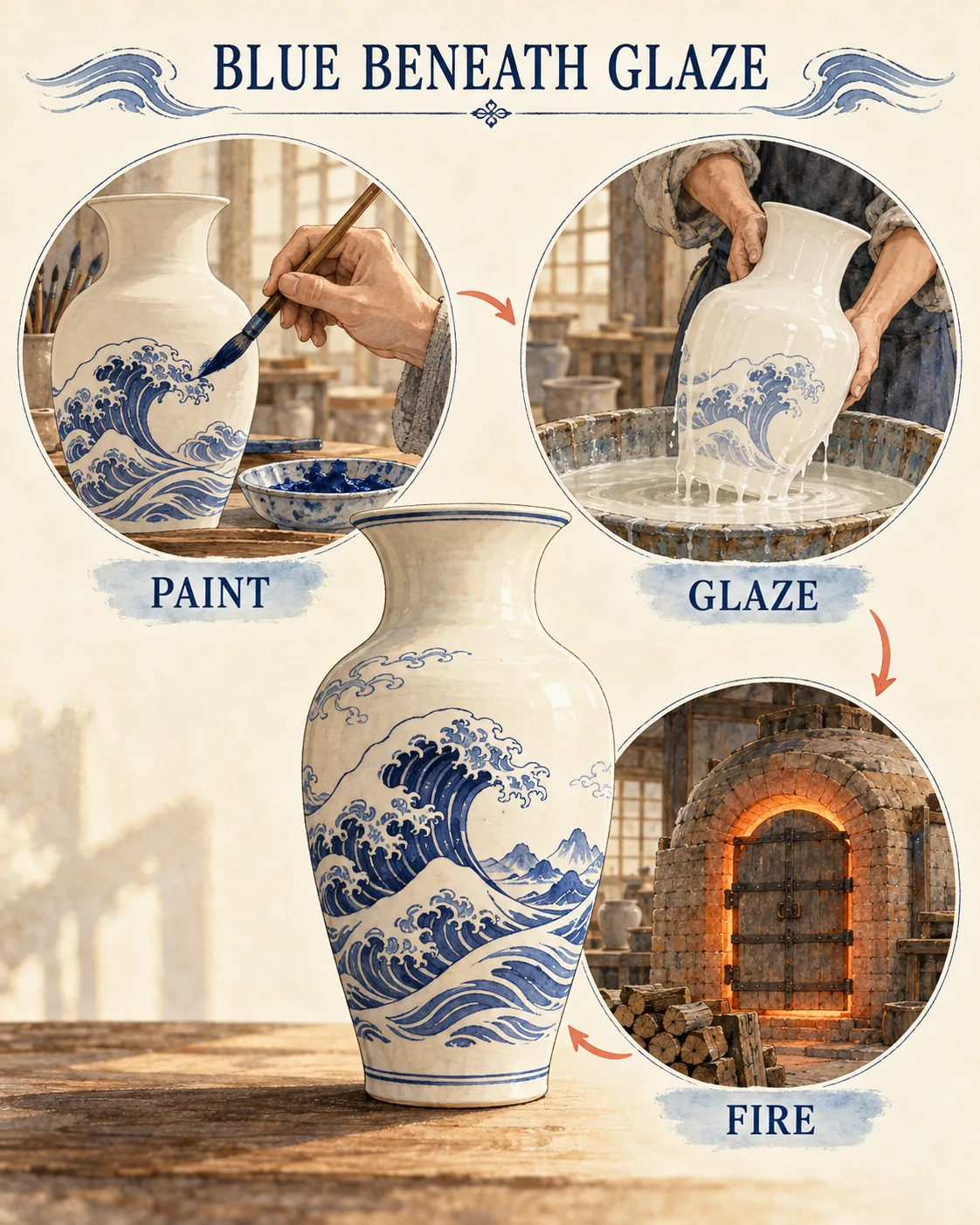
Vertical 4:5 portrait frame. An elegant porcelain infographic centers a single cream vase with cobalt wave motifs, surrounded by three large process illustrations showing brush decoration, clear glaze dipping and a closed kiln. Fine ink lines and translucent watercolor sit on warm ivory stock, with soft painted studio light and tiny coral arrows. Title reads "BLUE BENEATH GLAZE"; process labels read "PAINT", "GLAZE" and "FIRE", no other text.

Prompts are kept in their original English to help reproduce the example. Copy one as it is, or adapt it for your project.

Opens GPT Image 2.5 Sunburst with this prompt and the settings below filled in.

135 tested GPT Image prompts →

Settings

Mode
Text to image
Aspect ratio
4:5
Quality
high
Price
From 2 credits

The exact price shows before you generate.

Make your own version

  1. The words in quotes, "BLUE BENEATH GLAZE", are printed in the picture. Keep them short and change them to your own.
  2. For a different mood, rewrite only the light: with soft painted studio light and tiny coral arrows.
  3. Fine ink lines and translucent watercolor sit on warm ivory stock sets the whole feel of the shot. Swap it for another camera style to change the vibe.

Where this idea comes from

Inspired by an idea from @joshesye, collected in freestylefly/awesome-gpt-image-2 under MIT. PopNow wrote this prompt and made the example above.

Style prompt guide

Style traits to keep

A central ceramic vase anchors a step-by-step craft infographic rendered in delicate watercolor and ink line work. The layout balances a finished cobalt-painted vessel with three circular workshop vignettes to clearly explain ceramic production. GPT Image 2.5 Sunburst delivers the design by pairing sharp typographic labels with soft, painterly textures on a warm paper background.

The style blends historical botanical drafting with modern editorial infographic formatting on antique paper.

Palette
Deep cobalt blue and creamy off-white contrast against tiny accents of coral, preventing the chart from looking monochromatic while avoiding distracting neon hues.
Line
Fine ink contours outline each ceramic vessel and tool, providing structural clarity typical of hand-drafted educational lithographs.
Texture
Translucent watercolor washes on warm ivory stock create gentle paper bleed and organic gradients instead of flat vector fills.
Composition
A balanced radial hierarchy places the finished artwork in the center with circular process scenes grouped neatly around it.

What defines this look

  1. compositional anchorVertical 4:5 portrait frame. An elegant porcelain infographic centers a single cream vase with cobalt wave motifs,

    Establishes the aspect ratio and plants the finished product directly in the middle. Removing this leaves the composition without a primary focal object for the steps to explain.

  2. narrative workflow stepssurrounded by three large process illustrations showing brush decoration, clear glaze dipping and a closed kiln.

    Forces the generator to create three distinct instructional steps rather than scattered decorative motifs. If altered, the model might produce random pottery fragments instead of sequential workflow stages.

  3. medium and surfaceFine ink lines and translucent watercolor sit on warm ivory stock,

    Dictates the delicate botanical-illustration aesthetic and keeps the backdrop warm rather than clinical white. Cutting this risks a harsh digital vector rendering or flat 3D render.

  4. lighting and flow cueswith soft painted studio light and tiny coral arrows.

    Guides the viewer through the instructional sequence with accent color while softening contrast. Omitting the arrows can leave viewers confused about the step order.

  5. text and negative controlTitle reads "BLUE BENEATH GLAZE"; process labels read "PAINT", "GLAZE" and "FIRE", no other text.

    Specifies the headline and three exact process tags while suppressing gibberish filler words. Without the negative constraint, AI image models routinely invent unreadable decorative typography.

Same style, new subjects

Bespoke Tailoring Infographic

Applies the botanical watercolor infographic style to the steps of bespoke garment tailoring.

Prompt

Vertical 4:5 portrait frame. An elegant sartorial infographic centers an adult tailor fitting a charcoal wool suit, surrounded by three large process illustrations showing chalk pattern drafting, hand basting stitching and steam pressing. Fine ink lines and translucent watercolor sit on warm ivory stock, with soft painted studio light and tiny coral arrows. Title reads "THE BESPOKE CUT"; process labels read "DRAFT", "BASTE" and "PRESS", no other text.

Working Sheepdog Training Study

Uses the instructional watercolor diagram treatment to map out pastoral dog herding maneuvers.

Prompt

Vertical 4:5 portrait frame. An elegant canine infographic centers a poised adult border collie in a grassy field, surrounded by three large process illustrations showing whistle command response, herd outrunning and pen gathering. Fine ink lines and translucent watercolor sit on warm ivory stock, with soft painted studio light and tiny coral arrows. Title reads "HERDING INSTINCT"; process labels read "WHISTLE", "OUTRUN" and "PEN", no other text.

Historic Bridge Construction

Shifts the medium to classic civil engineering history to break down stone bridge building.

Prompt

Vertical 4:5 portrait frame. An elegant architectural infographic centers a majestic stone arch bridge crossing an urban river, surrounded by three large process illustrations showing wooden centering assembly, keystone placement and mortar curing. Fine ink lines and translucent watercolor sit on warm ivory stock, with soft painted studio light and tiny coral arrows. Title reads "ARCH OF STONE"; process labels read "FRAME", "KEYSTONE" and "SET", no other text.

Model and settings

Keep the aspect ratio at 4:5 portrait frame because the vertical format provides the necessary vertical margin for both a top headline and flanking circular process vignettes. Use high quality mode to ensure the model resolves the small text labels without blur or mangled letterforms. If you switch to landscape mode like 16:9 for a banner, rearrange the prompt wording to place process illustrations horizontally side by side.

  • Nano Banana ProChoose Nano Banana Pro if your infographic requires complex diagram spacing and strict layout planning before rendering dense labels.

When the style drifts

The chart looks like a modern glossy 3D product render instead of an illustrated craft print.
Reinforce the medium by keeping translucent watercolor and fine ink lines while explicitly replacing studio light with matte wash lighting.
Random gibberish letters and extra pseudo-text crowd the white space around the illustrations.
Move the text instruction to the very end and strictly retain the exact words no other text to enforce clean margins.
Muddy, murky color bleeds obscure the blue wave motifs on the central vase.
Replace translucent watercolor with crisp watercolor washes over pen lines to define the borders of the blue glaze distinctly.

Questions about this style prompt

How can I change the pottery style while keeping the infographic look?

Swap out cobalt wave motifs and cream vase with your preferred ceramic tradition, such as green celadon glaze or terracotta earthenware. Keep the surrounding process stages, ink lines, and ivory paper descriptions intact so the instructional structure remains unchanged.

Why did the kiln or dipping steps turn into abstract blobs?

Overly dense prompts can cause secondary vignettes to lose definition. Ensure you describe each stage with simple active nouns like clear glaze dipping or closed kiln, and keep total process steps limited to three.

Can I add more process steps to this infographic layout?

Adding more than three steps in a 4:5 aspect ratio tends to crowd the canvas and degrade text legibility in GPT Image 2.5 Sunburst. If you need four or five steps, expand to a taller canvas or switch the layout to a horizontal timeline.