To turn a video into anime, upload a short clip, choose an animated style and let the model redraw the scene using the original movement as a guide. PopNow's video-to-anime tool accepts clips from 3 to 10 seconds, with at least 720 pixels on each side. The aim is the same action in a new visual style, but you should check the full result for changes in timing and detail.
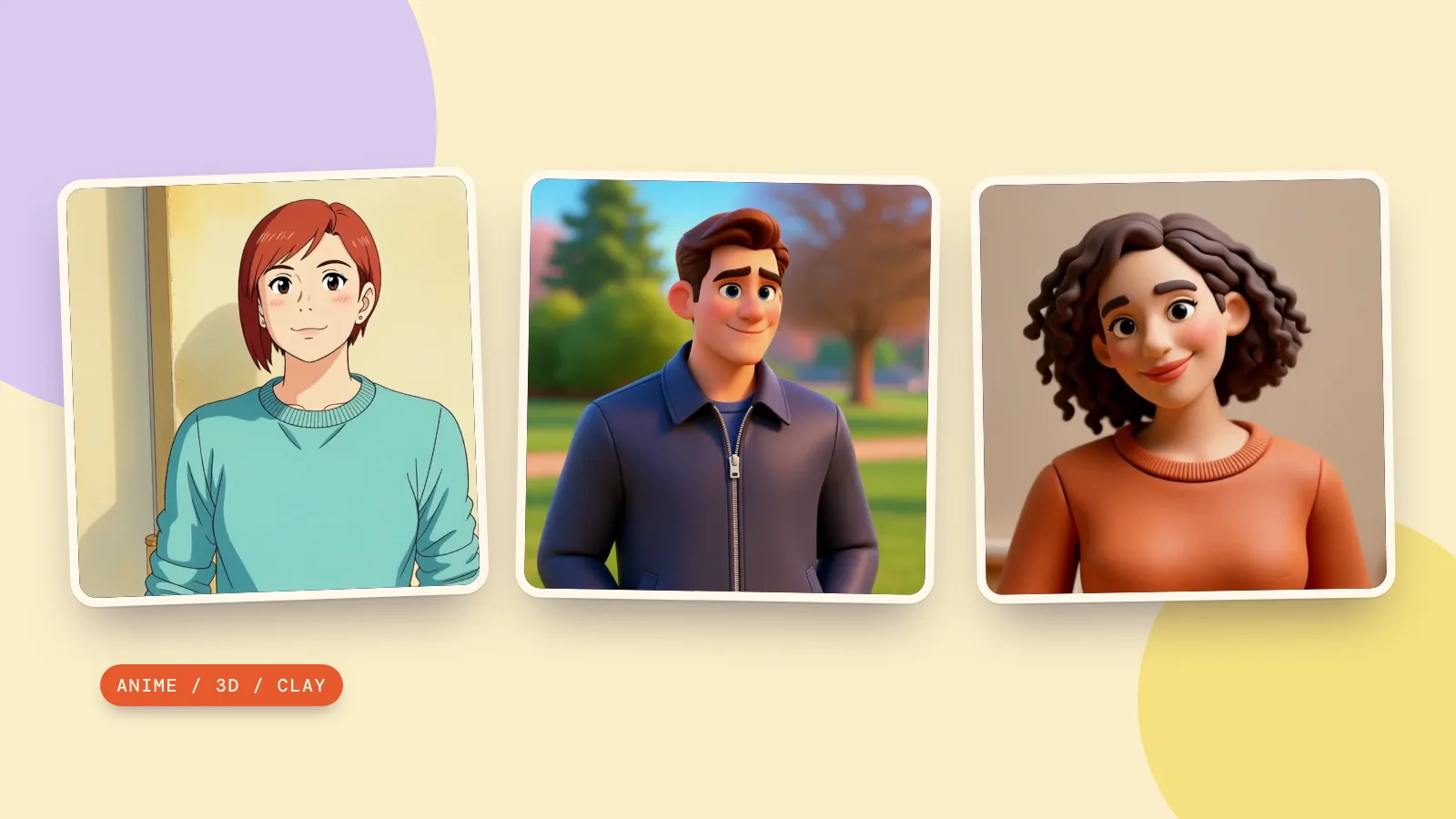
The easiest first test is one adult, one continuous action and a steady camera. On October 29, 2026, we generated three fictional adult source clips and converted one each into Anime, 3D cartoon and Claymation with the page’s default Kling O3 workflow. Below are the original clips and real conversions, including a movement change in the clay result.
How do you prepare a video for anime conversion?
- Pick one readable moment. A head turn, a smile or a simple step is easier to inspect than a fast montage. Keep the subject visible through the action.
- Check both dimensions. A clip with a tall side above 720 pixels can still fail if its short side is smaller. Our sources are 1280 × 720 pixels and three seconds long.
- Use footage you can use. For your own upload, the page asks you to confirm that you filmed it or have the right to use it. Our examples contain generated fictional adults.
- Avoid tiny text and crowded scenes. Signs and fine patterns are redrawn along with people. Decide whether those details matter before spending a run on the clip.
A video-to-anime converter transforms a sequence of images, so a good opening frame is only part of the result. Keep enough movement to judge the change, but not so much blur that the model has to guess the subject's appearance for most of the clip.
How do you convert a video to anime on PopNow?
- Under What to make, keep Whole video in cartoon style selected. This redraws the existing people and surroundings together.
- Add Your video and confirm the rights checkbox for an uploaded clip. Use a source between 3 and 10 seconds with both sides at least 720 pixels.
- Under Style, choose Anime. The other choices are 3D cartoon and Claymation; these are styles within the same whole-video mode.
- Review Keep the sound. It is on by default. Our source clips are silent, so the examples below do not test audio preservation.
- Press Make it Anime, review the result beside the source, then download the version you want. The button changes to the selected style and shows the price before you start.
The page uses Kling O3 at 720p. A five-second conversion is listed at 633 credits. Review the actual quote rather than assuming a shorter clip will always cost proportionally less. Creating the source clip is a separate task; these tokens describe the conversion step only.
What changed in our three style tests?
We generated three separate three-second source clips with Kling 3.0 at 720p, with generated audio off. We then edited each once with Kling O3 at 720p, using the exact page style prompt and Keep the sound on. Each result is about 3.04 seconds at 24 frames per second. We inspected all 73 frames of each conversion for character consistency and anatomy. The source prompt cards recreate the original footage; the additional Kling O3 cards apply the actual conversion instructions to an uploaded clip.
1. Anime: a head turn against a gray wall
The head turn and short auburn hair remain easy to follow, while the sweater becomes cel-shaded and the gray wall turns warm yellow. The face stays consistent through the turn and blink. This is a clear anime treatment, but the background color change shows why the original palette is not guaranteed.
A fictional adult woman age 35 with short auburn hair in a plain teal sweater, standing next to a simple gray wall. She slowly turns her head from left to face the camera and smiles. Hands remain outside the frame. Medium portrait shot, locked camera, soft daylight, realistic live-action look, no text or logos.
Restyle the entire clip as a hand-drawn 2D anime: clean cel shading, crisp ink outlines, soft painted backgrounds, vivid but gentle colors. The person keeps the same hairstyle, hair color, facial hair, skin tone and clothing colors, drawn in this style. Keep every motion, the timing, the camera movement and the scene layout exactly as in the source. Clearly an animated cartoon, not live action, with no photographic look anywhere. No text.
2. 3D cartoon: a turn in a park
The navy jacket and head turn remain recognizable, and both the adult character and park become a smooth 3D scene. The trees shift toward an autumn palette and the face is more stylized. We found no extra limbs or sudden character changes, but this example does not preserve every background color.
A fictional adult man age 40 with short dark hair and a plain navy jacket, standing in a quiet park. He slowly turns his head from right toward the camera and smiles. Hands remain outside the frame. Medium portrait shot, locked camera, daylight, realistic live-action look, no text or logos.
Restyle the entire clip as a 3D animated movie: stylized smooth materials, big expressive eyes, soft warm cinematic lighting. The person keeps the same hairstyle, hair color, facial hair, skin tone and clothing colors, drawn in this style. Keep every motion, the timing, the camera movement and the scene layout exactly as in the source. Clearly an animated cartoon, not live action, with no photographic look anywhere. No text.
3. Claymation: a smile in an art studio
The curls, orange sweater and head tilt carry into a smooth, sculpted clay-like scene. The face stays consistent, but a raised hand appears briefly at the start although it is outside the frame in the source. We show that difference openly: this is a completed style conversion with a motion deviation, not proof of frame-perfect movement. It is an AI rendering, not a photographed physical stop-motion set.
A fictional adult woman age 45 with curly dark hair and a plain orange sweater, standing in a simple art studio. She slowly tilts her head and smiles toward the camera. Hands remain outside the frame. Medium portrait shot, locked camera, warm daylight, realistic live-action look, no text or logos.
Restyle the entire clip as a claymation stop-motion film: handmade plasticine characters and set with visible fingerprints and soft clay texture, warm miniature-set lighting. The person keeps the same hairstyle, hair color, facial hair, skin tone and clothing colors, drawn in this style. Keep every motion, the timing, the camera movement and the scene layout exactly as in the source. Clearly an animated cartoon, not live action, with no photographic look anywhere. No text.
How do you choose a style or a character workflow?
For an AI anime video from an existing performance, start with whole-video mode. My cartoon character is the separate mode for introducing a particular illustrated character. It offers From a selfie, Ready-made and My cartoon. A selfie is drawn into a cartoon first; an uploaded character must be a cartoon reference. We tested only whole-video restyling here; character mode was not tested.
If you need a still image first, use anime creation for an anime picture or Cartoonify for a cartoon photo treatment. A styled still can help you decide on the look, but it does not show whether the eventual video stays consistent during motion.
Same prompt, different models: these are three style tests within Kling O3, not a comparison of conversion engines. The page uses the same model with a different style instruction for each look. Visit model comparison when exploring alternatives, and check whether a model accepts an existing video. Text-to-video generation makes new footage rather than editing the uploaded sequence.
FAQ
Does a video-to-anime converter preserve every movement?
The page's prompts ask to preserve motion, timing, camera movement and scene layout. That is an instruction, not a guarantee. Compare the opening pose, the main action and the final pose, then watch at normal speed for sudden changes.
Can I turn a video into a cartoon instead of anime?
Yes. In Whole video in cartoon style, choose 3D cartoon or Claymation. The character and surroundings receive the chosen treatment together. These choices do not require using My cartoon character mode.
Can I convert a long video to anime?
This tool accepts 3 to 10 seconds per source clip. Prepare a short excerpt before uploading. Separate runs may interpret the character or palette differently, so do not assume several converted shots will automatically form a visually consistent long film.
Does the result keep the source audio?
Keep the sound is on by default, and you can turn it off for a silent output. Listen to the downloaded file before using it in a finished edit. Our silent sources let us inspect picture changes, but cannot demonstrate how music or speech is preserved.
How much does an AI anime video cost?
At 720p, the catalogue lists a five-second Kling O3 conversion at 633 credits. Each source requires a separate conversion. Our three-second clips received a five-second estimate before generation and were settled against the output length; review your own quote. Making source footage or drawing a character from a selfie adds its own cost.