GPT Image 2.5 Sunburst infographic promptPersonal Color Analysis
An image-edit prompt for GPT Image 2.5 Sunburst: you upload a picture and this text says what to change.
Fill in the blanks
Change any box and the prompt below updates. Copy it, or make one with your version.
Prompt
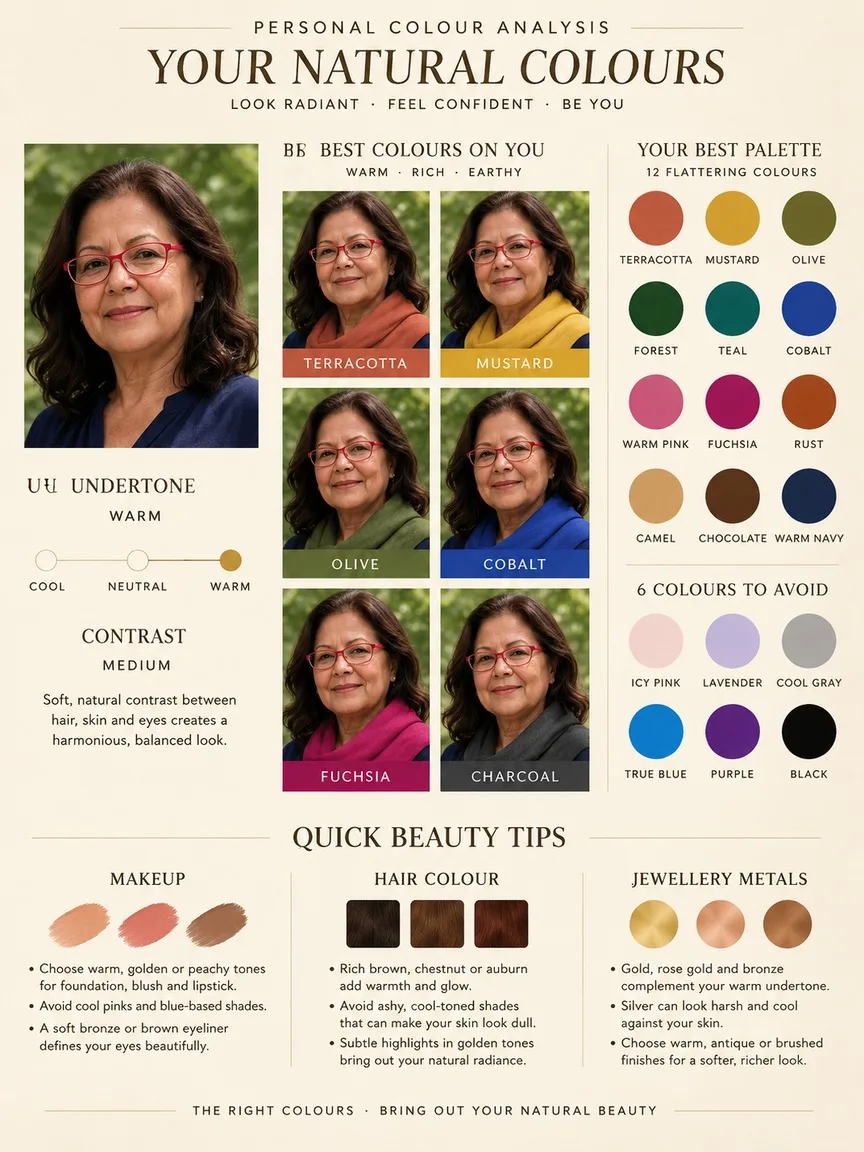
Create a personal colour analysis sheet for the person in image 1, styled like a beauty magazine supplement on warm ivory paper. Keep the face exactly as in image 1: same features, skin tone and hair, no retouching that changes them. First judge the undertone and contrast from the photo. Layout: top left, the portrait with a small undertone scale (cool, neutral, warm) and a marker on her reading; centre, a 2x3 grid of the same face, each wearing a different colour scarf near the face: terracotta, mustard, olive, cobalt, fuchsia and charcoal; right, her best palette as 12 swatches and 6 colours to avoid; bottom, three short tips for makeup, hair colour and jewellery metals. Clean serif headers, small uppercase labels, crisp readable text.
Prompts stay in English, the language these models follow best. Copy it as it is, or change a few words.
First judge the undertone and contrast from the photo makes the model work out the details first, so you only type the topic.
Keep the face exactly as in image 1: same features, skin tone and hair is the line that keeps your photo recognisable. Leave it in, whatever else you change.
Asking for a 2x3 grid of the same face gets several panels in one picture. Describe each panel in order.
This is a fill-in template: swap the parts in braces, like {colors}, in the boxes above and keep the rest word for word.
A personal colour analysis sheet for the person in your photo, laid out like a magazine supplement on warm ivory paper. GPT Image 2.5 Sunburst reads the undertone and contrast first, then places a portrait, a six-scarf grid and a 12-swatch palette in named zones. It works because the face is locked to the input picture and the layout is spelled out, so the model has fixed slots to fill.
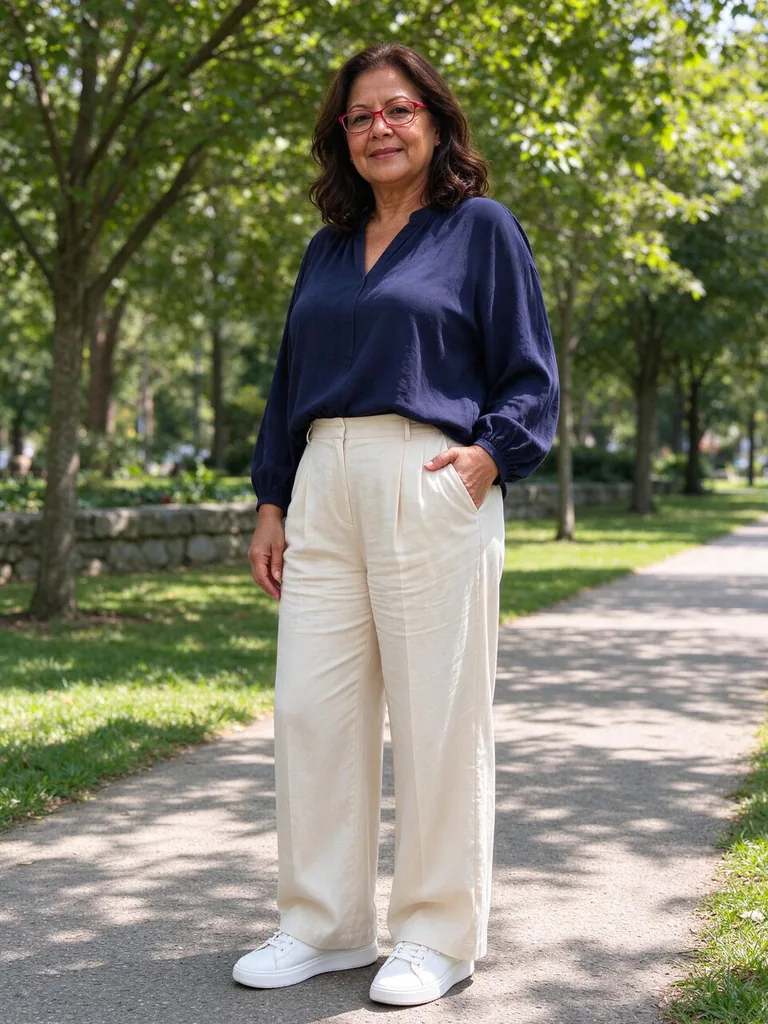
This edit needs one clear, front-facing photo of an adult, with the face evenly lit and not cropped. The model copies the face from the input, so the quality of the photo matters more than the wording.
Works: a front-facing portrait in even daylight
Shows the true skin undertone and contrast, which is what the analysis reads. Harsh coloured light or a warm lamp can make the model judge the wrong undertone.
Works: a plain or neutral background with the face unobstructed
Keeps the portrait clear of clutter so the model can keep the face as it is in the photo. Hair pulled back also shows the jaw and where a scarf would sit.
Avoid: heavy filters, beauty retouching or skin smoothing already applied
The prompt asks to keep skin tone and features exactly, so pre-edited skin gives the model a false baseline. The analysis then reads the filter, not the person.
Avoid: sunglasses, masks or a face turned away from the camera
Hidden features and a turned head make it hard to keep the same face across six scarf versions. The grid may then show a different-looking person.
What each instruction does
Sheet type and styleCreate a personal colour analysis sheet for the person in image 1, styled like a beauty magazine supplement on warm ivory paper
Sets the job as one analysis sheet for the photo in image 1 and gives it the magazine supplement look on ivory paper. Remove the style phrase and the result often drifts toward a plain chart with no editorial feel.
Face identity lockKeep the face exactly as in image 1: same features, skin tone and hair, no retouching that changes them
Tells the model to keep the same features, skin tone and hair, and to avoid retouching. Without it, the portrait can drift into a different person or a smoother, beautified version, which defeats the point of a colour test.
Undertone judgement firstFirst judge the undertone and contrast from the photo
Asks for the undertone and contrast to be read from the photo before any colours are chosen. If you delete it, the palette and scarves are picked by guesswork, so the best swatches may not suit the skin.
Six-scarf comparison gridcentre, a 2x3 grid of the same face, each wearing a different colour scarf near the face: terracotta, mustard, olive, cobalt, fuchsia and charcoal
Places the same face in six scarf colours so the reader can see which hues flatter it. Removing 'near the face' lets the scarf drift away, and the colour stops reaching the skin.
Palette and tips panelsright, her best palette as 12 swatches and 6 colours to avoid; bottom, three short tips for makeup, hair colour and jewellery metals
Asks for 12 best-palette swatches, 6 colours to avoid, and three short tips in the bottom row. Each number sets a count the model must match, so changing 12 or 6 changes the size of the swatch panel and the avoid list.
Other edits in the same pattern
Lookbook on cool grey
Swaps the paper, the scarf set and the tips topic for a cooler, lighter look, for a reader who wants a softer editorial page.
Prompt
Create a personal colour analysis sheet for the person in image 1, styled like a lookbook page on cool grey paper. Keep the face exactly as in image 1, with no retouching. First judge the undertone and contrast from the photo. Layout: top left, the portrait with an undertone scale and a marker; centre, a 2x3 grid of the same face in six pastel scarves near the face; right, her best palette as 12 swatches; bottom, three short tips for hair colour and eyewear frames. Clean sans-serif headers, crisp readable text.
Seasonal spring guide
Changes the target from a full colour analysis to a seasonal guide with spring scarves, for when you only need the season and a palette.
Prompt
Create a seasonal colour guide for the person in image 1, styled like a beauty magazine spread on pale cream paper. Keep the face exactly as in image 1, with no retouching. First judge the undertone and contrast from the photo. Layout: centre, a 2x3 grid of the same face wearing six warm spring scarves near the face; right, her best palette as 12 swatches; bottom, three short tips for makeup, hair colour and jewellery metals. Clean serif headers, small uppercase labels, crisp readable text.
Jewellery metals sheet
Points the grid at metals instead of scarves, for a jewellery brand style sheet that still starts from the undertone reading.
Prompt
Create a personal colour analysis sheet for the person in image 1, styled like a jewellery catalogue page on soft white paper. Keep the face exactly as in image 1, with no retouching. First judge the undertone and contrast from the photo. Layout: top left, the portrait with a small undertone scale and a marker; centre, a 2x3 grid of the same face wearing six jewellery metals near the face; right, her best palette as 12 swatches; bottom, three short tips for earrings, necklaces and rings.
Model and settings
Keep the 3:4 ratio, since the sheet is taller than it is wide, with a portrait on the left and a palette panel on the right. Keep the 1k resolution and high quality for crisp swatch edges and small labels, and consider a higher setting only if the text looks soft. The mode is an edit of one input picture, so attach the single portrait and leave the rest as it is. For a landscape poster, change the ratio first and then check that the scarf grid still fits.
Nano Banana ProPick it when the headers, labels and swatch captions matter more than the photo, because its layout-first planning suits this three-zone sheet with dense small text.
FLUX.2 ProPick it when the 12 best swatches and 6 avoid colours must match exact shades, since its hex colour control can pin each swatch to a set value.
When the edit misses
The face shifts away from the input photo, so the grid shows a different person.
Keep the sentence 'Keep the face exactly as in image 1: same features, skin tone and hair' word for word, and use a clear, front-facing input picture.
The portrait is smoothed or re-lit, so the undertone the sheet reports no longer matches the real skin.
Keep 'no retouching that changes them' in the prompt and use an input photo that has not already been filtered.
The scarf grid shows the scarves away from the face, or the same scarf colour repeats.
Keep 'near the face' after 'a different colour scarf', and add 'one colour per frame' so each of the six panels gets a single named colour.
The sheet comes out square or landscape, which cuts off the palette panel and the bottom tips.
Set the ratio to 3:4 before generating, since the top left portrait, the centre grid and the right panel need a tall frame.
Questions about this edit prompt
Can I use a selfie for a personal colour analysis sheet?
Yes, if the face is clear, front-facing and in even daylight. GPT Image 2.5 Sunburst needs the undertone to be visible in the photo, and a strong filter or heavy shadow across the cheeks will push the undertone reading off.
Why does the prompt ask for six scarf colours instead of picking one?
The six colours are terracotta, mustard, olive, cobalt, fuchsia and charcoal, so the reader can compare how each hue sits against the same face. One colour would show a single result and hide which hues suit the skin, which is the point of the grid.
Can I change the swatch and avoid colours to match my own palette?
Yes, but keep the same sentence order and count. Replacing the six scarf names or the 12 swatches with your own shades works, while the face-lock sentence should stay word for word so the portrait does not change.
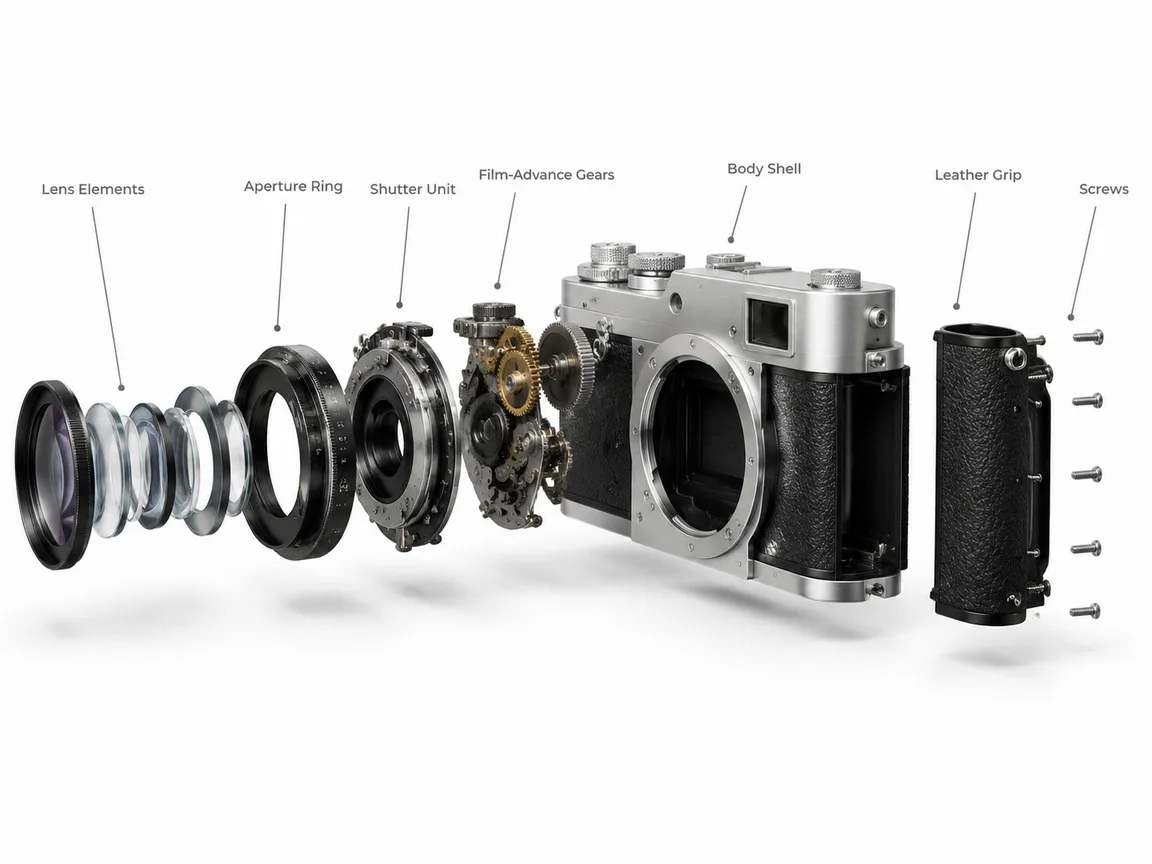
A clean 3D exploded assembly view of a vintage film camera, every part floating apart along one straight axis in the order it is assembled: lens elements, aperture ring, shutter unit, film-advance gears, body shell, leather grip and screws. Keep the real proportions and the brushed silver and black finish, on a plain unbranded body with no logos or model names. Thin grey leader lines link each part to a short label in a neat sans-serif. White studio background, soft shadows under each floating part, technical product-render look.
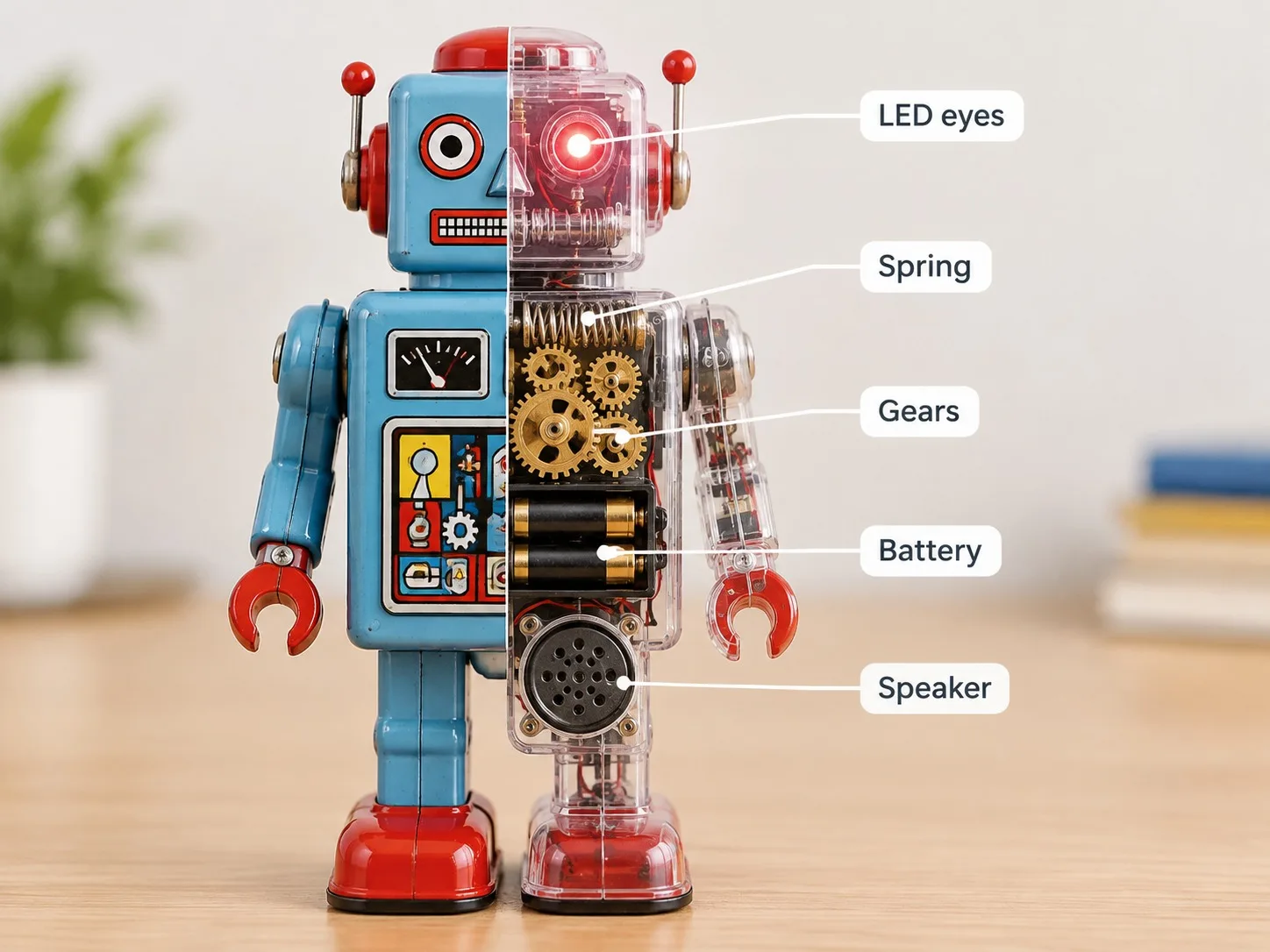
One retro tin robot toy stands on a desk, displayed split down the middle. The left half is the normal painted toy; the right half is a clear transparent shell that reveals the inner mechanism: a wind-up spring, brass gears, a battery box, a tiny speaker and LED eyes. Thin white leader lines point from each part to short labels on the right side of the picture: "Spring", "Gears", "Battery", "Speaker", "LED eyes". Bright clean background, softly blurred tabletop, product photography lighting, crisp readable labels.
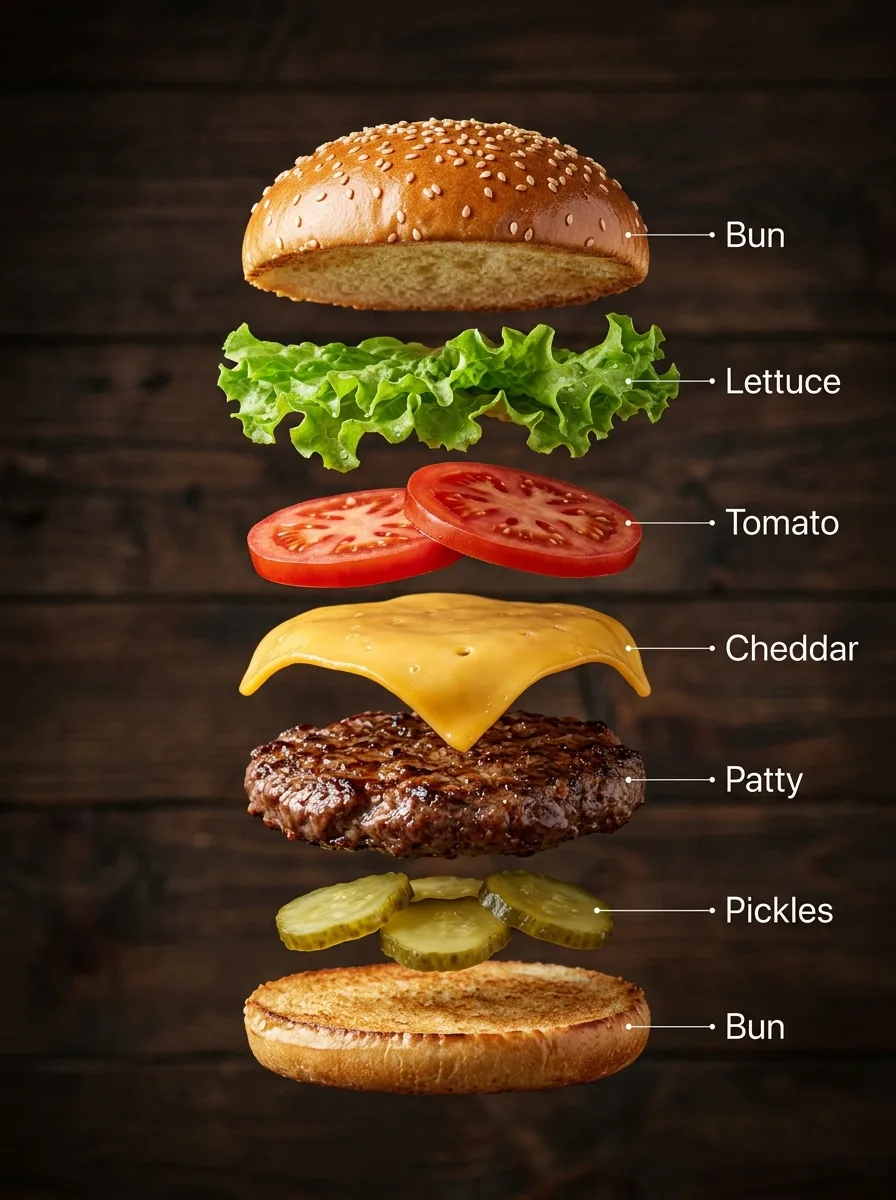
A hyper-real exploded vertical infographic of a classic cheeseburger: every layer floats in a perfectly aligned stack, top to bottom: sesame bun top, lettuce, tomato slices, melted cheddar, grilled beef patty, pickles, bun bottom. Realistic shadows under each layer, rustic wooden background, soft studio light. Clean labels with thin pointer lines using these exact words: "Bun", "Lettuce", "Tomato", "Cheddar", "Patty", "Pickles". Ultra-detailed food textures, premium commercial look.
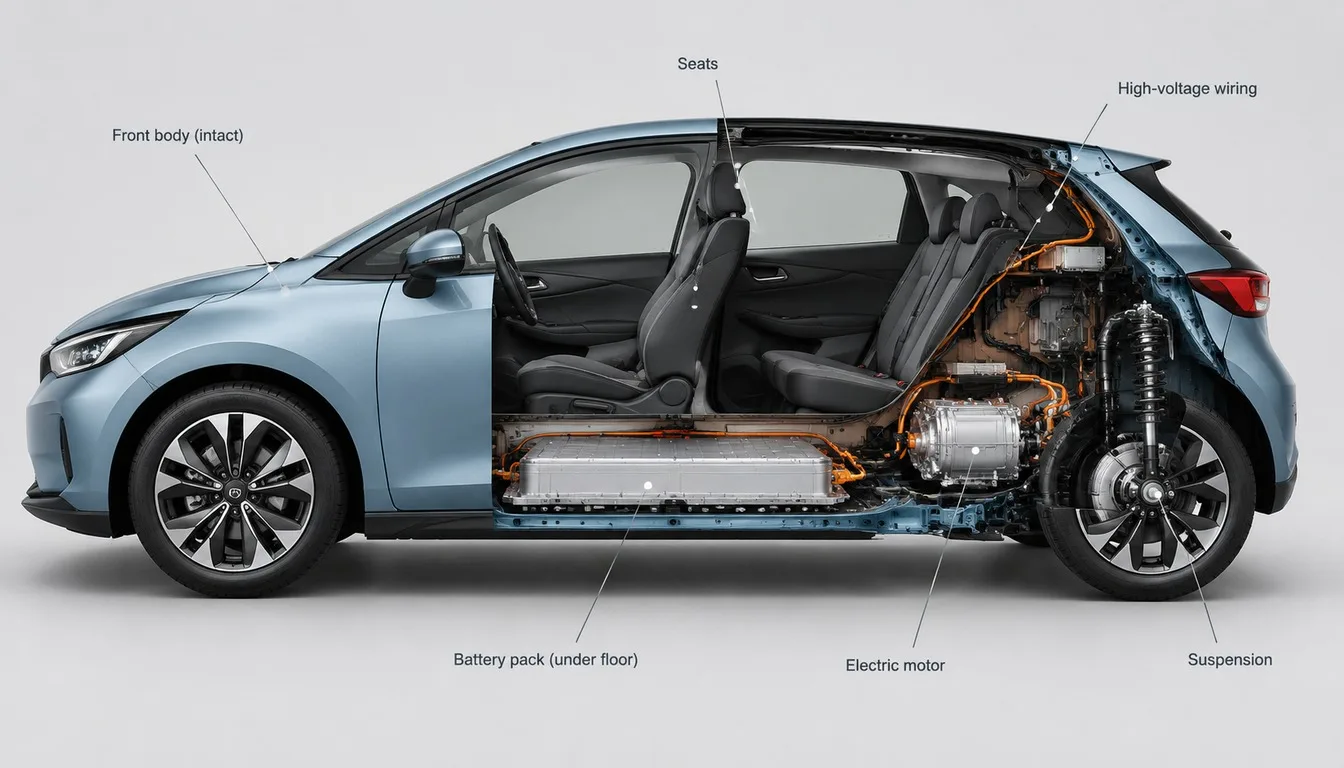
A cutaway visualisation of a compact electric hatchback in side view: the front half shows the intact painted body, the back half is cut open to expose the battery pack under the floor, the electric motor, the seats, the wiring and the suspension. Accurate proportions, realistic materials, thin callout lines with short labels, clean light-grey studio background, technical illustration meets product render.
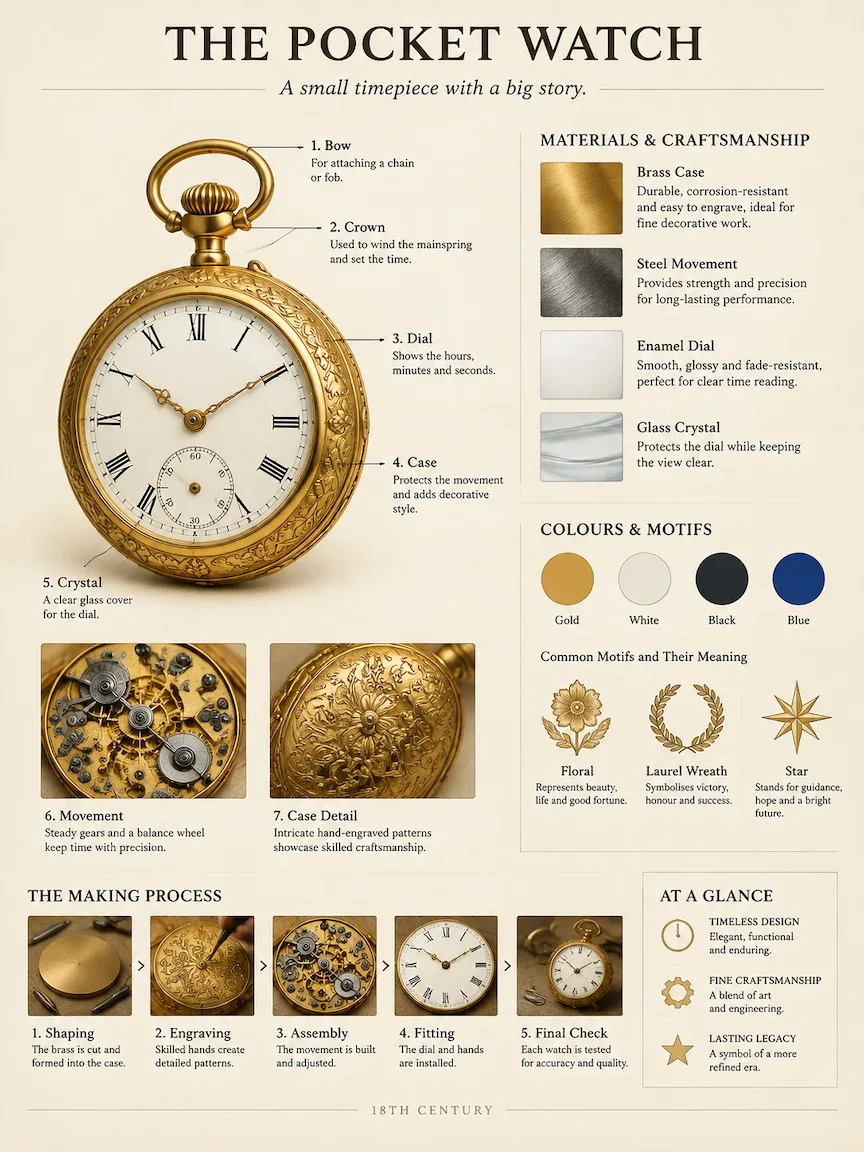
A museum catalog-style breakdown poster of an 18th-century brass pocket watch. Work out the right structure, materials and history yourself. Fixed layout on warm ivory paper: top, the title "THE POCKET WATCH" with a one-line subtitle; left, the object large and photoreal with numbered leader-line callouts to its key parts and two close-up insets; upper right, material and craft samples with short notes; middle right, colour swatches and what its motifs mean; bottom, a small making-process strip and a three-point summary. Calm, professional exhibition-panel design, crisp readable English text, no clutter.
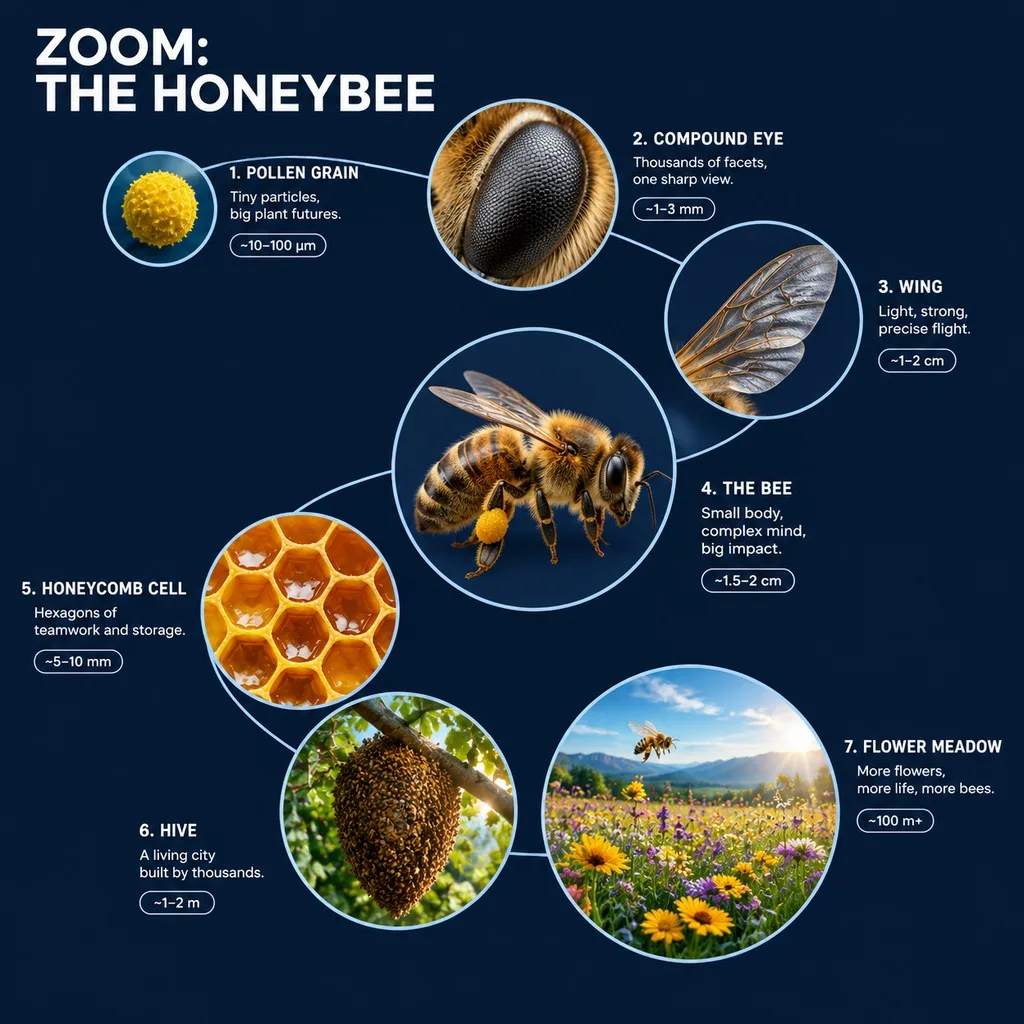
A 3D zoom-sequence science infographic about a honeybee, titled "ZOOM: THE HONEYBEE". Seven circular frames arranged in an expanding spiral, from the smallest detail to the full subject in its world: a pollen grain, the compound eye, a wing, the whole bee, a honeycomb cell, the hive and the flower meadow. Each frame holds a detailed render at that scale, the scale name, a four-word insight and a size tag. Frames are joined by thin zoom-path lines; no two frames show the same scale, and each frame grows with its scale. Clean dark navy background, crisp white labels, no generic magnifying-glass icons.
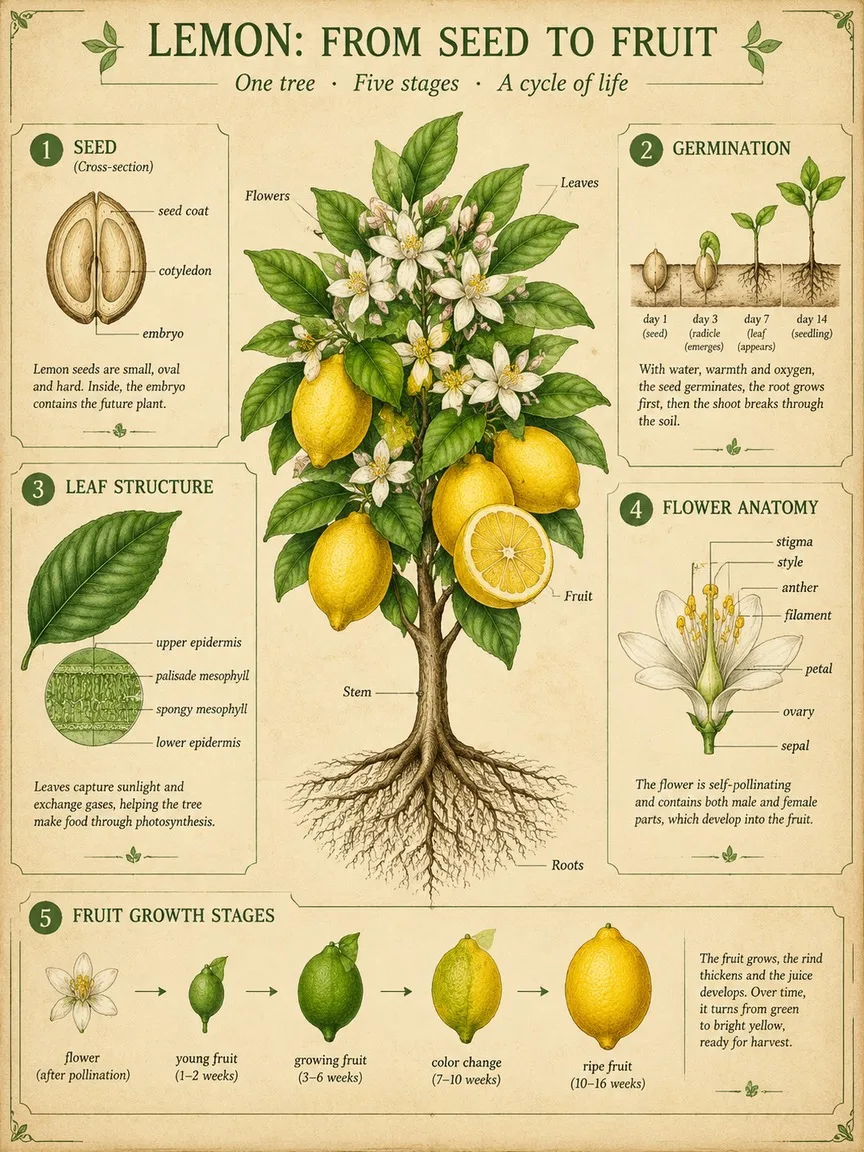
A scientific botanical infographic poster of the lemon tree: vintage botanical illustration mixed with clean modern infographic design on parchment. Centrepiece: the whole plant with roots, stem, leaves, flowers and fruit, one fruit cut in half. Around it, five numbered panels: 1 seed cross-section, 2 germination, 3 leaf structure, 4 flower anatomy with labelled parts, 5 fruit growth stages. Title at the top: "LEMON: FROM SEED TO FRUIT". Palette: leaf greens, lemon yellow and soft ink brown. Fine linework, readable labels.
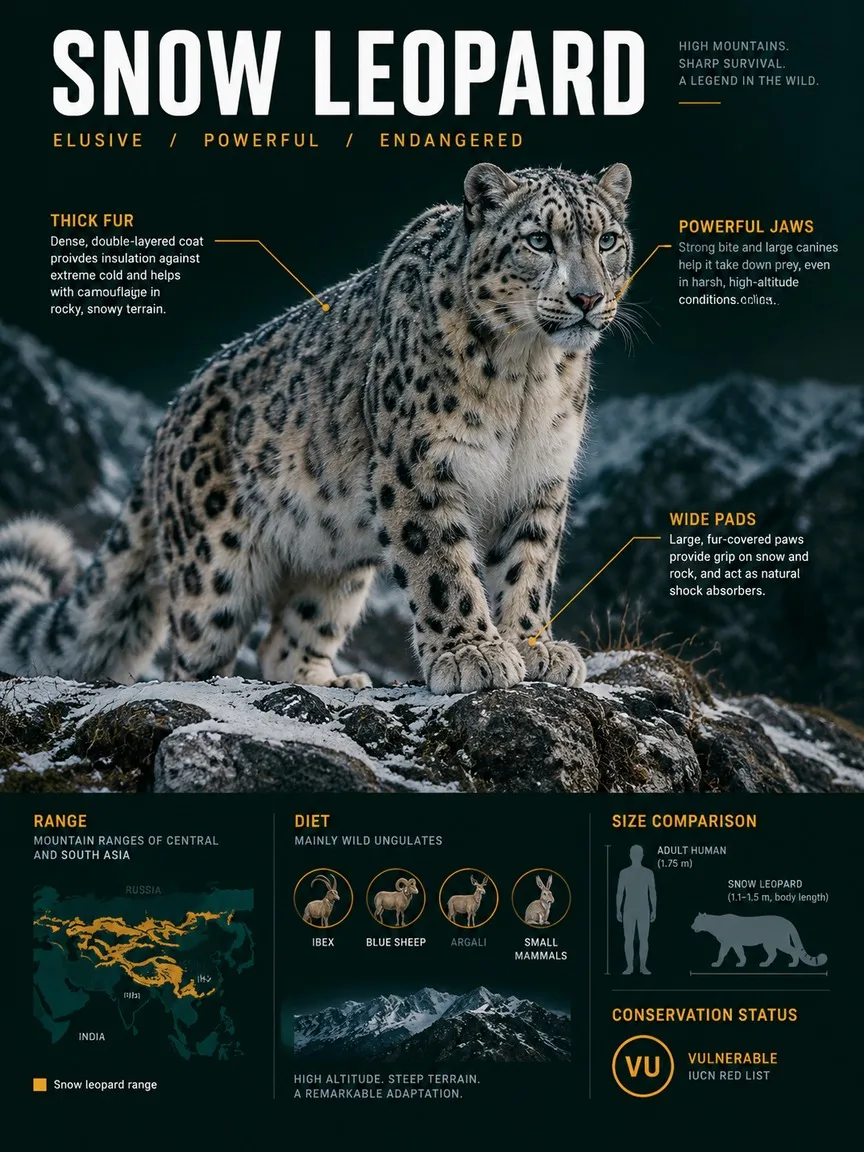
A premium wildlife infographic poster about the snow leopard, styled like a sleek field dossier rather than a school chart. The animal dominates the page in photoreal detail in its habitat, a windswept rocky ridge with light snow. Around it, layered callouts: three anatomy notes with thin lines, a range map, a size comparison with an adult human silhouette, a diet icon row and a conservation-status badge. Title "SNOW LEOPARD" at the top in bold condensed type. Dark green-black background, crisp white and amber text.