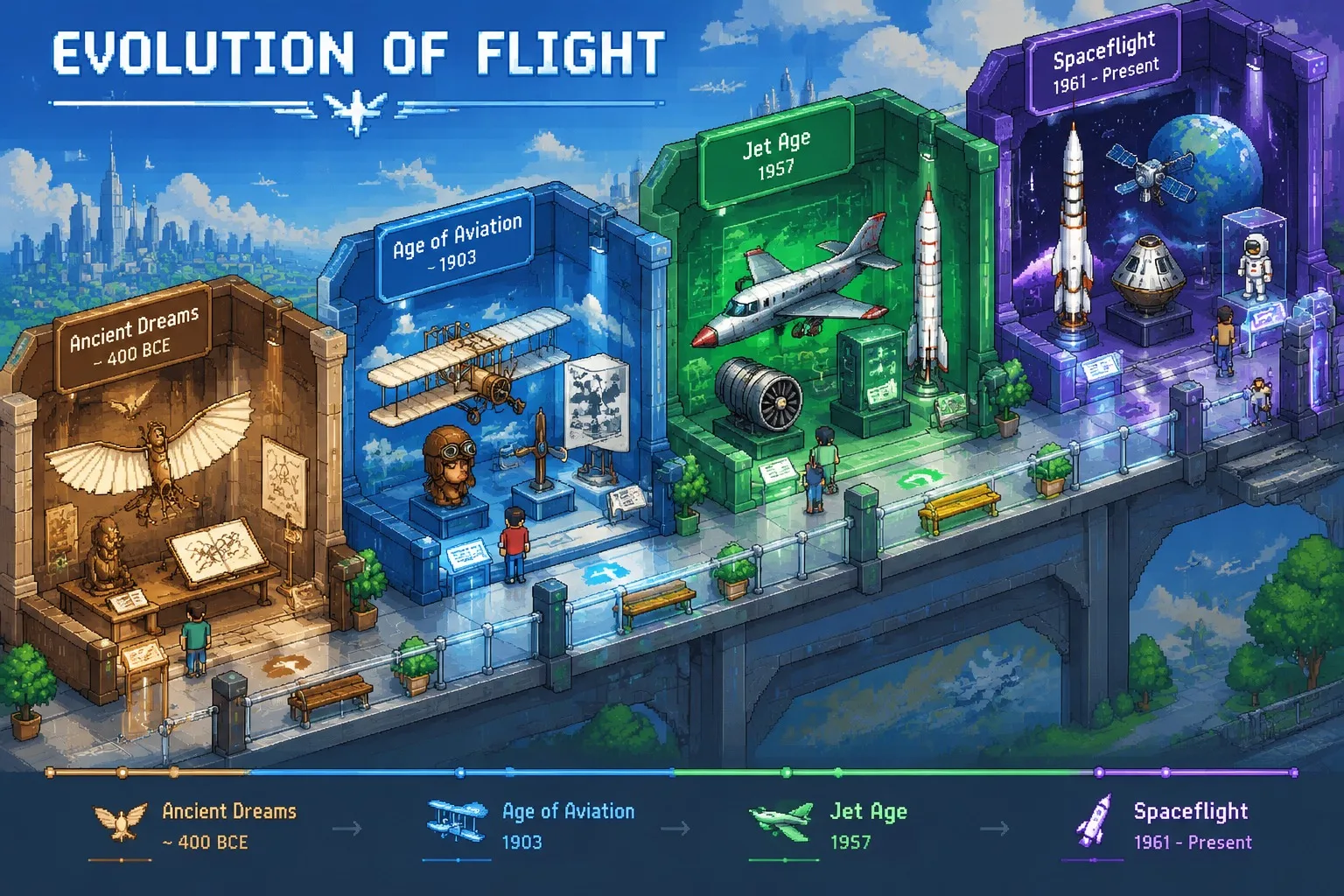
Isometric Pixel Timeline, made with GPT Image 2.5 Sunburst
Example made with GPT Image 2.5 Sunburst

Text to imageInfographics & diagrams

GPT Image 2.5 Sunburst timeline infographic promptIsometric Pixel Timeline

The exact text-to-image prompt behind this picture, made with GPT Image 2.5 Sunburst.

Fill in the blanks

Change any box and the prompt below updates. Copy it, or make one with your version.

Prompt

An ultra-detailed isometric pixel-art timeline of the history of human flight. First work out the earliest and latest periods and four key stages, then build an isometric "evolution museum" where each hall is one stage and walking through the space moves forward in time. Give each hall three or four symbolic objects and its own colour scheme. Add a pixel-font title "EVOLUTION OF FLIGHT" and a small date marker on each hall. Standard 2:1 isometric view, layered depth, smooth transitions between halls.

Prompts stay in English, the language these models follow best. Copy it as it is, or change a few words.

Opens GPT Image 2.5 Sunburst with this prompt and the settings below filled in.

67 tested GPT Image prompts →

Settings

Mode
Text to image
Aspect ratio
3:4
Resolution
1k
Quality
high
Price
From 2 credits

The exact price shows before you generate.

Make your own version

  1. First work out the earliest and latest periods and four key stages makes the model work out the details first, so you only type the topic.
  2. The layout is spelled out piece by piece: each hall is one stage and walking through the space moves forward in time. Keep that structure and change only the content, or the model loses track of the page.
  3. This is a fill-in template: swap the parts in braces, like {theme}, in the boxes above and keep the rest word for word.

Where this template comes from

Adapted from a prompt by @GeekCatX, collected in freestylefly/awesome-gpt-image-2 under MIT. PopNow rewrote it as a fill-in template and made the example above.

Style prompt guide

Style traits to keep

An isometric pixel-art museum timeline visually tracks human aviation across interconnected exhibition halls using retro game aesthetics. GPT Image 2.5 Sunburst excels here because it renders clean pixel grids alongside legible typography for hall titles and dates. The architectural layout keeps chronological stages distinct while maintaining a cohesive diorama feel.

The isometric pixel style combines retro video game art with technical diagramming rules to make complex historical information instantly readable.

Perspective
Standard 2:1 isometric projection provides a top-down angled view where parallel lines never converge, keeping all rooms equally clear.
Texture
Crisp pixel grids define every surface without anti-aliased blur, giving the museum the appearance of a 16-bit simulation game.
Palette
Dedicated colour themes per room create strong zoning, shifting from warm historical earth tones to cool modern aerospace blues.
Composition
Layered depth connects sequential rooms along a clear diagonal pathway that guides the eye forward through chronological time.

What defines this look

  1. core medium and subjectAn ultra-detailed isometric pixel-art timeline of the history of human flight.

    This establishes the retro digital rendering technique and the overall historical topic. Removing pixel-art will cause the model to generate a standard 3D digital render or modern vector diagram instead.

  2. structural layout directiveFirst work out the earliest and latest periods and four key stages, then build an isometric "evolution museum" where each hall is one stage and walking through the space moves forward in time.

    This guides the model to construct a connected spatial walk-through rather than random floating islands. It ensures temporal progression flows naturally across the canvas.

  3. visual pacing and paletteGive each hall three or four symbolic objects and its own colour scheme.

    This prevents visual clutter by constraining object counts per room and assigns distinct environmental palettes to differentiate historical eras.

  4. typography and labellingAdd a pixel-font title "EVOLUTION OF FLIGHT" and a small date marker on each hall.

    This specifies the exact text string and ensures labels match the pixelated art direction instead of appearing as modern anti-aliased type.

  5. camera angle and compositionStandard 2:1 isometric view, layered depth, smooth transitions between halls.

    This locks in the precise geometric projection angle used in classic simulation games, creating consistent architectural alignment and depth.

Same style, new subjects

Maritime Navigation Timeline

Swaps aviation for naval exploration while keeping the multi-room isometric pixel museum format.

Prompt

An ultra-detailed isometric pixel-art timeline of the history of maritime navigation. First work out the earliest and latest periods and four key stages, then build an isometric "evolution museum" where each hall is one stage and walking through the space moves forward in time. Give each hall three or four symbolic objects and its own colour scheme. Add a pixel-font title "OCEAN EXPLORATION" and a small date marker on each hall. Standard 2:1 isometric view, layered depth, smooth transitions between halls.

Video Game Console History

Applies the architectural timeline structure to consumer electronics and gaming evolution.

Prompt

An ultra-detailed isometric pixel-art timeline of the history of video game consoles. First work out the earliest and latest periods and four key stages, then build an isometric "evolution museum" where each hall is one stage and walking through the space moves forward in time. Give each hall three or four symbolic objects and its own colour scheme. Add a pixel-font title "GAMING HARDWARE" and a small date marker on each hall. Standard 2:1 isometric view, layered depth, smooth transitions between halls.

Urban Architecture Evolution

Uses the pixel diorama layout to show architectural shifts from ancient stone masonry to futuristic skyscrapers.

Prompt

An ultra-detailed isometric pixel-art timeline of the history of urban architecture. First work out the earliest and latest periods and four key stages, then build an isometric "evolution museum" where each hall is one stage and walking through the space moves forward in time. Give each hall three or four symbolic objects and its own colour scheme. Add a pixel-font title "CITY STRUCTURES" and a small date marker on each hall. Standard 2:1 isometric view, layered depth, smooth transitions between halls.

Model and settings

Keep the aspect ratio at 3:4 to allow vertical stacking of diagonal isometric rooms. Use high quality mode to ensure the pixel grid remains sharp and room labels stay legible. If you want a wider horizontal timeline showing more halls side by side, switch the aspect ratio to 16:9 while retaining high resolution.

  • Nano Banana ProSwitch to Nano Banana Pro if you need complex multi-room structural planning and extremely sharp historical labels, as it plans diagram layouts before rendering.

When the style drifts

Pixel art washes out into a smooth, blurry modern 3D render.
Add strict retro constraints like '16-bit pixel art, crisp pixel edges, no 3D anti-aliasing' directly after the opening sentence.
Halls blend together with identical lighting and colors, making eras hard to distinguish.
Explicitly assign palette themes in the prompt, such as 'sepia tones for hall one, deep navy for the final hall'.
Text labels become warped or unreadable modern fonts.
Reinforce typographic style by specifying 'blocky 8-bit bitmap pixel text in quotes' for all headers and date markers.

Questions about this style prompt

Why does the prompt specify a standard 2:1 isometric view?

A 2:1 isometric ratio matches classic game graphics where lines move two pixels horizontally for every one pixel vertically. This keeps stairs, walls, and floor tiles strictly aligned without perspective distortion.

Can I increase the number of stages in the timeline?

Yes, but adding more than four stages in a vertical aspect ratio can overcrowd the rooms. If you add five or six stages, change the aspect ratio to 16:9 to give each room enough visual space.

How do I ensure the date markers appear correctly on each room?

State the exact dates inside quotes within the prompt, such as 'mark hall one with 1903 and hall four with 1969', which gives the model precise text targets to render.